

Home Brewing: Beer Recipe Log
Home Brewing: Beer Recipe Log — A brewing log for every batch, from grain to glass
Home Brewing: Beer Recipe Log is a brewing log for people who make beer at home. Keep each recipe in a book, record hydrometer gravity and temperature readings while a batch ferments, and get the ABV as soon as your original and final gravity are in. It is for adults of legal drinking age, and it is on Google Play for Android.

- Price
- Free with ads, Pro upgrade
- Platforms
- Android (Google Play)
- Languages
- 10
- Audience
- Adults of legal drinking age
The notes you did not write are the batch you cannot repeat.
Home brewing rewards the person who can say what they changed. A recipe with its gravity readings, temperatures and tasting notes beside it turns one lucky batch into something you can improve on, which is the whole point of keeping a log.
What it is
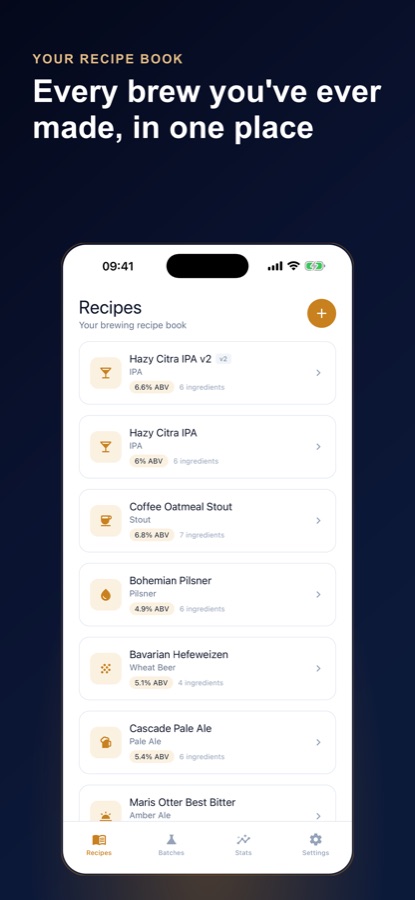
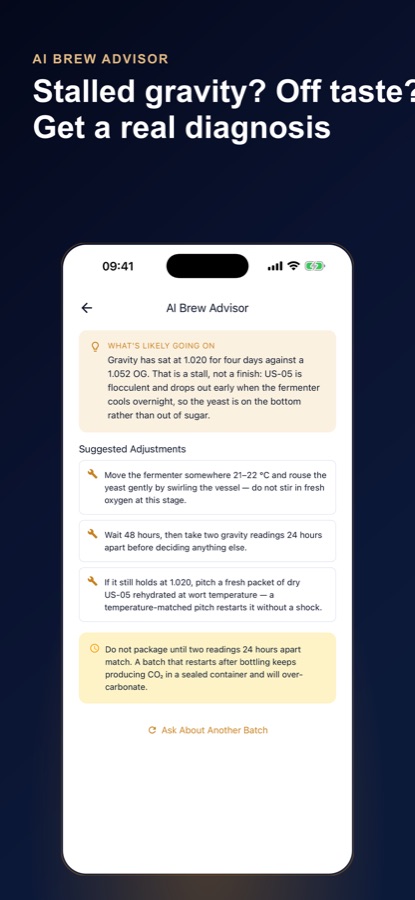
Home Brewing: Beer Recipe Log is an Android app that works as a recipe book and fermentation log for homebrewed beer. You write down the malt, hops, yeast, water notes and ordered brew-day steps for a recipe, log dated hydrometer gravity and temperature readings for each batch, and let the ABV calculator work out alcohol by volume from your original and final gravity. A batch moves from fermenting to conditioning to completed, and finished beers get a 1 to 5 rating and tasting notes. An AI Brew Advisor suggests adjustments when a batch stalls or tastes off.
Inside the app
What it looks like
Background
How do you know when a homebrew has finished fermenting?
You measure it rather than guess. A hydrometer reads the density of the liquid, and as yeast turns sugar into alcohol the reading falls until it stops falling. When two readings taken a day or more apart are the same, fermentation has most likely finished, and that final reading is your final gravity. Airlock bubbles are a poor guide, since they can slow or stop for reasons that have nothing to do with the sugar being used up.
Original gravity (OG)the starting reading
Original gravity is the density of the cooled wort before the yeast goes in. It tells you how much fermentable sugar the batch started with, and together with the final reading it determines the beer's alcohol by volume.
Final gravity (FG)the reading that stops moving
Final gravity is the density once fermentation is done. A high final gravity usually means a sweeter, fuller beer or a fermentation that stalled, and a low one means a drier beer, so the number helps you read the batch.
Temperaturethe quiet variable
Yeast behaves differently at different temperatures, so a temperature written next to each gravity reading explains a lot after the fact. A batch that stalled on a cold night shows up clearly in a log, and it is far easier to fix the next time.
Conditioningthe wait after the sugar is gone
After the main fermentation the beer is left to clear and mature, and carbonation is built or finished. Packaging before the gravity is stable can leave sugar for the yeast to keep working on in a sealed bottle, which is a real pressure risk.
How it works
How a batch moves through the app
The log follows the order you actually brew in, from writing the recipe to rating the finished beer.
Write the recipe
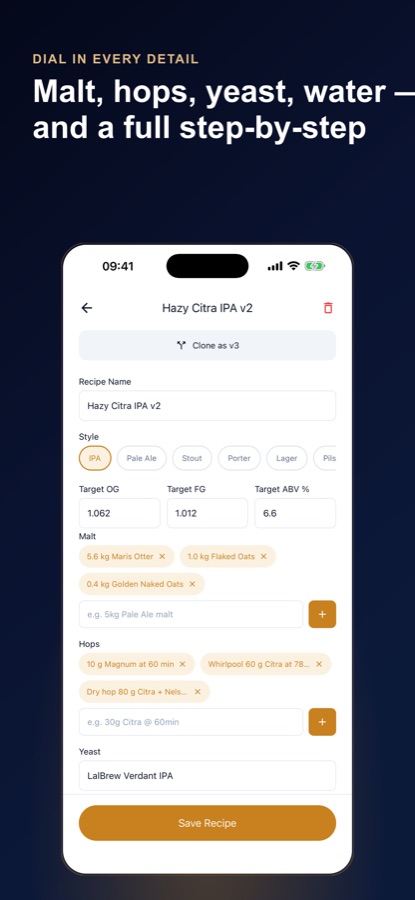
Add the malt bill, hop additions, yeast and water notes, list the mash and brew-day steps in order, and tag the beer style. If a style is new to you, you can ask the AI for a starting recipe that you then review and edit.
Start a batch and log readings
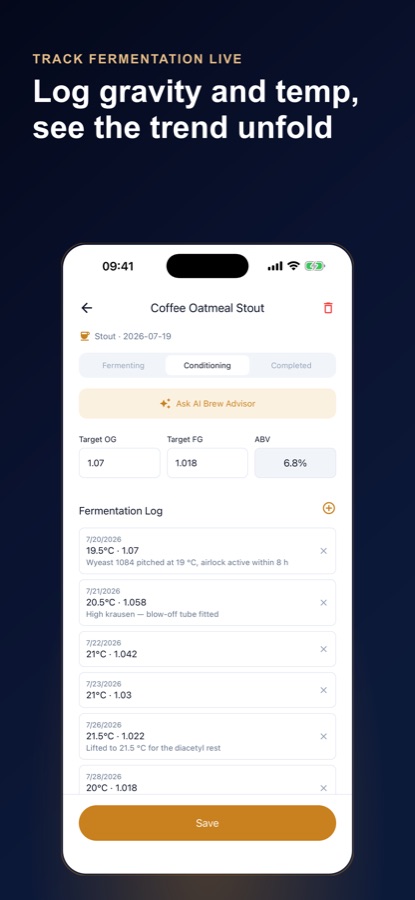
Add gravity and temperature readings as you take them, each with a date and an optional note, and set the batch to fermenting, conditioning or completed as it progresses.
Get the ABV
Enter the original and final gravity and the ABV calculator gives alcohol by volume straight away.
Rate it and improve it
Give the finished beer a rating from 1 to 5 and write notes on aroma, mouthfeel and carbonation. Clone the recipe into a new version in Pro, then compare how the versions turned out.
What's inside
What is inside
Recipes
Beer recipe book
Malt, hops, yeast and water notes plus ordered brew-day steps, with a beer style tag such as IPA, pale ale, stout, porter, lager, pilsner, wheat beer, sour or amber ale.
Log
Fermentation log
Dated gravity and temperature readings with optional notes, kept in order for the whole batch.
ABV
ABV calculator
Alcohol by volume worked out automatically once the original and final gravity are entered.
AI
AI Brew Advisor
Give it the style, your readings, the days fermenting and what the beer tastes like (too bitter, watery, flat, cloudy, too sweet or a stalled gravity) and it returns a plain-language diagnosis with adjustments. It is process advice, not a sanitation guide.
Stats
Batches, ratings and styles
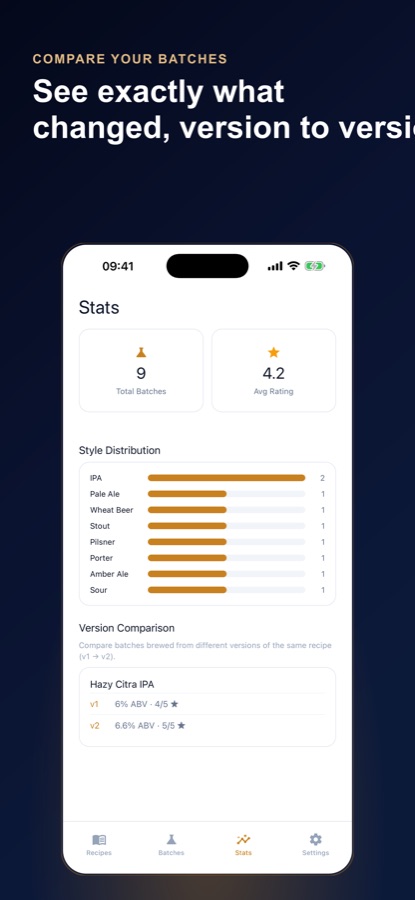
Total batches, average rating and the styles you brew most, with a version comparison in Pro that lines up batches from v1 and v2 of a recipe.
10
Languages and themes
Ten interface languages, with light and dark themes.
Fit
Who it's for — and who it isn't
A good fit if you
- Brew beer at home and want recipes, readings and tasting notes in one place
- Keep rewriting the same recipe and want to see what each version changed
- Want the ABV worked out from your own gravity readings
- Get stuck mid-ferment and want a second opinion on what the numbers suggest
- Are of legal drinking age and take your own sanitation seriously
Not the right tool if you
- Are under the legal drinking age where you live
- Want an app that tracks how much you drink, because this one logs the brewing craft and not consumption
- Need a sanitation or food-safety guide, since the Brew Advisor gives process advice only
- Use an iPhone, because the app is on Google Play for Android
Safety and limits
For adults who brew responsibly
Home Brewing: Beer Recipe Log is for adults of legal drinking age. It is about the craft of recipes, process and measurements. It does not encourage drinking, does not track how much anyone drinks and makes no health claims.
Sanitation and local rules are your responsibility. Home brewing is regulated differently from place to place, so check the rules where you live. The app's AI advice is not a sanitation guide, and it cannot see your equipment or your batch.
Do not package a beer early. Bottling before the gravity has stopped changing can leave sugar for the yeast to work on in a sealed bottle, and the pressure can burst glass. Confirm that two readings taken a day apart match before you bottle.
Privacy
Where your brewing log lives
Your recipes, batches, readings and tasting notes are stored on your phone, and there is no sign-up form: the app creates an anonymous guest profile so your subscription and free allowances work. When you use an AI feature, the details you entered for that request go through the app's server to a third-party AI service.
Full details are in the CoddyKit privacy policy.
Questions
Frequently asked questions
What is a good app for logging homebrew batches?
A good one keeps the recipe, the readings and the tasting notes together. Home Brewing: Beer Recipe Log has a recipe book, a dated fermentation log for gravity and temperature, an automatic ABV calculator and a 1 to 5 rating with notes for each finished beer. It is free to start on Android.
How do I calculate the ABV of my homebrew?
You need two readings from your hydrometer: the original gravity before fermentation and the final gravity after it. Enter both into Home Brewing: Beer Recipe Log and the ABV calculator gives alcohol by volume immediately, so you do not have to work it out by hand.
How do I know my fermentation is finished?
Take gravity readings a day or more apart and look for the number to stop changing. When two readings match, fermentation has most likely finished. Logging each reading with its date and temperature, as Home Brewing: Beer Recipe Log does, makes that trend easy to see.
What does the AI Brew Advisor do?
You give it the beer style, your gravity readings, the days fermenting and what the beer tastes like, such as too bitter, watery, flat, cloudy, too sweet or a stalled gravity. It returns a plain-language diagnosis with concrete adjustments for this batch and the next. It is process advice and does not replace a sanitation guide.
Can I keep several versions of the same recipe?
Yes, with Pro. Clone a recipe into a new version, such as v2 or v3, instead of overwriting your notes. The Stats tab then compares batches from the different versions side by side so you can see what a change did.
Is Home Brewing: Beer Recipe Log free?
It is free to start and shows banner ads. Recipes, batches and fermentation log entries are unlimited, and ratings, tasting notes and Stats are free, while the Brew Advisor includes 3 free analyses and recipe suggestions have a monthly allowance. Pro removes the ads and unlocks unlimited advisor analyses, recipe cloning and version comparison.
How is Pro billed?
Pro is an auto-renewing monthly or annual subscription. The price for your country is shown in the app before you buy, the payment is charged to your Google Play account and you can cancel any time in Google Play under Payments and subscriptions.
Does the app work for a first extract kit?
Yes. It is meant to cover everything from a first extract kit to an all-grain batch, because the log is the same: a recipe, some readings and your notes. If a style is new to you, the app can suggest a starting recipe that you review and edit before saving.
Is there an iPhone version?
No. Home Brewing: Beer Recipe Log is available on Google Play for Android only. It supports 10 interface languages and light and dark themes.
Get started
Write down tonight's batch
Free to start on Android, in 10 languages. For adults of legal drinking age.
More from CoddyKit
Available on Android.