

Coffee Journal: Brew Log
Coffee Journal: Brew Log — A coffee journal that names what to change in tomorrow's cup
Coffee Journal: Brew Log is a free coffee journal for home baristas who want a good cup to be repeatable. Log a pour over, AeroPress, French press, moka pot, cold brew or espresso shot in seconds, tap how it tasted, and get one concrete change to try next time instead of a guess. It works from your own numbers: dose, water, grind, temperature and time.

- Price
- Free, Pro upgrade
- Platforms
- Android
- Languages
- 10
- Account
- Not needed
Change one variable at a time.
A cup that tastes off has several possible causes, and adjusting three of them at once means you never learn which one mattered. A log that stores the dose, water, grind, temperature and time next to the taste verdict is what lets you see the pattern across a week of brews instead of guessing each morning.
What it is
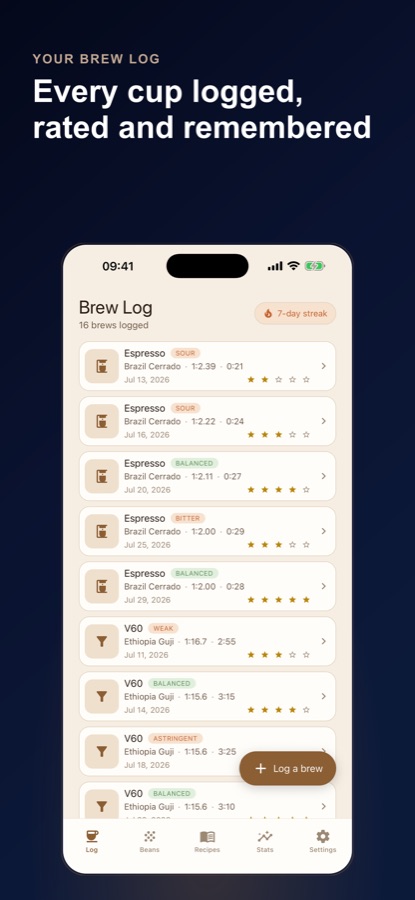
Coffee Journal: Brew Log is a free Android coffee journal and brew log for home baristas. Each entry stores dose, water, grind, temperature, time and a taste verdict (sour, bitter, weak, astringent, strong or balanced), and the app answers with a dial-in hint from a curated troubleshooting table. It covers nine methods including V60, Chemex, AeroPress, espresso, moka pot and cold brew, works out your espresso ratio and flow rate, and keeps entries on your device with no account.
Inside the app
What it looks like
Background
How do you dial in a coffee that tastes sour or bitter?
Dialing in means adjusting one brewing variable at a time until the cup tastes balanced. Sourness usually points to under-extraction (the water pulled too little out of the grounds) and bitterness or a dry, harsh finish usually points to over-extraction, so the common first moves are a finer grind for sour and a coarser grind for bitter. Coffee is not that tidy, though: water temperature, brew time, the water itself and how old the beans are all push the same taste in the same direction, which is why a written record beats memory.
Brew ratiocoffee to water
The ratio is the weight of coffee compared with the weight of water, written like 1:16. Filter methods such as V60 or Chemex commonly sit around 1:15 to 1:17, immersion methods can run a bit stronger, and a moka pot or concentrate-style cold brew sits much further down the scale. Fixing the ratio first removes the biggest source of weak or harsh cups.
Under- and over-extractionsour versus bitter
Extraction is how much of the coffee dissolves into the water. Too little tastes sharp, sour and thin; too much tastes bitter, hollow and drying. A balanced cup sits between them, and the grind, temperature and contact time all move you along that line.
Espresso ratio and timedose in, yield out
Espresso is described by the dry dose that goes in and the liquid weight that comes out. A yield under about 1.7 times the dose is a ristretto, roughly 1.7 to 2.5 times is a normale shot, and above that is a lungo, each with its own usual shot-time window. A shot far outside its window is usually a grind adjustment rather than a recipe change.
Bean freshnessdays since roasting
Freshly roasted coffee releases carbon dioxide for days, which can make filter coffee uneven and espresso gush or choke. Most beans taste best after a short rest, hold a plateau for a couple of weeks, then slowly fade over several more. Knowing the roast date explains many cups that seem to change for no reason.
Waterthe quiet variable
Coffee is around 98 percent water, and its mineral content affects extraction. Very soft water can give a flat, hollow cup that no grind change fixes, while very hard or high-alkalinity water can mute brightness. If you have changed grind several times and the cup still tastes flat, the water is worth looking at.
How it works
How a brew gets logged
The habit is a short loop: log the numbers while the cup is still warm, tap what you tasted, and read the hint before you brew again.
Log the brew in seconds
Pick the method, then enter dose, water, grind, temperature and time. The ratio updates as you type and is marked stronger, weaker or inside the usual range for that method. For espresso you enter the dose in and the yield out, and the app places the shot as ristretto, normale or lungo and shows its flow rate.
Tap how it tasted
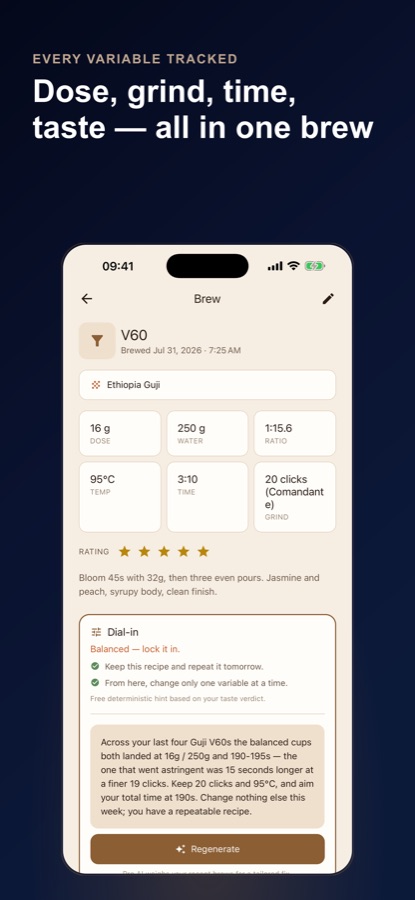
Choose sour, bitter, weak, astringent, strong or balanced. The entry saves with a free dial-in hint that names the one thing to change next, taken from a fixed troubleshooting table rather than made up on the spot, and translated into your own grinder's clicks once you have chosen it.
Brew it again, then compare
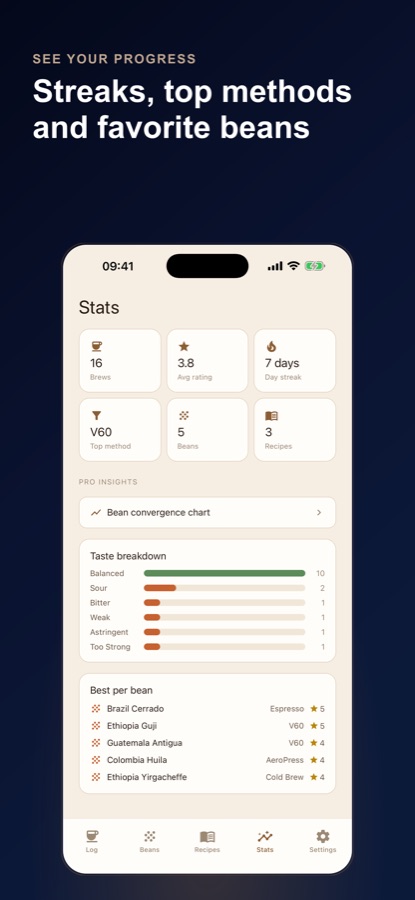
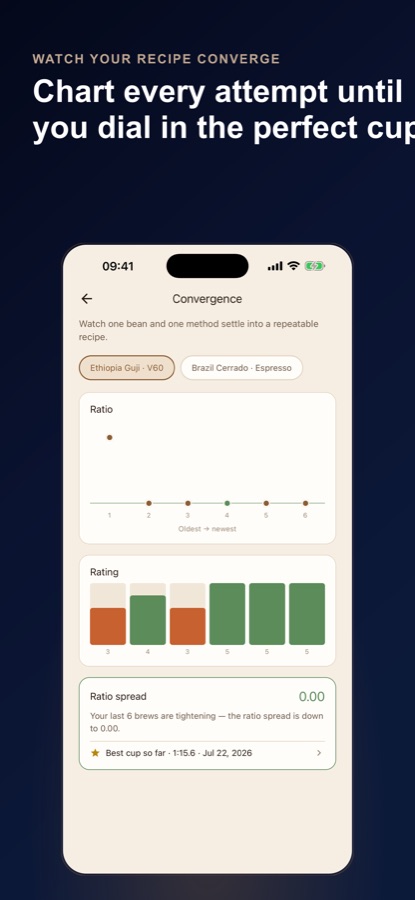
Use Log again to pre-fill the same recipe, change only the variable the hint named, and brew the next cup. Over several entries the stats and the weekly recap show your cups, your best brew and what changed between them.
What's inside
What the app does
9
Brew methods
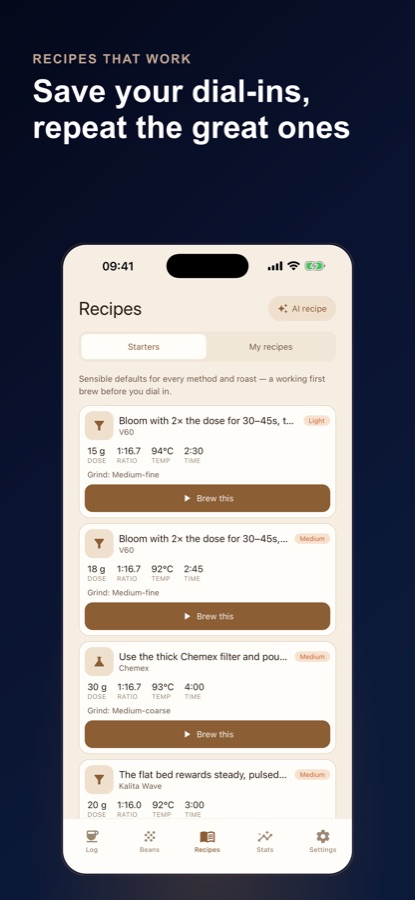
V60, Chemex, Kalita, AeroPress, espresso, French press, moka pot, cold brew and Clever, each with its own ratio range and its own flavour of dial-in advice.
Hint
Dial-in tip on every entry
Pick the taste verdict and the entry saves with one clear change for next time. The free hint comes from a curated table, so it stays the same whether you are online or not.
1:x
Live ratio and espresso shot analysis
Type dose and water and the ratio updates immediately. Enter dose in and yield out for espresso and the app works out the ratio and flow rate, then gives one plain grind instruction: finer, coarser or stay.
Timer
Guided pour over timer
Pick a method, dose and target yield and the timer walks you through the bloom, the pours and the drawdown, with step cues if you allow notifications. An Espresso Ladder walks you shot by shot toward a target until it holds.
Beans
Grinder, water and bean details
Choose your grinder once so grind advice becomes your own clicks or dial numbers. Save a water profile, a roast date for a freshness clock (resting, peak or fading), a bag size for grams left, and flavour notes from a simple wheel.
AI
AI dial-in and bag scans
Free includes a small monthly allowance of AI dial-in suggestions and AI bag scans, which fill a bean in from a photo of its label. Pro removes the limit, reads your last eight entries for the same bean and method, and adds AI starting recipes. AI features ask your permission first.
Fit
Who it's for — and who it isn't
A good fit if you
- Brew at home and keep forgetting what worked last week
- Own a hand grinder or a small espresso setup and want grind advice in your own clicks
- Switch between a V60, an AeroPress and a moka pot and want one place for all of them
- Buy a new bag every few weeks and want to know when it is resting, at its peak or fading
- Want to log without an account or a connection
Not the right tool if you
- Want a coffee shop finder or a café review app
- Need caffeine intake tracking; the app logs brews, not how much you drink
- Expect everything free: the free version shows ads, and unlimited AI dial-in, recipe saving and CSV export are Pro
- Want advice for a machine that automates every step; the hints assume you control dose and grind
Privacy
What stays on your phone
Your entries, beans and recipes are stored on your device, and no account is needed; signing in is optional. AI features ask your permission first, then send only the details they need, or the one label photo you pick, to our server and an AI service. The server keeps only a count of your AI requests. The app uses analytics and crash reports.
Full details are in the CoddyKit privacy policy.
Questions
Frequently asked questions
What is a good app for logging coffee brews?
A useful brew journal records the numbers that change the cup (dose, water, grind, temperature and time), the taste, and a way to compare entries. Coffee Journal: Brew Log does that for nine methods and answers each taste verdict with a dial-in hint. It is free on Android and works without an account.
Why does my coffee taste sour?
Sourness usually means under-extraction: the water pulled too little out of the grounds. Common fixes are a finer grind, hotter water or a little more contact time, changing one at a time. In Coffee Journal: Brew Log you tap sour on the entry and the dial-in hint names the next change for that brew method.
Why does my coffee taste bitter or dry?
Bitterness or a dry, harsh finish usually points to over-extraction: too much was dissolved. A coarser grind, slightly cooler water or a shorter brew time are the usual moves. Coffee Journal: Brew Log gives different advice for espresso, immersion methods and pour over, because the same bitter cup has a different cause in each.
What coffee to water ratio should I use?
Filter methods like a V60 or Chemex usually start around 1:15 to 1:17, which is about 60 to 67 grams of coffee per litre of water. Immersion, moka pot and cold brew run on other ranges. Coffee Journal: Brew Log updates the ratio as you type your dose and water and marks it stronger, weaker or inside the typical range for the method.
How do I know if my espresso shot is a ristretto, normale or lungo?
It depends on the ratio of liquid out to dry coffee in. Under about 1:1.7 is a ristretto, roughly 1:1.7 to 1:2.5 is a normale shot, and above 1:2.5 is a lungo, each with its own usual time window. Coffee Journal: Brew Log works this out from your dose, yield and shot time, and tells you to grind finer, coarser or stay.
How long should I let coffee beans rest after roasting?
Freshly roasted beans release carbon dioxide for a few days, so many people wait a few days for filter coffee and about a week for espresso. Peak flavour usually follows for a couple of weeks before a gradual fade. Coffee Journal: Brew Log shows a freshness clock from the roast date you enter, using ranges that vary by method and roast level.
Can the water make my coffee taste flat?
Yes. Very soft or low-mineral water can give a flat, hollow cup that grind changes do not fix, and very hard water can mute brightness. Coffee Journal: Brew Log lets you save a water profile, so a flat or sour cup can be traced to the water instead of the grinder.
Is Coffee Journal: Brew Log free?
Yes to start. Unlimited logging, the dial-in hint on every entry, the live ratio, espresso analysis, the pour over timer, the recipe library, up to 10 saved beans, the streak and the weekly recap are free, and the free version shows ads. Pro is an optional subscription that adds unlimited AI dial-in, unlimited beans, saved recipes, CSV export and no ads.
Does Coffee Journal: Brew Log need an account or internet?
No account is needed and your entries, beans and recipes are stored on your device. Logging, the ratio, the dial-in hint and the pour over timer do not depend on a server. Only the optional AI features, which ask your permission first, send details to a server.
Is it available on iPhone?
Not at the moment. Coffee Journal: Brew Log is available on Android through Google Play, in 10 languages. The page will be updated if that changes.
Get started
Make tomorrow's cup better than today's
Free on Android, in 10 languages, with no account needed.
More from CoddyKit
Available on Android.