

Screen Time Detox - Dopaminer
Screen Time Detox - Dopaminer — A dopamine detox that puts a visible cost on going over your limit
Screen Time Detox - Dopaminer is a free iPhone and Android dopamine detox and digital detox app built around consequences. Pick the apps that eat your day, set a daily screen time limit, and run a 7-day challenge: go over and you lose Energy, stay under and your streak grows. It measures, warns and keeps score, and the decision to put the phone down stays yours.


- Price
- Free, Pro upgrade
- Platforms
- iOS and Android
- Languages
- 13
- Age rating
- 4+
- Requires
- iOS 16.0 or later
Willpower alone rarely lasts, so the rule gets stakes.
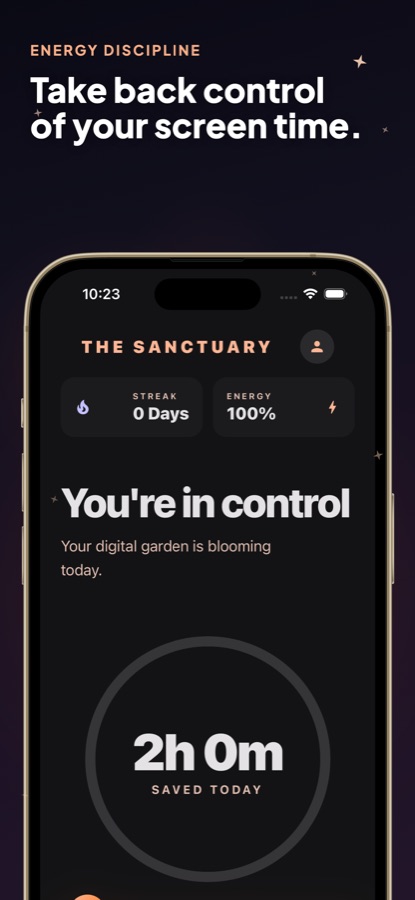
Dopaminer starts every day with 100 Energy. On Android, going over your limit costs 15 of it and each successful day adds a streak day and recovers 10. Hit zero and Void Mode starts, a 24-hour countdown until the void lifts. The numbers turn a vague plan to scroll less into a scoreboard you can see.
What it is
Screen Time Detox - Dopaminer is a free iOS and Android app for cutting phone time with a daily limit and a game-like consequence. You choose the apps that distract you most (up to 3 on the free plan), set a limit from 1 to 6 hours in half-hour steps and commit to a 7-day challenge. Staying under the limit builds a streak, going over drains Energy, and alerts arrive at 50%, 80% and 100% of the limit on Android. It is a self-discipline and habit tool, not medical advice or a treatment.
Inside the app
What it looks like
Background
What is a dopamine detox, and does a daily screen time limit help?
"Dopamine detox" is a popular name for taking a deliberate break from the things you scroll, watch or check compulsively, so it is better read as a way to reduce habit-forming phone use than as a literal reset of any chemical. The practical question is whether you can keep a limit, and rules you set yourself tend to fail at the moment they are needed, late at night or in a gap between tasks. A limit that is measured, warned about and scored gives you a clearer signal than a vague intention, but it works only if you act on it.
Doomscrollingthe late-night loop
Scrolling through a feed of bad or endless news and posts long after you meant to stop. It is hard to notice from the inside because there is no natural end to a feed, which is why a time-based warning can help.
Daily screen time limita rule you choose in advance
A fixed number of minutes for the apps you pick. Deciding it when you are calm, and for specific apps rather than the whole phone, makes it easier to stick to than a general plan to use the phone less.
Streaks and stakeswhy a game mechanic helps
A streak rewards consistency and a cost makes a slip visible. Neither changes why you reached for the phone, but both make the pattern harder to ignore.
Usage accesswhat the app needs to read your time
To measure time in other apps, an Android app needs the Usage Access permission, which you grant in system settings. On iPhone the equivalent is Apple's Screen Time permission. The app reads usage only for the apps you select.
How it works
How a challenge works
Commit to one week per round. One bad day resets the streak and the next morning is a clean start.
Give it access and pick your apps
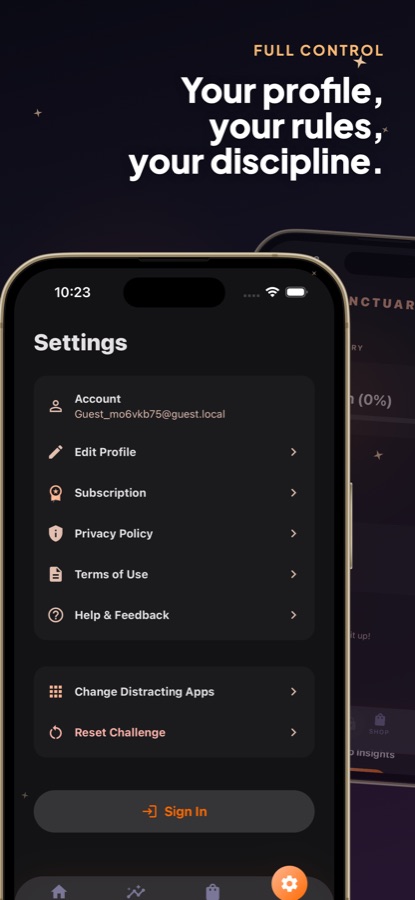
Allow screen time access, then choose the apps that distract you most. The free plan covers up to 3 apps, and you can change them later in Settings.
Set a daily limit
On Android the limit runs from 1 to 6 hours in half-hour steps, and a quiet background tracker checks your usage about once a minute. Alerts arrive at 50%, 80% and 100% of the limit so nothing sneaks up on you.
Watch Energy and the streak
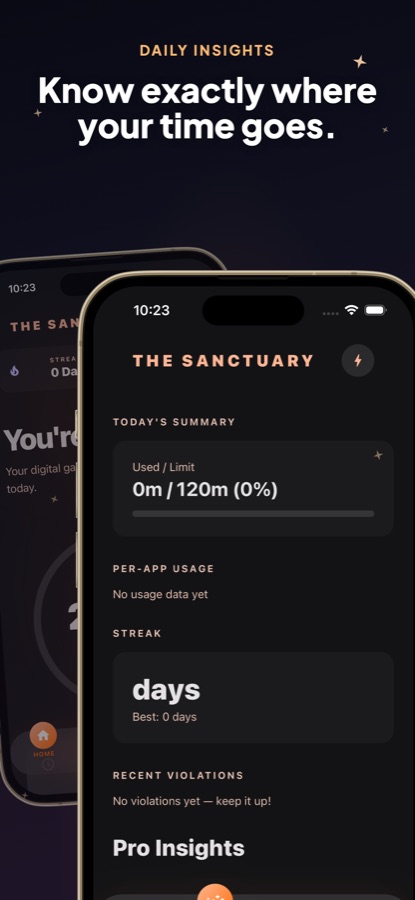
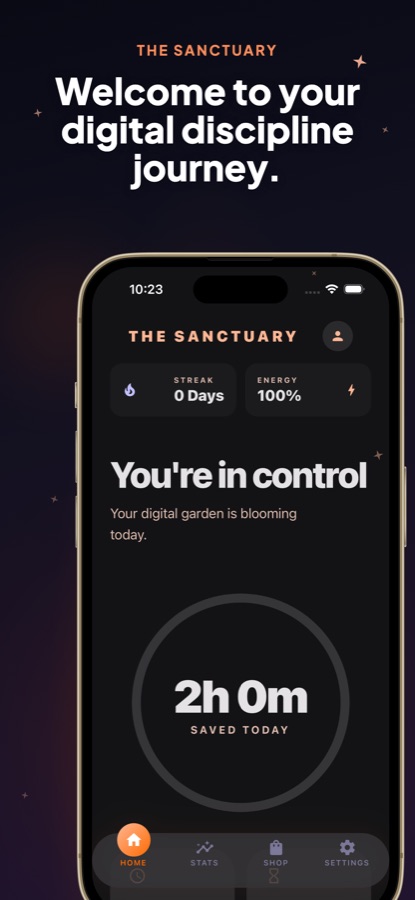
The Sanctuary home screen shows your streak, your Energy and which of four states you are in: in control, stay vigilant, losing ground or lost control. The Stats tab shows minutes used against minutes left, your best streak and recent slips.
What's inside
What is in the app
100
Energy
You start with 100 Energy. On Android, a day over your limit costs 15 and a successful day recovers 10.
7 days
Weekly challenges
One week per round, with a streak that counts every day under your limit and resets after a bad one.
24 h
Void Mode
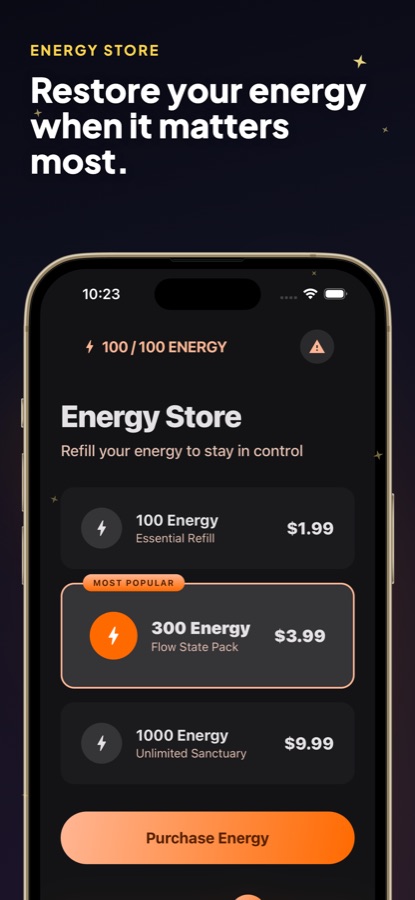
If Energy reaches zero a 24-hour countdown starts until the void lifts. Optional Energy Restore packs of 100, 300 or 1000 Energy are one-time purchases.
50 / 80 / 100
Usage alerts
Alerts at 50%, 80% and 100% of your limit on Android, so you get a chance to stop before the cost lands.
Pro
Pro Insights
Your biggest time sink among tracked apps, this week against last week with the percentage change, a weekly usage chart against your limit and your riskiest 2-hour window.
Dark
A calm, dark design
A minimal interface with clear numbers instead of bright colours competing for your attention.
Fit
Who it's for — and who it isn't
A good fit if you
- Lose evenings to short-video feeds, social apps or endless video and want a limit that has consequences
- Want a simple screen time tracker for a few chosen apps rather than a full device lock
- Respond to streaks and scores and would rather play against your own rule than read a report
- Want an alert before you reach your limit, not only after
- Prefer a dark, quiet interface that does not add to the noise
Not the right tool if you
- Need an app that locks or hides other apps on Android, because Dopaminer measures, warns and keeps score only
- Want a treatment for addiction, ADHD, anxiety or any other condition, which the app is not
- Want to track more than 3 apps for free, as more are part of Pro
- Dislike ads, since the free plan shows a banner and an occasional full-screen ad
Safety and limits
A habit tool, not a treatment
Screen Time Detox - Dopaminer is a self-discipline and habit tool. It is not medical advice and it is not a treatment for addiction, ADHD, anxiety or any other condition.
If phone use is seriously affecting your sleep, work, relationships or wellbeing, or things feel heavier than a phone habit, please talk to a qualified professional or a crisis line in your country.
Privacy
What the app tracks
Dopaminer tracks usage only for the apps you select. Your challenge, score, streak and daily usage totals are saved to your account on the CoddyKit servers so your progress is kept, and app analytics are used to improve it. You can delete your account from your profile in Settings.
Full details are in the CoddyKit privacy policy.
Questions
Frequently asked questions
What is the best way to do a dopamine detox from your phone?
Pick the few apps you lose the most time to and set a specific daily limit for each, rather than trying to use the phone less in general. Screen Time Detox - Dopaminer then measures your time in those apps, warns you before you hit the limit and adds a streak and an Energy cost so a slip is visible. It supports the habit; the choice to stop stays with you.
How does the Energy system work?
In Screen Time Detox - Dopaminer you start with 100 Energy. On Android, a day over your limit costs 15 Energy and each successful day adds a streak day and recovers 10. Four states show where you stand, from in control to lost control, and reaching zero starts Void Mode, a 24-hour countdown.
Does Dopaminer block or lock my apps?
On Android it does not lock or hide other apps. It reads your usage for the apps you pick, warns you at 50%, 80% and 100% of your limit and keeps score, and the decision to put the phone down stays with you. On iPhone it uses Apple's Screen Time permission to see your usage.
What permission does the app need?
On Android, Dopaminer asks for Usage Access so it can read how long you spend in the apps you choose, and you turn it on in system settings. On iPhone it uses Apple's Screen Time permission, which you can review in the Settings app under Screen Time. Without access the daily limit cannot move and no slip is recorded.
How many apps can I track, and what limit can I set?
The free plan covers up to 3 apps. On Android you can set a daily limit from 1 to 6 hours in half-hour steps. Pro lets you track more than 3 apps in a challenge.
Will it help me stop doomscrolling?
It can make the habit visible and give you a prompt at the moment you need one: an alert as you near your limit, a streak to protect and an Energy cost. Screen Time Detox - Dopaminer does not change why you reach for the phone, so it works best alongside a rule you have chosen deliberately.
What do Pro Insights show?
Pro Insights show your biggest time sink among the apps you track, this week compared with last week as a percentage change, a weekly usage chart against your daily limit and your riskiest hours, the 2-hour window when most slips happen. Pro also removes ads and lets you track more apps.
Is Screen Time Detox - Dopaminer free?
The app is free to download on the App Store and Google Play. Free includes up to 3 tracked apps, Energy, streaks, Void Mode, 7-day challenges, usage alerts and the dashboard and stats, and it shows ads. Pro, a weekly, monthly or yearly subscription, adds more apps, Pro Insights, a longer list of past slips and no ads. Energy Restore packs are separate one-time purchases.
Is it a treatment for phone addiction?
No. Screen Time Detox - Dopaminer is a self-discipline and habit tool, not a medical treatment for addiction, ADHD, anxiety or any other condition. If phone use is seriously affecting your health or wellbeing, please talk to a qualified professional.
Which languages and devices does it support?
Screen Time Detox - Dopaminer runs on Android and on iPhone with iOS 16.0 or later, and its page is available in 13 languages. It is rated 4+.
Get started
Set your first limit today
Free to start on iOS and Android. A habit tool, not a treatment.
More from CoddyKit
Available on iOS and Android.