Productivity · Free · iOS & Android
By CoddyKit
InterviewAce AI Prep: a mock interview app for your phone
InterviewAce AI Prep is a free mock interview app for iPhone and Android. Set your target role, company, and experience level, then practise a behavioral, technical, HR, or company-specific round by voice or by typing — and get an answer-by-answer feedback report when it ends. Free, with a daily session cap that Pro lifts.
- Price
- Free, with ads
- Platforms
- iOS and Android
- Age rating
- 4+
- Pro plans
- Weekly, monthly, annual
A rehearsal partner, not a question bank.
The app writes practice questions from your role, resume, and the job description you paste. It has no access to any employer's real questions, and it says so in its own store listing.
What it is
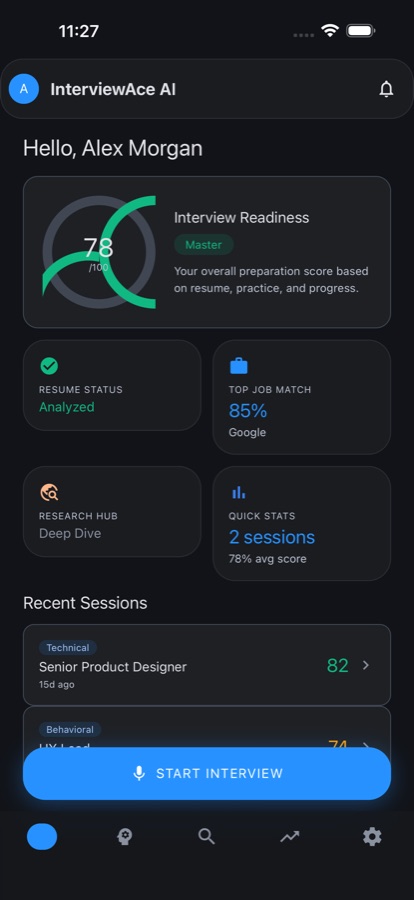
InterviewAce AI Prep is a free interview practice app for iOS and Android. It runs AI mock interviews in behavioral, technical, HR, company-specific, or mixed formats, adapted to your target role and experience level. You answer by voice or by typing, then get a report scoring each answer for quality, clarity, and relevance, with a stronger rewrite and coaching notes. The questions are generated practice, not any employer's real ones.
Background
What is a mock interview, and why rehearse one?
A mock interview is a rehearsal of a real interview round: someone asks the questions you expect to face, you answer them out loud under something like real conditions, and afterwards you go through what you said. The value is in the saying. Most people can describe their work fine in their head and lose the thread the first time they have to say it to another person.
Behavioral round"tell me about a time…"
Questions about things you have actually done, on the theory that past behaviour predicts future behaviour. Answers are judged on the specifics of the situation and what you personally did in it.
STAR methodanswer structure
Situation, Task, Action, Result — a four-part shape for behavioral answers that keeps a story from wandering. You set the scene, say what you had to do, what you did, and how it turned out.
Technical roundskills check
A round aimed at whether you can do the work: the concepts, tools, and problem-solving of the role itself, rather than how you handled a difficult colleague in 2023.
Job match scoreresume vs posting
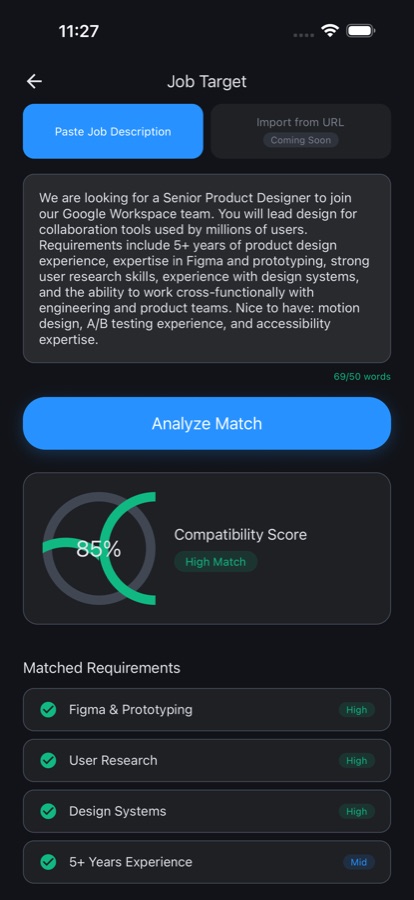
A comparison of your resume against a specific job description that shows which stated requirements you already meet, which skills are missing, and which of those gaps matter most.
How it works
How a session runs
Each round is set up, answered, and then read back to you. The set-up is what makes the questions feel like your interview rather than a generic list.
Set up the round
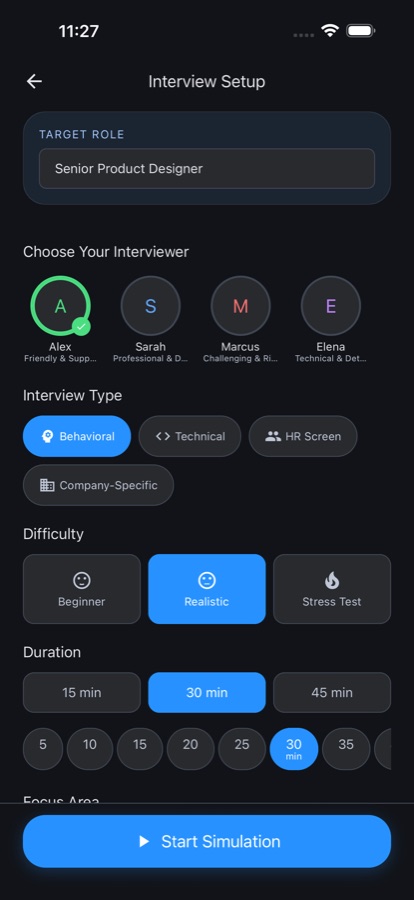
Pick the role, company, and experience level you are aiming at, then choose the format — behavioral, technical, HR, company-specific, or mixed — plus interviewer style, difficulty, session length, and a focus area. A gentle warm-up and a hard final rehearsal are different settings, not different apps.
Answer out loud
Speak your answers with live speech recognition, or switch to typing when you cannot talk. While you answer, the app shows live confidence and speaking-pace signals, and behavioral questions carry built-in STAR guidance so your stories keep a shape instead of trailing off.
Read the report, then go again
Every session ends with a full report rather than a pass or fail: each answer rated for quality, clarity, and relevance, rewritten as a stronger version so you can see why, plus coaching notes. Progress tracking shows your trend and which areas stay weak.
What’s inside
What is in the app
5
Interview formats
Behavioral, technical, HR, company-specific, and mixed rounds, with interviewer style set to friendly, professional, or challenging, and difficulty from warm-up to hard.
STAR
Voice or typed practice
Answer by speaking with live speech recognition, or type instead. Live confidence and pace signals while you talk, and STAR guidance on behavioral questions.
AI
Feedback reports
Quality, clarity, and relevance ratings answer by answer, your own words rewritten as a stronger version, and coaching notes on what to fix before the real thing.
Resume analysis
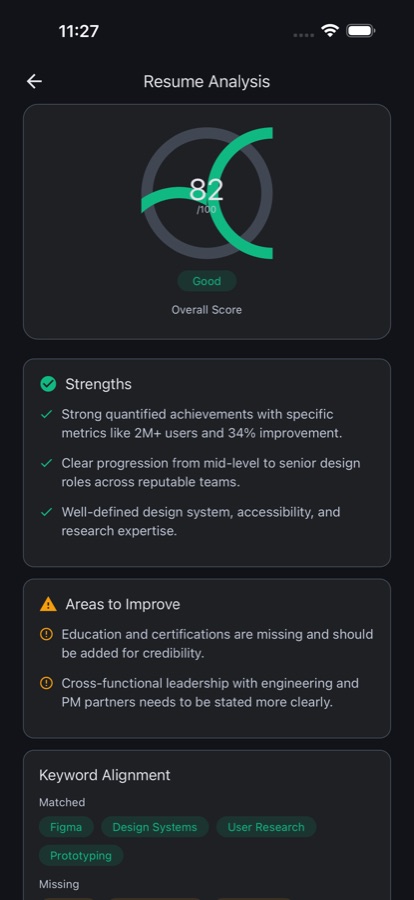
Upload a PDF or paste your resume text. The analysis covers your professional summary and work history, and flags the gaps a recruiter would notice first.
URL
Job match scoring
Paste a job description or import one from a URL for a compatibility score: requirements you match, skills you are missing, and priority gaps. Interview straight from that posting.
Hub
Company research
Look up a company for a read on its culture, likely interview style, and what to expect. Researched companies are kept, so prep does not start from zero.
Inside the app
What it looks like
.jpg)
Fit
Who it’s for — and who it isn’t
A good fit if you
- Have an interview booked and want to say your answers out loud before the day
- Are changing careers and need practice fielding questions from an unfamiliar field
- Have never sat a formal interview and want to know what a round actually feels like
- Want to see how your resume reads against a specific posting before you apply
- Are prepping for an internal promotion or a leadership round
Not the right tool if you
- Want a real employer's actual question bank — these questions are generated, not leaked
- Need your resume to stay on your device; it is sent to an AI service to be analysed
- Want unlimited free practice — the free tier caps daily sessions and shows ads
- Are looking for job listings or an application tracker; this app is practice and analysis only
Privacy
Where your resume goes
The resume you paste or upload, the answers you give during a session, the job descriptions you add, and the company names you look up are sent to an AI service so it can produce your analysis, match score, and feedback. That is what they are used for. The app is not affiliated with or endorsed by any employer you research or apply to.
Full details are in the CoddyKit privacy policy.
Questions
Frequently asked questions
What's the best app for practising job interviews?
The useful ones do three things: ask questions that fit the actual role rather than a generic list, let you answer out loud the way you will on the day, and tell you specifically what to say better. InterviewAce AI Prep adapts questions to your target role, company, and experience level, takes spoken or typed answers, and returns an answer-by-answer report with a stronger rewrite of what you said. It is free on iOS and Android.
Do mock interviews actually help?
Rehearsal helps mainly because saying something out loud is a different skill from knowing it. Most candidates can describe a project clearly in their head and then lose the thread the first time a stranger asks about it. A mock round moves that first fumbling attempt off the real interview and into practice, and it surfaces the questions you have no answer ready for while there is still time to build one.
What is the STAR method?
STAR stands for Situation, Task, Action, Result. It is a four-part shape for answering behavioral questions: set the scene briefly, say what you were responsible for, describe what you personally did, and finish with how it turned out. Its job is to stop a story from wandering and to make sure the answer contains your actions rather than the team's. InterviewAce AI Prep includes built-in STAR guidance on behavioral questions.
What's the difference between a behavioral and a technical round?
A behavioral round asks about things you have already done — "tell me about a time you disagreed with a manager" — and judges the specifics of the situation and your part in it. A technical round tests whether you can do the work itself: the concepts, tools, and problem-solving of the role. Many processes include both, plus an HR screen about logistics and motivation. The app can run each of those formats separately or mixed.
How do I match my resume to a job description?
Read the posting as a list of requirements, then go line by line and ask whether your resume gives concrete evidence for each one. The gaps fall into two piles: things you have done but did not write down, which you fix by editing, and things you genuinely have not done, which you either learn or address directly. The app's job match scoring does that comparison and ranks which gaps matter most.
How should I research a company before an interview?
Aim for three things you can actually use: what the company does in plain terms, how it tends to run its interviews, and what the role is expected to deliver. That gives you talking points and sensible questions to ask at the end. InterviewAce AI Prep has a company research hub covering culture, likely interview style, and what a candidate should expect, and it keeps a history of the companies you have looked up.
Is InterviewAce AI Prep free?
Yes, it is free to download on the App Store and Google Play. The free tier gives you a limited number of practice sessions per day and is supported by ads. InterviewAce Pro removes the ads and unlocks unlimited mock interviews, full AI feedback reports, resume analysis, job match scoring, company research, and progress tracking. Pro is an auto-renewing subscription available weekly, monthly, or annually, and can be cancelled in your device account settings.
Can I practise by speaking instead of typing?
Yes. Answers can be spoken with live speech recognition, which is the point of a rehearsal — you find out how the sentence comes out when you say it. While you speak, the app shows live confidence and speaking-pace signals. If you are somewhere you cannot talk, on a commute or in an office, you can switch to typed answers and get the same feedback report at the end.
What happens to my resume and my answers?
The resume you upload or paste, your interview answers, the job descriptions you add, and the company names you look up are sent to an AI service so it can generate your analysis, match score, and feedback. That is what they are used for. Full details are in the CoddyKit privacy policy, linked from the app's store listing and from this page.
Will it give me the exact questions my interviewer will ask?
No, and the app says so itself. It generates practice questions from general interview best practices plus the details you give it about the role, your resume, and the job description. It has no access to any company's real question bank, does not guarantee those questions will come up, and is not affiliated with or endorsed by any employer you research. It is a rehearsal partner — the real interview is still yours.
Start logging
Rehearse before it counts
Free on iOS and Android, with a Pro upgrade for unlimited sessions.
More from CoddyKit
Available on iOS and Android.