
Screenshot Organizer: ShotBox
Screenshot Organizer: ShotBox — Find any screenshot by the words inside it
Screenshot Organizer: ShotBox turns the screenshots already on your iPhone into a searchable library. It reads the text in each image with on-device OCR, so you can run an OCR text search for a receipt, a boarding pass or an error log, and it sorts screenshots into categories such as receipts, travel, shopping, work and links.

- Price
- Free, Premium upgrade
- Platforms
- iOS
- Languages
- 10
- Age rating
- 4+
- Requires
- iOS 15.0 or later
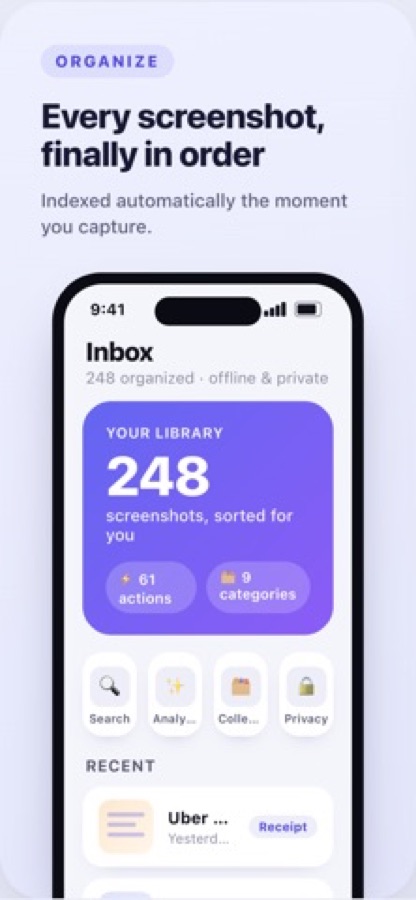
You remember what the screenshot said, not what it was called.
Camera-roll thumbnails all look alike, and the file names are dates. Because the app reads the words inside each screenshot, you can search for the name on the ticket, the amount on the receipt or the phrase in the error message and land on the right image.
What it is
Screenshot Organizer: ShotBox is an iOS screenshot manager that indexes your screenshots automatically, reads their text with on-device OCR and lets you search by the words inside them. It sorts images into categories such as receipts, travel, shopping, work and links, pulls out details like prices, dates, addresses, order numbers and links, and offers one-tap actions: add a date to your calendar, set a reminder, copy details, open a map or call a number. It needs no account.
Inside the app
What it looks like
Background
How do you find an old screenshot, and keep the camera roll from becoming a junk drawer?
Screenshots pile up because taking one is instant and filing one is not. People capture a receipt, a flight, a link or an idea, and weeks later cannot find it among thousands of near-identical thumbnails. The practical fix is to search by content rather than by date: optical character recognition reads the text in an image, so a word on the screenshot becomes a search term. Sorting by type, with receipts in one place and travel plans in another, handles the rest.
OCRturning pixels into searchable text
Optical character recognition detects text in an image and converts it into characters that can be searched. When it runs on your phone, the images do not have to be sent anywhere to be read, which matters for screenshots of tickets and statements.
Categories and collectionssorting without folders
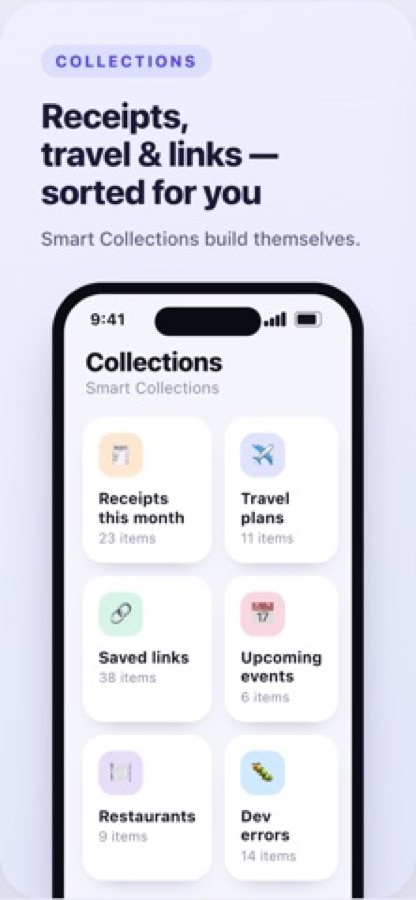
Instead of asking you to make albums by hand, the app groups screenshots by what they contain. Collections such as receipts this month, travel plans and saved links then collect themselves as new screenshots arrive.
Detected detailsthe useful bits inside an image
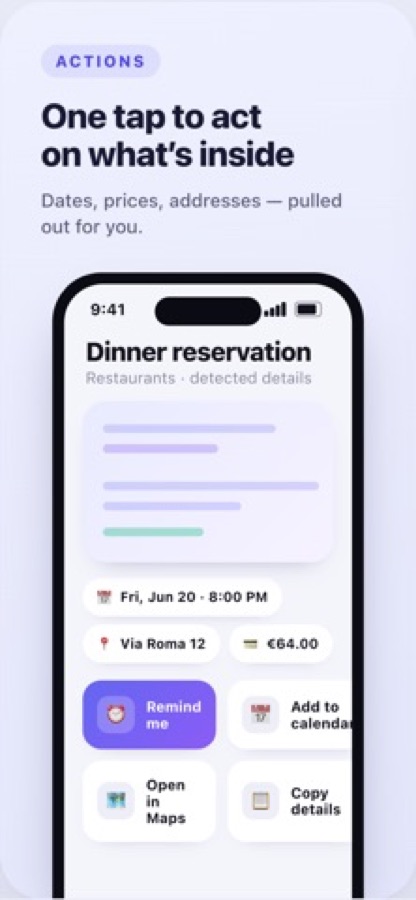
A screenshot of a dinner booking holds a date, a time, an address and an amount. Pulling those out means you can act on them, for instance by adding the date to a calendar or opening the address in Maps, without retyping.
Reminders on a screenshotcapture now, deal with it later
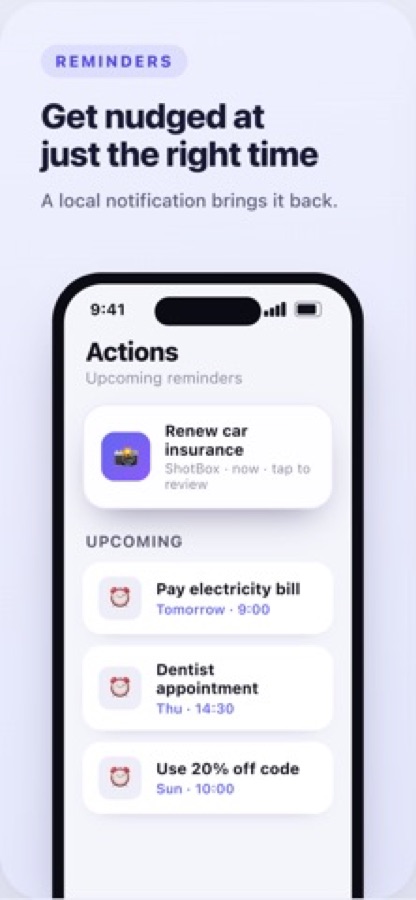
Many screenshots are really tasks: renew insurance, pay a bill, use a discount code before it expires. A reminder attached to the image brings you back to it at the right moment.
How it works
How it works day to day
You keep taking screenshots as before, and the app does the filing.
Capture as usual
Screenshots are indexed automatically after you take them, and the Inbox shows how many are organised along with recent items and their categories.
Search by the words inside
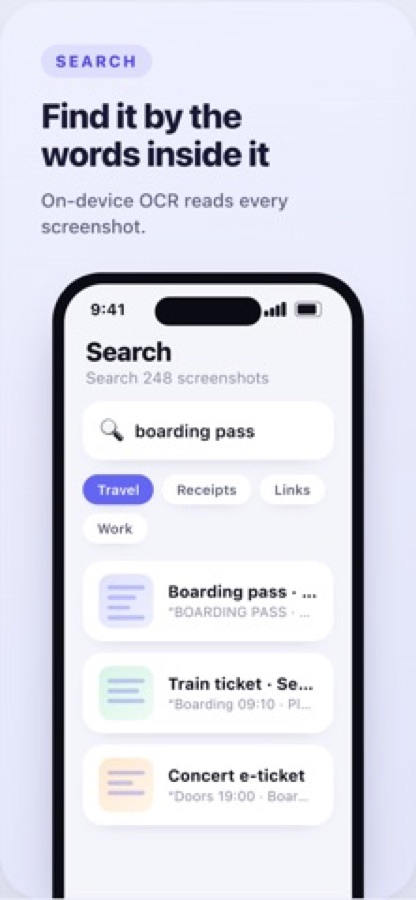
Type a word such as boarding pass and narrow the results with category chips for travel, receipts, links or work. The match shows the text that was found in each image.
Act on what is inside
Open a screenshot to see the detected date, address or amount, then tap Remind me, Add to calendar, Open in Maps or Copy details.
What's inside
What it does
OCR
Instant text search
Find any screenshot by the words in it. Text is read locally on your iPhone, so the search works offline.
Sorted
Smart categories
Receipts, travel, shopping, work, links and more, assigned for you without making albums by hand.
Details
Detected details
Prices, dates, addresses, order numbers and links are pulled out of the image so you can copy or use them.
1 tap
Actions
Add a date to the calendar, set a reminder, copy details, open a map or call a number from the screenshot itself.
Alert
Reminders
Set a reminder on any screenshot and get a local notification at the time you chose; tapping it jumps straight back to the image.
Premium
Smart Collections and more
Premium unlocks unlimited indexing and analysis, advanced actions, smart collections such as Receipts this month, data export and backup, and Smart AI summaries.
Fit
Who it's for — and who it isn't
A good fit if you
- Take screenshots of receipts, tickets, links and ideas and cannot find them later
- Want to search your images by the text they contain
- Like to turn a screenshot into a calendar entry or reminder in one tap
- Prefer an app that needs no account and no sign-up
- Want sensitive screenshots handled on the phone
Not the right tool if you
- Use an Android phone; the app is iOS only
- Need a general photo editor or a cloud backup service
- Expect every feature free; smart collections, export and backup, and AI summaries are Premium
- Want to search photos by what appears in them rather than by text
Privacy
What the store listing says about your screenshots
The App Store listing describes the app as private by design: everything runs on your device, with no account, no sign-up, no cloud sync, no tracking and no ads, and your screenshots never leave the phone. You can delete everything the app has indexed at any time.
Full details are in the CoddyKit privacy policy.
Questions
Frequently asked questions
What is Screenshot Organizer: ShotBox?
Screenshot Organizer: ShotBox is an iPhone app that indexes your screenshots, reads their text with on-device OCR and lets you search for them by the words inside. It sorts them into categories, pulls out dates, prices and addresses, and offers one-tap actions such as a reminder or a calendar entry. It is free to download, with an optional Premium upgrade.
Is Screenshot Organizer: ShotBox free?
Screenshot Organizer: ShotBox is free to download on the App Store and needs no account. Premium is an optional auto-renewing subscription that adds unlimited indexing and analysis, advanced actions, smart collections, data export and backup, and Smart AI summaries. You can manage or cancel it in your Apple ID account settings.
How do I find an old screenshot on my iPhone?
Search by what the screenshot said instead of when you took it. Screenshot Organizer: ShotBox reads the text in each image with on-device OCR, so a word such as a name on a ticket or a total on a receipt finds the right image, and category chips like travel or receipts narrow the results.
How do I search my screenshots by text?
Open Search in the app and type a word or phrase that appears in the screenshot, such as a name on a ticket or a total on a receipt. Add a category chip like travel or receipts to narrow the list. Each result shows a snippet of the text the app found.
Does it need an account or an internet connection?
No account or sign-up is needed, and the store listing says the app works fully offline. Text is read locally with the iPhone's text recognition, so searching does not depend on a connection.
Are my screenshots uploaded anywhere?
According to the App Store listing, your screenshots never leave your device and there is no cloud sync, tracking or ads. You can delete everything the app has indexed at any time. Read the privacy policy for the details of any optional features.
What actions can I take on a screenshot?
When the app detects a date, address, phone number or amount, you can add the date to your calendar, set a reminder, copy the details, open the address in Maps or call the number. You can also attach a reminder to any screenshot and tap the notification to return to it.
How are screenshots organised?
Automatically, into categories such as receipts, travel, shopping, work and links. Premium adds Smart Collections that build themselves, for example Receipts this month, Travel plans and Saved links, so you do not have to create folders.
What does Premium include?
Premium unlocks unlimited indexing and analysis, advanced actions, smart collections, data export and backup, and Smart AI summaries. It is an auto-renewing subscription that you can manage or cancel in your account settings, and the free version remains available.
Which iPhones can run it?
Screenshot Organizer: ShotBox needs iOS 15.0 or later and has a 4+ age rating. There is no Android version.
Get started
Find the screenshot you took last month
Free to download on iOS, in 10 languages.
More from CoddyKit
Available on iOS.