

Home Inventory for Insurance
Home Inventory for Insurance — A household inventory with photos, serial numbers and a proof-of-loss PDF
Home Inventory for Insurance is a home inventory app for Android that builds the list before you need it: after a move, before a policy renewal or after a loss. Catalog belongings room by room with photos, brand, model and serial numbers, track warranties, and export a proof-of-loss PDF with the records an insurer may ask for.

- Price
- Free, Pro upgrade
- Platforms
- Android (Google Play)
- Categories
- 10
- Languages
- 10
The list should exist before the stressful week, not after it.
After a theft, a flood or a fire, nobody remembers the serial number of a laptop or what the sofa cost. A household inventory is a record you build on a calm afternoon and hope never to use, and the app is designed for exactly that kind of slow, room-by-room work.
What it is
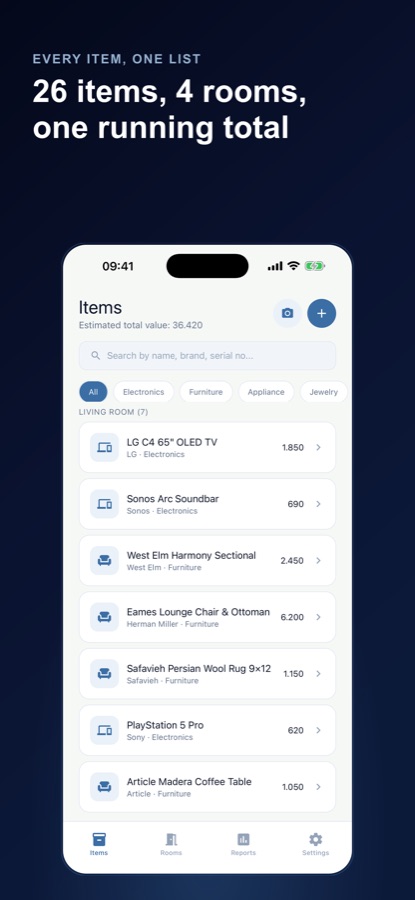
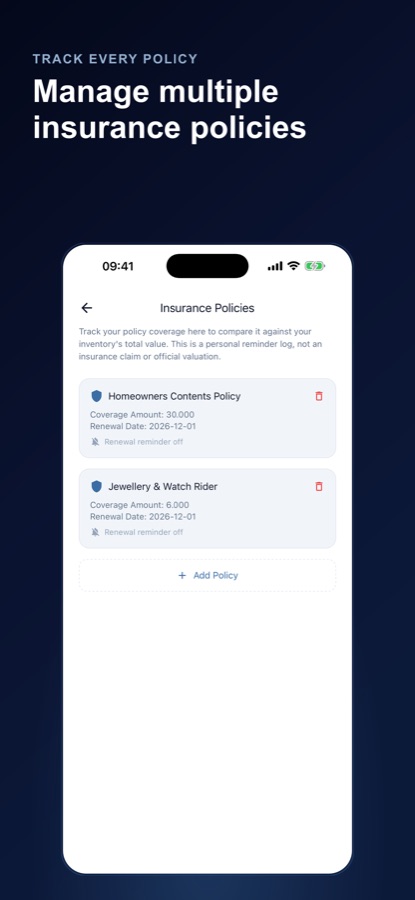
Home Inventory for Insurance is a free-to-start Android app that catalogs your household belongings with photos, brand, model, serial number, purchase date, price and warranty expiry. Items are organised by room and by ten categories, you can keep several properties, and you can save your insurance policy details and compare coverage against your inventory total. It can export a proof-of-loss PDF packet. It is not an insurer or an appraiser and cannot promise a claim will be accepted.
Inside the app
What it looks like
Background
What should a home inventory contain, and how do insurers use it?
A home inventory is a written record of what you own, with enough detail to prove the item existed and what it was worth. After a loss, an insurer typically asks for descriptions, values and some evidence of ownership, and the more complete the record, the less you have to reconstruct from memory. Insurance rules differ by country and policy, so the inventory supports a conversation with your insurer rather than replacing it.
Serial numbers and photosevidence an item existed
A serial number identifies one particular television or laptop among thousands of the same model, and a photo shows its condition. Together they are the simplest proof that you owned the thing in question.
Replacement cost and actual cash valuetwo ways to value an item
Replacement cost is what it would take to buy a new equivalent today, while actual cash value subtracts depreciation for age and wear. Which one your policy pays is set in the policy, so check the wording.
Category limitswhere cover can fall short
Many policies cap what they pay for particular groups of items such as jewellery, art or electronics. Valuable collections can exceed those caps, which is why some people add a separate rider.
Warranties and renewalsdates worth tracking
Appliance and electronics warranties expire quietly, and policy renewals come around yearly. Putting both dates in one place means a reminder arrives while there is still time to act.
How it works
How to build an inventory
The most practical way to do it is one room at a time, with the camera in your hand and a short list of fields to fill in.
Set up your rooms
Start from a set of rooms that matches your type of home, add a second property if you have one, and use quick-add checklists of common items for the kitchen, bedroom or garage.
Add each item
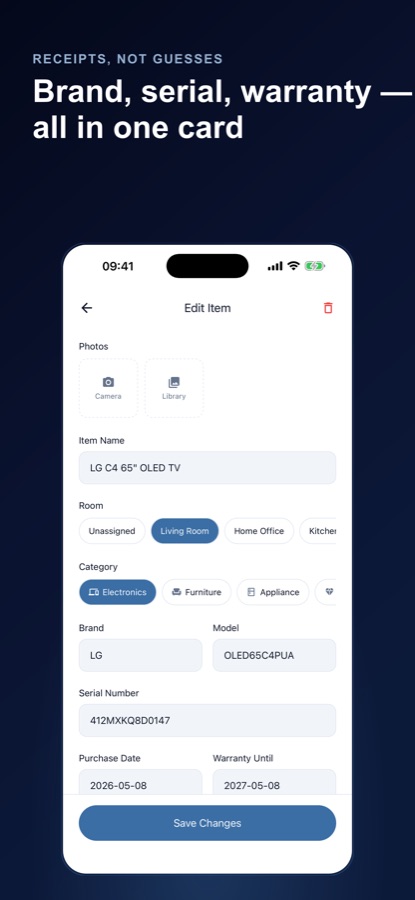
Take photos from the camera or your library, flag one as the receipt, and enter name, brand, model, serial number, purchase date, price and warranty expiry. Search later by any of those.
Check your cover and export
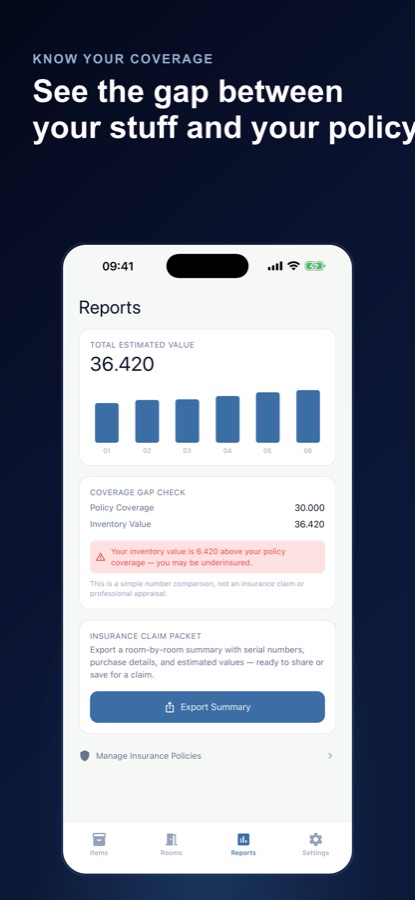
Save your policy, compare its coverage with your inventory total on the Reports screen, and export a summary with serial numbers and values when you need it.
What's inside
What comes with the app
Proof-of-loss packet
A PDF with a cover sheet, tables of serial numbers and values, totals by category and a list of thinly documented items, ready to save or share.
Gap
Coverage gap check
Compare your inventory total with your policy's contents coverage and see category limits where caps could leave you short. Both are part of Pro.
Room
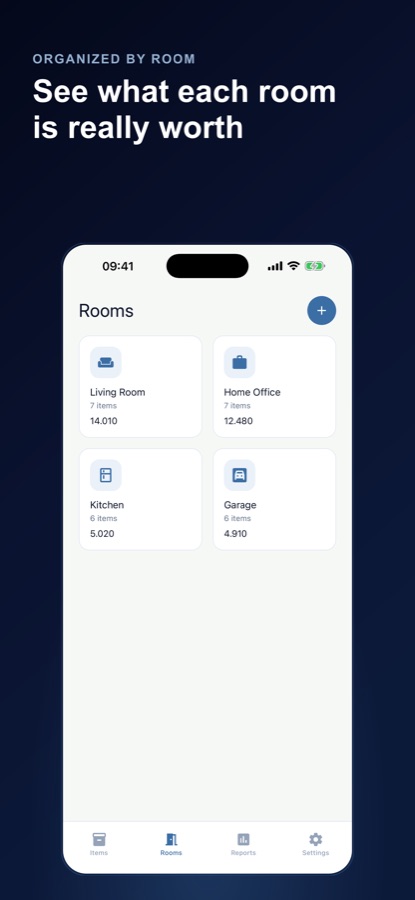
Room-by-room totals
See item counts and total value for every room, and spot spaces you have not updated lately.
10
Item categories
Electronics, furniture, appliances and more, including jewellery and art & collectibles so valuables get the same record as a sofa.
AI
Optional AI helpers
Value estimates, photo scan and room sweep suggest items and figures, always labelled as estimates and never as appraisals. The app asks for consent before each use.
30 d
Warranty and renewal reminders
Optional reminders 30 days before a warranty ends, and 30 and 7 days before a policy renews, listed in the Warranty & Renewal Radar.
Fit
Who it's for — and who it isn't
A good fit if you
- Are moving house and want a record of what goes in the van
- Are renewing a homeowners or renters policy and want to check the cover
- Own jewellery, art, collectibles or electronics worth documenting
- Rent out a property or keep belongings in a storage unit
- Prefer building a list slowly, room by room, over doing it in one weekend
Not the right tool if you
- Want an insurer, an appraiser or a claims service, because the app does none of those
- Need an iPhone app, as it is currently on Google Play for Android
- Expect photos to back up to the cloud, since backup saves rooms, items and policies but not photos
- Expect every helper unlimited and free, as the free plan sets limits on the AI tools
Privacy
Where your inventory lives
Your household inventory and photos are stored on your device, and no account is needed to start. If you sign in, Backup & Restore saves rooms, items and policies, but not photos, to your account, and only when you tap Back Up. The AI helpers send the item text or photo you choose to a third-party AI service, and only after you consent.
Full details are in the CoddyKit privacy policy.
Questions
Frequently asked questions
What is the best way to make a home inventory for insurance?
Go room by room and record each item with a photo, brand, model, serial number, purchase date and price. Home Inventory for Insurance gives you those fields on one card per item, with room totals and search, so the list is complete and easy to hand over.
What should I record for each item?
A name, a photo, the brand and model, the serial number, the purchase date and price, an estimated value and the warranty expiry. Home Inventory for Insurance lets you flag one photo as the receipt, and it is a simple flag, not a receipt scanner.
Does the app file insurance claims?
No. Home Inventory for Insurance is not an insurance company or an appraiser, it does not file claims, and it cannot promise that a claim will be accepted or that any value is exact. It helps you keep the records an insurer may ask for.
What is the proof-of-loss packet?
It is a PDF with a cover sheet, tables of serial numbers and values, totals by category and a list of thinly documented items. You can save or share it. The free plan includes one packet, and Pro makes them unlimited.
How accurate are the AI value estimates?
They are suggestions, not appraisals. The estimate is based on the item's name, brand, model and category, and it is always labelled as an estimate. The app asks for your consent before sending anything to the AI service, and you can add every item by hand instead.
What is the difference between replacement cost and actual cash value in the app?
Home Inventory for Insurance shows replacement cost next to an estimated actual cash value based on typical depreciation for each category. Your policy decides which basis it pays on, so confirm the wording with your insurer.
Is Home Inventory for Insurance free?
It is free to download. The free plan has unlimited rooms, items, photos, properties and search, plus five value estimates, one photo scan, eight room sweep photos, one proof-of-loss packet and one saved policy, with ads. Pro adds unlimited estimates, scans and packets, the nameplate reader, coverage gap, category limits, multiple policies and no ads.
Are my photos backed up?
Photos stay on your device. If you sign in, Backup & Restore saves your rooms, items and policies to your account, but not photos, and only when you tap Back Up. Keep your own copy of important photos.
Do I need an account to use Home Inventory for Insurance?
No. Your household inventory and photos are stored on your device, and no account is needed to start. Signing in is only needed for Backup & Restore, which saves rooms, items and policies to your account when you tap Back Up.
Can I track more than one property?
Yes. You can keep a second home, a rental or a storage unit as separate properties, each with its own rooms and items.
Is there an iPhone version?
At the moment the app is on Google Play for Android. It is available in 10 languages.
Get started
Start with one room
Free to start on Android, in 10 languages.
More from CoddyKit
Available on Android.