

Hotel+ Guest App & Concierge
Hotel+ Guest App & Concierge — Hotel services, room service and requests on your phone
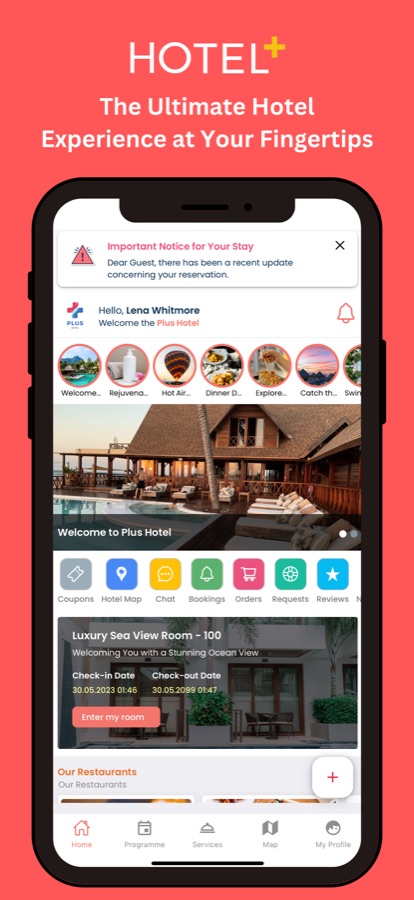
Hotel+ Guest App & Concierge is a free iOS and Android hotel guest app that puts the services you would normally ask the front desk about on your phone. Send a request, order from the property's own menus, chat with the staff, check the daily programme and browse the local guide — in your own language. It works only at hotels that use Hotel+.


- Price
- Free for guests
- Platforms
- iOS and Android
- Languages
- 11
- Age rating
- 4+
- Requires
- iOS 13.4 or later
Your hotel, in your pocket — not a hotel search.
Hotel+ does one job: it connects you to the hotel you are already staying at. It does not list hotels, compare rooms or take a reservation. Everything in it — the menus, the programme, the opening hours, the FAQs — is written by your hotel, so what you see is what that property actually offers.
What it is
Hotel+ Guest App & Concierge is a free iOS and Android app that gives hotel guests one place for hotel services during a stay: sending requests such as extra towels or room cleaning and following their status, ordering room service from the property's own menus, chatting with staff, reading the daily programme and setting reminders, and exploring a property map and local guide. It is a guest companion for hotels that use Hotel+, not a hotel search or room reservation app, and it takes no payments: orders are settled with the hotel, for example at checkout.
Inside the app
What it looks like
Background
What does a hotel guest app do, and how is it different from a hotel search app?
A hotel search app helps you choose where to sleep and reserve a room before you travel. A hotel guest app starts after that: once you are in the building, it replaces the paper folder in the room and the phone call to reception. It is run by the property itself, so the menus, opening hours and answers are the hotel's own rather than a third party's description. The point is to ask for something in one tap, see that the team received it, and not wait on hold.
Digital conciergethe front desk on your phone
A concierge answers questions and arranges small things for a guest. In a guest app that becomes a chat with the team and a request form, so a question about breakfast hours or a late departure reaches the right people and the whole conversation stays in one thread you can scroll back through.
Request versus ordertwo different kinds of ask
A request is something the hotel does for you — more pillows, a cleaned room, a repair — and it moves through statuses until the team marks it completed. An order is something you choose from a catalog, such as a dish from the room service menu. Keeping them apart means a repair never gets mixed up with a dinner order.
Settling the billwhy the app takes no card
Many hotels add in-stay charges to the room account and collect them at checkout, or collect them when an item is delivered. Hotel+ records the order for the team without taking a payment itself, which keeps card details out of the app and leaves the final bill with the front desk as usual.
Daily programme and surveyswhat is on, and how it is going
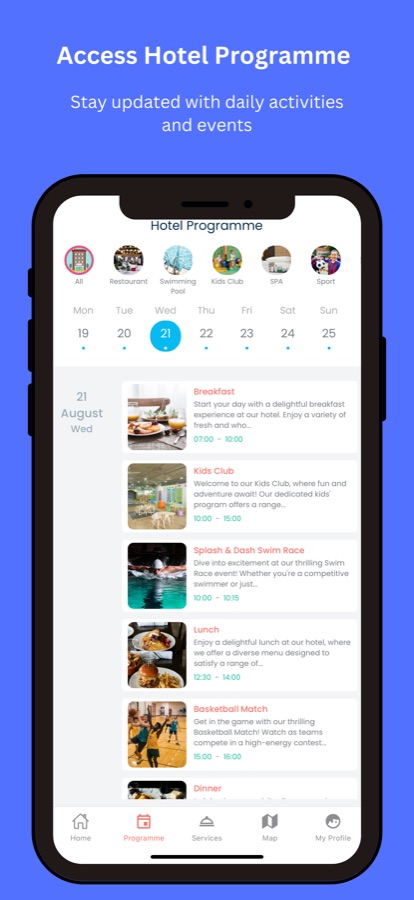
Resorts and larger hotels run a day-by-day schedule of meals, kids club sessions, pool activities and shows. A guest app lists them by day and category and lets you set a reminder. Short surveys during the stay let the team hear about a problem while there is still time to fix it.
How it works
How a stay with Hotel+ works
You connect to your own hotel once, and the rest of the app is built around that property.
Find your hotel
Install Hotel+, then search for the name of the hotel you are staying at, or use the hotel code your property shares. Continue as a guest, or sign in with your email together with your room number or passcode. If your hotel does not appear, it does not use Hotel+ yet — the front desk can tell you.
Ask for what you need
Create a request, choose where in the property it applies and how urgent it is, and send it. Order from the property's catalog and menus, ask for a time slot at the spa, restaurant or kids club, or start a chat with the team. Each item shows its current status.
Follow along and give feedback
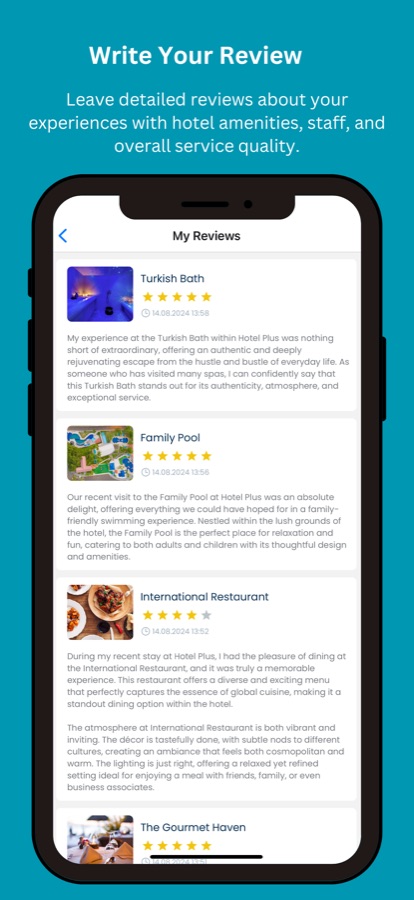
Notifications tell you when a request, order or chat reply is updated and when an event you saved is about to start. Rate a venue, leave a review or answer a short survey while you are still there.
What's inside
What is inside the app
Request
Requests with live status
Ask for extra towels, pillows, room cleaning or a repair, pick the location and priority, and watch the request move from received to in progress to completed. A request timeline keeps the history.
Order
Room service and service orders
Browse the property's own catalog and menus, build an order and send it to the team. The app does not take payments; the order is settled with you directly, for example at checkout.
Chat
Chat with staff
Start a conversation with the hotel team, choose the topic and keep the whole exchange in one place, like a concierge desk you can message from the pool.
Slots
Time-slot requests for facilities
Ask for a time at the spa, a restaurant, the kids club or an activity. The team reviews and confirms each request, and you can cancel one you no longer need.
Today
Programme and event reminders
A day-by-day schedule with category filters for restaurants, pool, kids club, spa and sport. Set a reminder so an event you like does not slip past.
Map
Property map and local guide
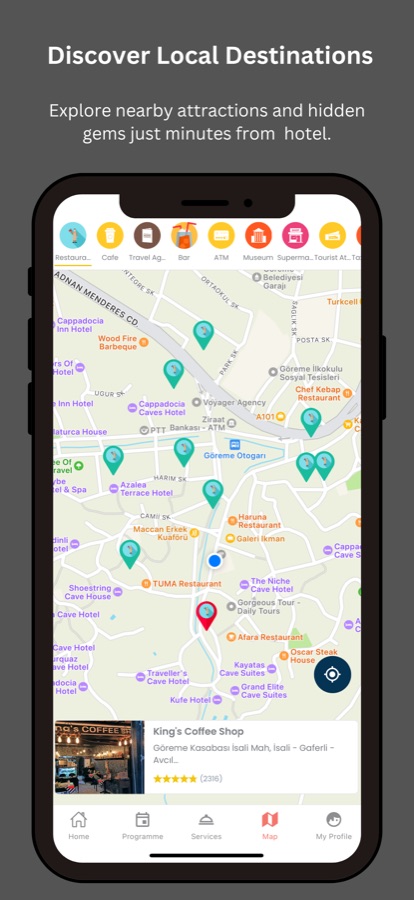
Find restaurants, bars, the pool and the spa on the property map, see places around the hotel, and read the destination guide the hotel prepared for the area.
Offers
Coupons and FAQs
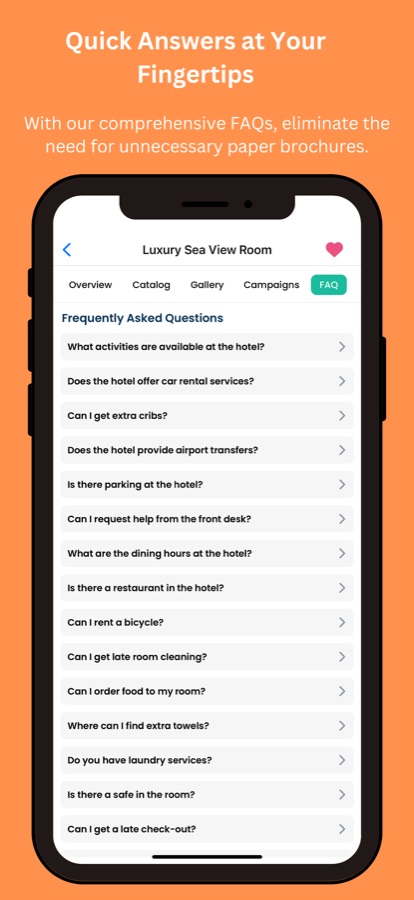
Open the in-house and outside coupons shared with you, and read short FAQs for each room or venue instead of calling reception.
11
Your language
English, Turkish, Arabic, Spanish, French, Portuguese, Russian, Hindi, Japanese, Korean and Chinese, switchable at any time in the app settings.
Fit
Who it's for — and who it isn't
A good fit if you
- Are staying at a hotel that uses Hotel+ and would rather tap than phone reception
- Want to send a request and see whether the team has picked it up
- Like to check today's programme and opening hours before leaving the room
- Prefer to read the hotel's information in your own language
- Want to leave feedback during the stay, while the team can still act on it
Not the right tool if you
- Want to search for hotels or reserve a room — Hotel+ does neither
- Stay at a property that does not use Hotel+, because there is nothing to connect to
- Expect to pay for orders inside the app, which takes no payments
- Are looking for a general trip planner rather than a guest app for one hotel
Privacy
What the app sends, and where
The details you enter — such as your name, email, room number, requests, orders, chats, reviews and survey answers — are sent to the property through Hotel+ servers so the team can serve you. Location is used only on the map, and only if you allow it.
Full details are in the CoddyKit privacy policy.
Questions
Frequently asked questions
What is Hotel+ Guest App & Concierge?
Hotel+ Guest App & Concierge is a free iOS and Android app for guests of hotels that use Hotel+. It brings requests, room service orders, staff chat, the daily programme, a property map and a local guide into one place on your phone, in one of 11 languages. It is a companion for the stay itself, not a way to find or reserve a hotel.
Can I use Hotel+ to find a hotel or reserve a room?
No. Hotel+ Guest App & Concierge does not list hotels and cannot reserve rooms; your reservation stays with the hotel you chose. The app only becomes useful once you are staying at a property that uses Hotel+, where it handles requests, orders and information during the stay.
How do I connect Hotel+ to my hotel?
Scan the QR code in your room or enter the hotel code your property gives you, or open Hotel+ and search for your hotel by name. After that you can continue as a guest or sign in with your email and room number or passcode. If the hotel does not appear in the search, it does not use Hotel+ yet, and the front desk can confirm whether a guest app is available.
Do I need to create an account to use Hotel+?
Not necessarily. Hotel+ lets you continue as a guest without registering, or sign in with your email and room number or a passcode if your hotel provides one. What you can do depends on how the hotel has set up its guest app, and staff use separate sign-ins created by their employer.
How do I order room service in Hotel+, and how is it paid for?
Open the property's catalog or menu in Hotel+, add what you want, enter your details and send the order to the team. Hotel+ does not take payments: the order is settled with the hotel directly, for example at checkout or on delivery, depending on how that property works.
How do I ask for extra towels or report a problem with Hotel+?
Create a request in Hotel+ Guest App & Concierge: describe what you need, choose the location and a priority, and send it. The request then shows a status such as received, in progress or completed, so you can see that the team has picked it up without calling reception.
Can I chat with hotel staff through Hotel+?
Yes. Hotel+ lets you start a chat with the hotel team, choose the topic and keep the whole conversation in one place. You also get a notification when the team replies, so you do not have to keep the app open.
Which languages does Hotel+ support?
Hotel+ Guest App & Concierge is available in 11 languages: English, Turkish, Arabic, Spanish, French, Portuguese, Russian, Hindi, Japanese, Korean and Chinese. You can change the language at any time in the app settings.
What data does Hotel+ collect about me?
The details you enter, such as your name, email, room number, requests, orders, chats, reviews and survey answers, are sent to your hotel through Hotel+ servers so the team can serve you. Location is used only on the map and only if you allow it. The app uses Firebase for notifications and analytics, and Firebase Crashlytics and Bugsnag for crash reports.
Is Hotel+ Elevate Guest Stay the same app as Hotel+ Guest App & Concierge?
Yes. The App Store currently lists this app as Hotel+ Elevate Guest Stay, while Google Play lists it as Hotel+ Guest App & Concierge. It is the same Hotel+ guest app for the same hotels, available on iOS and Android.
Get started
Take the front desk with you
Free for guests on iOS and Android — for stays at hotels that use Hotel+.
More from CoddyKit
Available on iOS and Android.