

New York Guide & Maps VoyageAI
New York Guide & Maps VoyageAI — An AI trip planner for the five boroughs
New York Guide & Maps VoyageAI is a free iOS and Android AI trip planner and city guide for New York City. Type your interests and pick a budget style, and the chat planner answers with a day-by-day itinerary you can follow on the map. A guide to landmarks, food, museums, parks and viewpoints sits beside it, with hours, directions and reviews for every place.


- Price
- Free with ads, Pro upgrade
- Platforms
- iOS and Android
- Age rating
- 4+
- Version
- 11.8.2
- Requires
- iOS 15.1 or later


New York rewards a route, not a list.
The famous names are far apart: a skyline view in lower Manhattan, a park in the middle of the island, a bridge that lands in Brooklyn. A day built around geography wastes less time between them, which is the job the planner takes on when it orders each day's stops.
What it is
New York Guide & Maps VoyageAI is a free iOS and Android app for planning a visit to New York City. You tell its chat planner what you like and choose Luxury, Economy or Family-friendly, and it returns a personalised itinerary split by day, with stops ordered so the route is efficient and visible on a map. A browsable place guide covers Manhattan, Brooklyn and beyond, with popular, trending and top-rated spots, plus opening hours, directions and reviews for each one. Free use includes ads, and Pro adds unlimited AI itineraries.
Inside the app
What it looks like
Ask it
What to ask the planner
These are the kinds of requests the planner is built to turn into a day-by-day New York itinerary. Pick a budget style first, then describe the trip.
- Plan two days in New York for first-time visitors who want the big landmarks without rushing
- I have one day in Manhattan. What is the most efficient route from Central Park to the Empire State Building?
- Build a Family-friendly New York itinerary with parks, museums and shorter walking days
- Plan an Economy weekend in New York that favours free views and neighbourhood food
- I want a Luxury New York trip with the skyline views and a Broadway evening
- Plan a day that walks the Brooklyn Bridge and then explores Brooklyn on foot
- Build a five-day New York trip that mixes museums, parks and viewpoints across Manhattan and Brooklyn
- What are good indoor stops for a rainy day in New York?
Background
How should you think about a first trip to New York City?
New York City is five boroughs, and a first visit usually lives in two of them: Manhattan for the famous sights and Brooklyn for the bridge, the waterfront and the neighbourhood food. Distances look small on a map but feel large on foot, so the practical question is less what to see than how to cluster the sights so you are not crossing the city twice in one day. Public transport and walking cover most of it.
Manhattan by areacluster by neighbourhood
Times Square, Broadway and the Empire State Building sit in midtown. Central Park runs along the island's middle, and the Statue of Liberty is seen from the southern tip, so grouping them by area keeps a day coherent.
Brooklyn and the bridgea walk with a view
The Brooklyn Bridge connects lower Manhattan to Brooklyn, and walking across it is a classic way to see the skyline from the water. Many visitors then stay on the Brooklyn side for food and neighbourhood streets rather than turning straight back.
Subway and walkingthe usual way around
The subway is how most locals move between boroughs, and a lot of central Manhattan is simply walkable. Check current fares and payment methods with the transit authority, since they change and the app does not quote them.
Seasons and weatherplan indoor backups
Summers are hot and humid and winters can be cold, so a good plan keeps museums or covered stops as a fallback for a bad-weather day. The explore screen shows the current weather next to the place list.
How it works
How the planner works
The planner is a conversation. You say what you want in a sentence, and it comes back with something you can follow rather than a list to sort yourself.
Choose a style and say what you like
Tap Luxury, Economy or Family-friendly, then type a budget or a detail such as the number of days or an interest like museums or food. You can add more in follow-up messages.
Tap Create Plan
The planner builds an itinerary split by day, with stops ordered to keep the route efficient. You see the route on the map instead of a bare list of names.
Check each place, then keep what you like
Open any stop to read a short description, its rating, address, opening hours and directions. Save places to your favourites, whether or not they ended up in a plan.
What's inside
What comes with the app
AI
Chat-based trip planner
Share your interests and budget in a message and get a personalised New York itinerary, whether you have one day or a full week.
Routes
Efficient order on the map
Stops are sequenced to visit attractions in the most efficient order, so you can see the day's route laid out on a map.
3
Budget modes
Luxury, Economy and Family-friendly plans change what the planner suggests, so the itinerary matches how you want to travel.
Explore
Popular, Trending and Top Rated
Browse places by category, from attractions and nature to culture and food and drink, or search for a destination. Nearby places and the current weather appear on the same screen.
Details
Information before you go
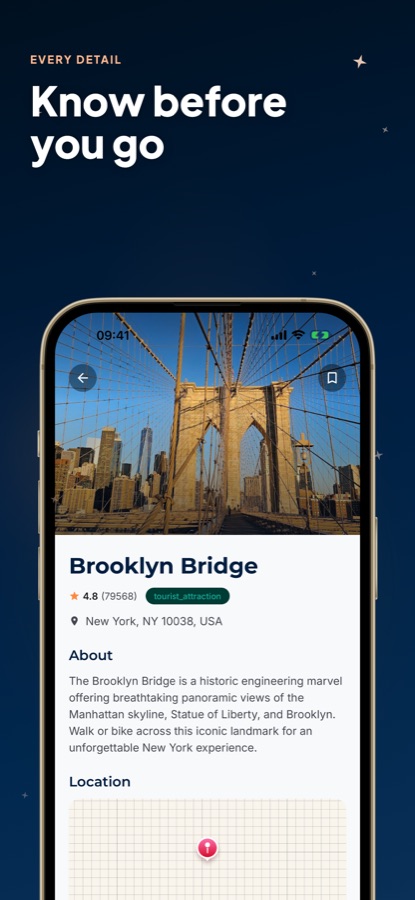
Each place has an about section, a rating, a location on a map, opening hours, directions and reviews, so you can judge a stop on its own.
Saved
Favourites you can build on
Add places you like and shape your own New York trip from them.
Fit
Who it's for — and who it isn't
A good fit if you
- Are visiting New York City and want a day-by-day plan instead of a blank page
- Want stops ordered so the day does not zigzag across the boroughs
- Travel on a different budget style each trip and want the plan to reflect it
- Like checking opening hours, directions and reviews for a place before committing
- Want to save places as you browse and shape the trip from them
Not the right tool if you
- Want unlimited AI itineraries for free, since free use is limited and shows ads
- Need live subway times or real-time traffic, because this is a trip planning guide and not a transit app
- Want to pay for or reserve anything inside the app, because it plans and explains and nothing more
- Are looking for a guide to another city, because this edition is about New York
Privacy
What the planner sends
The interests, budget and details you type into the planner are sent to an AI service so it can generate your itinerary, and that is what they are used for. The places in the guide are listed for information only.
Full details are in the CoddyKit privacy policy.
Questions
Frequently asked questions
What is a good AI travel guide for New York City?
A useful one gives you a plan and the facts about each stop. New York Guide & Maps VoyageAI builds a day-by-day itinerary from your interests and budget style, orders the stops so the route is efficient on a map, and shows hours, directions and reviews for every place. It is free to start on iOS and Android.
How do I plan one day in New York?
Group the day by area rather than by fame. In New York Guide & Maps VoyageAI you describe the day, such as a morning in Central Park and an afternoon of skyline views, and the planner returns stops in an efficient order on the map. You can then open each place to check its opening hours before you leave.
Is it worth walking across the Brooklyn Bridge?
For many visitors it is one of the best low-effort views in the city, because you see the Manhattan skyline from the water and finish in Brooklyn. The Brooklyn Bridge appears in the app's guide with a rating, an address and a map location, and you can add it to a plan or save it first.
How many days do I need in New York?
Two or three days covers the best-known sights at a steady pace, and a full week lets you slow down and add Brooklyn neighbourhoods, museums and parks. New York Guide & Maps VoyageAI is meant for either, from one day to a full week, so you can ask for the length you have.
What do the Luxury, Economy and Family-friendly modes change?
They are the three styles you can pick before asking the planner for an itinerary, so the plan it returns is built around how you want to travel. You choose one in New York Guide & Maps VoyageAI, then describe the trip in your own words and add a budget or detail if you have one.
How does the AI trip planner work?
You chat with it. Tap a budget style, type what you want to see or spend, and tap Create Plan. New York Guide & Maps VoyageAI then returns an itinerary split by day with stops placed on the map, and you can keep refining it in follow-up messages.
What does the app show for each place?
Each place page has a photo, a rating, an address, an about section, a location map, opening hours, directions and reviews. That lets you compare a stop on its own before you put it into a New York plan.
Is New York Guide & Maps VoyageAI free?
Yes, it is free to use with ads. Pro is an upgrade that gives unlimited AI itineraries, an ad-free experience and priority recommendations. Free use is limited, so heavy planning is where Pro matters.
Does the app work for the whole of New York City?
The guide covers landmarks, hidden gems, restaurants, museums, parks and viewpoints across Manhattan, Brooklyn and beyond. Which places appear depends on what you search or what the planner picks for your request.
Can I save places without making a plan?
Yes. You can add any place to your favourites while you browse in New York Guide & Maps VoyageAI, and shape your own trip from the list later. A saved place does not need to be part of a generated itinerary.
Is New York Guide & Maps VoyageAI the same app as AI Travel Guide - New York?
Yes. It is one app with two store names: New York Guide & Maps VoyageAI on Google Play and AI Travel Guide - New York on the App Store. The screens inside the app are headed VoyageAI, and both versions share the same AI trip planner, place guide and favourites.
Get started
Plan your New York trip in minutes
Free on iOS and Android, with a Pro upgrade for unlimited AI itineraries.
More from CoddyKit
Available on iOS and Android.