

Lucid Dreaming: Dream Diary
Lucid Dreaming: Dream Diary — A dream journal that turns what you write into tonight's practice
Lucid Dreaming: Dream Diary (DreamWake) is a free Android app for lucid dreaming that starts with a dream journal. Log a dream by typing or voice in the morning, and the app finds your recurring dream signs in your own words and builds reality check reminders around them for tonight.

- Price
- Free, Pro upgrade
- Platforms
- Android
- Languages
- 10
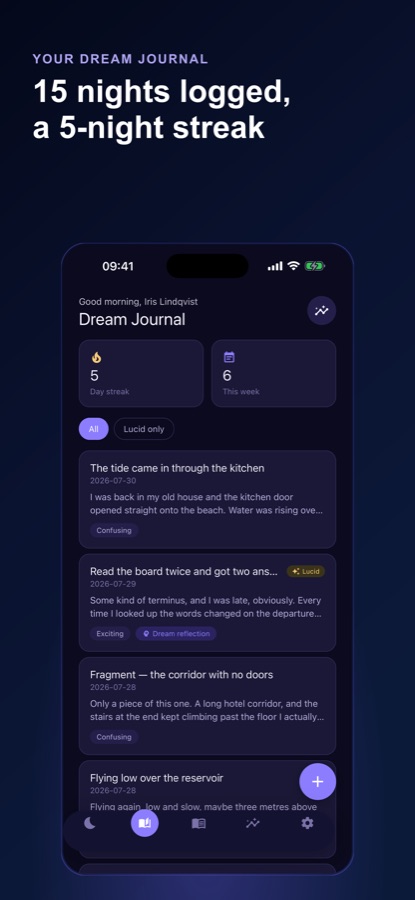
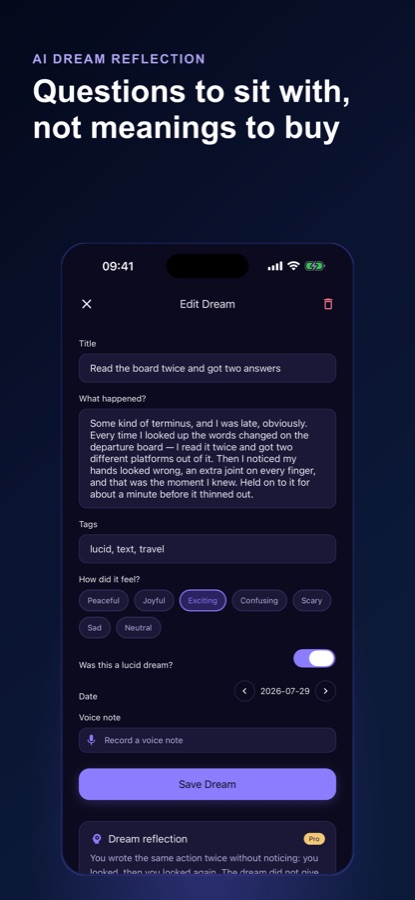
A plain dream diary just stores text. Here, what you write becomes what you practise.
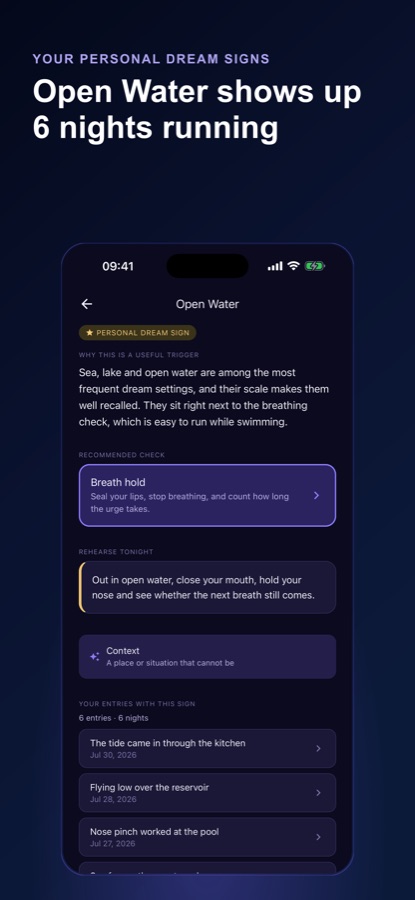
Entries are matched on your phone against 60 known dream signs, such as flying, falling or being back at school, and the matches are highlighted in your own writing. Those signs then feed the reality check reminders that you carry through the day.
What it is
Lucid Dreaming: Dream Diary, also called DreamWake, is a free Android dream journal and lucid dreaming trainer. It records dreams by text or voice, matches them against 60 known dream signs on the device, and turns those signs into reality check reminders. It teaches 12 induction techniques including MILD, WBTB and SSILD, runs a 21-night path and a wake-window alarm, and cannot promise lucid dreams.
Inside the app
What it looks like
Background
What is lucid dreaming, and how does a dream journal help you practise it?
A lucid dream is one in which you realise you are dreaming while it is happening. Techniques for it have two parts: remembering your dreams, which a morning journal trains, and building the habit of questioning whether you are awake, which reality checks train. Because the first step is recall, a dream journal is the foundation of most lucid dreaming practice, and results vary from person to person.
Dream recallthe first skill
You cannot notice a pattern in dreams you do not remember. Writing something down immediately on waking, even a fragment, strengthens recall over weeks and gives you the record everything else depends on.
Dream signsyour own recurring cues
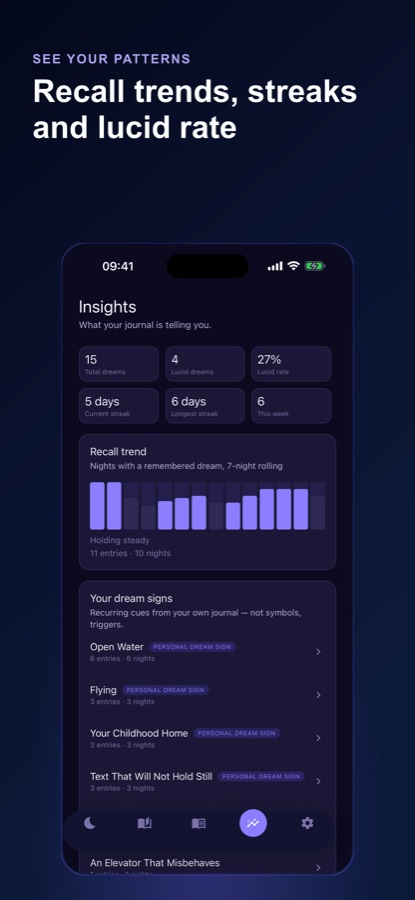
A dream sign is something that turns up in your dreams again and again, such as flying, a childhood home, or text that will not hold still. Spotting yours gives you something specific to watch for, in dreams and during the day.
Reality checksthe daytime habit
A reality check is a small test you run while awake, such as pinching your nose and trying to breathe in, so that the habit of asking whether you are dreaming carries over into a dream. The app lists how each method is done and how it can fail inside a dream.
MILD, WBTB and SSILDinduction techniques
These are named methods used around sleep. MILD sets an intention to recognise a dream as it happens. WBTB wakes you briefly after several hours of sleep before you go back to bed. SSILD uses a short sequence of sensory attention on waking. How well each works differs between people.
How it works
How a day with the app goes
The loop has three parts: capture in the morning, check through the day, and arm a technique at night.
Capture the dream in the morning
Quick Capture takes typed text or a voice note, with tags, a mood and a lucid toggle. Matching dream signs are highlighted in what you wrote, and an entry marked private is kept out of every AI feature.
Check reality through the day
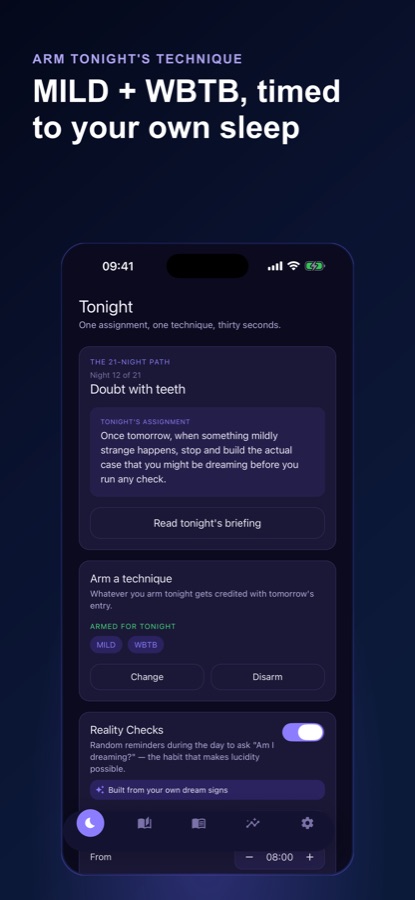
Reality check reminders arrive during the day, and in Pro they are built from your own dream signs. Each of the 10 methods is explained, including how it can fail in a dream.
Arm a technique for tonight
In the Tonight tab, pick the technique you will try. The next morning's entry is credited to it, so the app can show which technique appears to work for you, and says it is too early to tell until there is enough data.
What's inside
What is inside the app
60
Dream signs
Entries are matched on the phone against 60 known dream signs, and your own signs are ranked by how often and how recently they appear.
12
Induction techniques
Dream Recall Training, Reality Testing, Dream-Sign Targeting, MILD, WBTB, SSILD, WILD, FILD, DEILD, Prospective Memory Training, Autosuggestion and Nap Induction, each with its sources.
21
Nights on the Path
A guided route from recall to awareness to induction, then new 7-night cycles built from your own record. Week 1 is free.
Alarm
Wake window and WBTB nudge
A wake-window alarm worked out from your bedtime and cycle length, plus an optional WBTB nudge. It is a schedule estimate, not a REM reading.
Stats
Recall trend and lucid rate
Recall streak, lucid dream rate, entries this week, a 7-night recall trend and a weekly Dream Week recap.
Optional AI
Dream reflection
A short written reflection on one entry: questions to think about, not a dream meaning or advice. The app shows what would leave your phone and asks permission first.
Fit
Who it's for — and who it isn't
A good fit if you
- Want a dream journal that does something with what you write
- Are curious about lucid dreaming and want named techniques with their sources
- Prefer a private journal saved on the phone, with no account needed to start
- Like a daily reminder habit that is tied to your own recurring dreams
- Want to see over time which technique seems to suit you
Not the right tool if you
- Expect a promise of lucid dreams — the app cannot guarantee them
- Want an interpretation of what your dreams mean — reflections ask questions rather than give meanings
- Have a sleep disorder, frequent nightmares or sleep paralysis and want to treat them with an app
- Use an iPhone — this page covers the Android app
Safety and limits
Read this before you try the techniques
Lucid Dreaming: Dream Diary is a journaling and training app, not medical advice. It does not diagnose or treat any sleep, mood or anxiety condition and cannot promise lucid dreams.
WBTB costs you sleep, so use it sparingly if you are already short of rest. Talk to a doctor first if you have a sleep disorder, frequent nightmares or sleep paralysis, or if practice leaves you anxious or unable to sleep.
Privacy
Your journal stays on your phone
The journal is saved on your phone and no account is needed to start. Entry text leaves the phone only for a dream reflection or a dream sign search that you have agreed to, or for Pro cloud backup of the journal text, and voice notes stay on the phone.
Full details are in the CoddyKit privacy policy.
Questions
Frequently asked questions
What is the best way to start a dream journal for lucid dreaming?
Write down whatever you remember the moment you wake, even a single image, and do it every morning. Lucid Dreaming: Dream Diary makes that quick with typed or voice capture, tags and a mood, and then highlights your recurring dream signs so the journal shows you what to watch for.
What are dream signs and how does the app find mine?
Dream signs are recurring elements in your dreams, such as flying, falling or being back at school. Lucid Dreaming: Dream Diary matches each entry on your phone against 60 known dream signs and ranks the ones that appear in your journal by how often and how recently they show up.
How do reality checks work in the app?
The app sends reminders during the day asking whether you are dreaming, and gives step-by-step guidance for 10 reality check methods, including how each can fail inside a dream. Free users get up to 4 reminders a day. In Pro they can be built from your own dream signs, up to 10 a day.
Which lucid dreaming techniques does it teach?
Twelve induction techniques with their sources: Dream Recall Training, Reality Testing, Dream-Sign Targeting, MILD, WBTB, SSILD, WILD, FILD, DEILD, Prospective Memory Training, Autosuggestion and Nap Induction. Five foundation techniques are free and the seven advanced ones are in Pro.
Can the app guarantee that I will have lucid dreams?
No. Lucid Dreaming: Dream Diary cannot promise lucid dreams, and results vary between people. It gives you a recall habit, named techniques and a way to see which one appears to work for you, with a note that it is too early to tell until there is enough data.
Does the app interpret my dreams?
No. The optional dream reflection offers a few questions to think about for one entry, not a dream meaning or advice. Before anything is sent, the app shows what would leave your phone and asks for your permission, and you can turn it off in Settings.
Is my dream journal private?
The journal is saved on your phone and no account is needed to start. Entry text leaves the phone only for an AI reflection or sign search you agreed to, or for Pro cloud backup. You can also mark any entry private to keep it out of every AI feature.
Is Lucid Dreaming: Dream Diary free?
The app is free to download. Unlimited journaling with voice notes, recall stats, your top 3 dream signs, five foundation techniques, all 10 reality check methods, up to 4 daily reminders, the wake-window alarm and Week 1 of the Path are free, and the free version shows ads. Pro adds the full toolkit and removes ads.
Is it safe to use WBTB and other techniques?
WBTB shortens your sleep, so it is not for everyone. Lucid Dreaming: Dream Diary is not medical advice, and anyone with a sleep disorder, frequent nightmares or sleep paralysis should talk to a doctor before trying induction techniques.
Is there an iPhone version?
Lucid Dreaming: Dream Diary is currently available on Android through Google Play, in 10 languages. This page does not cover an iPhone release.
Get started
Write down your next dream
Free to start on Android, in 10 languages.
More from CoddyKit
Available on Android.