

Gongfu Tea Timer & Journal
Gongfu Tea Timer & Journal — Log every infusion and find where the leaf peaks
Gongfu Tea Timer & Journal (also known as Tea Brewing) is a free-to-start Android app for gongfu tea with loose leaf. It treats a sitting as a sequence: a built-in steep timer, water temperature, leaf weight and a rating for each infusion, joined into a steep curve that shows which cup was the best, and a Best Brew preset that remembers it for next time.

- Price
- Free, Pro upgrade
- Platforms
- Android
- Languages
- 10
The same leaf tastes different every time you steep it.
The first infusion of a rolled oolong is tight and closed, the third may be the peak and the sixth is spent. A note that says only what you brewed misses all of that, which is why the log here records each infusion on its own and draws them as one curve.
What it is
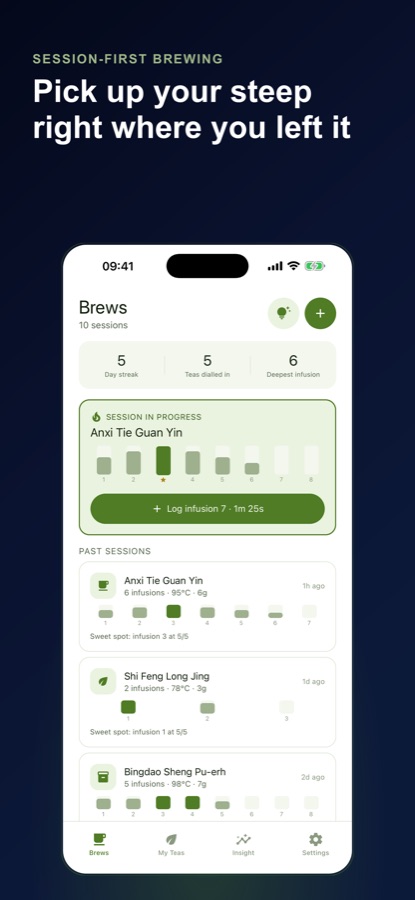
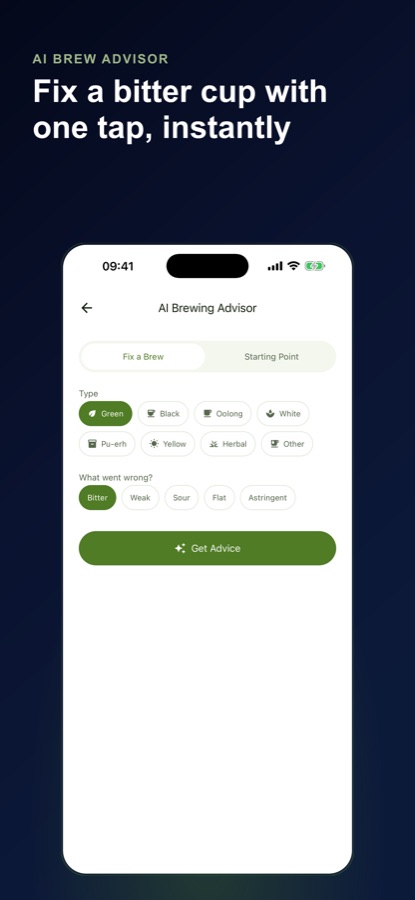
Gongfu Tea Timer & Journal is an Android app for loose leaf drinkers who brew gongfu style. You keep a library of teas, then log every infusion of a session with water temperature, steep time, leaf weight, infusion number and a rating. A steep timer sits inside the logging form, a steep curve on each session card shows where the leaf peaked, and the highest-rated brew of each tea becomes a one-tap preset. An AI brewing advisor helps when a cup comes out bitter, weak, sour, flat or astringent.
Inside the app
What it looks like
Background
What is gongfu tea brewing, and what should you record?
Gongfu brewing steeps a generous amount of leaf in a small vessel such as a gaiwan for many short infusions, so the flavor changes from cup to cup instead of being averaged into one mug. Because water temperature, steep time and leaf weight all shift the result, the practice rewards notes: write down what you changed and how the cup tasted, and the next session starts from your best result rather than a guess.
Short, repeated infusionsseconds, not minutes
A gongfu session often runs six or more infusions, starting with a short steep and lengthening it slowly as the leaf opens. Tracking the time for each infusion shows how fast your tea fades, and that is what a single-cup note cannot show.
Water temperaturethe variable that makes or breaks a leaf
Green and delicate teas are usually brewed cooler and other teas, such as pu-erh and black tea, tolerate hotter water. The same leaf can taste sweet at one temperature and bitter and flat at another, so recording the temperature is the quickest way to learn a tea.
Leaf-to-water ratiowhy weight beats spoons
Leaves differ in density, so a spoonful can be twice as heavy for one tea as another. Weighing the leaf in grams gives you a repeatable ratio, which is the other half of a brew you can reproduce.
Tea typesgreen, oolong, black, white, pu-erh, yellow
Each type has its own starting point and its own way of going wrong. Knowing the type tells you where to start, and ratings by type show which category suits your taste and brewing style.
How it works
How a session works
One sitting with a gaiwan becomes five or six logged rows instead of one, so the curve of the whole session is saved.
Add the tea to your library
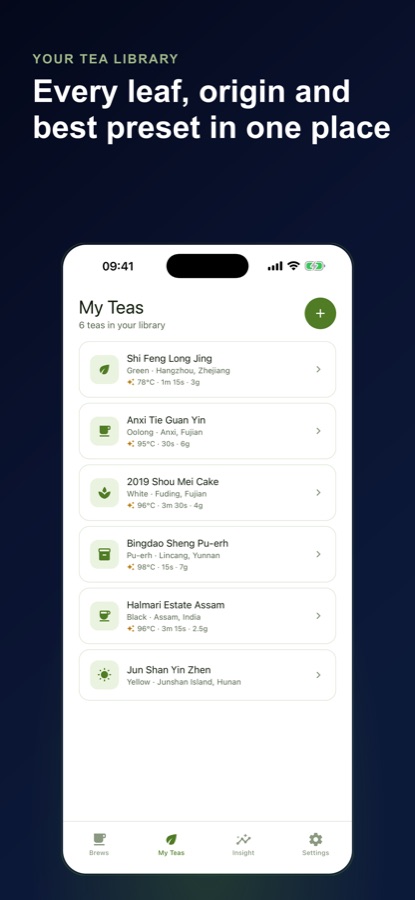
Create a tea with its type, origin and tasting notes. A name lookup suggests the type and origin, and the logging form pre-fills a starting point for that type.
Time and log the first infusion
Use the steep timer inside the logging form and copy the elapsed time into your steep time with one tap. Record the temperature, leaf weight and a rating.
Brew the next infusion
Tap Save & brew infusion 2 to re-arm the form with a longer steep time for your tea type. Infusions up to number 8 are grouped as a single session with a steep curve.
What's inside
What comes with the app
1 to 8
Session-first logging
Infusion numbers 1 through 8 are grouped automatically as one session, with the steep time laddered up per infusion the way a real multi-steep session runs.
Curve
Steep curve on every session
Rating is plotted against infusion number on each session card, with a note of the sweet spot, so you see at a glance which cup was the best one.
Best
Best Brew preset
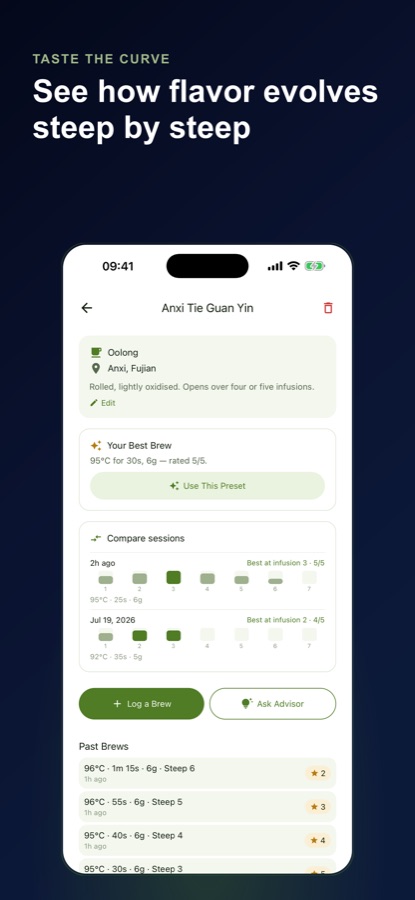
The highest-rated brew of each tea becomes a one-tap preset for temperature, steep time and leaf weight next time you reach for that leaf.
Timer
Integrated steep timer
A timer inside the logging form, with one tap to copy the elapsed time into the steep time field.
Tea
Tea library
Keep each tea with its type, origin and tasting notes, with an AI name lookup that suggests type and origin.
AI
AI brewing advisor
Pick the tea type and what went wrong, whether bitter, weak, sour, flat or astringent, and get advice grounded in a per-type reference table.
Fit
Who it's for — and who it isn't
A good fit if you
- Brew loose leaf in a gaiwan or small pot and steep the same leaf many times
- Want to know which infusion was the best and when a leaf fades
- Keep adjusting temperature, time and leaf weight and want a record of what worked
- Often have a cup come out bitter or flat and want a place to start fixing it
- Like a small habit, such as a brew streak, to keep a tea practice going
Not the right tool if you
- Want a caffeine tracker or a tea encyclopedia, which this app deliberately is not
- Brew a single bag in a mug, since the log is built around multi-infusion sessions
- Expect unlimited advisor questions for free, because the free version allows three a day
- Use an iPhone, as the app is available for Android
Privacy
What stays on your phone
Your tea library and brew log are stored on your device, and the logging, timer and charts work offline. Only the AI features reach a server: the name lookup and the brewing advisor send what you ask to an AI service, and the app asks for your consent before the first AI request.
Full details are in the CoddyKit privacy policy.
Questions
Frequently asked questions
What is the best app to track gongfu tea brewing?
Look for one that logs each infusion, not just each cup. Gongfu Tea Timer & Journal records water temperature, steep time, leaf weight and a rating for every infusion of a session, draws a steep curve and remembers your best-rated brew of each tea as a preset. It is free to start on Android.
How do I know when a tea has peaked during a gongfu session?
Rate each infusion and compare. In Gongfu Tea Timer & Journal each infusion has its own rating, and the session card plots those ratings against the infusion number with the sweet spot noted. After a few sessions of the same tea you see where it usually peaks and when it drops off.
What does the Best Brew preset do?
When you rate a brew highly, the app remembers its temperature, steep time and leaf weight for that tea. The next time you brew that leaf, one tap fills the form with your best result, so you start from what already worked instead of from a generic default.
Why is my tea bitter, weak or sour?
The usual causes are water that is too hot or a steep that is too long for bitterness, and the opposite for a weak or sour cup, plus too little or too much leaf. The AI brewing advisor asks for the tea type and the fault, whether bitter, weak, sour, flat or astringent, and answers from a per-type reference table rather than a generic chatbot.
Does it work for pu-erh, oolong, green and other teas?
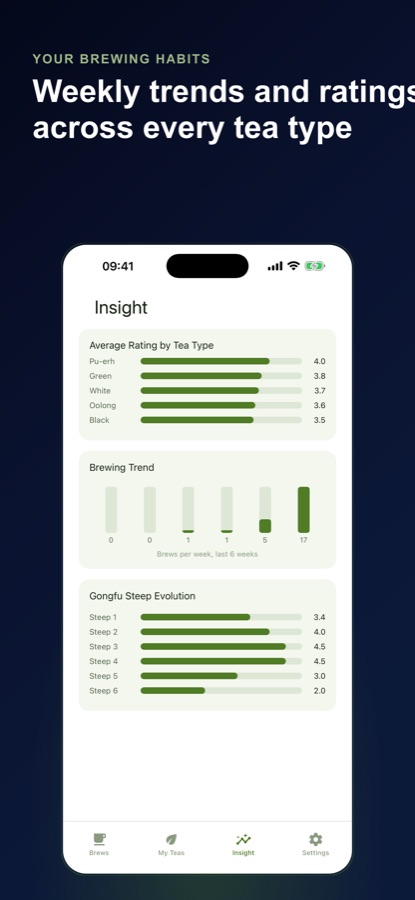
Yes. Teas can be set as green, black, oolong, white, pu-erh, yellow, herbal or other, and the logging form pre-fills a sensible starting point for the type. Ratings are then summarised by type on the Insight tab so you can see which kind of tea you brew best.
Is Gongfu Tea Timer & Journal the same app as Tea Brewing?
Yes. Gongfu Tea Timer & Journal is the name of the listing on Google Play, and the app describes itself as Tea Brewing, a gongfu tea log. The address of this page uses the longer name Gongfu Tea Brewing Log. They all refer to one app made by CoddyKit.
Is Gongfu Tea Timer & Journal free?
The core loop is free: unlimited teas, brews and sessions, the integrated timer, the Best Brew preset on every tea, rating-by-type and weekly-trend charts, the steep-again reminder and three advisor questions a day. Pro removes the daily advisor cap, unlocks the Gongfu Steep Evolution chart and session comparison, and removes ads. It is a monthly or annual subscription.
What do Pro's Steep Evolution chart and session comparison do?
The Gongfu Steep Evolution chart plots your average rating across infusions 1 through 6, showing where a leaf usually peaks and where it drops off, which complements the steep curve on each session card. Session comparison lines up your last three sessions of a tea side by side, so you can see whether a change in temperature, time or leaf weight earned the extra star. Both are part of Pro.
Is it on iPhone or Android, and does it work offline?
Gongfu Tea Timer & Journal is available on Android through Google Play, in 10 languages, and it is not on iPhone. Your tea library and brew log are stored on the device, and logging, the timer and the charts work offline. Only the AI name lookup and the brewing advisor need a connection.
Get started
Log your next steep
Free to start on Android, with a Pro upgrade.
More from CoddyKit
Available on Android.