
Orbital Lab: Orbit Simulator
Orbital Lab: Orbit Simulator — Set a launch speed and a real Kepler solver draws the orbit
Orbital Lab: Orbit Simulator is an orbit simulator and gravity lab for iPhone and Android. Set a launch speed and angle and a real two-body Kepler solver draws the exact orbit that results, not a canned animation. Thirty-one lessons each end on a live workbench, from escape velocity to Hohmann transfers and three-body chaos.


- Price
- Free, Pro upgrade
- Platforms
- iOS and Android
- Lessons
- 31, in four units
- Languages
- 10
- Age rating
- 4+
- Version
- 1.0
- Requires
- iOS 15.1 or later
A lesson is complete when you have done what it asked, not when you press Play.
Raise the launch speed past the true escape boundary, then recover an orbit just under it, or hunt down the exact speed that avoids a crash. The solver recomputes eccentricity, periapsis, apoapsis and period from scratch on every frame, so the numbers on screen are the physics rather than a picture of it.
What it is
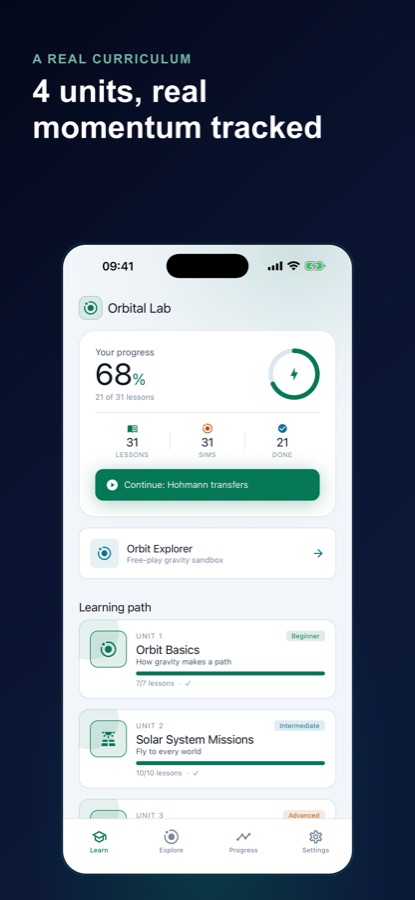
Orbital Lab: Orbit Simulator is a free-to-start orbit simulator and orbital mechanics course for iOS and Android with 31 lessons in four units. Each lesson ends on a live 3D workbench driven by a closed-form Kepler solver for two bodies, and the Deep Space unit switches to an n-body integrator for three-body scenes. It also has an unlimited Explore sandbox, covers escape velocity, gravity, Hohmann transfers and delta-v budgets, and needs no science background.
Inside the app
What it looks like
Background
Why are orbits ellipses, and what does escape velocity actually mean?
An orbit is what happens when a body moves sideways fast enough that, as gravity pulls it down, the ground curves away beneath it. Johannes Kepler showed that the path is an ellipse with the central body at one focus, and the speed at launch decides which ellipse you get. Escape velocity is the speed above which the path stops closing and the body leaves for good.
Eccentricityhow squashed the ellipse is
A value of 0 is a perfect circle, and as it climbs toward 1 the ellipse grows long and thin. Past 1 the path is no longer closed, which is the hyperbolic escape case.
Periapsis and apoapsisclosest and farthest
Periapsis is the point where the orbiting body is nearest the central body and apoapsis the point where it is farthest. The body moves fastest at periapsis and slowest at apoapsis, which is Kepler's second law at work.
Escape velocitythe edge between orbit and departure
From a given distance, the escape speed is about 1.41 times the speed of a circular orbit there. Just below it the body still loops back in a very long ellipse, and just above it the body never returns.
Hohmann transfer and delta-vhow spacecraft change orbit
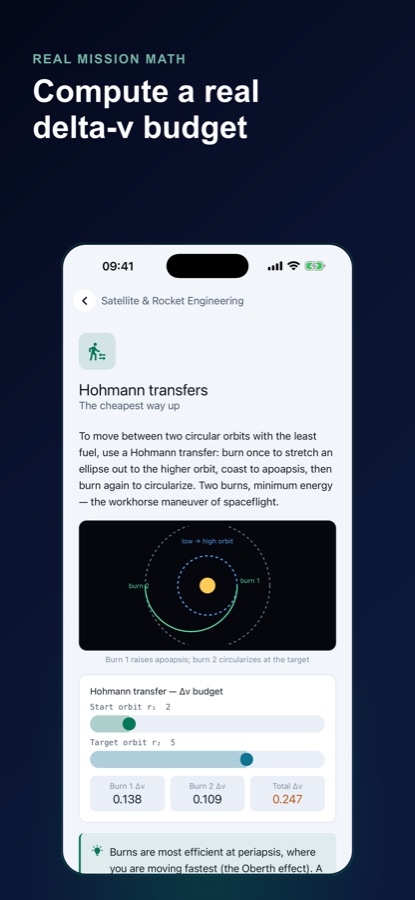
A Hohmann transfer moves between two circular orbits with two engine burns: one stretches the orbit out, and one circularises it at the target. Delta-v, the total change in speed those burns need, is the currency every mission is budgeted in.
How it works
How a lesson works
Every lesson pairs a short piece of reading with a workbench you can drag, so the concept is something you change rather than something you memorise.
Read one idea
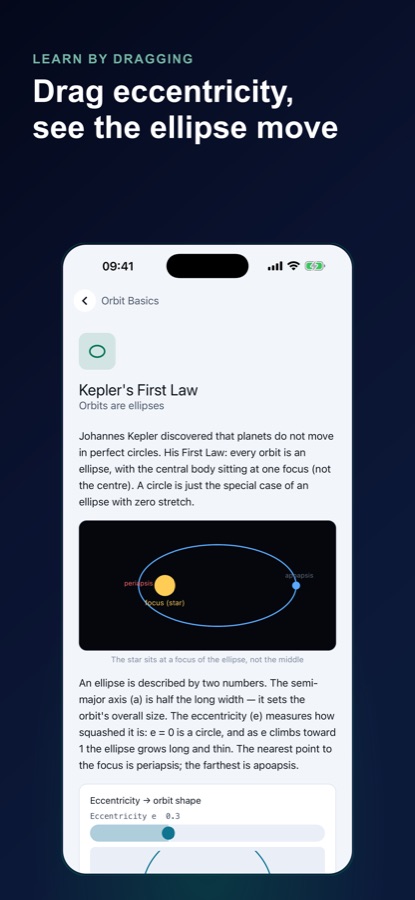
A lesson opens with a few paragraphs of plain language, such as Kepler's First Law and why a circle is just an ellipse with zero stretch, with a small diagram to anchor it.
Drag the sliders
Move the eccentricity, launch speed or launch angle slider and watch the orbit reshape in real time. The readouts, such as the burn costs of a transfer, update on every frame.
Finish the challenge
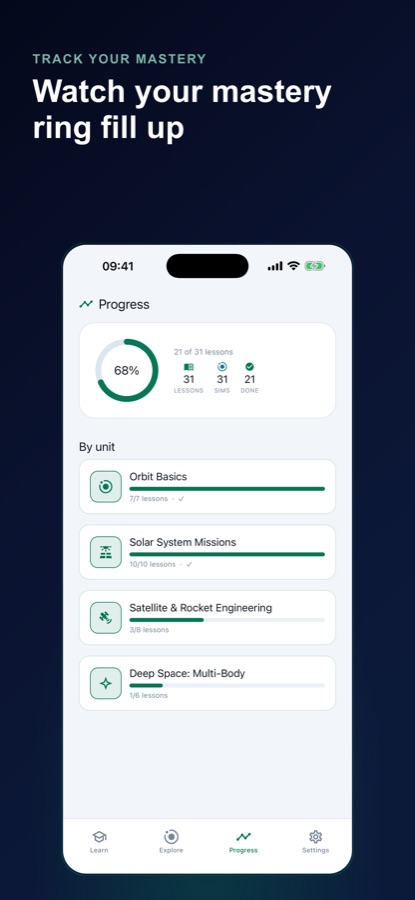
A lesson marks complete only when you have done what it asked. Progress is tracked per unit, and Explore is always open if you just want to experiment.
What's inside
What comes with the app
31
Lessons in four units
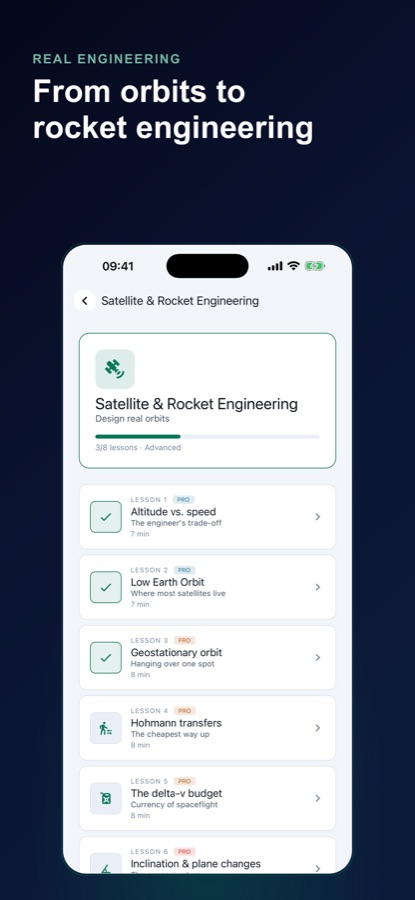
Orbit Basics, Solar System Missions, Satellite & Rocket Engineering and Deep Space: Multi-Body, each lesson with its own live workbench.
Kepler
A real two-body solver
The exact analytic solution for the two-body problem draws every orbit and computes eccentricity, periapsis, apoapsis and orbital period from scratch.
n-body
Deep Space three-body scenes
Six curated scenes run on a Verlet integrator, including a figure-eight choreography, a stable Lagrange point and an authentically chaotic pass. This unit is part of Pro.
Explore
An unlimited sandbox
No lesson and no lock: set any launch speed and angle and watch circular orbits, long ellipses and hyperbolic escapes resolve on the same solver.
Δv
Real mission math
Compute a delta-v budget for a Hohmann transfer between two orbits, and learn why burns are most efficient at periapsis.
AI
AI tutor
Pro includes an AI tutor that explains the orbit currently on your screen.
Fit
Who it's for — and who it isn't
A good fit if you
- Are curious about space and want orbital velocity to mean more than a textbook line
- Study physics or astronomy and want to see Kepler's laws change as you drag a slider
- Have flown a space sim and want the actual laws behind it
- Like learning by experimenting in a sandbox with no goal and no timer
- Want a science app that needs no science background to start
Not the right tool if you
- Want a game with levels, scoring and rockets to unlock, because this is a physics course
- Need a full astrodynamics textbook with derivations, as lessons stay short and visual
- Expect every lesson to be free, since 11 of the 31 are free and Pro opens the other 20
- Want a planetarium or star map for naming what is in the night sky
Privacy
Guest by default
Orbital Lab: Orbit Simulator starts as a guest, with no account to create and no sign-in wall. Explore, the first eleven lessons and your progress are available the moment you open the app, and you can sign in later if you want to.
Full details are in the CoddyKit privacy policy.
Questions
Frequently asked questions
What is the best orbit simulator for learning orbital mechanics?
A good one should compute the physics, not play an animation. Orbital Lab: Orbit Simulator uses a real two-body Kepler solver and a Verlet n-body integrator, and 31 lessons each end on a live workbench. It is free to start on iOS and Android.
What is escape velocity, and how does the app show it?
Escape velocity is the speed above which a body never returns to the body it left. In Orbital Lab: Orbit Simulator you raise the launch speed past the escape boundary and watch the closed ellipse open into an escape path, then recover an orbit by dropping just under it.
How is Orbital Lab different from a space game?
A game scores you on reaching a goal, while Orbital Lab: Orbit Simulator is built to teach the underlying mechanics. Every lesson ends on a workbench driven by the same solver, and a lesson completes only when you have done what it asked. The Explore sandbox has no goal at all.
Is it a gravity simulator that handles more than two bodies?
Yes, in the Deep Space unit. It uses a symplectic Verlet integrator for n-body cases, where Kepler's two-body maths stops applying, and it runs six curated three-body scenes. Each scene is checked to hold its total energy over the run.
Do I need a physics or maths background?
No. Orbital Lab: Orbit Simulator builds the vocabulary as you go, starting with what an ellipse, periapsis and escape velocity mean. It suits space-curious adults and physics or astronomy students alike.
What is a Hohmann transfer?
A Hohmann transfer is the lowest-energy way to move between two circular orbits, using two burns: one that stretches the orbit into an ellipse and one that circularises it at the target. The Hohmann transfers lesson lets you set the start and target orbit and read the delta-v of each burn.
What is free and what is Pro?
Unit 1 in full and Mercury through Mars in Unit 2 are free, which is 11 of the 31 lessons, along with unlimited Explore and progress tracking. Pro adds the other 20 lessons, the Deep Space three-body simulations, an AI tutor and no ads.
Is Orbital Lab the same app as Orbit Lab: Kepler Physics?
Yes. Orbital Lab: Orbit Simulator is the Google Play title, and the App Store listing for iPhone is named Orbit Lab: Kepler Physics. Both are the same CoddyKit app with the same 31 lessons, the Explore sandbox and the Deep Space unit.
When does a lesson count as complete?
A lesson in Orbital Lab: Orbit Simulator marks complete only when you have done what it asked, not when you press Play. That can mean raising the launch speed past the escape boundary and then recovering an orbit just under it, or finding the exact speed that avoids a crash.
Which languages and platforms does Orbital Lab support?
Orbital Lab: Orbit Simulator runs on iOS and Android and is available in 10 languages, with light and dark themes. It is rated 4+ and needs iOS 15.1 or later on iPhone.
Get started
Launch your first orbit
Free to start on iOS and Android, in 10 languages.
More from CoddyKit
Available on iOS and Android.