

English for Kids: Wordzy
English for Kids: Wordzy — A daily English vocabulary habit with Pip the Parrot
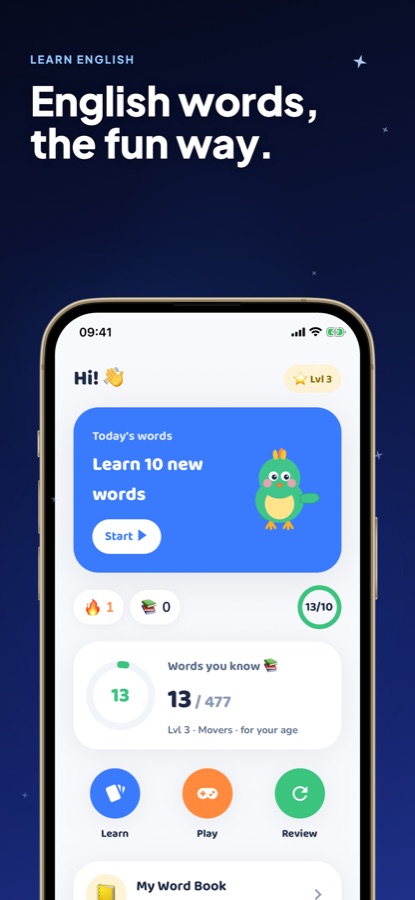
Wordzy is a free English vocabulary app for ages 5 to 13, built around Pip the Parrot, who says and celebrates every new word your child learns. 1,500+ words across 23 topics, 12 mini-games, and six levels aligned to Cambridge Young Learners bands — free to start, works fully offline, and needs no login.


- Price
- Free, Pro upgrade
- Platforms
- iOS and Android
- Languages
- 10
- Age rating
- 4+
- Version
- 1.3.0
- Requires
- iOS 15.1 or later
A word a child says out loud is a word they keep.
Flashcards a child only looks at fade fast. Wordzy pairs every word with Pip's voice, a mini-game and a spot in the child's own Word Book, so the same word gets practiced from three different angles before it's expected to stick.
What it is
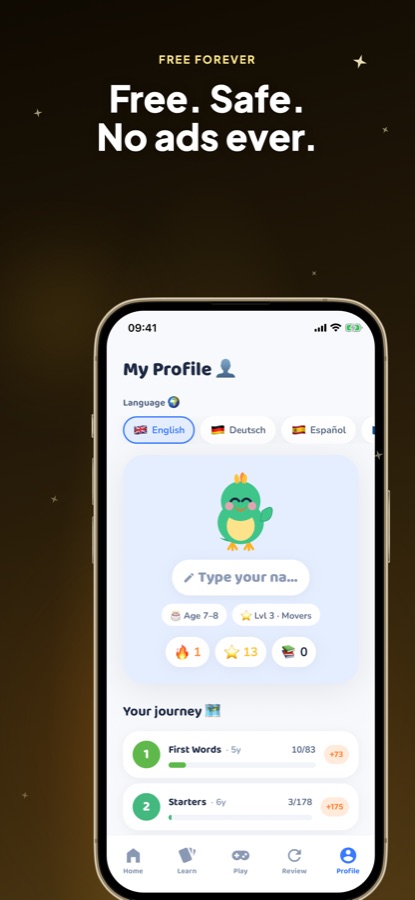
English for Kids: Wordzy is a free iOS and Android app that teaches English vocabulary to children aged 5 to 13 through picture flashcards, spoken words and mini-games. It covers 1,500+ words across 23 topics such as Animals, Food, Colors, Numbers and Family, organized into six levels — First Words, Starters, Movers, Flyers, Explorers and Achievers — aligned with Cambridge Young Learners bands and CEFR A1 to B1. The first two levels are free forever, it works fully offline, and it needs no account to start.
Inside the app
What it looks like
Background
What actually helps a child build English vocabulary?
Vocabulary apps for children work best when a word is met more than once, in more than one form — seen as a picture, heard spoken aloud, and then used in a short game — rather than read once off a list. ESL researchers generally group early vocabulary into high-frequency topic sets (animals, food, family, numbers) because children learn words faster when they arrive in a theme they can picture, and the Cambridge Young Learners framework (Starters, Movers, Flyers) gives parents a recognizable way to see where a child's vocabulary actually sits.
Spaced repetition for kidsreviewing before forgetting
Rather than drilling a fixed list daily, spaced repetition resurfaces a word just as a child is likely to be forgetting it, which is more efficient than either constant repetition or a single pass. A system that tracks which words a child has seen and when can target review instead of repeating everything equally.
Cambridge Young Learners bandsStarters, Movers, Flyers
These are widely recognized English levels for children, roughly mapping to CEFR A1 and the early edge of A2/B1 as a child progresses. They give a vocabulary app's levels a meaning parents can look up independently, rather than an arbitrary in-app number.
Picture-word associationwhy flashcards use images first
Associating a word directly with an image, rather than with a translation, is a standard approach in early-childhood ESL teaching because it builds the word's meaning directly rather than routing every word through the child's first language.
Listening before speakingthe usual order
Children typically build a passive vocabulary (words they recognize when they hear them) before an active one (words they can produce), which is why audio playback on every word, before any speaking exercise is introduced, matches how early English acquisition usually proceeds.
How it works
How a session works
A session is built to fit a short window — waiting for dinner, a car ride, ten minutes before bed — not a scheduled lesson block.
Pick a topic pack
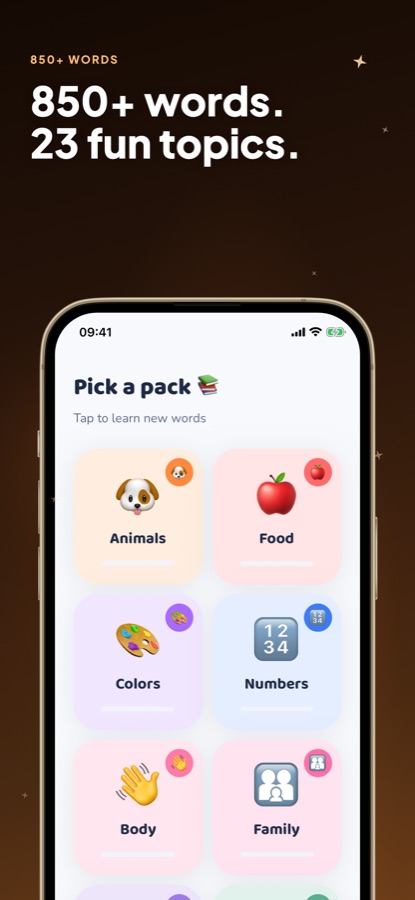
Your child chooses a topic — Animals, Food, Colors, Numbers, Family and 18 more picture-packed packs — and sees the words waiting inside it before committing to a session.
See it, hear it, say it
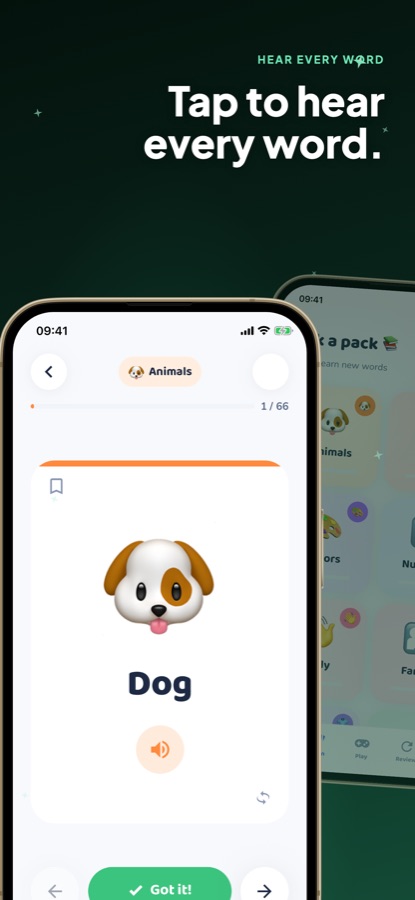
Each flashcard pairs a picture with the word; tapping it plays Pip speaking the word clearly. A "Got it!" button moves the card into the child's own progress, and a bookmark saves favorites to the Word Book.
Play a game, then review
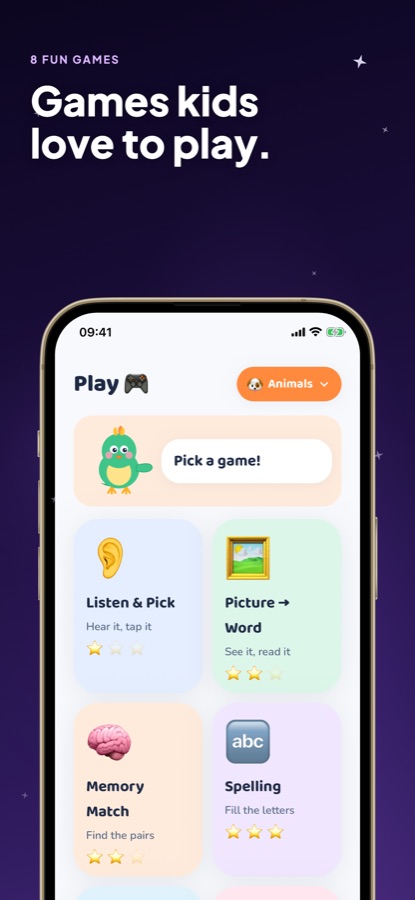
Mini-games like Listen & Pick, Memory Match, Picture → Word and Spelling turn the same words into quick challenges, and a spaced-repetition review brings back words that are due before they're forgotten.
What's inside
What's inside Wordzy
1,500+
English words, 23 topics
Picture-packed topic packs covering Animals, Food, Colors, Numbers, Family, School, Sports, Nature, Technology, Feelings and more, each one a self-contained set a child can finish in a sitting.
12
Free mini-games
Listen & Pick, Memory Match, Trace with Pip finger-writing, Word Rush's 60-second dash, Family Duel for two kids on one phone, and more — the same words, practiced from a different angle each time.
6
Cambridge-aligned levels
First Words, Starters, Movers, Flyers, Explorers and Achievers map to Cambridge Young Learners bands and CEFR A1-B1, so a child always sees words matched to where they actually are.
Spaced
Smart review
A spaced-repetition system tracks which words a child has learned and resurfaces the ones that need practice, rather than repeating the whole list equally.
Grown-ups
A parent dashboard
A "For grown-ups" area shows a weekly report, a shareable postcard, favourite topics and a "what's next" preview, so progress doesn't stay hidden inside a kids' interface.
Offline
No login, works offline
Wordzy needs no account and works fully offline, including on a plane, with no third-party ads anywhere in the app — a parental gate protects every purchase screen.
Fit
Who it's for — and who it isn't
A good fit if you
- Want your child building English vocabulary in short daily sessions instead of one long lesson
- Prefer an app that works offline with no login, so screen time doesn't need a connection or an account
- Want a level system you can check against a known standard (Cambridge Young Learners, CEFR) rather than a vague in-app number
- Like seeing what your child actually practiced, through a parent-facing weekly report
- Want zero third-party ads reaching your child's screen
Not the right tool if you
- Are looking for a full English course with grammar and sentence structure — Wordzy is vocabulary-focused
- Want every level and the speech games for free — First Words and Starters are free forever, the rest is Pro
- Need an app for a teenager working toward an exam like IELTS or TOEFL — this is built for ages 5 to 13
- Want a single lifetime word list rather than topic packs your child chooses one at a time
Questions
Frequently asked questions
What's a good English vocabulary app for kids?
Look for one that pairs a picture with spoken audio rather than a word-and-translation list, mixes in short games so the same word gets practiced more than once, and uses a level system you can check against a real standard. Wordzy is built that way: 1,500+ words across 23 topics, 12 mini-games, spoken audio on every card, and six levels aligned with Cambridge Young Learners bands. It's free to start on iOS and Android, works offline, and needs no login.
What age is Wordzy for?
Wordzy is built for children aged 5 to 13, with six levels — First Words, Starters, Movers, Flyers, Explorers and Achievers — that follow Cambridge Young Learners bands and CEFR A1 to B1. A younger child typically starts at First Words with the most common everyday topics, while an older child who already has some vocabulary can move into Movers or Flyers faster.
Is Wordzy safe for kids to use alone?
Wordzy shows no third-party ads, works fully offline with no account required, and a parental gate ("Ask a grown-up") sits in front of every purchase and subscription screen so a child can't tap into a payment by accident. The app is designed with COPPA in mind and does not need to collect data from a child to work. A "For grown-ups" area still gives a parent visibility into what was practiced.
Is Wordzy free?
Yes. Levels 1 and 2 — First Words and Starters — are free forever, with no trial clock, along with new lessons and games added regularly. Wordzy Pro is an optional subscription that unlocks every level and word, unlimited daily lessons and games, speech games, read-aloud stories and a themed Weekly Adventure. The app is a complete vocabulary tool without Pro.
Does Wordzy work offline?
Yes, fully. Wordzy needs no account to start and works offline, including on a plane, so a child can keep practicing anywhere without a connection. This matters for travel and for households that limit when a device is online.
What languages does the interface support?
Wordzy's interface and word translations are available in 10 languages, including English, Turkish, German, Spanish, French, Japanese, Korean, Portuguese, Russian and Chinese. The translation is an optional assist for the parent or child's home language — the vocabulary itself being taught is always English.
How does Wordzy decide which words to review?
Wordzy uses a spaced-repetition system that tracks which words a child has learned and resurfaces ones that are due for practice, rather than repeating the entire topic equally every time. In the app, a plant in Pip's Garden grows with every learned word, and a thirsty plant is Wordzy's visual cue that a review is due.
What do the mini-games actually practice?
The 12 free mini-games cover different angles of the same vocabulary: Listen & Pick and Memory Match test recognition, Trace with Pip practices finger-writing the word, Word Rush is a 60-second speed round, and Family Duel lets two children play against each other on one phone. Rotating through games rather than one flashcard format is what keeps repeated topics from feeling repetitive.
What does Wordzy Pro add?
Pro unlocks every level and word, unlimited daily lessons and games, on-device speech games (Pronounce and Pip Asks) that add speaking practice to listening, read-aloud bedtime stories, a themed Weekly Adventure each Monday, and printable practice sheets built from a child's own tricky words. It's an optional monthly or yearly subscription — Wordzy's core vocabulary learning stays free either way.
Can I see what my child has been practicing?
Yes. The "For grown-ups" area includes a weekly report, a shareable weekly postcard, a look at favourite topics and a preview of what's coming next, so a parent has a clear window into progress without needing to sit through every session.
Get started
Let Pip start the first word today
Free forever for Levels 1 and 2, on iOS and Android — no login, no third-party ads.
More from CoddyKit
Available on iOS and Android.