
Public Speaking: Speech Drills
Public Speaking: Speech Drills — Daily speech practice that counts your pace and filler words
Public Speaking: Speech Drills is a free Android app for speech practice in small daily doses: read a short prompt, record yourself for well under a minute, and get two plain numbers back — your speaking pace and how many filler words slipped in. No camera, no live audience, just your own voice.

- Price
- Free, Pro upgrade
- Platforms
- Android
- Languages
- 10
- Camera
- Not used
You cannot fix what you cannot hear.
Most people have no idea how fast they talk or how often they say "um" until they hear it counted. A forty-five second recording and two numbers turn a vague worry about sounding nervous into something you can measure on Monday and measure again on Friday.
What it is
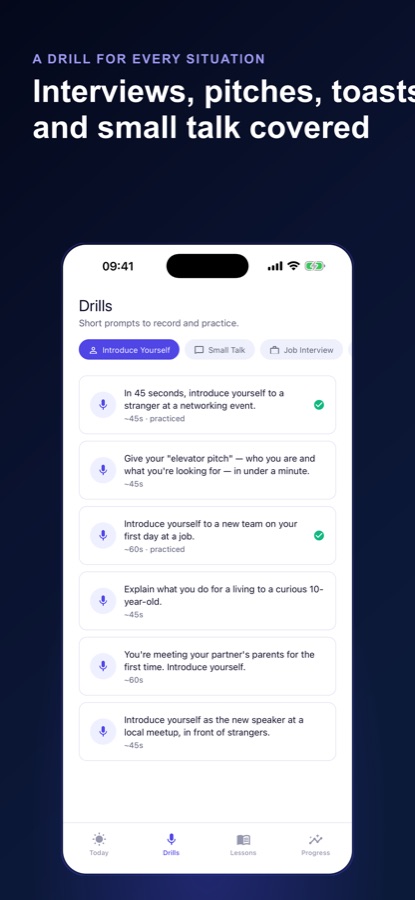
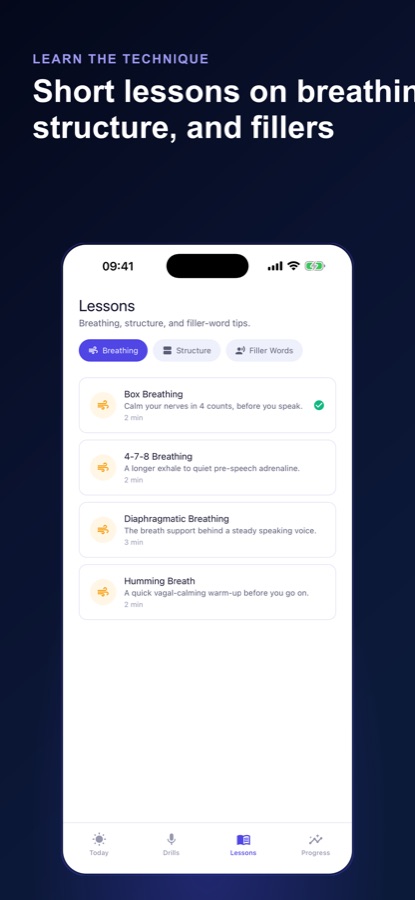
Public Speaking: Speech Drills is a free Android app for practising short spoken answers for interviews, toasts, presentations, pitches and small talk. You read a prompt, record yourself, and the app transcribes your voice on the phone and computes your words per minute and filler-word count with plain code, then shows a tip matched to those numbers. It has 48 drills across 8 situations, 12 short lessons, a daily streak and pace and filler trends over time.
Inside the app
What it looks like
Background
How do you practise public speaking when you freeze up?
Freezing up is usually a rehearsal problem more than a talent problem: the first time many people say a toast or an interview answer aloud is the moment it counts. Practising out loud in short, repeated rounds, listening back, and changing one habit at a time works better than rereading notes silently. The habits worth measuring first are the ones you can actually count: how fast you speak and how often a filler word fills a silence.
Filler wordsum, uh, like, you know, basically
Fillers are small sounds and phrases that fill a gap while you think. A few are normal in any natural speech; they become noticeable when they cluster at the start of sentences or replace every pause. The usual fix is swapping the filler for a half-second of silence, which tends to sound more deliberate.
Speaking pacewords per minute
Everyday English conversation is often described as running around 120 to 160 words per minute. Nerves usually push pace upward, so a run-through that feels fine in your head can arrive too fast for listeners. Measuring it shows whether you are rushing, and by how much.
Short, repeated drillsreps beat one long rehearsal
A one-minute answer repeated on several days exposes a different weakness each time. Short rounds also lower the cost of starting, which is the main obstacle for anyone who dreads the exercise itself.
Structure before deliverya shape for the answer
Interview answers often follow a situation, task, action and result outline known as STAR, and a toast needs only an opening, one story and a close. Having a shape in mind removes the mid-sentence searching that causes most fillers.
Breathing before you speaka pause, not a cure
Slow breaths before you begin give your voice a steadier start and give you a moment to settle. They are a way to start calmly, not a remedy for anxiety, and they work best when practised before the day they are needed.
How it works
How one speaking drill works
A session fits into the gap between two other things. There are three parts: the prompt, the recording and the numbers.
Read the prompt and record
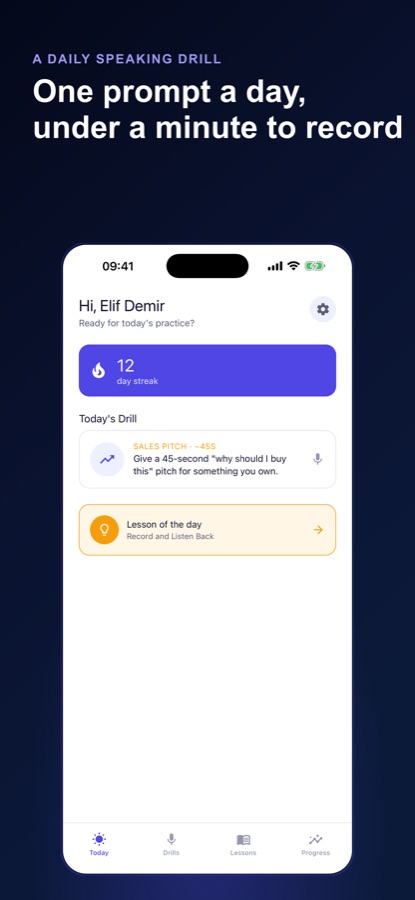
Each drill is a short prompt such as introducing yourself to a stranger at a networking event, with an estimated length of about 45 to 60 seconds. Tap record, talk, and stop. Prefer not to record? Rate how it felt instead and your streak still counts.
See your pace and fillers
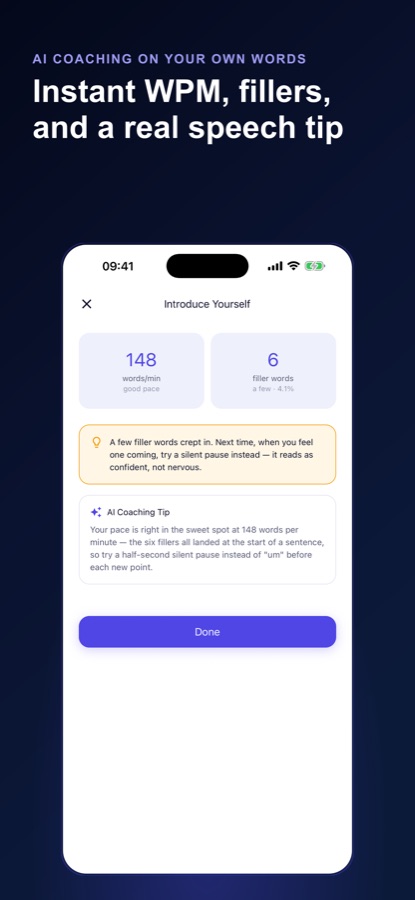
Your voice is turned into text by your phone's speech recogniser, and the app computes words per minute and the number of filler words from that transcript with deterministic code. The result screen labels pace as slow, good or fast and the filler count as barely any, a few or quite a lot.
Take the tip, then repeat tomorrow
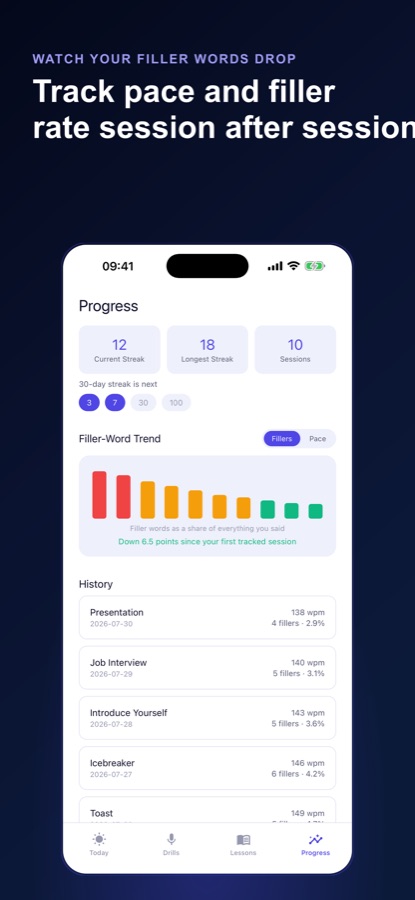
A built-in tip is matched to your numbers, for example trying a silent pause instead of a filler. A new drill is assigned each day, and the Progress tab charts your pace and filler rate across sessions so you can see whether they are moving.
What's inside
What is inside the app
48
Drills in 8 situations
Introducing yourself, small talk, interview answers, presentations, pitches, toasts, icebreakers and eulogies, each a short prompt you answer out loud.
12
Short lessons
Step-by-step scripts on breathing before you speak, structuring an answer including the STAR method, and cutting filler words.
WPM
Pace and filler measurement
Words per minute and filler count come from the on-device transcript. Japanese and Chinese are measured character by character, because they are not written with spaces between words.
Trend
Pace and filler trends
A running history of every session plus charts of pace and of filler words as a share of everything you said, so you can see whether the rate is falling over weeks.
100
Daily streak
A streak with milestones at 3, 7, 30 and 100 days, an optional daily reminder at a time you choose, and a single nudge if your streak is about to break.
AI
Optional AI coaching tip
Pro adds an AI-generated tip on top of the built-in one, sent from the text of that one session after you agree on a consent screen. Drills and lessons stay usable without it.
Fit
Who it's for — and who it isn't
A good fit if you
- Have a toast, interview or presentation coming and want to say it aloud before the day
- Suspect you rush when nervous or lean on "um" and want the actual numbers
- Prefer private practice with no camera and no audience
- Have only a few minutes a day and want one prompt chosen for you
- Speak in one of ten supported languages and want measurement in that language
Not the right tool if you
- Want feedback on your face, posture or the emotion in your voice — the app reads only the words your phone transcribes
- Expect a pass-or-fail grade — the drills give numbers and tips, not a score of your talent
- Need unlimited practice for free — the free plan has 3 sessions a week and 16 of the 48 drills
- Are looking for treatment of severe speaking anxiety — this is a practice tool, not therapy
Safety and limits
Practice tool, not treatment
Public Speaking: Speech Drills is a speaking-practice tool. It does not diagnose, treat or reduce anxiety, and the breathing lessons are not medical advice. The app measures pace and filler words from a transcript; it does not assess how you feel.
If fear of speaking is intense, brings on panic or interferes with work or daily life, talk to a doctor or a qualified mental health professional rather than relying on an app.
Some breathing lessons include holding the breath or lengthening the exhale. Stop if you feel dizzy, lightheaded or short of breath, and ask a doctor first if you have a heart or breathing condition or are pregnant. Practise lessons while seated and never while driving.
Privacy
What happens to your voice
The app does not save or upload your audio. Your phone's own speech recogniser turns speech into text, and the app saves only the numbers derived from a session, such as pace and filler count, on your phone. On Android the system recogniser is Google's, which may handle audio under its own privacy terms. If you are a Pro member and request the optional AI tip, that session's transcript is sent to produce one sentence of feedback.
Full details are in the CoddyKit privacy policy.
Questions
Frequently asked questions
What is a good app for practising public speaking alone?
A good solo practice app lets you speak out loud, hear a measurable result and repeat daily without needing an audience. Public Speaking: Speech Drills does this with a 45-second prompt, a recording of your own voice and two numbers, pace and filler-word count, plus a streak. It uses no camera and works for toasts, interviews, pitches and presentations.
How does the app count filler words?
Your phone's speech recogniser transcribes what you say, and the app then counts filler words in that text with plain, deterministic code, so the number is a count and not an invented score. The results screen shows the total and its share of everything you said, and the Progress tab charts that share across sessions.
What is a good speaking pace?
Everyday English conversation is often described as roughly 120 to 160 words per minute, though a good pace depends on the setting and the listener. Public Speaking: Speech Drills reports your words per minute after each recording and labels it slow, good or fast, and its trend chart shows whether your pace is settling or drifting.
Is Public Speaking: Speech Drills free?
Yes, it starts free. Free members get 3 practice sessions a week, 16 of the 48 drills, 3 of the 12 lessons, their last 3 sessions of history and a matched tip after each drill, with banner and interstitial ads shown between drills. Pro removes the weekly limit, unlocks all drills and lessons, keeps the full history, adds the filler-rate trend and an AI coaching tip, and removes ads.
Do I need to record myself to use the app?
No. Recording is how you get the pace and filler numbers, but if you would rather not record, you can rate the drill yourself and your streak keeps going. There is no pass or fail, so a self-rated day still counts toward your daily habit.
Does the app upload my voice recordings?
The app does not write an audio file or upload a recording. Your phone's own speech recogniser converts speech to text, and only derived numbers like pace and filler count are saved on your phone. On Android that recogniser is Google's and may process audio under Google's own terms. Only if you ask for the optional Pro AI tip is that session's transcript sent.
What kinds of situations does Public Speaking: Speech Drills cover?
The 48 drills fall into 8 situations: introducing yourself, small talk, interview answers, presentations, pitches, toasts, icebreakers and eulogies. A new drill is assigned automatically every day, and the 12 lessons cover breathing before you speak, structuring an answer including the STAR method, and cutting filler words.
Does the app help with speaking anxiety?
It is a practice tool, not a treatment. Repeated rehearsal and short breathing lessons can make starting a talk feel more familiar, but the app does not diagnose or treat anxiety and makes no such claim. For intense or persistent fear of speaking, a doctor or qualified mental health professional is the right person to ask.
Which languages does Public Speaking: Speech Drills support?
The interface, speech recognition and the pace and filler measurement work in ten languages: English, Turkish, German, Spanish, French, Japanese, Korean, Portuguese, Russian and Chinese. Japanese and Chinese are measured character by character, since neither is written with spaces between words.
Is Public Speaking: Speech Drills on iPhone?
Not at the moment. Public Speaking: Speech Drills is available on Android through Google Play, and this page links only to the Google Play listing.
Get started
One prompt. One minute. Two numbers.
Free on Android, no camera, and no audience but you.
More from CoddyKit
Available on Android.