

Learn English Speaking with AI
Learn English Speaking with AI — An AI coach for speaking, grammar and listening
Learn English Speaking with AI is a free-to-start iOS and Android app that helps you learn English from A1 to C2 with an AI coach that watches which words stick and which you forget. It then picks the next lesson, review or game for the day, covering speaking, listening, vocabulary, grammar, reading and writing in one place, with menus and explanations in your own language.


- Price
- Free, Pro upgrade
- Platforms
- iOS and Android
- Languages
- 22
- Age rating
- 4+
- Requires
- iOS 15.1 or later
The right next lesson is the one you are about to forget.
A fixed course treats every learner the same, so some people repeat what they already know while others hit a gap and stall. This app keeps a running picture of your answers and builds the day's plan from it, so the review comes just before a word fades and the new material arrives when you are ready for it.
What it is
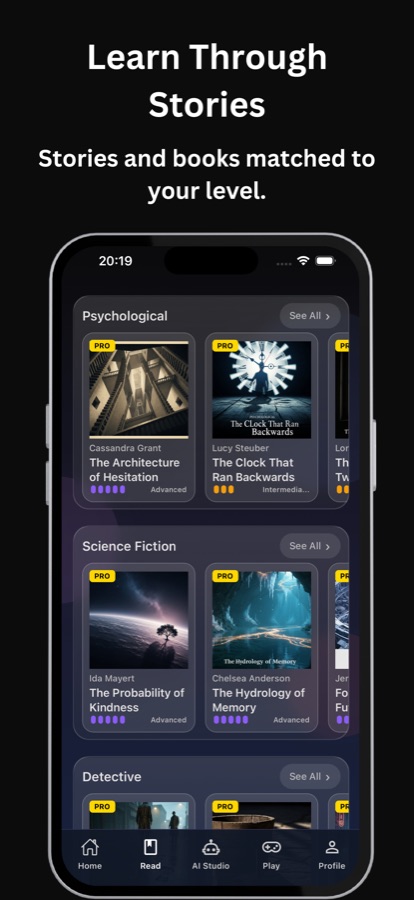
Learn English Speaking with AI is an iOS and Android app that teaches English through a daily plan built by an AI coach. It covers speaking practice, listening tasks, a vocabulary builder with spaced repetition, short grammar lessons, stories and books matched to your CEFR level, and an AI Studio that writes lessons and stories on a topic you choose. Progress is tracked from A1 to C2, and the interface is translated so you can learn from your own language.
Inside the app
What it looks like
Background
How do you learn English quickly, and what do the levels A1 to C2 mean?
Learning English quickly mostly means practising all four skills regularly instead of studying one in depth. The CEFR scale describes progress in six levels: A1 and A2 for basic everyday use, B1 and B2 for independent use at work and in conversation, and C1 and C2 for advanced command. Knowing your level tells you what to read, what to listen to and how hard a conversation should feel.
A1 to A2: survival Englishgreetings, needs, short exchanges
At the first two levels you learn to introduce yourself, ask simple questions and handle a shop, a menu or directions. Progress here comes from repeating a small set of everyday phrases until they come out without translating in your head.
B1 to B2: independent speakerthe long middle
Intermediate learners can hold a conversation, but the plateau is real: grammar mistakes fossilise and vocabulary stops growing. Reading graded stories and reviewing new words on a schedule are the usual ways through it.
C1 to C2: precisionnuance and register
Advanced English is about choosing the exact word, handling idioms and adapting tone to the listener. Progress is slow and mostly comes from a large amount of reading and listening, plus writing that gets noticed and corrected.
Spaced repetitionwhy review timing matters
A new word is forgotten quickly unless you meet it again at growing intervals. A word list reviewed by a schedule is far more efficient than rereading the same list, which is why the review step carries as much weight as the first lesson.
How it works
How a day with the app works
You do not choose from a menu of courses. You open the app, follow the plan, and use the other tabs when you want more.
Start from zero or test your level
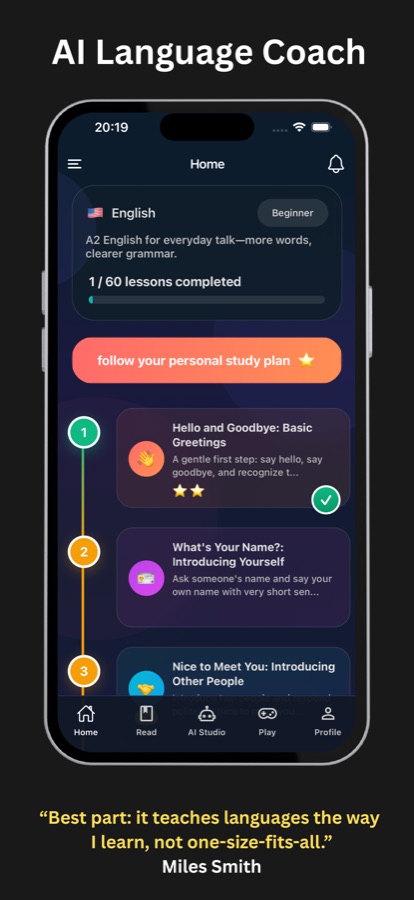
Begin as a complete beginner, take a level test, or jump straight into topics you care about. The Home tab shows your level, how many lessons you have completed and a path of lessons to follow.
Follow today's AI plan
The AI coach looks at which words stuck and where you hesitated, then chooses today's lesson, review or game, so you skip what you already know and do not miss what comes next.
Practise every skill, then go further
Speak, listen, read a story, play a word game or ask AI Studio for a lesson on a topic of your own. Save any word you meet, and the app turns it into a review session.
What's inside
What comes with the app
A1 to C2
Level-based learning path
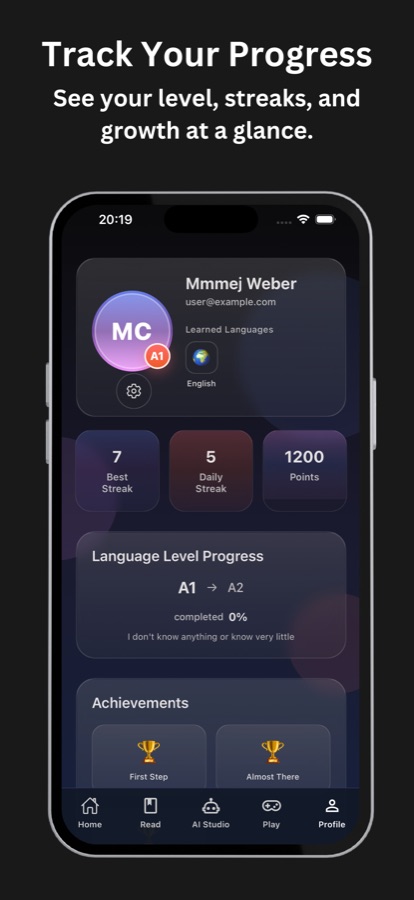
A path of short lessons from absolute beginner to advanced, with your level, daily streak, points and achievements tracked on the Profile tab.
AI
Personal AI learning coach
The AI follows which words stick and where you hesitate, and builds a study plan around it, choosing the lesson, review or game for the day.
6 skills
Speaking, listening, vocabulary, grammar, reading, writing
Speaking practice for conversation confidence, listening tasks such as choosing the word you hear, a vocabulary builder with synonyms and antonyms, short grammar lessons, level-matched reading and writing mini-prompts.
Read
Stories and books by level
A library of stories and books sorted by genre, such as psychological, science fiction and detective, each marked with its difficulty so you can read at the level you are working on.
Studio
AI Studio
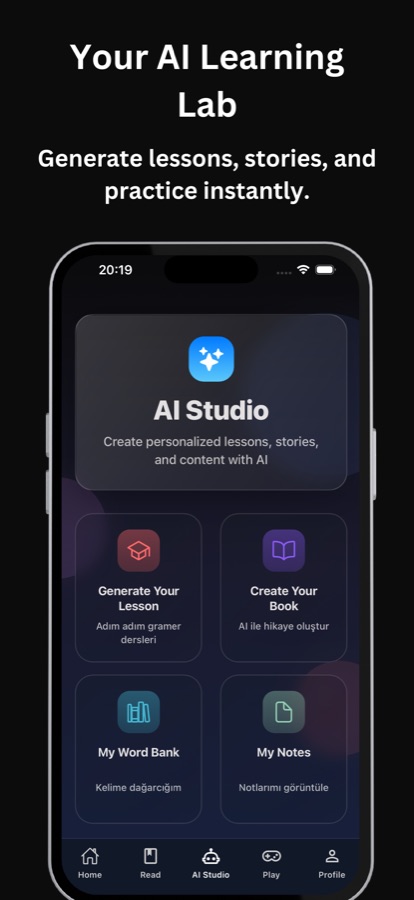
Generate a lesson or create your own book on a theme and difficulty you pick, then keep the words in a personal word bank and add notes to remember your own tips.
Games
Game Center
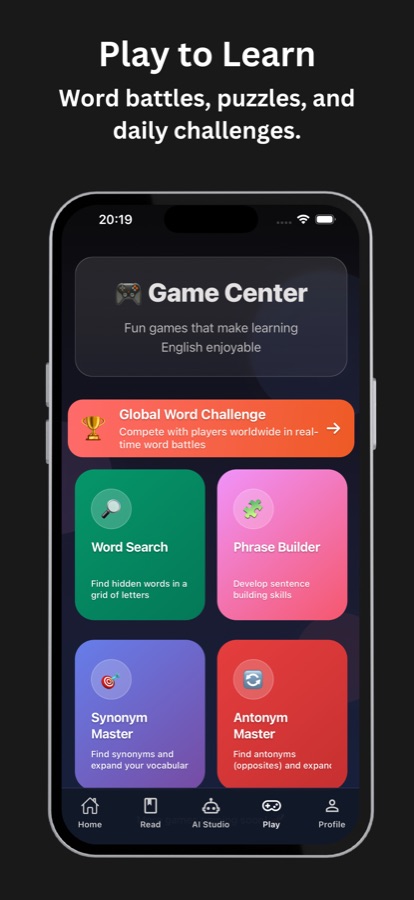
A Global Word Challenge plus Word Search, Phrase Builder, Synonym Master and Antonym Master, built to train recall and speed, with topic challenges you can join with friends using a code.
Fit
Who it's for — and who it isn't
A good fit if you
- Want one app that covers speaking, listening, reading, vocabulary and grammar
- Study in short daily sessions and want the app to decide what to do next
- Prefer menus and explanations in your own language while the lessons stay in English
- Are preparing for travel, work conversations, school or an exam
- Enjoy word games and graded stories as part of practice
Not the right tool if you
- Need a live human teacher who corrects your speech in real time
- Expect every lesson, book and game to be free: Pro unlocks full access
- Want a formal exam course tied to one specific test
- Need to study with no connection at all, since the AI features need one
Questions
Frequently asked questions
What is the best app to learn English speaking with AI?
Look for one that makes you speak and adapts to your mistakes. Learn English Speaking with AI combines speaking practice with an AI coach that tracks which words you forget and builds the day's plan from that. It also covers listening, vocabulary, grammar and reading, so speaking sits within a full routine. It is free to start on iOS and Android.
Can I learn English from zero with this app?
Yes. Learn English Speaking with AI starts at A1, the absolute beginner level, with lessons that begin with hello and goodbye and introducing yourself. You can also take a level test or choose topics you care about. Menus and key explanations appear in your own language, so you do not need English to find your way around.
How does the AI coach decide what I study each day?
It watches which words you remember, which ones you forget and where you hesitate, then picks the lesson, review or game that fits that day. The aim is to avoid repeating what you already know and to schedule review before a word fades. You can follow your personal study plan from a button on the Home tab.
Does Learn English Speaking with AI help with speaking and pronunciation?
Yes. It includes speaking practice to build confidence for real conversations and pronunciation support. Speaking is one of six skills it trains, alongside listening, vocabulary, grammar, reading and writing, so you practise the words you are learning in the same app.
What can AI Studio create?
AI Studio generates personalised lessons, short stories and practice sets from a theme and difficulty you choose, for example English for a trip, a job interview or a school topic. You can also create your own book, keep new words in a word bank and write notes on lessons.
Is Learn English Speaking with AI free?
The app is free to download on the App Store and Google Play. Pro is an optional upgrade that unlocks all lessons and books, unlimited AI Studio generation, unlimited games and priority support. Prices are shown in the app, and the free version lets you start learning straight away.
Is it the same app as LingoBuddy?
Yes. The store description and the app itself refer to LingoBuddy, the name of the AI language-learning app behind Learn English Speaking with AI. If you see LingoBuddy inside the app, you are in the right place.
Which languages does the app support?
The interface, guidance and key explanations are translated, so you can learn English from languages such as Arabic, Turkish, Spanish, French, German, Italian, Portuguese, Russian, Ukrainian, Polish, Hindi, Indonesian, Japanese, Korean, Chinese and Thai. The learning content itself stays in English.
Get started
Take today's English lesson
Free to start on iOS and Android, in 22 languages.
More from CoddyKit
Available on iOS and Android.