
Debt Payoff Planner: Snowball
Debt Payoff Planner: Snowball — See which debt to pay first and when you could be debt free
Debt Payoff Planner: Snowball is a free iPhone and Android debt payoff planner and payment tracker. Type in your credit cards, loans and medical bills, pick the debt snowball or debt avalanche order, and the app works out an estimated debt-free date and a numbered list of which balance gets your extra money next. There is no bank linking: you enter your own balances, rates and minimum payments.


- Price
- Free, Pro upgrade
- Platforms
- iOS and Android
- Languages
- 10
- Age rating
- 4+
- Requires
- iOS 15.1 or later
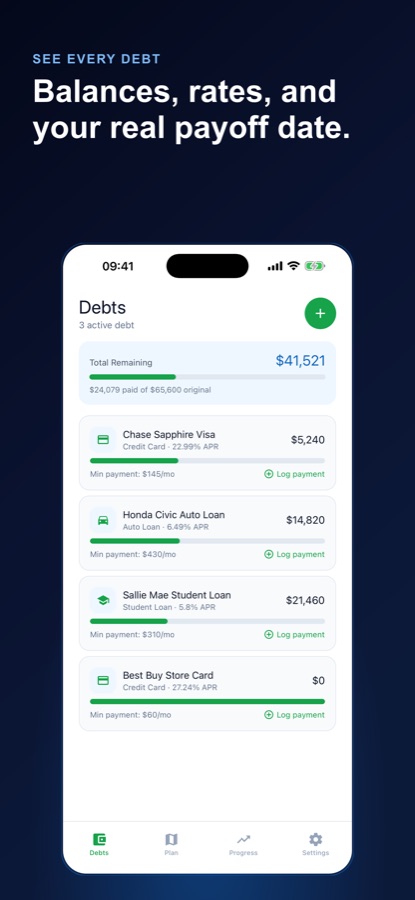
A calculator of your own numbers, not a financial product.
Debt Payoff Planner: Snowball never connects to a bank. Every balance, APR and minimum payment is something you typed in, and the payoff math runs on the phone, so the estimated debt-free date is only as accurate as the figures you gave it.
What it is
Debt Payoff Planner: Snowball is a free iOS and Android app that answers one question: which of your balances should you pay first, and roughly when could you be debt free? You add each credit card, personal loan, student loan, auto loan or medical bill with its balance, APR and minimum payment, choose the snowball method (smallest balance first) or the avalanche method (highest interest rate first), and the app shows an estimated debt-free date, time to go, total interest and the order to pay in. It is a planning and tracking tool, not a lender or a financial advisor.
A planning and tracking tool, not financial advice. Every date and amount is an estimate based on the numbers you enter..
Inside the app
What it looks like
Background
Debt snowball or debt avalanche: which balance do you pay off first?
Both methods start the same way: pay at least the minimum on every debt, then put all the extra money you can spare on one chosen balance until it is gone, and roll what was going to it onto the next. They differ only in which balance goes first. The debt snowball picks the smallest balance, which closes accounts early and gives quick wins. The debt avalanche picks the highest interest rate, which keeps the total interest bill lower. Which one suits you is partly arithmetic and partly how you stay motivated, so it helps to see both on your own figures.
Debt snowballsmallest balance first
You line the debts up from the smallest balance to the largest and aim the extra money at the first one. Each cleared balance is a visible win, and its old payment joins the next debt in line. The cost is that a small balance with a low rate can come before a large, expensive one.
Debt avalanchehighest APR first
You rank the debts by interest rate and attack the most expensive one first. Because the costliest balance shrinks soonest, less interest builds up overall. The trade-off is patience: the first balance you target may be a big one and take a long time to clear.
APR and minimum paymentthe two numbers that drive the plan
The APR is the yearly interest rate on a balance, and the minimum payment is what the lender asks for each month. If the minimum barely covers the monthly interest, paying only that amount can stall for years, which is why a small monthly extra can change the schedule so much.
Extra payment rolloverwhy the order matters
When a debt reaches zero, the money that was paying it does not go back into your budget by accident; it moves to the next debt on the list. That rollover is what makes the later balances shrink faster and what a payoff schedule has to model month by month.
How it works
How the planner works
The core planner works offline and you can start as a guest in a few seconds. Signing in is optional.
Add each balance by hand
Enter a credit card, personal loan, student loan, auto loan or medical bill with its current balance, APR and minimum payment. Each debt keeps its own payment history. There is no bank connection to set up.
Choose snowball or avalanche and set an extra amount
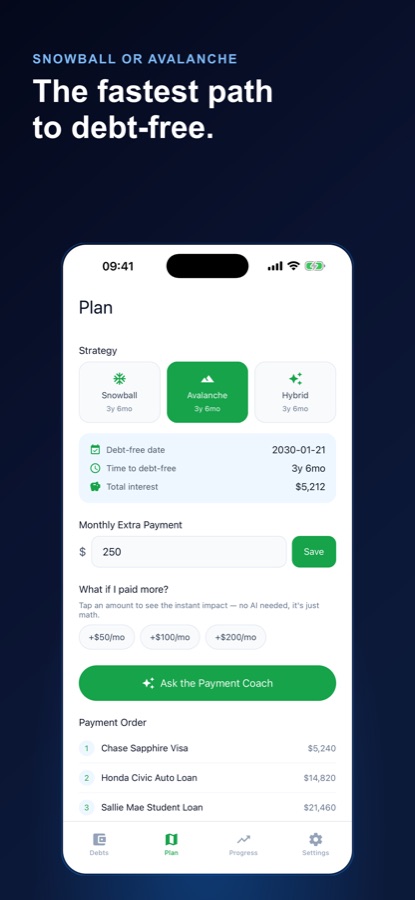
Pick a strategy on the Plan tab and set a monthly extra payment. The strategy cards show the estimated months to go for each method, and the plan shows an estimated debt-free date, time to go, total interest and a numbered payment order.
Log payments and watch the date move
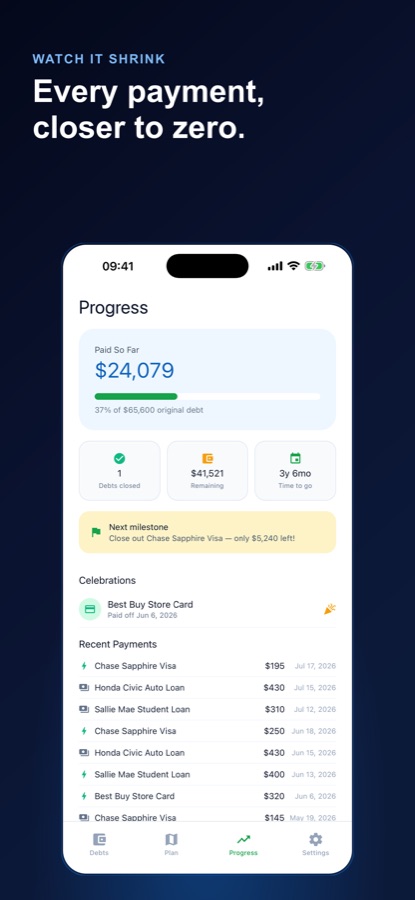
Record each payment in seconds and mark it as an extra payment when you paid more than the minimum. Balances, the progress bar and the estimated payoff date update as soon as you save, and each balance you close gets a dated celebration.
What's inside
What is in the app
2 + 1
Snowball, avalanche and hybrid
Snowball and avalanche are free and sit side by side so you can compare estimated months to debt free. A hybrid order is part of Pro.
No bank
Your own numbers only
Debt Payoff Planner: Snowball never links to a bank. The payoff calculations happen in the app, from the figures you enter.
+50 / 100 / 200
What-if extra payments
Tap +50, +100 or +200 a month and see how many months and how much interest a bigger payment could save, as plain math shown instantly.
Any debt
Unlimited debts of every kind
Credit cards, personal, student and auto loans, medical bills and anything else you owe, each with its own balance, rate and payment log.
Progress
Paid so far and next milestone
A progress screen shows how much you have paid, the share of the original total, balances closed, what remains, and the balance closest to zero as your next milestone.
AI
Payment Coach
A short AI coach tip explains your plan in plain words, and can talk through a what-if result. It explains numbers the app already calculated and is set up not to invent figures or recommend financial products. Three explanations a month are free.
Fit
Who it's for — and who it isn't
A good fit if you
- Owe money on several credit cards or loans and want to know which one to pay off first
- Pay only minimums today and want to see what a small extra amount would change
- Want to compare the snowball method and the avalanche method on your own balances
- Prefer a simple payoff calculator and payment tracker to a hand-built spreadsheet
- Would rather type in your figures than connect a bank account
Not the right tool if you
- Want an app that pulls balances from your bank automatically, because there is no bank linking
- Are looking for a loan, debt consolidation or debt relief: the app offers none of these
- Need personal investment, credit or tax advice, which the app does not give
- Expect a guaranteed payoff date: every date is an estimate that assumes your numbers stay the same
Privacy
What leaves your phone
Debt Payoff Planner: Snowball never connects to your bank, and the payoff calculations happen in the app. The one exception is the optional Payment Coach: when you ask for an explanation, the numbers it needs are sent to the CoddyKit server so an AI model can write the answer.
Full details are in the CoddyKit privacy policy.
Questions
Frequently asked questions
What is the best way to decide which debt to pay off first?
The two common orders are the debt snowball (smallest balance first) and the debt avalanche (highest interest rate first). Debt Payoff Planner: Snowball lets you enter your own balances, APRs and minimum payments and compares both on the same screen, showing estimated months to go for each, so you can choose with your own figures rather than a rule of thumb.
What is the difference between the debt snowball and the debt avalanche?
The snowball pays the smallest balance first to get quick wins, while the avalanche pays the highest interest rate first to keep interest costs down. In Debt Payoff Planner: Snowball both are free, and each strategy card shows the estimated months to go so you can see how far apart they land on your numbers.
Does Debt Payoff Planner: Snowball connect to my bank?
No. The app has no bank linking at all. You type in each balance, interest rate and minimum payment yourself, and the payoff math runs on the phone. That keeps setup manual but means no bank credentials are ever involved.
How does the app estimate my debt-free date?
It builds a month-by-month payoff plan from the balances, APRs, minimum payments and monthly extra amount you entered, using the strategy you chose. The result is an estimated debt-free date, time to go and total interest. It assumes your numbers stay the same, so real results depend on your lenders' terms, fees and any rate changes.
What does the what-if feature do?
On the Plan tab you can set a monthly extra amount or tap +50, +100 or +200 to see how much sooner a bigger payment could finish the plan and how much interest it could save. Debt Payoff Planner: Snowball shows this as plain math on your own numbers, instantly.
What kinds of debt can I track?
Credit cards, personal loans, student loans, auto loans, medical bills and anything else you owe. Each debt keeps its own balance, APR, minimum payment and payment history, and there is no limit on how many you can add.
Is the Payment Coach real financial advice?
No. The Payment Coach is an AI helper that explains the plan the app has already calculated in plain language and talks through what-if results. It is set up not to invent figures or recommend financial products, and the app as a whole is a planning tool, not a lender or licensed financial advisor.
Is Debt Payoff Planner: Snowball free?
The app is free to download on the App Store and Google Play. Unlimited debts, both strategies, the payment tracker, what-if amounts and progress are free, along with three Payment Coach explanations a month. Pro adds unlimited coach tips, a personalized optimization plan and the hybrid strategy.
Do I need an account?
No. You can start as a guest in a few seconds, and signing in is optional. The core planner works offline.
Which languages and devices does it support?
Debt Payoff Planner: Snowball runs on iPhone and Android and its interface is available in 10 languages, including English, Spanish, German, French and Portuguese. On iPhone it needs iOS 15.1 or later, and it is rated 4+.
Get started
Add your first debt and see the path
Free to start on iOS and Android, with no bank linking.
More from CoddyKit
Available on iOS and Android.