

Savings Goals: Goal Planner
Savings Goals: Goal Planner — A savings tracker that tells you if each goal is on pace
Savings Goals: Goal Planner is a free Android savings tracker for people saving for more than one thing at once, such as a trip, an emergency fund, a wedding or a new laptop. Name a goal, log deposits and withdrawals by hand, and the app works out the monthly amount you need and whether your recent pace will reach the deadline. No sign-up and no bank linking.

- Price
- Free, Pro upgrade
- Platforms
- Android
- Languages
- 10
- Account
- Not needed, no bank linking
Am I actually on pace for what I am saving for?
That is the one question the app answers. It does not try to be a bank, a budgeting suite or an advisor: it takes the numbers you enter and shows whether each goal is ahead, on track or behind.
What it is
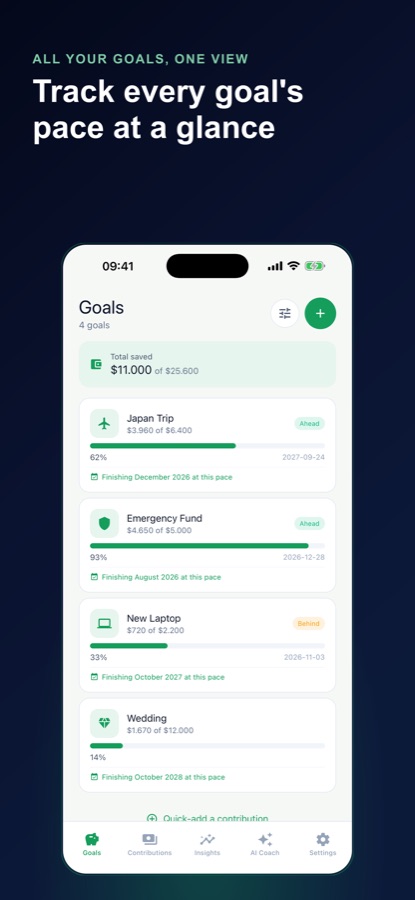
Savings Goals: Goal Planner is an Android savings tracker that keeps several goals in one place. For each goal you set a target amount, an optional deadline, a priority and your own currency, then log deposits and withdrawals by hand. A pace engine compares the monthly amount you need with your average of the last three months, gives each goal a projected finish date and labels it ahead, on track or behind. Everything is stored on the phone, with no account and no bank linking.
Inside the app
What it looks like
Background
How do you save for several goals at the same time?
Saving for more than one goal works best when each goal has a target, a deadline and a monthly amount, and when you can see whether you are keeping up. The arithmetic is simple: the amount still needed, divided by the months left, gives the monthly figure to compare with what you actually put aside. Where money is limited, many people also rank goals, so the one with the nearest deadline or the highest priority gets funded first. This is general information about arithmetic, not financial advice.
Required monthly amountremaining divided by months left
Subtract what you have saved from the target and divide by the months until the deadline. The result is the amount per month that reaches the goal on time, and it rises if you fall behind.
Recent pacewhat you really save
Comparing the required amount with your actual three-month average shows whether you are ahead, on track or behind. Using recent months rather than a single good month gives a more honest picture.
Projected finish dateif nothing changes
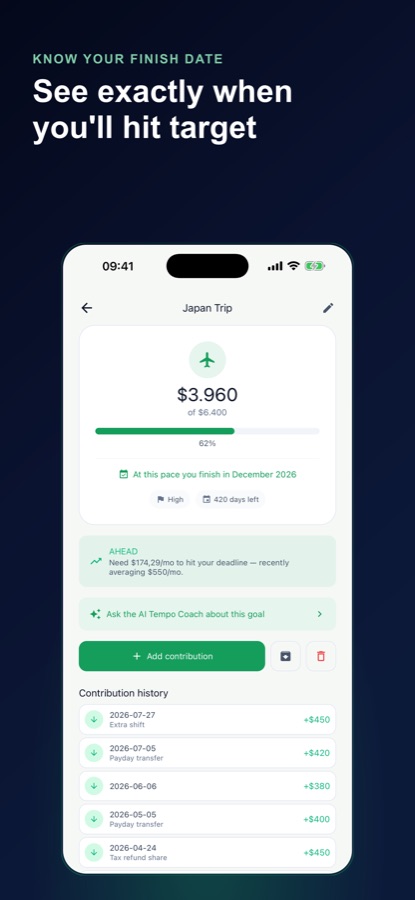
Divide the amount still needed by your recent monthly pace to see when you would finish at the current rate. It is a projection, not a promise, and it moves as your deposits change.
Emergency fund versus a wishgoals differ in urgency
A trip can wait a month and a fund for unexpected costs often cannot, which is why goals carry a priority. Splitting a monthly amount by priority and by how close each deadline is gives a plain order of funding.
Round-ups and weekly increasessmall habits, simple sums
A round-up habit adds the difference between a purchase and the next whole number, and a weekly increase raises the saved amount each week. Simulators only show what those habits would add up to, using numbers you type in.
How it works
How the app is used
The routine is two taps after the setup: add what you moved, and read the pace card.
Create a goal
Give the goal a name, a target amount, an optional deadline and a priority, and choose your currency. The app formats amounts with the symbol and decimal style for your device.
Log each deposit or withdrawal
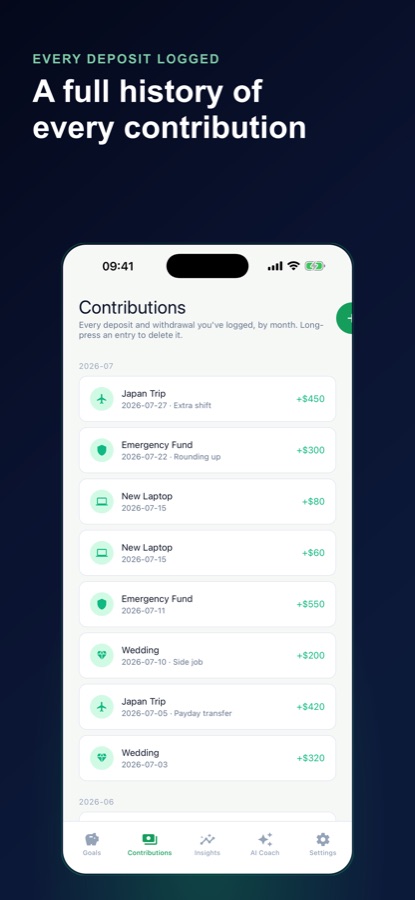
Add a contribution in a few taps whenever money goes toward a goal, or comes out. Entries are kept by month with optional notes, and a long-press deletes one.
Read the pace and the Insights tab
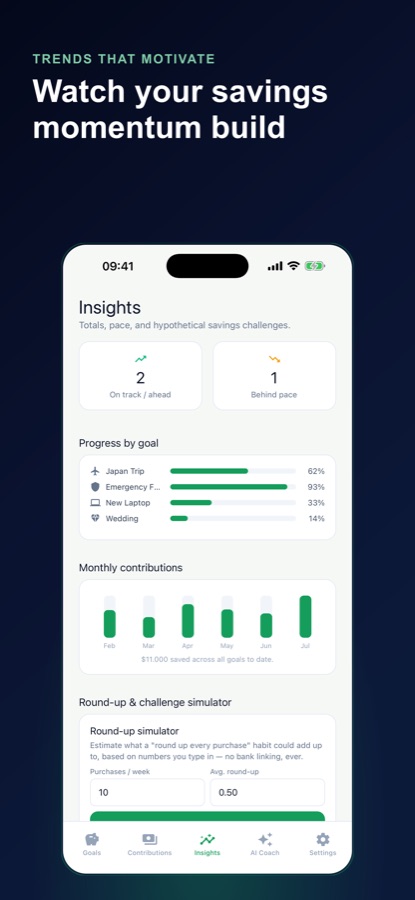
Each goal shows how much you need per month against your recent average and a projected finish date. Insights summarises how many goals are on track or behind and charts the last six months of contributions.
What's inside
What the app does
Goals
Several goals at once
Each goal has its own target, priority and deadline. Free use allows up to three active goals, and Pro removes that limit.
Pace
Pace engine
Required monthly amount against your actual three-month average, with an ahead, on track or behind label and a projected finish date.
Ledger
Contribution ledger
Signed deposits and withdrawals organised by month with notes, so every movement toward a goal is on record.
Alerts
Local reminders
A monthly nudge, an early warning when a deadline is close and you have fallen behind, and a note at 25, 50, 75 and 100 percent, computed on the device with no push server.
AI
Tempo coach
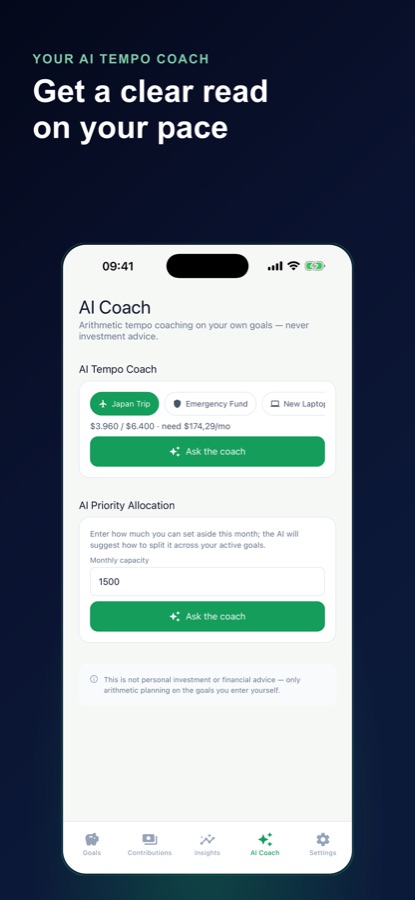
An optional AI coach that reads your own numbers and explains in a sentence or two whether you are on pace. It never recommends investments, loans, spending cuts or moving money.
Pro
Allocation and simulators
Pro adds Priority Allocation across your goals and round-up and weekly-increase simulators over 12, 26 or 52 weeks, and removes ads.
Fit
Who it's for — and who it isn't
A good fit if you
- Are saving for several goals at the same time and want them in one place
- Prefer to enter deposits yourself rather than link a bank account
- Want to know the monthly amount a deadline needs and whether you are keeping up
- Like an app that keeps the numbers on your phone
- Want a simple projected finish date for each goal
Not the right tool if you
- Want automatic transactions pulled from a bank, since the app has no bank linking
- Need budgeting, investment advice or loan guidance; it does arithmetic on your own goals only
- Use an iPhone, since the app is on Android
Safety and limits
Not financial advice
Savings Goals does simple arithmetic on the numbers you enter. It is not a bank, a budgeting suite or a financial advisor, and nothing in it is personalised financial or investment advice. Projections show what happens if your pace stays the same, and they promise no outcome.
The optional AI coach reasons only about the target, current amount, deadline and recent pace you typed in. It never recommends investments, loans, spending cuts or moving money between accounts, and the app says so wherever the coach appears. For decisions about your money, speak to a qualified professional.
Privacy
What stays on your phone
Goals and contributions live on your device. There is no sign-up, no login and no bank linking, and nothing about your money leaves the phone unless you choose to ask the optional AI coach a question.
Full details are in the CoddyKit privacy policy.
Questions
Frequently asked questions
What is a good savings tracker for more than one goal?
Look for one that keeps each goal separate, shows the monthly amount a deadline needs and compares it with what you really save. Savings Goals: Goal Planner does this on Android with a pace card, a projected finish date for each goal and a contribution ledger, and it needs no account or bank linking.
How does the app know if I am on pace?
It compares the required monthly amount, the remaining sum divided by the months to the deadline, with your actual average of the last three months. The goal is then labelled ahead, on track or behind in plain language.
Does Savings Goals connect to my bank?
No. You log deposits and withdrawals by hand. There is no sign-up, no login and no bank linking, and your goals and contributions are stored on your phone.
What does the AI coach do?
The tempo coach reads the target, current amount, deadline and recent pace you entered and explains in a sentence or two whether you are on pace. It does not recommend investments, loans, spending cuts or moving money. It is a calculator with a friendly voice, not an advisor.
Is Savings Goals free?
Free use includes up to three active goals, unlimited contribution logging, the full pace engine and projected finish dates, the Insights summary and chart, local reminders and three tempo coach questions a month. Pro, a monthly or annual subscription, adds unlimited goals and coach questions, Priority Allocation, the round-up and weekly-increase simulators and removes ads.
What is Priority Allocation?
It is a Pro feature that splits a monthly amount you can set aside across your active goals by priority and by how close each deadline is. It shows a plain arithmetic breakdown for every goal, based only on the numbers you entered.
Can I use my own currency?
Yes. You choose a currency for each goal, and amounts are formatted with the right symbol, decimal style and rounding for your device. The interface is available in 10 languages.
Will it remind me to save?
Yes. Local reminders include a monthly nudge, an early warning when a deadline is close and you have fallen behind, and a celebration at 25, 50, 75 and 100 percent. They are scheduled on your phone, with no push server.
Does a projected finish date guarantee I will reach the goal?
No. A projected finish date shows when you would reach the goal if you kept your recent monthly pace. It changes whenever your deposits change and is not a promise.
Get started
Know where each goal stands
A savings tracker for Android, free to start, with no account and no bank linking.
More from CoddyKit
Available on Android.