
Plant It - AI Plant Care
Plant It - AI Plant Care — Photograph a plant to identify it and find out what is wrong with it
Plant It - AI Plant Care, listed as Plant Healer: Plant Care AI on the App Store, is a plant identification and plant disease diagnosis app. Take a photo of a plant, flower, leaf or tree to find out what it is, photograph a damaged leaf to get suggested causes and treatment steps, and keep the plants you own in a collection with care routines.


- Price
- Free, with optional in-app purchases
- Platforms
- iOS and Android
- Languages
- 10
- Age rating
- 4+
- Requires
- iOS 16.4 or later
A name is only the first answer; what to do next is the useful one.
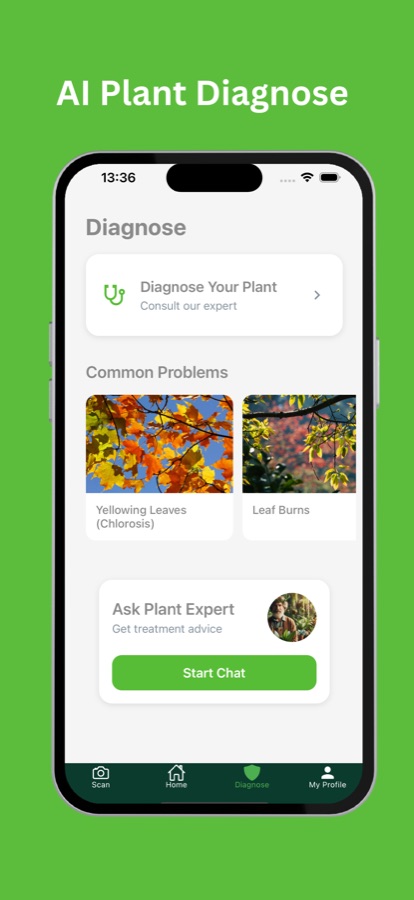
Identifying a plant tells you what it is, and photographing the damaged leaf is meant to tell you what to do about it. The diagnosis screen lists common problems such as yellowing leaves and leaf burns, and each one opens into what it is, how to care for it and how to prevent it.
What it is
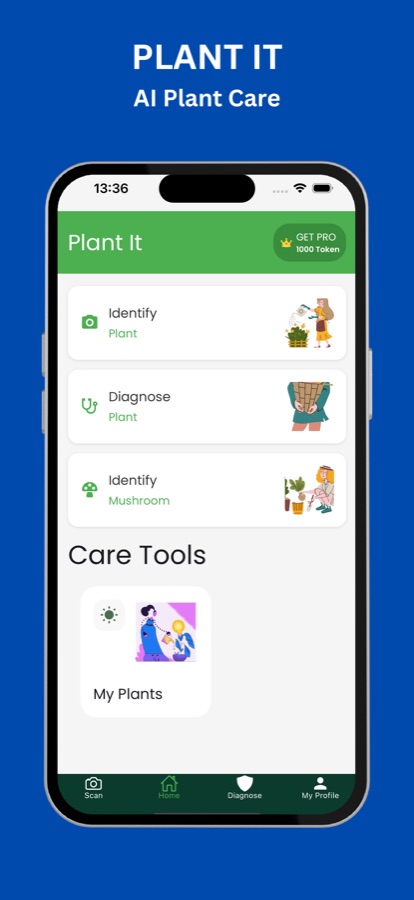
Plant It - AI Plant Care, called Plant Healer on the App Store, is an iOS and Android app that identifies plants, flowers and trees from a photo and helps diagnose plant problems. It gives care information for what it recognises, has a diagnosis section covering common problems such as yellowing leaves and leaf burns with treatment and prevention tips, offers a chat with a plant expert, and stores your plants in a personal collection.
Inside the app
What it looks like
Background
Why is my plant struggling, and how can a photo help work it out?
Most houseplant problems come from a short list of causes: too much or too little water, the wrong amount of light, a nutrient imbalance, fertilizer or sun scorch, and pests or disease. The difficulty is that different causes look alike, so yellow leaves can mean overwatering, a shortage of nitrogen or simply age. A photo helps by giving you a named starting point and a set of likely causes to check against your watering, light and feeding, rather than a guess made on the spot.
Yellowing leaveschlorosis, with several possible causes
Leaves that lose green can be a sign of too much water, poor drainage or a nutrient shortage, and one yellow leaf at the base of a plant can be normal ageing. The pattern matters: which leaves, how fast and whether the veins stay green.
Leaf burnbrown, crisp patches
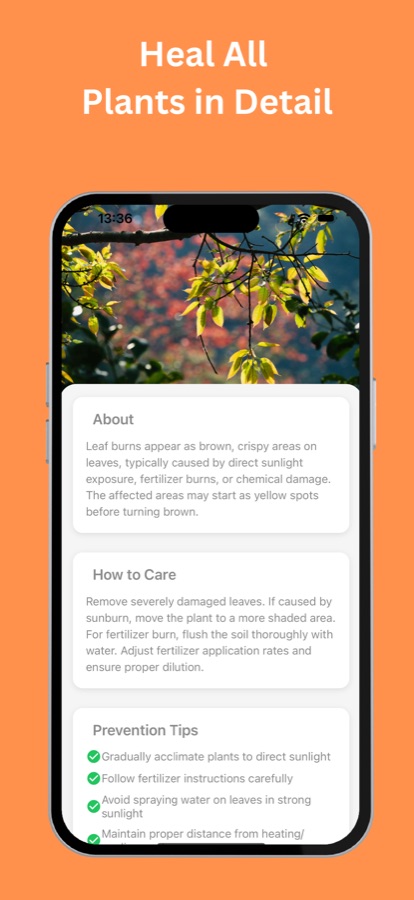
Brown, crispy areas on leaves often come from direct sun, fertilizer applied too strongly or chemical damage. Moving the plant to shade, flushing the soil and diluting feed are the usual first steps.
Watering and lightthe two things to check first
Before assuming disease, check whether the soil is soggy or dry through and through, and whether the spot gets the light the species wants. These two factors account for a large share of ordinary problems.
Care routinesconsistency over cleverness
Plants respond to steady habits: a watering rhythm that suits the species, feeding in the growing season and repotting when roots fill the pot. A collection with notes lets you see what you changed before a problem began.
How it works
From photo to plan
Three screens cover most of what you will do.
Scan the plant
Open the app and take or upload a photo of a plant, flower, leaf or tree. The app identifies it and shows information about it and how to care for it.
Diagnose a problem
Photograph the affected area or browse common problems. Each problem explains what it is, how to care for the plant and how to prevent it from happening again. You can also start a chat with a plant expert for treatment advice.
Save it to your collection
Keep identified plants under My Plants, add notes, track growth and manage care routines in one place.
What's inside
What the app offers
Photo
Plant and flower identification
Identify plants, flowers, leaves and trees from a camera photo or an upload, with background and care information on what is recognised.
Diagnose
Problem diagnosis
Photograph an affected area or open a common problem, such as yellowing leaves or leaf burns, to see its causes, how to care for the plant and prevention tips.
Chat
Ask a plant expert
A chat entry on the diagnosis screen for asking about treatment, in addition to the written guidance for each common problem.
Hub
Plant knowledge hub
Descriptions, care tips, photos and facts about plant species, so a scan leads to something you can read and keep.
My Plants
Personal collection
Save plants you have identified, add custom notes, track growth and manage care routines. The App Store listing adds watering reminders and toxicity information for pets and children.
Fungi
Mushroom identification
The home screen also has an Identify Mushroom option. Never eat a mushroom or plant because an app named it; see the safety note below.
Fit
Who it's for — and who it isn't
A good fit if you
- Own houseplants and want to know what a new one is called and how to look after it
- Have a plant with yellow or burnt leaves and want likely causes to check
- Like keeping a record of the plants you own with notes on how each is doing
- Are curious about plants you meet on walks and want a name to start from
Not the right tool if you
- Need a confirmed identification of a wild plant or mushroom before eating or handling it
- Need professional horticultural advice for a valuable or commercial crop
- Want veterinary advice; the app is not a substitute for a vet
- Expect unlimited scans for free; free use is limited and Premium unlocks more
Safety and limits
Read this before you rely on a plant identification
An app identifies a plant from a photo, and it can be wrong, especially with look-alike species. The app offers guidance for hobby growers and is not a substitute for professional horticultural or veterinary advice.
Never eat or taste a wild mushroom or plant because an app named it. Several poisonous species closely resemble edible ones, and a photo may not show the features that tell them apart. If you want to forage, confirm every find with an experienced local expert.
Many common houseplants are harmful to pets and children if chewed or swallowed. If a pet or child has eaten part of a plant, contact a vet, a doctor or a poison control service straight away, and do not wait for an app to confirm what the plant was.
Questions
Frequently asked questions
What is Plant It - AI Plant Care?
Plant It - AI Plant Care is an iPhone and Android app that identifies plants and flowers from a photo, helps diagnose plant problems and stores your plants in a collection. The App Store lists it as Plant Healer: Plant Care AI. It is free to download, with optional in-app purchases.
How do I identify a plant from a photo?
Open the app, choose Identify Plant and take or upload a photo of the plant, flower, leaf or tree. For best results, photograph the whole plant in good light and add a close-up of a leaf or flower. The app returns a name with background and care information.
Can the app tell me what is wrong with my plant?
It can suggest likely causes. Photograph the affected leaf or browse the common problems, such as yellowing leaves and leaf burns, and each entry covers what it is, how to care for the plant and how to prevent it. Check the suggestions against your own watering, light and feeding before you change anything.
Is the identification always correct?
No. Image-based identification can miss, particularly with similar-looking species or a poor photo, and the app is guidance for hobby growers. If a decision depends on the answer, such as eating or handling a plant, confirm it with a qualified person.
Does it tell me whether a plant is toxic to pets?
The App Store listing says the app shows pet and child toxicity information for the plants it identifies. Treat that as a first check and verify it with a trusted source. If a pet or child has chewed a plant, contact a vet, doctor or poison control service immediately.
Does the app identify mushrooms?
The home screen includes an Identify Mushroom option. Identification of fungi from photos is unreliable, and eating the wrong one can be fatal, so use it for curiosity only. Never eat a wild mushroom because an app named it.
What is free and what is Premium?
The app is free to start, with a limited number of scans. Premium unlocks unlimited scans, removes ads and gives full diagnosis and care details, as an auto-renewing subscription managed in your store account. Check the store listing for current prices.
Get started
Photograph your first plant
Free to download on iOS and Android, in 10 languages.
More from CoddyKit
Available on iOS and Android.