

Learn Excel: Formulas & Course
Learn Excel: Formulas & Course — An Excel tutorial you practise in a real spreadsheet
Learn Excel: Formulas & Course is a free iOS and Android Excel tutorial for beginners and anyone brushing up for work or study, built around practice. A working practice spreadsheet with a formula bar lets you type SUM, IF, VLOOKUP and XLOOKUP and watch the results recalculate, across 30 courses and 120 short lessons that work the same in Microsoft Excel and Google Sheets.


- Price
- Free, Pro upgrade
- Platforms
- iOS and Android
- Languages
- 22
- Age rating
- 4+
- Requires
- iOS 15.1 or later
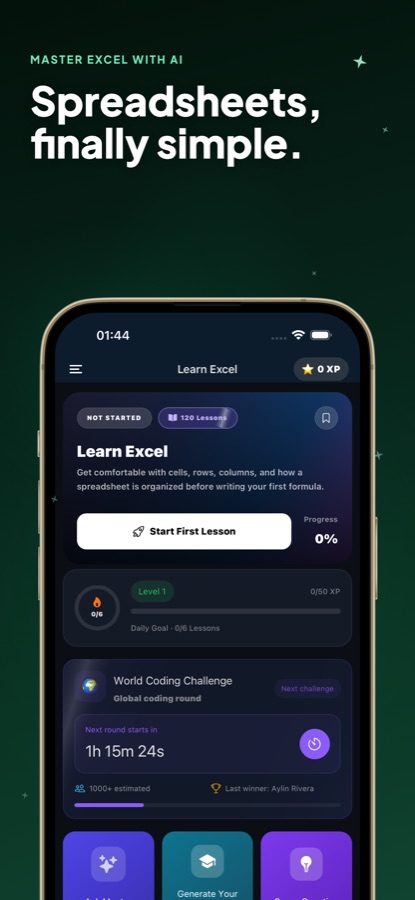
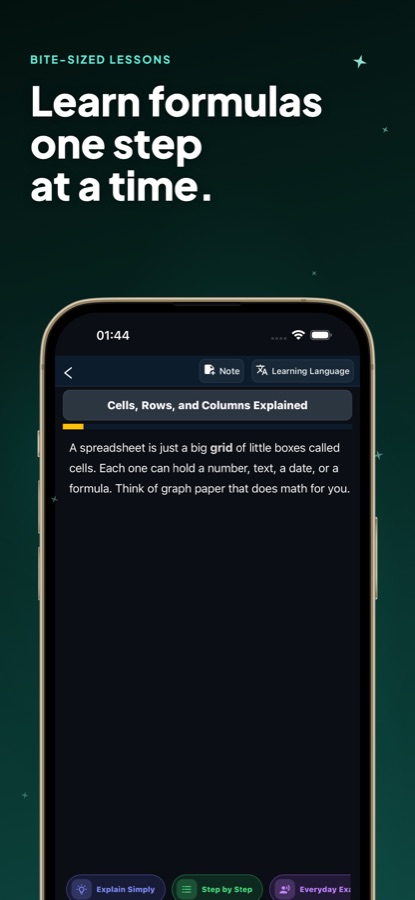
You learn a formula by breaking it.
Reading that VLOOKUP needs an exact match is easy to forget; seeing it return #N/A on a table you typed yourself is not. The Sheet tab lets you change a number, watch every dependent formula recalculate and read what the error means, so each function is tied to a result you saw happen.
What it is
Learn Excel: Formulas & Course is a free iOS and Android app that teaches spreadsheet formulas through short lessons and a practice sheet you can type into. It has 30 courses and 120 lessons levelled from A1 beginner to B2 advanced, covering cell references, SUM and IF, SUMIF and COUNTIF, VLOOKUP, XLOOKUP and INDEX MATCH, dates, dynamic arrays, LET and LAMBDA, and Google Sheets QUERY. A function browser, 20 exercises built on real work problems and an AI mentor sit beside the lessons.
Learn Excel is an independent learning app. It is not affiliated with, endorsed by or sponsored by Microsoft Corporation. Excel is a trademark of Microsoft Corporation..
Inside the app
What it looks like
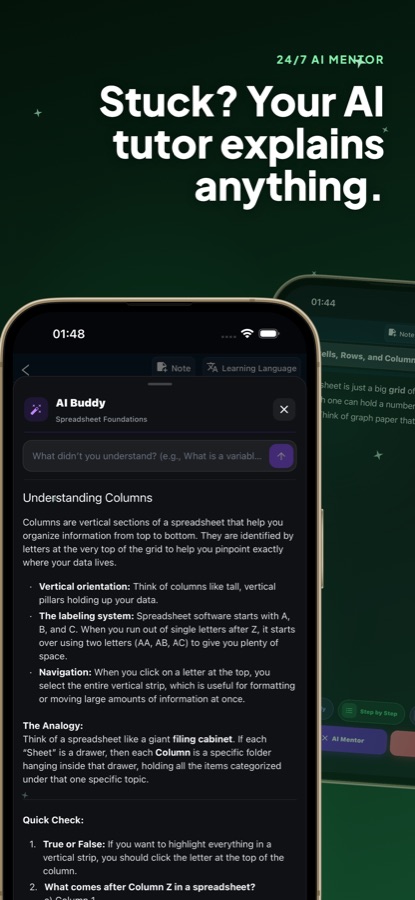
The course
What the Excel course covers
30 courses and 120 lessons, from the first cell to dashboards built with formulas. The names below come from the app's own course list on CoddyKit.
Spreadsheet Foundations
How a spreadsheet is organised into cells, rows and columns before you write a formula. This first course is free in full.
First Formulas, SUM, AVERAGE and Counting
Start formulas with an equals sign, total and average ranges, count cells with the COUNT family and copy formulas with the fill handle.
Absolute and Relative References
Use the dollar sign to lock a cell so a formula copies exactly as intended, one of the habits that separates a tidy sheet from a fragile one.
Logical Functions and Conditions
Make a cell decide with IF, combine tests with AND, OR and NOT, and handle many outcomes with IFS, SWITCH and nested logic.
Text Functions and Conditional Math
Clean and join text, then total and count only what meets a condition with SUMIF, COUNTIF and the multi-criteria IFS functions.
Lookups: VLOOKUP, XLOOKUP and INDEX MATCH
Find matching values by column or row, replace older lookups with XLOOKUP, build direction-independent lookups with INDEX and MATCH, and look up by row and column together.
Errors, Dates, Names and Validation
Catch and replace error values, calculate with dates and times, control rounding and number formats, name ranges and restrict input with data validation.
Advanced Formulas, Google Sheets and Dashboards
Dynamic arrays with FILTER, UNIQUE and SORT, LET and LAMBDA, financial and statistical functions, Google Sheets QUERY and ARRAYFORMULA, and a closing dashboards course.
How it works
How a lesson goes
Each lesson is short enough for a commute and ends with something to try, so the formula is typed rather than only read.
Read one short lesson
Open a course and take a lesson of a few minutes. The text is plain language, and chips under it can explain the idea more simply, step by step or with an everyday example.
Type it into the practice sheet
Switch to the Sheet tab, tap a cell and enter the formula. A function browser describes each function and inserts it for you, and when a cell shows an error the app tells you what went wrong.
Fix a real work problem
Missions are short exercises based on problems people meet at work, such as a lookup returning #N/A or a total that is short because numbers are stored as text. You find the cause and correct it.
What's inside
What is in the app
120
Lessons in 30 courses
Levelled from A1 to B2, the course goes from cells, rows and columns through SUM and IF to lookups, dates, dynamic arrays and dashboard-style reports built with formulas.
64
Functions in the practice sheet
A working spreadsheet with a formula bar where every dependent cell recalculates as you edit. Free learners get 10 core functions, including SUM, IF, ROUND, VLOOKUP and CONCAT, and Pro opens all 64.
20
Exercises from real work
Missions cover duplicate rows that inflate a total, dates that will not sort, a new column that breaks every lookup, revenue per region built with a pivot table, and a chart that exaggerates growth.
AI
AI mentor
Ask for a formula, a function or an error message to be explained in plain words. You can also create a custom lesson on any topic with AI.
86
Formula cheat sheet
A reference of 86 entries sits beside a daily quiz, notes, saved lessons and review sessions for the formulas you keep forgetting.
Both
Excel and Google Sheets
The formulas taught work the same way in Microsoft Excel and in Google Sheets, and two late courses cover Sheets-only tools: QUERY, ARRAYFORMULA and regular-expression text cleaning.
Background
Which Excel formulas should you learn first, and in what order?
Most people get a long way with about a dozen functions, learned in a sensible order: how a cell reference works, then the arithmetic functions, then IF for decisions, then the conditional sums and the lookup functions. Each step builds on the one before, which is why lessons that jump straight to VLOOKUP leave beginners copying formulas they cannot repair. The order matters more than the total number of functions you know.
Relative and absolute referencesthe dollar sign
A reference such as B2 shifts when you copy a formula down a column, while $B$2 stays fixed. Understanding the difference is what stops a copied formula from quietly pointing at the wrong row, and it underlies almost every lookup and total you build later.
Logical and conditional functionsIF, SUMIF, COUNTIF
IF lets a cell choose between two outcomes, and SUMIF and COUNTIF add up or count only the rows that meet a condition. Together they cover a large share of everyday reporting, such as totalling one region's sales or counting overdue tasks.
Lookup functionsVLOOKUP, XLOOKUP, INDEX MATCH
A lookup finds a value in a table by matching a key such as a product code. VLOOKUP searches the first column of a range, XLOOKUP is the newer, more flexible option that can search in any direction, and INDEX MATCH is the long-standing alternative that survives when columns are inserted.
Error values#N/A, #REF!, #VALUE!
Each error code is a clue rather than a failure: #N/A usually means a lookup found no match, #REF! points to a deleted cell reference, and #VALUE! often means a number is stored as text. Learning to read them turns a broken sheet into a short debugging exercise.
Fit
Who it's for — and who it isn't
A good fit if you
- Use spreadsheets at work or study and want formulas explained from the very first cell
- Are preparing for a new role or a test and want to practise VLOOKUP, SUMIFS and IF until they stick
- Learn best by typing a formula and seeing it recalculate rather than watching someone else do it
- Use Google Sheets as well as Excel and want one set of skills for both
- Have a few spare minutes on a commute and prefer short lessons to long video courses
Not the right tool if you
- Need to build or edit real workbooks on your phone — this is a learning app with a practice sheet, not a replacement for Excel
- Expect every lesson to be free: the first course and a preview of each other lesson are free, and Pro unlocks the rest
- Want a full macro and VBA course, which the course list does not include
- Already build complex models daily and want a reference rather than a step-by-step course
Privacy
Questions and data
Lessons and the practice sheet are part of the app, and the AI mentor answers the questions you type. Questions for the mentor are sent to an AI service to generate a reply.
Full details are in the CoddyKit privacy policy.
Questions
Frequently asked questions
What is a good way to learn Excel formulas on a phone?
Short lessons paired with typing the formula yourself work better than watching videos. Learn Excel: Formulas & Course gives you a practice spreadsheet with a formula bar, so you enter SUM, IF or VLOOKUP, change a number and see every dependent cell recalculate. Lessons take a few minutes and follow a path from cell references up to dynamic arrays.
Does the course work for Google Sheets as well as Excel?
Yes. The core formulas taught in Learn Excel: Formulas & Course behave the same way in Microsoft Excel and Google Sheets. Two courses near the end cover tools that are specific to Google Sheets, namely QUERY, ARRAYFORMULA and regular-expression text cleaning.
Will I learn VLOOKUP and XLOOKUP?
Both are taught, along with HLOOKUP and INDEX MATCH. The lessons explain how each one finds a matching value, why XLOOKUP is more flexible than VLOOKUP, and how to look up by row and column together. A work-problem exercise has you fix a VLOOKUP that returns #N/A.
How many lessons and exercises are there?
The course has 30 courses and 120 lessons, levelled from A1 beginner to B2 advanced. Alongside them are 20 hands-on missions built on real work problems, a daily quiz, an 86-entry formula cheat sheet, notes and saved lessons.
Can I type formulas in the app, or only read about them?
You can type them. The Sheet tab is a working spreadsheet on your phone with a formula bar. Tap a cell, enter a formula, and every formula that depends on it recalculates; a function browser describes each of the 64 functions and inserts it for you.
What does the AI mentor do?
The AI mentor explains formulas, functions and error messages in plain words when a lesson leaves you stuck. Learn Excel also lets you create a custom lesson on any topic with AI. Free learners get a small number of mentor questions each day, and Pro removes that limit.
Is Learn Excel free?
It is free to download. Free learners get the whole first course, a preview of every other lesson, the practice sheet with 10 core functions, two missions and a few AI mentor questions a day. Learn Excel Pro unlocks all 120 lessons, all 64 functions, AI help inside the sheet, all 20 missions and unlimited questions.
Do I need to know anything before I start?
No. Learn Excel: Formulas & Course begins with what a cell, row and column are and builds from there, so the first course suits someone who has barely opened a spreadsheet. It also helps people who use Excel daily but have never understood why a formula broke.
Is Learn Excel - Formulas Course on the App Store the same app as Learn Excel: Formulas & Course on Google Play?
Yes. Learn Excel is one app from CoddyKit with the same 30 courses and 120 lessons on both stores; only the listing title is punctuated slightly differently, Learn Excel - Formulas Course on the App Store and Learn Excel: Formulas & Course on Google Play.
Is this an official Microsoft app?
No. Learn Excel is an independent learning app and is not affiliated with, endorsed by or sponsored by Microsoft Corporation. Excel is a trademark of Microsoft Corporation, and the practice sheet is the app's own spreadsheet rather than Microsoft Excel.
Get started
Type your first formula today
Free to start on iOS and Android, in 22 languages.
More from CoddyKit
Available on iOS and Android.