
English Vocabulary Builder
English Vocabulary Builder — Memorize English words with stories you can picture
English Vocabulary Builder is a free-to-start iOS and Android app to memorize English words with memory techniques instead of endless lists. The AI turns a word into a short illustrated story you can picture, and a word quiz, word games and a personal word bank keep your English vocabulary growing day by day.


- Price
- Free, Pro upgrade
- Platforms
- iOS and Android
- Languages
- 22
- Age rating
- 4+
- Requires
- iOS 15.1 or later
A word you can picture is a word you can find.
Copying a word and its translation ten times builds familiarity, not recall. The method here is the opposite: give each word an image and a small story, so that when you need the word your memory has something to grab. The story is what you remember, and the word comes with it.
What it is
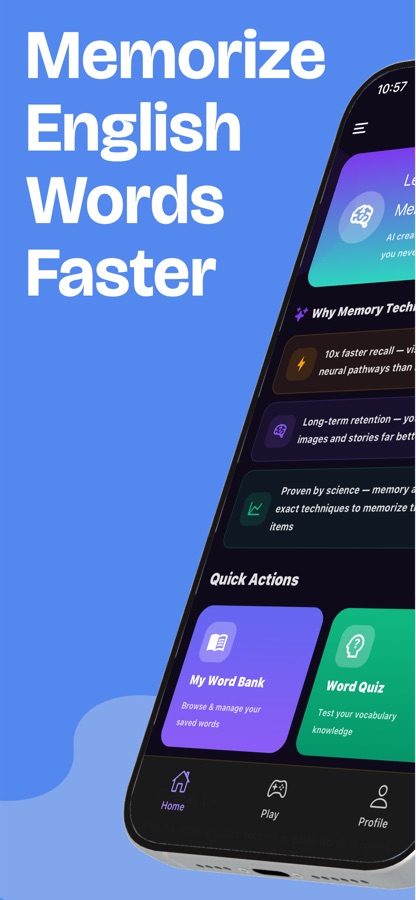
English Vocabulary Builder is an iOS and Android app that helps you memorize English words using visual memory techniques. For each word the AI writes a short illustrated story that links the word to a picture, and a word quiz checks what stuck. Words you save go into a personal word bank, there are vocabulary games, and a challenge mode lets you compete with friends by code.
Inside the app
What it looks like
Background
What is the fastest way to memorize English vocabulary and not forget it?
The most reliable way is to combine three things: attach each new word to a vivid image or story, review it at growing intervals, and test yourself instead of rereading. A word met once and never revisited is lost within days. Learning ten words well and reviewing them on schedule beats skimming a hundred.
Mnemonics and imagerygive the word a hook
A mnemonic links the sound or spelling of a new word to a picture. Imagining a bakery stand piled with more buns than anyone could eat is a hook for abundant, and the stranger the image, the easier it is to recall.
Spaced repetitionreview just before you forget
Memory fades along a predictable curve, so reviewing a word after a day, then a few days, then a week fixes it far better than cramming. Even without a scheduling tool, coming back to a short list on a rhythm like this beats one long session.
Active recalltest, do not reread
Trying to produce the meaning or complete a sentence strengthens memory more than looking at the answer. That is why quizzes, flashcards and fill-in-the-blank exercises matter as much as the first encounter with a word.
Words in contextmeaning plus use
A word learned inside a sentence or a story comes with how it is used, which a one-word translation cannot give. Context also makes the word easier to use in your own speaking and writing.
How it works
How a session works
A session is a handful of words, each learned through a story, saved to your word bank and then checked with a quiz.
Pick a word and read its story
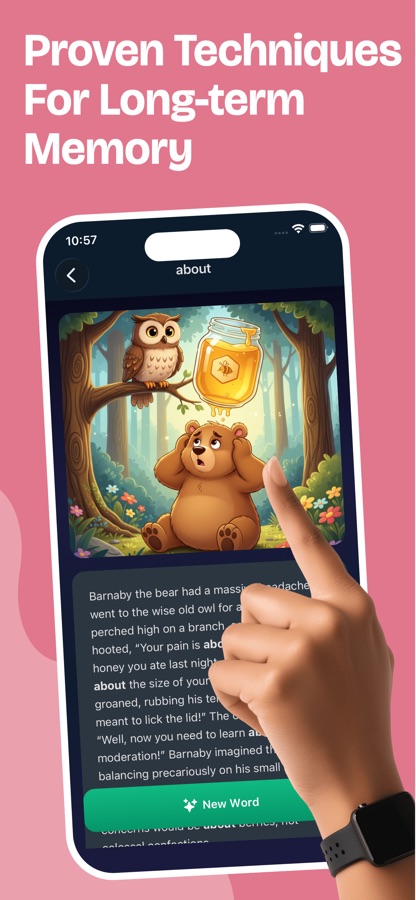
Choose a word from the Essential Words list. The AI Memory Technique writes a short illustrated story built around it, with the word highlighted wherever it appears, and a New Word button moves on to the next one.
Save it to your word bank
Add the word to a list in your word bank. Words are marked Not Learned until you have them, so you can see what still needs work.
Test what stuck
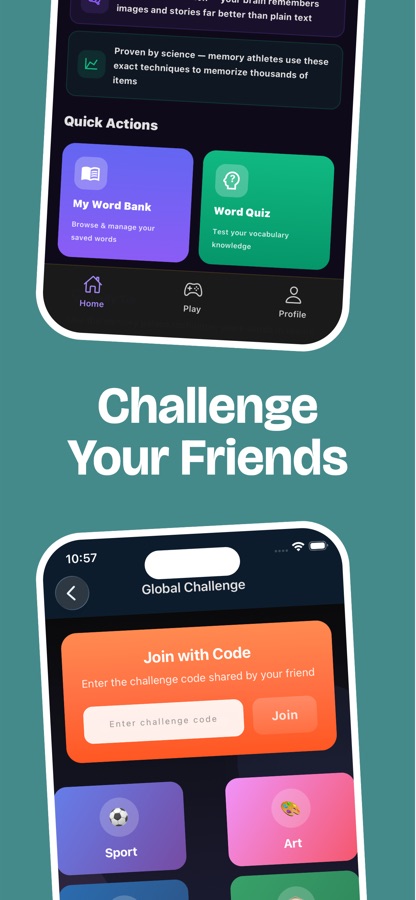
The Word Quiz on the Home screen checks your vocabulary, and the Play tab has word games and a Global Challenge for a faster, more playful round.
What's inside
What comes with the app
AI
AI Memory Technique
Generates a visual story for a word so you link it to an image instead of repeating it. Free accounts get one story a day; Pro lifts the limit.
942
Essential Words list
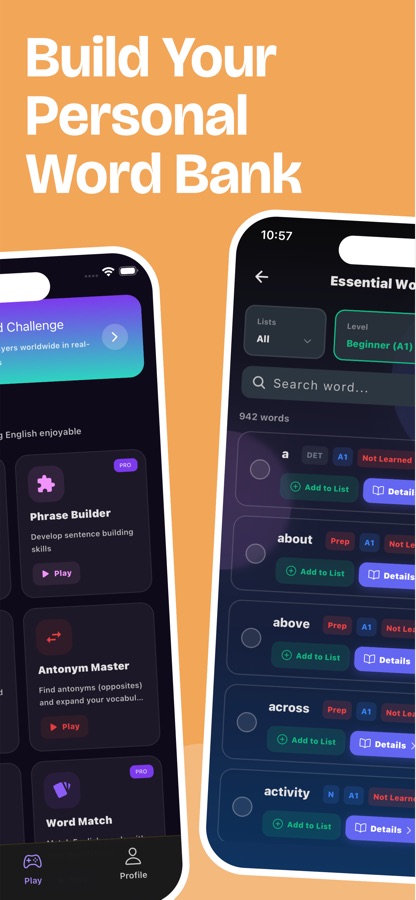
A beginner-level list of 942 words you can filter by list, level and word type, with a details page for each word and a marker for words not yet learned.
Quiz
Word Quiz
A vocabulary quiz one tap from the Home screen, to check which words you can really recall.
Bank
Personal word bank
Save words into your own lists and browse or manage them whenever you want, a bank built from the words you actually study.
Games
Vocabulary games
Phrase Builder, Antonym Master and Word Match turn word knowledge into short rounds, with some games marked Pro.
Friends
Global Challenge
Join a challenge by code shared by a friend, or pick a topic such as sport or art, and compete on word games.
Fit
Who it's for — and who it isn't
A good fit if you
- Learn new words but forget them within a week
- Find word lists boring and want a picture or story to hang each word on
- Prefer a few well-learned words a day to a long list
- Want a word bank built from the words you actually study
- Like a friendly challenge with a friend to keep going
Not the right tool if you
- Need grammar, speaking or a full course: this app is about vocabulary
- Want unlimited AI stories without upgrading, since free accounts get one a day
- Learn best from definitions and example sentences without imagery
- Need a word list tied to one specific exam
Questions
Frequently asked questions
What is the best vocabulary builder app for English?
The best one pairs a memory method with regular testing. English Vocabulary Builder gives each word an illustrated story, keeps your saved words in a word bank and checks them with a word quiz and vocabulary games. That mix of image, recall and play helps a word stay in memory, and the app is free to start on iOS and Android.
How do I memorize English words faster?
Link each word to a vivid image, return to it after a day and again after a few days, and test yourself instead of rereading. English Vocabulary Builder supports this routine with an AI story for the word, a word bank that marks what you have not yet learned and a quiz that makes you recall the meaning.
How does the AI Memory Technique work?
You pick a word and the AI writes a short story around it, shown with an illustration, so the word comes with a picture and a situation. The word is highlighted in the text, and a New Word button moves to the next one. Free accounts can generate one story a day, and Pro removes the limit.
Does the app help me review words so I keep them?
Yes. Words you save stay in My Word Bank marked Not Learned until you have them, so you know what to go back to, and the Word Quiz tests whether you can recall them. For a lasting effect, return to the same words over several days rather than once; English Vocabulary Builder keeps them in one place for that.
Can I build my own word list?
Yes. You can add any word to a list from the Essential Words list or from your own study, then browse and manage the words in My Word Bank. Each word has a details page, and words stay marked as Not Learned until you have them, which makes it easy to see what to work on next.
Does English Vocabulary Builder include quizzes and games?
Yes. Beyond the AI stories there is a Word Quiz on the Home screen, plus word games such as Phrase Builder, Antonym Master and Word Match, some of them marked Pro. A Global Challenge lets you join friends with a code or play a topic such as sport or art.
Is English Vocabulary Builder free?
The app is free to download on the App Store and Google Play. Free accounts can generate one AI memory story a day and some features are limited, while Pro unlocks unlimited use. You can start learning words immediately, and prices are shown in the app.
Why does the app have different names, such as MemoryMaster and Memorize English Words Fast?
They are the same app. Google Play lists it as "English Vocabulary Builder", the App Store currently lists it as "Memorize English Words Fast", and the home screen inside the app shows the name MemoryMaster. Its focus is the same everywhere: memorizing English words with memory techniques.
What level of English do I need?
A beginner level is enough to start. The Essential Words list begins at A1 with everyday words such as about, above and across, and you can filter by level as you progress. The stories and quizzes work with the words you choose, so the app adapts to what you are learning.
Which platforms and languages does it support?
English Vocabulary Builder runs on iOS 15.1 or later and on Android, and the app is available in 22 languages. It is rated 4+, so it suits teenagers and adults, and anyone else who is learning English words.
Get started
Learn your first word with a story
Free to start on iOS and Android, in 22 languages.
More from CoddyKit
Available on iOS and Android.