
Learn English with AI Stories
Learn English with AI Stories — Read and listen to stories at your level and keep the words you meet
Learn English with AI Stories is a free iOS and Android app for learners at beginner to intermediate level who want English reading practice built around stories. Pick a story at your level, follow the text while the audio narration plays, tap any word you do not know to see its translation, and save it to your Word Bank. With Pro, an AI story generator writes a new story from a topic, a genre and words you choose.


- Price
- Free, Pro upgrade
- Platforms
- iOS and Android
- Languages
- 36
- Age rating
- 4+
- Requires
- iOS 15.1 or later
You remember a word better when you met it in a sentence.
A word list gives you a meaning with nothing around it. A story gives you the same word inside a scene, next to the words it usually keeps company with, and that is why the app lets you tap a word mid-page instead of sending you to a separate vocabulary screen.
What it is
Learn English with AI Stories is an iOS and Android app for learning English by reading and listening to stories. A library of stories is sorted by level and genre, each story is read page by page with audio narration at an adjustable speed, and any word can be tapped for its translation and saved to a Word Bank. Pro adds an AI story generator that writes a story from your topic, genre and chosen vocabulary, plus a set of English word games.
Inside the app
What it looks like
Background
Can you learn English by reading stories, and at what level should you start?
Reading stories is a long-established way to build English, and teachers often call it extensive reading: you read a lot of text that is easy enough to follow without stopping, so new words arrive inside sentences you already mostly understand. It works best at a level slightly below your limit rather than far above it. Stories do not replace speaking or writing practice, but they give steady exposure to natural vocabulary and sentence patterns, which is the part most learners find hardest to get on their own.
Levels from beginner to advancedthe CEFR scale
Learners are commonly placed on the six-step CEFR scale, A1 to C2. A beginner story uses short sentences and everyday words, while an upper-intermediate one carries longer sentences and abstract ideas. Starting at the level where you understand most of a page is far more useful than starting at the level you hope to reach.
Extensive readingvolume over difficulty
The aim is to read many pages with only the occasional unknown word, not to decode every line. If you meet more than a few unfamiliar words per paragraph, the story is probably above your level, and choosing an easier one will do more for you than pushing through.
Learning words in contextmeaning plus company
A word learned from a sentence comes with its usual partners and its tone, so you also learn how it is used. Looking up the odd word and moving on keeps the story going, which helps memory more than stopping at every unknown term.
Reading while listeningeye and ear together
Following a written text while hearing it read aloud links spelling to sound. It also gives a model of rhythm and stress for words whose spelling gives no hint of how they are said.
How it works
How a reading session works
A session is one story, read a page at a time. The tools for words and listening sit on the same screen as the text.
Choose a story at your level
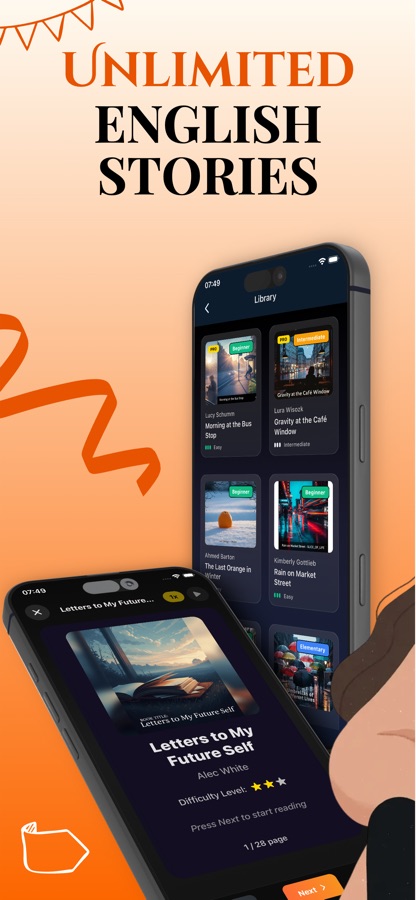
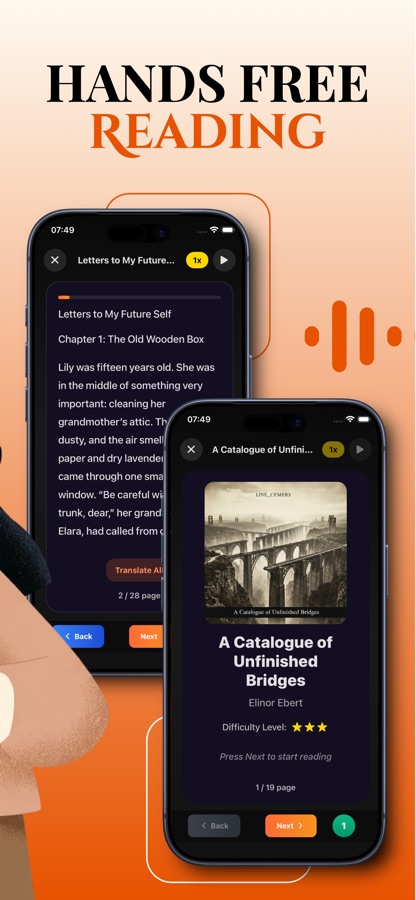
Open the library and browse stories marked Beginner, Elementary or Intermediate, each with a difficulty rating shown in stars. Explore by genre, or continue the story you left unfinished from the home screen.
Read and listen together
Stories open with a cover and then run page by page. Press play to hear the narration, change its speed, or turn a whole page into your native language and switch back with Show Original.
Tap, save and review
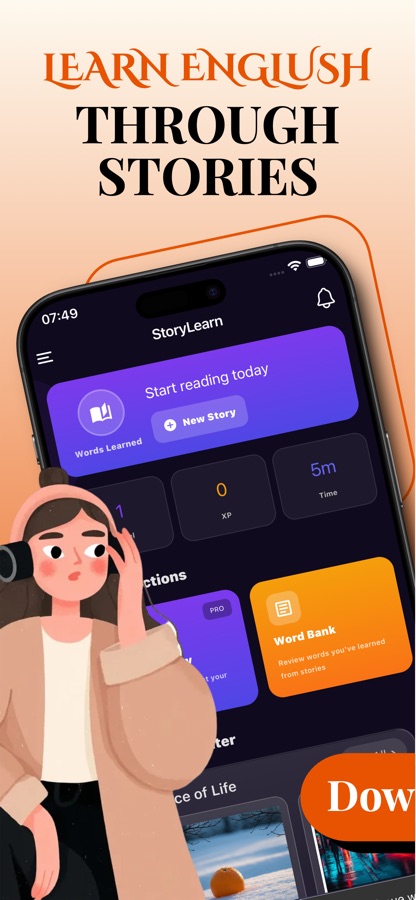
Tap any word to see its translation and add it to a list. Saved words collect in your Word Bank, and the home screen tracks words learned, experience points and reading time.
What's inside
What comes with the app
AI
AI story generator
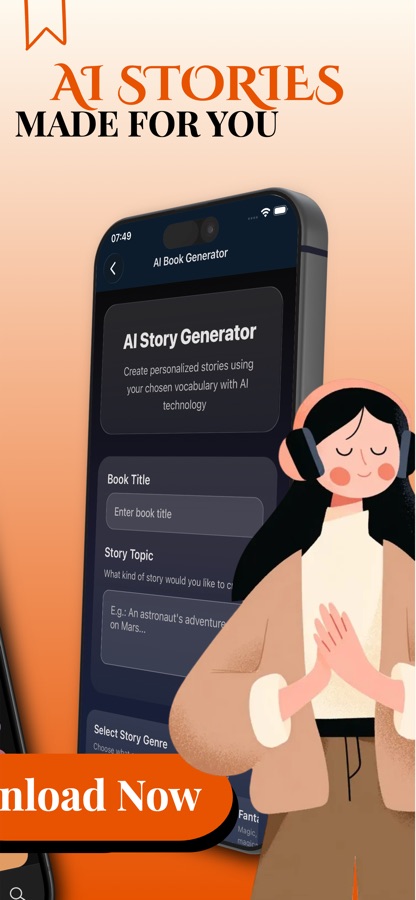
Give a title, describe a topic, pick a genre and a difficulty level, and add words from your own vocabulary list. The app writes a story that uses them. The generator is part of Pro.
Levels
Stories by level
The library labels stories Beginner, Elementary or Intermediate and gives each a star difficulty rating, so you can read at the level that suits you today.
Audio
Narration with speed control
Play or pause the narration on any page and adjust the playback speed while you follow the text, for listening practice that sits inside the reading.
Tap
Word translation
Tap a word to see its translation and save it to a list, or translate the whole page into your own language when a passage is stubborn.
Bank
Word Bank
Words you save from stories are kept in one place, with a running count of words learned shown on the home screen.
6
English word games
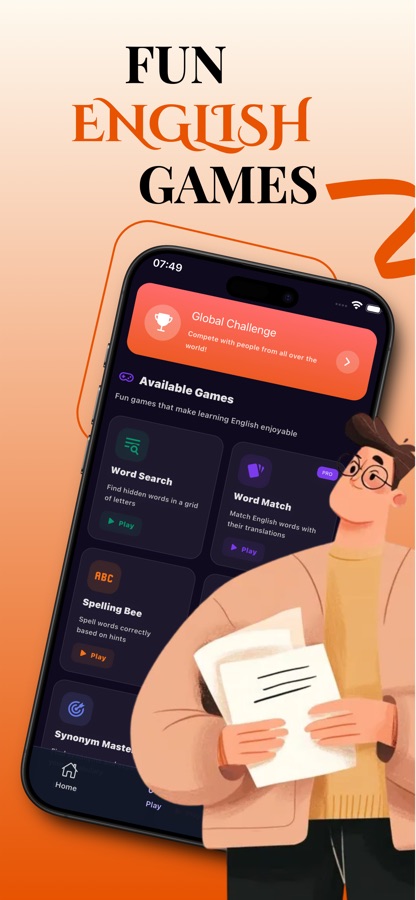
Word Search, Spelling Bee, Synonym Master and Antonym Master are open to all; Word Match and Phrase Builder are Pro. A Global Challenge entry sits above them on the Play tab.
Fit
Who it's for — and who it isn't
A good fit if you
- Want to read English for practice and would like the text to match your level
- Learn better by hearing the words while following the page
- Prefer picking up vocabulary from a story to memorising a list
- Have a favourite genre, from mystery to sci-fi, and want stories in it
- Want a few spare minutes with a short game after reading
Not the right tool if you
- Need speaking practice with a teacher or a partner; the app is built around reading and listening
- Want a structured grammar course with lessons and exercises for each rule
- Expect every feature at no cost; the AI story generator, some stories and two games are Pro
- Prepare for a specific exam and need exam-style tasks
Questions
Frequently asked questions
What is the best way to learn English with stories?
Read at a level where you understand most of each page, so new words arrive inside sentences you can follow. Learn English with AI Stories sorts its library by level, adds narration so you can hear the text, and lets you tap an unknown word and save it instead of stopping to look it up elsewhere. Reading a little every day, and moving up a level once pages feel easy, gives steadier progress than rare long sessions.
Does the app have audio, and can I change the speed?
Yes. Each story page has a play button for audio narration, and the narration speed can be changed while you read. That lets you follow the written text and hear it at the same time, which is useful for English listening practice because spelling and sound are linked on the same screen.
Can I translate words or pages into my own language?
Yes. Tapping a word shows its translation and lets you add it to a list. A Translate All button translates the whole page into your native language, and Show Original returns to the English text. Using it for the odd hard word keeps the story moving, whereas translating every line tends to slow down the reading skills you are trying to build.
How do the AI stories work?
In the AI story generator you give a title, describe a topic, choose a genre and a difficulty level, and can add words from your own vocabulary list to be used in the story. The app then writes a new story around them, so you can practise the words you are actually learning. The generator is part of Pro. Because the text is written by an AI, treat it as reading practice rather than as a model of perfect style.
Which English levels does Learn English with AI Stories cover?
The library labels stories Beginner, Elementary or Intermediate and shows a star difficulty rating on each book, and the app asks for your level when you set it up. That covers readers from first simple sentences up to ordinary adult fiction. Learners at the very top of the scale will find the library thinner than the lower levels.
Is Learn English with AI Stories free?
It is free to download and you can read stories, tap words and save them to your Word Bank without paying. Some stories are marked Pro, and Pro also unlocks the AI story generator and two of the six games, Word Match and Phrase Builder. The price is shown before you buy, and the app is rated 4+.
What games are included?
The Play tab has six English word games: Word Search, Word Match, Spelling Bee, Phrase Builder, Synonym Master and Antonym Master. Word Match and Phrase Builder are Pro, and the others are open to everyone. A Global Challenge entry sits at the top of the tab for playing against people around the world.
Will it help me with grammar?
Not directly. Learn English with AI Stories teaches through reading and listening, so grammar is met in context rather than explained rule by rule. Stories written at your level show structures such as tenses and word order in use, and the Phrase Builder game practises putting words into a sentence, but there is no grammar course in the app.
Can I use the app in my own language?
Yes. The interface of Learn English with AI Stories ships in 36 languages, and the story text itself is always English, because that is what you are learning. When a page is hard, the Translate All button shows it in your native language. Setting your native language during setup lets the app show translations in the language you actually read.
Can the app remind me to read every day?
Yes. During setup it offers a reading reminder, and you can choose the time. The app asks before it sets a daily reminder, and you can turn it off again in Settings. A short reminder suits this kind of practice, since one story a day adds more English than a long session once a month.
Get started
Start with one story today
Learn English with AI Stories is on iOS and Android: stories by level, narration, word translation and a Word Bank.
More from CoddyKit
Available on iOS and Android.