

Habit Garden: Sprig
Habit Garden: Sprig — A gentle habit tracker where every check-in grows a plant
Habit Garden: Sprig is a free iPhone habit tracker that turns each daily habit into a plant. Check in and it grows from a seed toward a blooming tree. Streaks forgive a missed day, a friendly guide called Fern celebrates your wins, and chapters, quests and a journal give your routine a sense of progress without the guilt of a to-do list.

- Price
- Free, with optional in-app purchases
- Platforms
- iOS
- Languages
- 10
- Age rating
- 4+
- Version
- 1.1
- Requires
- iOS 16.4 or later
Consistency over perfection.
Most trackers punish a missed day by resetting the number and leaving you staring at a zero. Sprig does the opposite: one missed day will not wipe your progress, and the garden waits for you. The point is to make coming back easy, because the routine that survives is the one you return to.
What it is
Habit Garden: Sprig is an iOS habit tracker where each daily routine is a plant that moves through real growth stages as you check in every day, from a tiny seed to a thriving, blooming tree. It has forgiving streaks, a guide named Fern, chapters and quests, a journal of milestones, stats for total check-ins, longest streaks and per-habit completion, and themes, decorations and plant types you can unlock to make the garden your own.
Inside the app
What it looks like
Background
How do you build a daily habit and keep the streak going?
A habit sticks when it is small, attached to a regular moment in your day and easy to resume after a gap. Streaks help because a visible chain motivates you to continue, but a streak that resets to zero after one miss can do the opposite. The most dependable approach is to pick a few habits, keep each one tiny and treat a missed day as a gap to recover from, not a failure.
Start smalla routine you can do on a bad day
A glass of water, two minutes of stretching or one page of a book are easy to repeat even when you are tired. A small action done daily builds the routine first and can grow into more later.
Anchor it to somethinghabit stacking
Tying a new routine to an existing moment, such as reading after dinner or stretching after you brush your teeth, removes the daily decision. The cue is already there, so you only need to act.
Forgiving streakswhy a missed day should not reset you
A single missed day is normal and does not erase the weeks before it. Streak systems that allow for a lapse keep people coming back, because the cost of returning is low.
Visible progressseeing it grow
Turning check-ins into something you can see, such as a plant that grows, a journal of milestones or per-habit totals, gives a reward for showing up that a plain checkmark does not.
How it works
How it works
The app is organised around five tabs: Garden, Journey, Stats, Shop and Settings.
Plant your habits
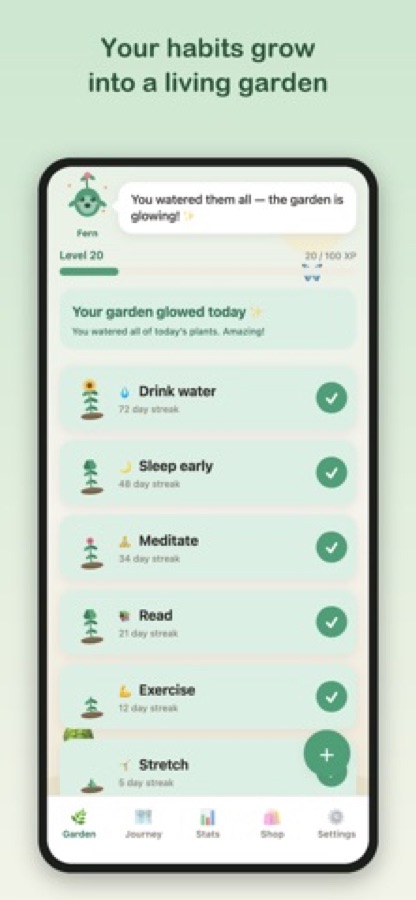
Add a habit such as drink water, read daily, meditate, sleep earlier, exercise or stretch. Each one becomes a plant in your garden with its own growth stage and streak.
Check in each day
Tap a plant when you have done it and it grows. Water every plant in a day and the garden glows, with a message from Fern.
Follow the journey and see the stats
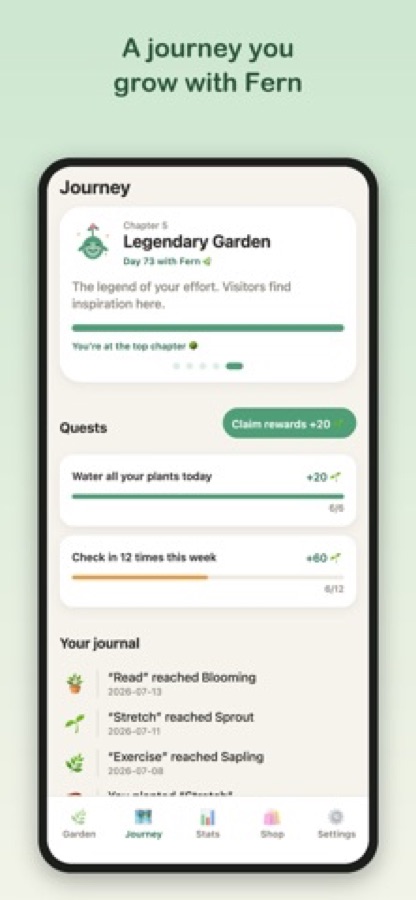
Move through chapters, complete quests for rewards, read the journal of milestones such as a plant reaching Blooming, and check totals, longest streaks and per-habit completion on the Stats tab.
What's inside
What comes with the app
Plants
Each habit is a plant
Show up daily and watch each plant move through real growth stages, from a tiny seed to a blooming tree.
Kind
Streaks that forgive
Build momentum with streaks, but one missed day will not wipe your progress. The garden waits for you.
Fern
A journey with a guide
Progress through chapters, complete quests and look back on a journal of milestones, with a friendly guide called Fern celebrating each win.
Stats
Clean progress stats
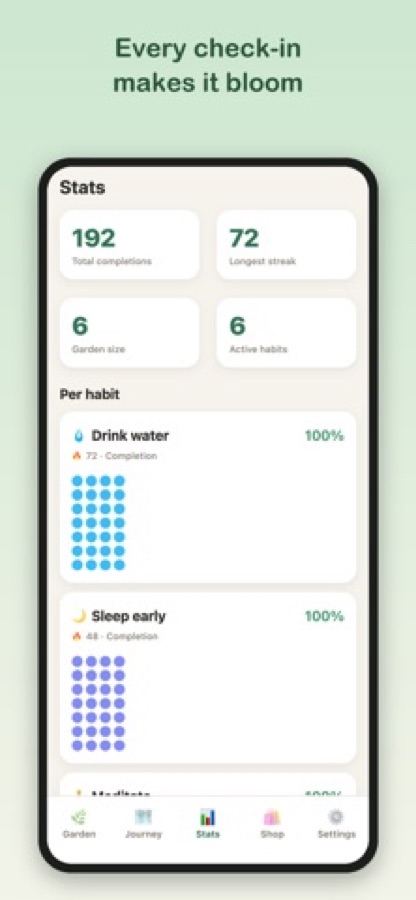
Total check-ins, longest streaks, garden size, active habits and per-habit completion, so small steps add up in front of you.
Shop
Make it yours
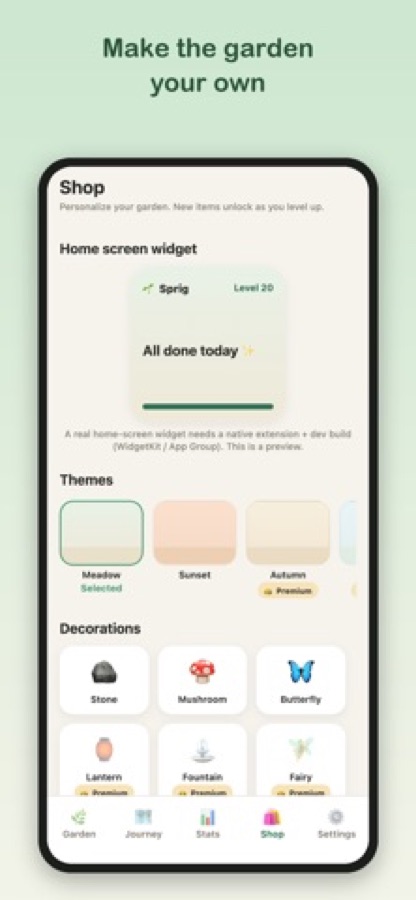
Unlock themes, decorations and new plant types as you level up, and design a garden that feels like home. Some items are marked Premium.
Calm
Gentle reminders
No noise and no pressure, just soft reminders and a space that rewards showing up.
Fit
Who it's for — and who it isn't
A good fit if you
- Have quit trackers before because one missed day made you feel you had failed
- Want a calm, visual way to keep a handful of daily routines going
- Like a little game around your habits, with quests, rewards and decorations
- Want simple stats on your streaks and check-ins without a complicated dashboard
- Prefer a gentle guide to a strict coach
Not the right tool if you
- Need task lists, deadlines or project management, since this tracks daily habits
- Want strict streaks that reset to zero on a miss
- Use an Android phone, as the app is for iOS
- Expect every theme, decoration and plant type to be free, because some items are Premium
Questions
Frequently asked questions
What is a good habit tracker that is not stressful?
Look for one that forgives lapses and rewards returning. Habit Garden: Sprig turns each routine into a plant, keeps streaks that a single missed day will not wipe, and uses a friendly guide instead of warnings. It is built so that coming back after a gap feels easy, which is what keeps most routines going.
How does Habit Garden: Sprig work?
You add habits, and each one becomes a plant in your garden. Checking in each day moves the plant through growth stages from a seed to a blooming tree. Chapters, quests and a journal sit on the Journey tab, and the Stats tab shows total check-ins, longest streaks and per-habit completion.
What happens if I miss a day?
The app is designed to be gentle: one missed day will not wipe your progress, and the garden waits for you. The aim is consistency over perfection, so you can pick it back up the next day without losing everything you built.
Which habits can I track?
Any daily habit you choose. The app's own examples include drinking water, reading daily, meditating, sleeping earlier, exercising and stretching, each shown as a plant with a day streak.
Who is Fern?
Fern is the friendly guide inside Habit Garden: Sprig. Fern comments on your garden, celebrates your wins and travels with you through the chapters of the Journey tab, so progress feels like a story instead of a checklist.
Can I customise my garden?
Yes. In the Shop you can pick a theme, such as Meadow, Sunset or Autumn, and add decorations such as a stone, a mushroom or a butterfly. New items unlock as you level up, and some are marked Premium.
Is Habit Garden: Sprig free?
The app is free to download from the App Store and offers optional in-app purchases. Some themes and decorations are marked Premium, and prices are shown in the app before you buy anything.
What stats does the app show?
The Stats tab shows total completions, your longest streak, garden size and the number of active habits, then a record for each habit with its completion rate. It is meant to show that small steps add up, not to bury you in charts.
Does it have reminders?
Yes, gentle reminders are part of the design, with no noise and no pressure. They exist to nudge you toward your daily check-in, and the app is built to feel calm rather than demanding.
Is Habit Garden: Sprig on iPhone and Android, and why is it called Sprig?
Habit Garden: Sprig is an iPhone app that needs iOS 16.4 or later and is rated 4+; there is no Android version at the moment. Sprig is the name the app uses on its own screens and the other half of its App Store name is descriptive, so both names point to the same app, which has an App Store listing in 10 languages.
Get started
Plant a habit today
Free to download on iOS, with optional in-app purchases.
More from CoddyKit
Available on iOS.