
Productivity · Free · iOS & Android
By CoddyKit
Allowance Tracker - Chores: a family chore chart and allowance tracker
Allowance Tracker - Chores is a free chore chart and allowance ledger for parents. Add each kid, assign chores, and approve completions with one tap. Payday calculates itself from what actually got done, and every payment, bonus, and deduction lands in one ledger per kid. It tracks the money; it never moves or holds it.
- Price
- Free
- Platforms
- iOS and Android
- Age rating
- 4+
- Real money
- Never held or moved
Logged, not remembered.
The weekly argument is really a memory problem — who did what, who was already paid. Once completions and payouts are both written down as they happen, payday stops being a negotiation.
What it is
Allowance Tracker - Chores is a free iOS and Android app for running a family chore chart and allowance ledger. You add each kid, assign daily, weekly, or one-off chores, and approve or reject completions from an approval queue before anything is paid. Each kid gets a Spend and Save balance, a named savings goal, a full transaction ledger, and reports on chores completed and money earned. It records money; it does not move it.
It is a tracker, not a bank account — no card, no transfers, no bank connection. See A tracker, not a bank.
Background
How does a chore-based allowance usually work?
Families generally settle on one of three structures. Some pay per chore, so the amount earned varies with what got done. Some pay a flat weekly allowance with chores expected as a condition of it. Others mix the two — a base amount plus paid extras. Many households also split the money into a spending portion and a saving portion, often against something the child is saving for.
Per-chore payearn what you do
Each task carries its own amount, and the week's total is whatever the child completed. It makes the link between work and money direct, and it makes the payout different every week.
Flat allowancefixed weekly amount
The same amount every week, with an agreed chore list as the condition for receiving it. Simpler to budget for, but it still needs a record of whether the chores were actually done.
Spend and Save splittwo buckets
The balance is divided in two: money available to spend now, and money set aside. Splitting it at the moment of payment is what makes the saved part visible rather than theoretical.
Approval stepbefore it is paid
A child marking a chore done and a parent agreeing it was done are two different events. Keeping them separate is what takes the argument out of payday.
How it works
How the app is used
Setup happens once, per kid. After that the daily part is a tap or two, and the ledger, the savings goals, and the monthly reports are all built from those taps rather than from anyone's memory.
Set up each kid
Add every kid once, each with an avatar emoji and a colour tag so balances are easy to tell apart. Give each one a chore list — daily, weekly, or one-off tasks, each with its own amount — and set the payout rule your family already uses.
Approve what actually got done
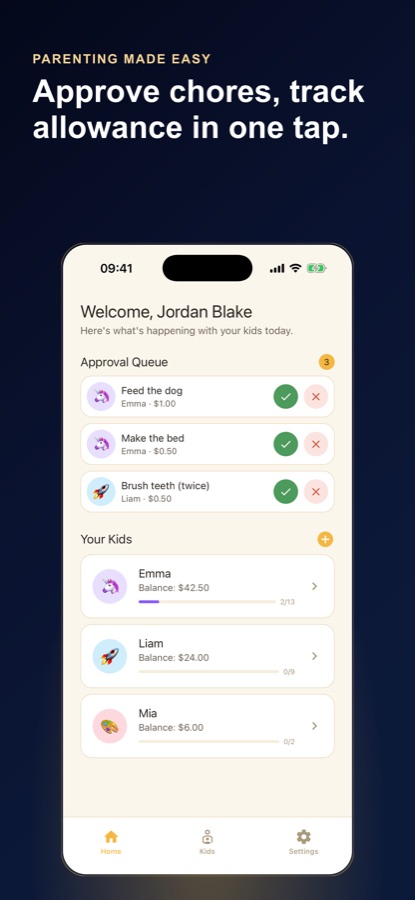
When a chore is marked done it does not pay itself out. It lands in the Approval Queue on the home screen, where one tap approves or rejects it. Approved chores hit that kid's balance straight away, and Undo reverses anything you tapped by mistake.
Read the ledger and the reports
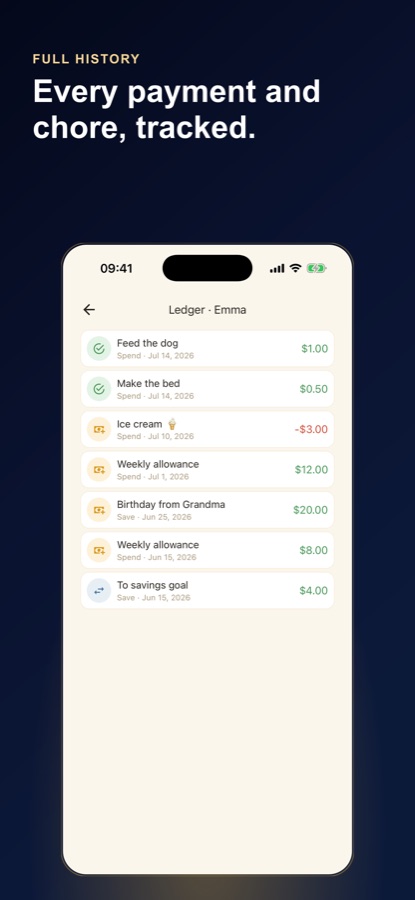
Every payment, bonus, deduction, and move to savings is written to that kid's ledger with a date. Reports roll it up — total earned, chores completed, approval rate, and a per-kid breakdown — so payday is a number you read, not one you reconstruct.
What’s inside
What the app keeps track of
/kid
One ledger per kid
Each child has their own chore list, balance, and dated history. Every payment, bonus, deduction, and transfer to savings is logged where you can find it later.
Daily
Chores on a schedule
Assign daily, weekly, or one-off tasks, each with clear ownership and its own amount. The chore list shows which days a task is expected and what it pays.
1tap
Approval queue
Marking a chore done does not pay it out. It waits in the Approval Queue for a one-tap approve or reject, and Undo reverses a mistap on the ledger and the balance.
3
Flexible payout rules
Pay per chore, pay a flat weekly rate, or mix both depending on the kid and the task. The app follows the way your family already runs allowance.
2
Spend and Save buckets
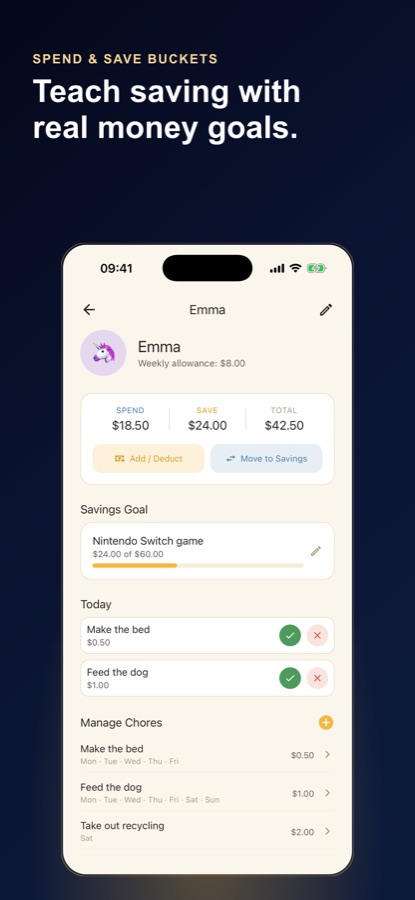
Each balance splits into Spend and Save. Add or deduct money directly, or move an amount across to savings, and both totals update together.
Goal
Named savings goals
Set what a kid is saving for and a target amount, then watch the Save bucket close in on it as a progress bar rather than a bare number.
Inside the app
What it looks like
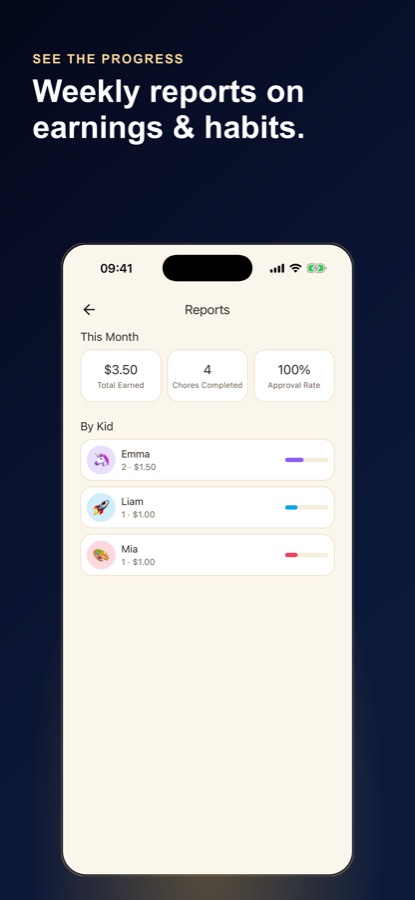
Fit
Who it’s for — and who it isn’t
A good fit if you
- Have more than one kid and want a separate, clear ledger for each
- Are tired of tracking chores and allowance in your head or on paper
- Want completed chores checked and approved before they get paid
- Pay per chore, a flat weekly rate, or some mix of the two
- Have ever paid a kid twice, or the wrong amount, because nothing was written down
Not the right tool if you
- Want the app to actually pay the allowance — it records money, it never moves it
- Are looking for a kids' debit card or a bank account with parental controls
- Expect meaningful reports on day one — completion rates and payout history build from what you log
- Want a spreadsheet you can slice yourself; this gives you a per-kid ledger and reports instead
Safety and limits
A tracker, not a bank
Allowance Tracker - Chores is a record-keeping app. It does not hold, move, or transfer real money, it does not issue a card, and it does not connect to a bank account. The balances in it are a shared record of what you and your child have agreed; the actual cash, or the transfer you make yourself, still happens outside the app.
It also does not give financial advice. How much allowance to pay, whether to pay for chores at all, and what a child should be expected to do are decisions for your household. The app follows the rule you set rather than recommending one.
Questions
Frequently asked questions
What's the best app for tracking kids' chores and allowance?
The useful ones share three things: a separate ledger for each child, a step where a parent confirms a chore was really done before it is paid, and a dated history to check when payday is disputed. Allowance Tracker - Chores does all three — an Approval Queue for one-tap approve or reject, a per-kid ledger of every payment, bonus and deduction, and reports on chores completed and money earned. Free on iOS and Android. It tracks money rather than moving it.
Should kids be paid for doing chores?
Opinion genuinely splits. One view is that some chores are part of belonging to a household and should not carry a price, with paid work sitting on top of that baseline — washing the car, clearing the garage. The other is that money is easier to learn with than to talk about, and a paid chore makes the link concrete. Many families run both: unpaid family jobs, plus a separate list that earns. There is no settled answer; it is a household decision.
How do families decide how much allowance to give?
The amount usually comes from two things: what the household can comfortably spend each week, and what the child is expected to cover with it. A child buying their own snacks, gifts, and small extras needs more than one whose allowance is pure surplus. Age matters mostly because expectations grow with it. Many families set the figure once, note what it is meant to cover, and revisit it yearly rather than renegotiating weekly. Allowance Tracker - Chores stores a weekly allowance per kid, so the agreed number is on record.
What's the difference between a flat weekly allowance and paying per chore?
A flat allowance is a fixed amount paid on a set day, usually with an agreed chore list as the condition for getting it. Per-chore pay varies week to week: each task carries an amount, and the total is whatever actually got done. Flat is simpler to budget and predictable for the child; per-chore ties effort to money more directly but takes more tracking. A mix is common — a base amount, plus extra jobs that earn on top. Allowance Tracker - Chores supports all three, per kid.
How do you stop the argument about whether a chore actually got done?
Write it down at the moment it happens, and separate two events that usually get merged: the child saying a chore is done, and the parent agreeing it is. If both are recorded with a date, payday stops depending on anyone's memory. That is how the Approval Queue in Allowance Tracker - Chores works — a completed chore waits there until you approve or reject it with one tap, and only an approved chore reaches the ledger. If you tap the wrong one, Undo puts the balance back.
What chores can kids realistically be responsible for?
The practical test is whether the task is a single, finishable step the child can do without supervision, and whether you can tell at a glance that it was done. Making a bed, feeding a pet, brushing teeth, clearing a plate, and taking the recycling out all pass that test at different ages. Vague standing duties like being tidy do not, because nobody can agree when they are finished. Chores that are specific and checkable are also the ones a tracker handles well.
Is Allowance Tracker - Chores free, and what devices does it run on?
Yes, it is free to download. It runs on iPhone and on Android phones, and it is rated 4+ in the App Store, the rating used for content suitable for all ages. You set it up on your own phone: add each kid, their chores, their payout rule, and their weekly allowance amount. The kid-friendly chore list means a child can check off what they have done, but nothing is paid until a parent approves it.
Does the app hold or move real money?
No. Allowance Tracker - Chores is a record, not a bank. It does not hold funds, transfer money, issue a card, or connect to a bank account. The balances you see are a shared record of what has been earned, paid, deducted, and moved into savings — the actual cash, or the transfer you make yourself, still happens outside the app. That is also why it works for households that pay in cash, and why nothing in it can be spent by mistake.
Can I track more than one kid?
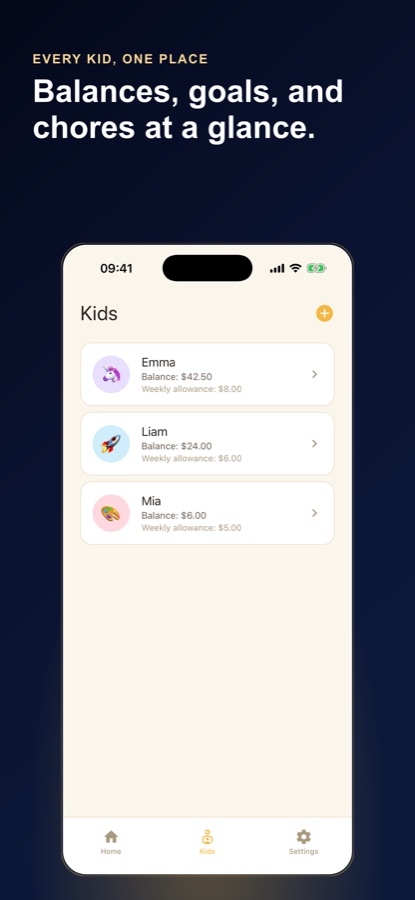
Yes, and that is the main reason to use it rather than a shared note. Each kid is added once with their own chore list, balance, and dated history, plus an avatar emoji and a colour tag so you can tell them apart at a glance. Ledgers stay separate, so a bonus for one child never muddles another's balance. The Kids screen shows every child with their current balance and weekly allowance, and the report breaks completion and earnings down per kid.
How do the Spend and Save buckets and savings goals work?
Each kid's balance is split in two: Spend, which is money available now, and Save, which is set aside. You can add or deduct an amount directly, or move money from Spend across to Save, and both totals update together with the transfer logged in the ledger. A savings goal gets a name — a bike, a particular game — and a target amount, and the Save bucket shows a progress bar against it. Nothing here moves real money; it is a record of what has been set aside.
Start logging
Make payday a number, not an argument
Free on iOS and Android. It tracks the money — it never moves it.
More from CoddyKit
Not a medical device. Does not diagnose or treat any condition.