

Newborn Baby Tracker: MamaNest
Newborn Baby Tracker: MamaNest — A baby tracker that also looks after the mom
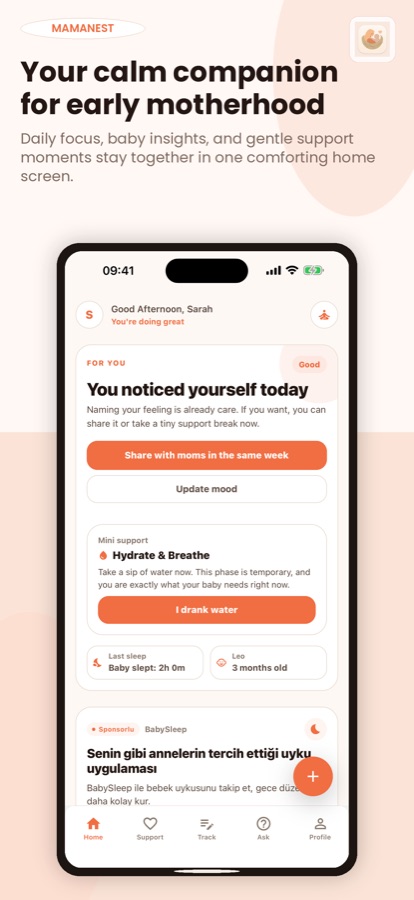
Newborn Baby Tracker: MamaNest is a free iOS and Android baby tracker for moms of babies aged 0 to 2. Log feeding, sleep, diapers and pumping in a few taps, see the day at a glance, ask everyday questions, and take a two-minute calm break when the day feels heavy. It is a support companion, not a medical app.


- Price
- Free, Pro upgrade
- Platforms
- iOS and Android
- Languages
- 10
- Age rating
- 12+
- Requires
- iOS 15.1 or later
You should not have to rebuild the day from memory.
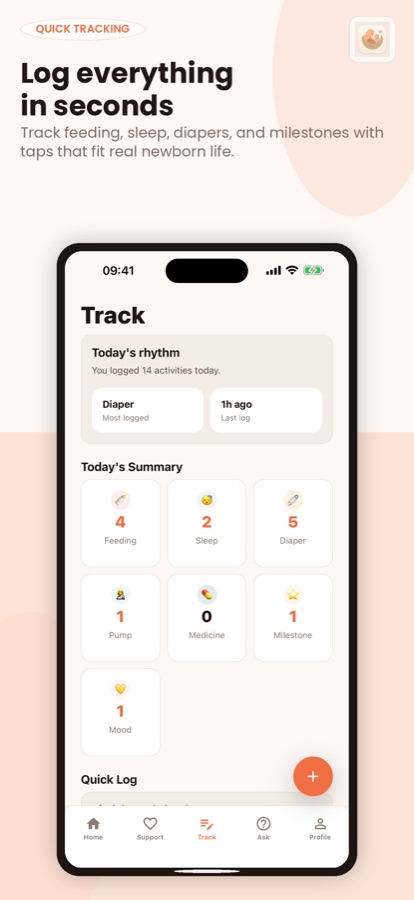
At four in the morning, the last feed, the last diaper and the last nap blur together. MamaNest keeps those care details in one place, with a summary of today at the top, so the answer to when did we last feed is a glance rather than a guess.
What it is
Newborn Baby Tracker: MamaNest is a free iOS and Android baby tracker for moms of babies aged 0 to 2. It logs breastfeeding with a left and right timer, bottle feeds, sleep, diapers, pumping, medicine, milestones and mood, shows today's summary, answers everyday questions with an AI assistant, and adds breathing and grounding breaks for the mother. It is not a medical app and does not diagnose, treat or replace a doctor, midwife or pediatrician.
Inside the app
What it looks like
Background
What is worth logging for a newborn, and what does a tracker not tell you?
In the first months the things most parents are asked about are the basics: when and how the baby fed, how long the baby slept, and how many wet and dirty diapers there were. Logging them with a timestamp turns a blurry week into a record that can be shown at a check-up. A tracker records what happened, though. It cannot say whether a pattern is healthy, so any worry about feeding, breathing, fever or wet diapers belongs with a doctor, midwife or pediatrician rather than with an app.
Feeding logbreast and bottle
For breastfeeding, a timer with a left and right side shows which breast was used last; for bottles, the amount is recorded. The history is useful when two caregivers share the feeds and neither remembers who did the last one.
Sleep and diapersthe other two staples
A sleep timer, or a nap added by hand afterwards, records how long the baby slept. Diaper entries note wet, dirty or mixed, with the time of the last change, which is the number most often asked for at a visit.
Pumping and medicinethe easy-to-forget ones
Pumping sessions are logged by left and right side. Medicine entries keep the name, dose and time of each dose given, so nobody has to guess whether the last dose was at six or at seven.
Mood and the motherthe part most trackers leave out
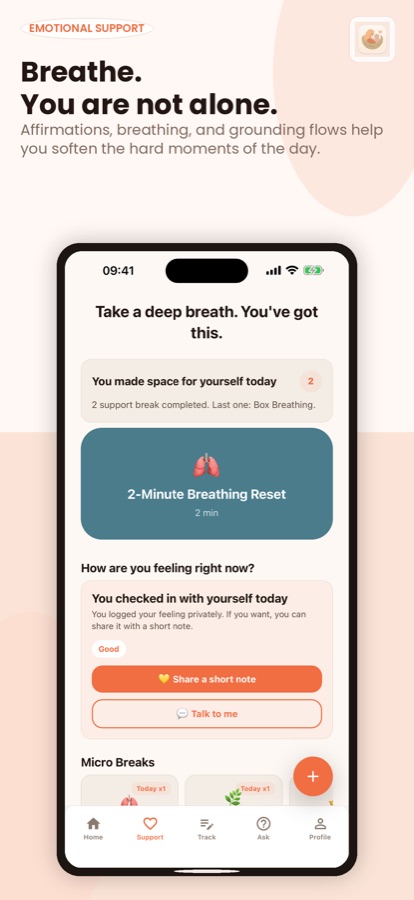
Early motherhood is tiring, and how the mother feels matters as much as the baby's schedule. A mood check-in, a short breathing exercise or a grounding break takes seconds and is meant for the moments when you are stretched thin.
How it works
How MamaNest fits into a day
The app is built to be used with one hand and very little sleep, so each log is a handful of taps and the day is summarised for you.
Log it as it happens
Tap the plus button and pick feeding, sleep, diaper, pumping, medicine, milestone or mood. Breastfeeding has a side timer, sleep has a timer, and a nap can also be added by hand.
Check the day at a glance
The Track tab shows today's rhythm and a summary count for each kind of log, with recent activity you can filter by type. The home screen adds a daily insight for your baby's age and a daily wrap-up at night.
Ask, or take a break
Use Ask for an everyday question, such as why a baby is waking often, or open Support for a two-minute breathing reset. Invite a partner so they can see your daily check-in and ideas for how to help.
What's inside
What comes with the app
7
Things you can log
Feeding, sleep, diapers, pumping, medicine, milestones with a date and an optional photo, and your own mood, each in a few taps.
Today
Summary and recent activity
A count for each kind of log, a note on what was logged most and how long ago the last entry was, and a recent-activity list filtered by type.
Ask
Everyday questions, calm answers
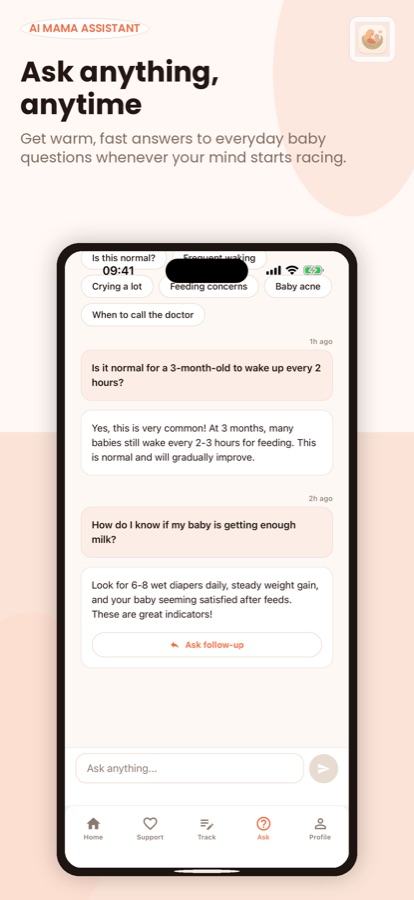
Quick prompts such as frequent waking, crying a lot or when to call the doctor. Answers are written by an AI model using your baby's age and how many entries you logged recently, and they are general information only.
Support
Breathing, grounding and sleep tips
Box breathing, a 5-4-3-2-1 grounding exercise, a gentle neck stretch, daily affirmations, soothing techniques and a sleep regression guide.
Partner
Partner mode and shared journal
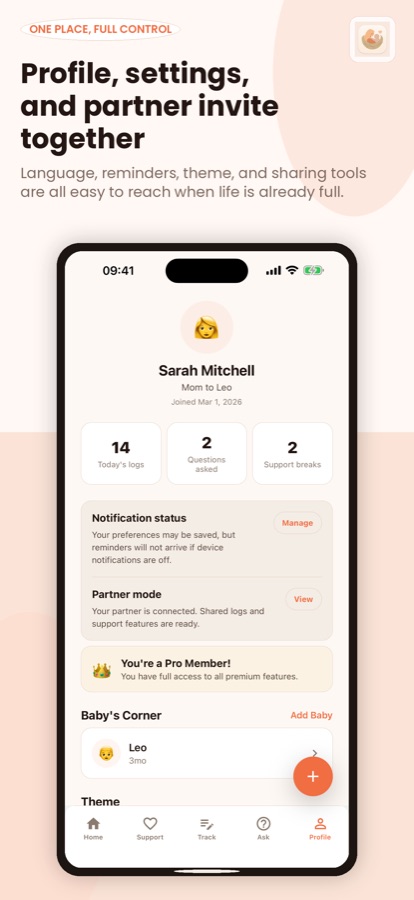
A partner sees your daily check-in and simple ideas for how to help, while your logs and your Ask conversations stay private. A shared journal holds short notes to each other.
Safety
Emergency screen
One tap to your pediatrician's number and a list of warning signs for the baby and for you.
Fit
Who it's for — and who it isn't
A good fit if you
- Are a mom of a baby aged 0 to 2 and want feeding, sleep, diapers and pumping in one place
- Share care with a partner and want them to see how your day went without a long recap
- Want a quick answer to an everyday question and a reminder of when to call the doctor
- Want a two-minute breathing or grounding break built into the same app
- Prefer to start as a guest and sign in later with email, Google, Apple or Facebook
Not the right tool if you
- Need medical advice, a diagnosis or emergency help; the app provides none of these
- Want free unlimited Ask: the free plan gives 3 Ask questions a day and Pro removes the limit
- Need all your data kept only on the phone: logs are stored in your MamaNest account on cloud servers
Safety and limits
Not a medical app
Newborn Baby Tracker: MamaNest is not a medical app and is not medical advice. It does not diagnose, treat or replace your doctor, midwife or pediatrician, and nothing it shows should change how you care for your baby without checking with one of them.
Contact a doctor, midwife or pediatrician about warning signs such as fever in a young baby, breathing trouble, refusing feeds, fewer wet diapers, or heavy bleeding for the mother, and about feeling persistently low or anxious. In an emergency, call your local emergency number rather than opening the app.
Ask answers are written by an AI model and are general information only. They can be wrong or incomplete, so for anything that worries you, ask a professional.
Privacy
What happens to your data
You can use MamaNest as a guest, or sign in with email, Google, Apple or Facebook. Logs are stored in your MamaNest account on cloud servers over an encrypted connection. When you use Ask, your question, your baby's age in weeks and a count of recent entries go to a third-party AI service to write the answer. Google Firebase handles sign-in, notifications and crash and usage reports, RevenueCat handles subscriptions, and your data is never sold. Deleting your account in the app permanently removes your profile, baby logs and support history.
Full details are in the CoddyKit privacy policy.
Questions
Frequently asked questions
What is Newborn Baby Tracker: MamaNest?
Newborn Baby Tracker: MamaNest is a free iOS and Android baby tracker and calm companion for moms of babies aged 0 to 2. It logs feeding, sleep, diapers, pumping, medicine, milestones and mood, shows the day at a glance, answers everyday questions, and offers short breaks for the mother. It is not a medical app.
Is MamaNest the same app as Newborn Baby Tracker: MamaNest?
Yes. Inside the app and in its logo it is called MamaNest. Google Play lists it as Newborn Baby Tracker: MamaNest and the App Store currently lists it as MamaNest - Baby Tracker, so you may see either name. It is one app with the same trackers, Ask feature and support content on both stores.
Can it track breastfeeding and pumping?
Yes. Breastfeeding has a left and right side timer and a feeding history, bottle feeds record the amount, and pumping is logged with left and right sides. All of these trackers are free in MamaNest, so a mother can use them without paying.
What does the Ask feature do, and can I trust it?
Ask lets you type an everyday question about newborn routines, feeding rhythms, sleep changes or the is-this-normal moments. An AI model writes the answer using your baby's age and how many entries you logged recently. The answers are general information only, so for anything worrying, ask your doctor, midwife or pediatrician.
Is MamaNest a medical app?
No. MamaNest does not diagnose, treat or replace a doctor, midwife or pediatrician, and it does not provide emergency care. It includes an emergency screen with one tap to your pediatrician's number and a list of warning signs, but in an emergency you should call your local emergency number.
What is free and what does Pro add?
Free: every tracker, today's summary, 3 Ask questions a day, all breathing, grounding and support content, the daily insight and wrap-up, and the latest notes from moms like you. MamaNest Pro, a monthly or yearly subscription, adds unlimited Ask questions, partner mode and the shared journal, weekly insights and the full moms-like-you feed.
How does partner mode work?
You invite your partner, who can then see your daily check-in and simple ideas for how to help. Your logs and your Ask conversations stay private, and a shared journal holds short notes to each other. Partner mode is part of MamaNest Pro.
What is moms like you?
If you choose to, you can share a short note about how today feels with moms whose babies are about the same age, and see how they are doing. Nothing from your logs is shared; only the note you write, and only when you tap share.
Is my baby's data private?
MamaNest stores logs in your account on cloud servers over an encrypted connection and does not sell your data. Ask sends your question, your baby's age in weeks and a count of recent entries to a third-party AI service, and you can delete your account in the app to permanently remove your profile, baby logs and support history.
Which languages and platforms does it support?
MamaNest runs on iOS through the App Store and on Android through Google Play, and is available in 10 languages. The App Store listing rates it 12+, and it needs iOS 15.1 or later on Apple devices.
Get started
Keep tonight's feeds in one place
Free to start on iOS and Android, in 10 languages.
More from CoddyKit
Not a medical device. Does not diagnose or treat any condition.