
Kids Games: Learn to Code
Kids Games: Learn to Code — Coding games for kids that need no reading, built for parents to trust
Kids Games: Learn to Code is a free-to-start iPhone and iPad app of coding games for kids ages 5-12, made for parents who want calm, educational screen time. A child drags colourful blocks such as move, jump and repeat into a sequence, presses Run and watches a cartoon hero carry out the plan. Nothing needs to be read, and the store listing describes the app as ad-free, offline and free of personal data collection.

- Price
- Free, with optional in-app purchases
- Platforms
- iPhone and iPad
- Levels
- 8, three of them free
- Languages
- 10
- Age rating
- 4+
- Version
- 1.0
- Requires
- iOS 15.1 or later
I told it what to do, and it did it.
That moment is the core idea of coding, and here it happens on the first tap. Underneath the friendly emoji world is a genuine block-execution runtime with sequences, loops, jumps and collisions, the same core concepts that programmers use, taught through play instead of lectures.
What it is
Kids Games: Learn to Code is a free-to-start iPhone and iPad app that teaches the basics of programming through block puzzles. A child snaps blocks like move, jump and repeat into a when-you-press-play sequence and watches an emoji hero act it out, earning one to three stars per level for using fewer blocks. There are eight levels, three free, and no reading is required. Any purchase sits behind a parental gate.
Inside the app
What it looks like
For parents
What does a child actually learn from block coding, and at what age can it start?
Block coding teaches the ideas behind programming without the typing. Children put instruction blocks in order, run them and see exactly what their plan did, which makes sequence, repetition and debugging concrete. The common starting point is the early school years, and a game that needs no reading makes it possible for a five-year-old to begin alone, with a parent nearby.
Sequenceorder matters
A program is a list of steps carried out one after another, so swapping two blocks changes the result. Seeing the hero walk the wrong way teaches that computers do exactly what they are told.
Loopsrepeat instead of copy
A repeat block runs the blocks inside it several times. It is the first idea that separates coding from simply tapping, and it shows why one repeat block can replace five identical ones.
Debuggingfix the plan, not the child
When the hero misses the goal, the child changes the blocks and runs again. Treating a failed run as information, not a failure, is one of the most useful habits coding builds.
Efficiencyfewer blocks, more stars
Stars are earned for solving a puzzle with fewer blocks, which nudges older children toward tidier solutions without any time pressure.
How it works
How a level plays
Each level is a small puzzle on a grid with an emoji hero, a goal and a palette of blocks, and a child can finish the first one in seconds.
Pick a game
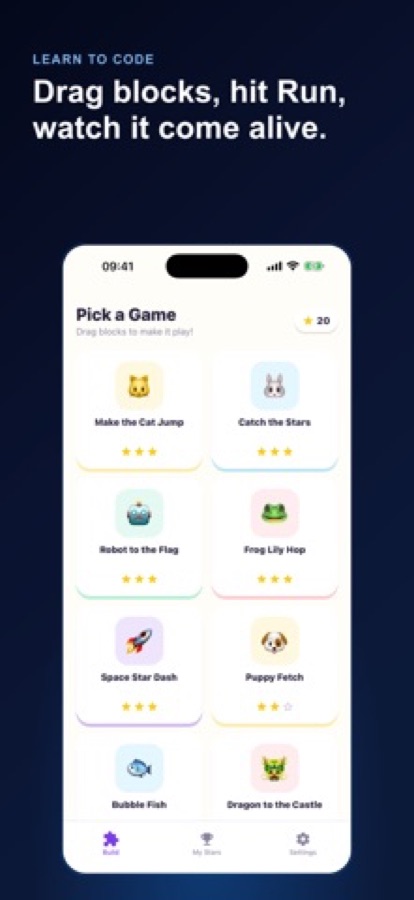
The Build tab shows the games as big picture tiles, such as Make the Cat Jump, Catch the Stars or Dragon to the Castle, each with its stars.
Snap blocks together
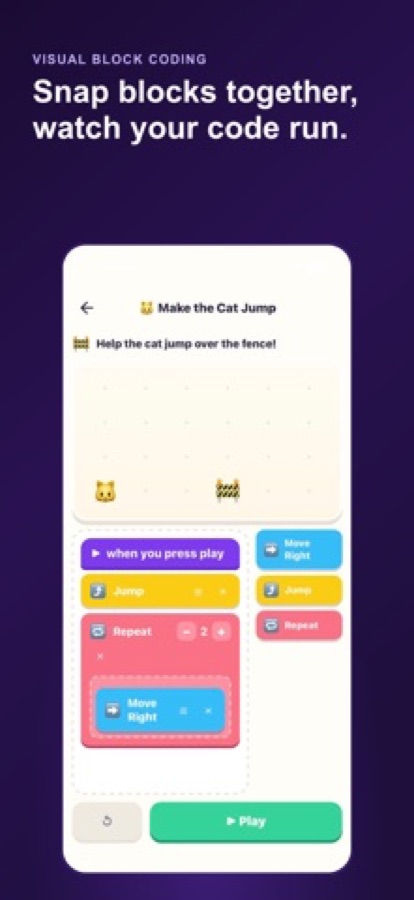
Drag blocks into the when-you-press-play sequence: move, jump or repeat with a number. The goal is shown at the top, for example helping the cat jump over a fence.
Press Run and adjust
The hero acts out the program. If it misses, change the blocks and run again, and finish with fewer blocks for more stars.
What's inside
What comes with the app
0
Reading needed
The whole game is emoji and blocks, so pre-readers and early readers can play on their own.
3
Goal types
Reach the goal, collect the stars or jump the gap, each asking a child to think about the problem differently.
1-3
Stars per level
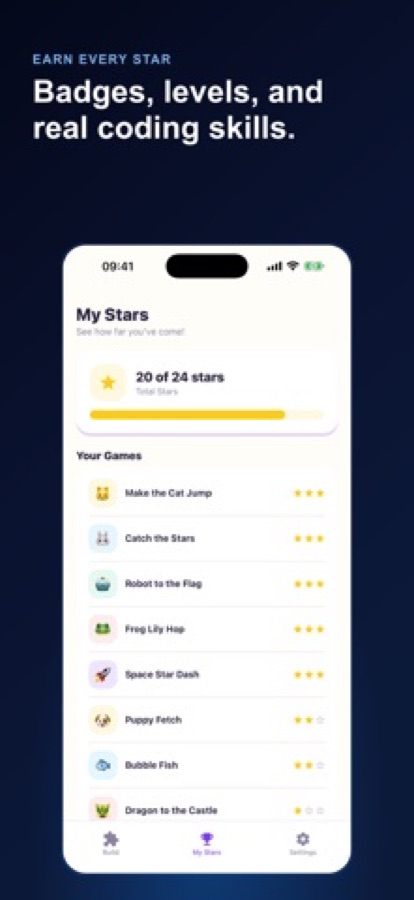
Fewer blocks earn more stars. A total star count only ever goes up, and milestones appear as badges on the Progress tab.
6
Emoji heroes
A cat, frog, rocket, puppy, fish and dragon star in the puzzles.
Gate
Parental gate
Any purchase sits behind an adult-only challenge, so a child cannot buy anything by accident.
Calm
No nagging
No push notifications ask a child to come back, and the app has no chat, social features or leaderboards.
Fit
Who it's for — and who it isn't
A good fit if you
- Are a parent who wants screen time that is educational and calm
- Have a child who cannot yet read long instructions but enjoys puzzles
- Want a child's first taste of sequences, loops and debugging
- Prefer an app without chat, social features or leaderboards
- Like to decide on any purchase yourself, behind a parental gate
Not the right tool if you
- Want a typed-code course for older children, because this is block coding
- Need an Android version, as it is currently on the App Store for iPhone and iPad
- Want dozens of levels from the start, since eight levels are included and three are free
- Expect everything free, as a one-time family unlock opens the five advanced levels
Privacy
Made for parents to trust
The store listing says Kids Games: Learn to Code has no ads, no data selling and no third-party tracking, no chat or social features, and no push notifications, and that play stays on the device. Purchases are protected by a parental gate, so a child cannot buy anything by accident.
Full details are in the CoddyKit privacy policy.
Questions
Frequently asked questions
What are the best coding games for kids who cannot read yet?
Look for games where every instruction is a picture or an emoji, not a sentence. Kids Games: Learn to Code uses coloured blocks and emoji heroes, so children as young as five can play on their own while a parent stays nearby.
How does block coding teach programming?
A child builds a program by snapping blocks such as move, jump and repeat into a sequence, then presses Run and watches the result. Kids Games: Learn to Code is built on sequences, loops and debugging, so the child sees at once whether the plan worked and can fix it.
What ages is it for?
The App Store subtitle says STEM puzzles for ages 5-12. Kids as young as five can play solo because nothing needs to be read, and the star challenge gives older children a reason to find shorter solutions.
Does Kids Games: Learn to Code have ads or tracking?
The store listing says there are no ads, no data selling and no third-party tracking, and that play stays on the device. There is also no chat, no leaderboard and no push notification asking a child to return.
Does it need an internet connection?
The store listing describes the app as fully offline, so the levels can be played without a connection.
What is free and what costs money?
Three starter levels are free, and they cover every goal type and the complete block palette, including loops. An optional one-time family unlock opens five advanced levels and future packs, and it sits behind a parental gate.
Can my child buy something by accident?
No. Any purchase is protected by a parental gate, an adult-only challenge a child is not expected to solve. The decision to unlock more levels stays with you.
How do the stars work?
Each level awards one to three stars, and fewer blocks earn more stars. The My Stars tab shows a total across all levels and a count for each game, and the total only goes up.
Is Kids Games: Learn to Code on Android?
Not at the moment. Kids Games: Learn to Code is listed for iPhone and iPad on the App Store, and there is no Google Play version yet.
Which languages and devices does it support?
Kids Games: Learn to Code is available in 10 languages and needs iOS 15.1 or later. It is rated 4+.
Get started
Let your child run their first program
Free to start on iPhone and iPad, in 10 languages.
More from CoddyKit
Available on iOS.