
Wine Cellar: Bottle Tracker
Wine Cellar: Bottle Tracker — A private wine collection log with drink windows
Wine Cellar: Bottle Tracker is a free iOS and Android app for wine enthusiasts aged 17 and over that manages your wine collection offline. Log each bottle with its vintage, varietal, region and rack, keep searchable tasting notes, and see which wines are ready to drink tonight. There is no public feed and no account needed to start.


- Price
- Free, Pro upgrade
- Platforms
- iOS and Android
- Languages
- 10
- Age rating
- 17+
- Version
- 1.0
- Requires
- iOS 15.1 or later
Stop opening the right wine a year too late.
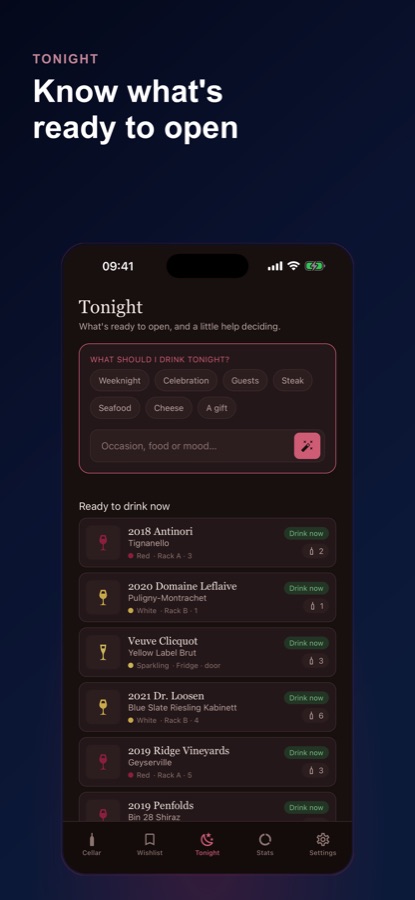
Every bottle gets a drink-window estimate based on its varietal and region, which you can edit. A reminder arrives when a bottle enters its window, so a wine you meant to enjoy at its best does not slip past while it sits in the rack.
What it is
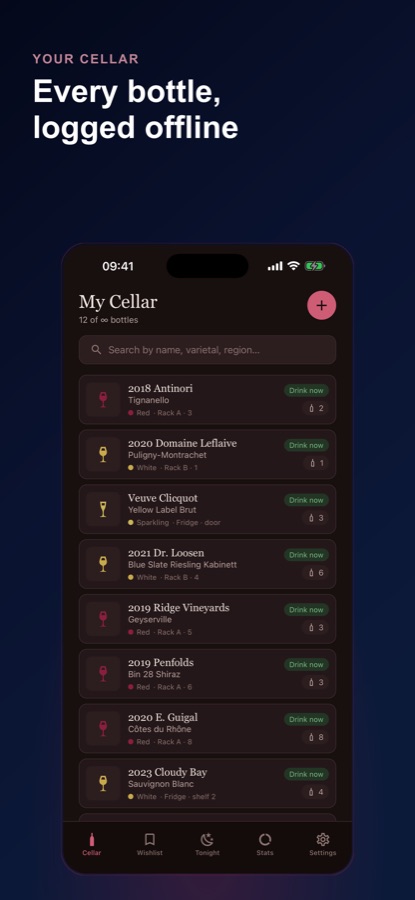
Wine Cellar: Bottle Tracker is a free iOS and Android app that works as a private wine collection log. It records each bottle's producer, vintage, varietal, region, quantity, price and rack position, keeps structured tasting notes tied to the exact bottle, estimates a drink window for every wine and shows which are ready now. It works offline, has no public feed and does not sell or ship wine.
Inside the app
What it looks like
Background
How do you keep track of a wine collection, and when should a bottle be opened?
A collection log needs to answer three practical questions: what do I own and where is it, what did I think of it, and which bottle is ready now. A notes app answers the first badly and the others not at all. Recording the same few facts for every bottle, vintage, varietal, region, quantity and location, makes a cellar searchable, and a drink window turns a list of bottles into a list of decisions about tonight.
Vintage and non-vintagethe year on the label
A vintage wine comes from grapes harvested in a single year, shown on the label, while a non-vintage wine, often marked NV, blends several years. The year matters for how long a bottle is likely to keep, so it is the first field worth recording accurately.
Drink windowan estimate, not a rule
A drink window is the range of years in which a wine is expected to taste its best. It depends on grape, region, producer and storage, so any figure is a starting point that should be edited once you have tasted the wine.
Appearance, nose, palate, finishthe classic note structure
Tasting notes traditionally move through how the wine looks, how it smells, how it tastes and how long the flavour lasts. Following the same order each time makes two notes on different bottles easy to compare.
Rack and bin locationfinding the bottle later
A bottle you cannot find is a bottle you will not open. Recording a rack, bin or shelf next to each wine saves a search through the cellar, and makes the quantity you have left trustworthy.
How it works
How the app works
Wine Cellar is built around three habits: add the bottle when it arrives, write a note when you open it, and look at Tonight before you choose.
Add a bottle when it arrives
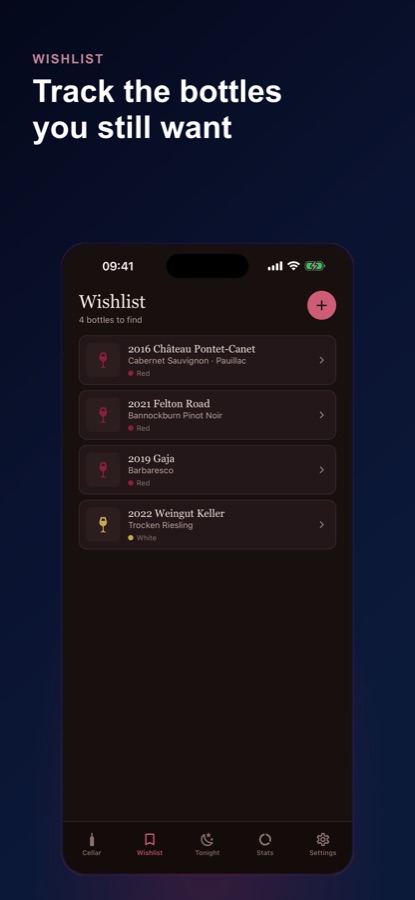
Enter the producer, vintage or NV, varietal, region, country and type, then the quantity, rack or bin, price, purchase date and a photo of the label. Bottles you still want go on the wishlist and move into the cellar the day they arrive.
Open it and write a note
Open a bottle to reduce the quantity and log the tasting in a single step: appearance, nose, palate and finish, a 1 to 5 rating, the occasion and a one-line summary you can search for later.
Check Tonight before you choose
The Tonight tab lists the wines that are ready now, and Pro adds an AI cellar assistant that suggests a bottle from your own cellar for an occasion, a dish or a mood and explains why.
What's inside
What comes with the app
Offline
A cellar that works without signal
Your collection lives on the device, so it works in a real cellar with no reception. Search by name, varietal, region, country or where a bottle is shelved.
25
Free bottles
The free version covers your first 25 bottles. Pro lifts the limit and adds complete collection analytics and an ad-free experience.
Notes
Structured tasting notes
Appearance, nose, palate and finish, a personal 1 to 5 rating and the occasion, each note tied to the exact bottle so the history builds itself.
Window
Drink windows and reminders
An editable estimate for every bottle, an at-a-glance view of what is ready, and a reminder when a bottle enters its window.
Stats
Your cellar at a glance
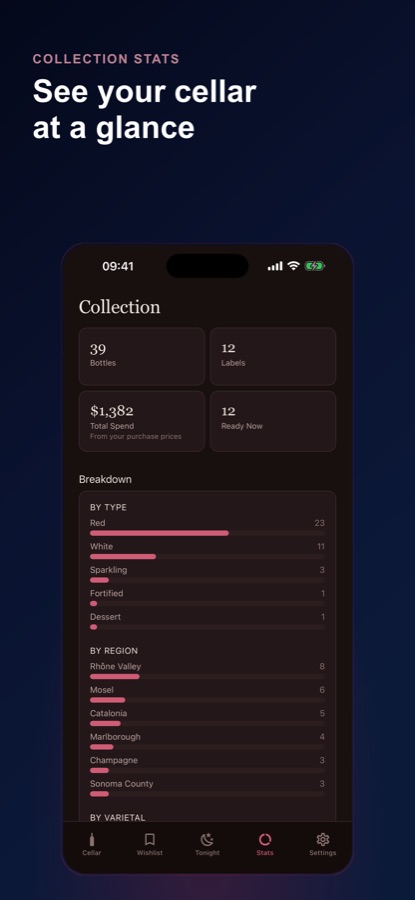
Total bottles, distinct labels, how many are ready, and breakdowns by type, region and varietal. Spend is based only on the prices you entered, never a market estimate.
AI
AI cellar assistant (Pro)
Draft tasting notes, pairing ideas, drink-window guidance and a pick for tonight from your own cellar. It is original guidance, not professional advice and never a valuation.
Fit
Who it's for — and who it isn't
A good fit if you
- Have outgrown a notes app but do not want a social network for wine
- Want to know which bottles are ready to open without opening a spreadsheet
- Like writing a short tasting note each time and being able to find it again
- Keep a cellar or rack with no mobile signal
- Want a wishlist of bottles to buy next kept next to what you already own
Not the right tool if you
- Want to buy, sell or ship wine — the app is not a marketplace
- Expect market prices or valuations of your bottles — spend uses only the prices you enter
- Need a barcode or label scanner — bottles are entered by hand, with an optional label photo
- Are under 17 — the App Store rates the app 17+
Safety and limits
Please enjoy responsibly
Wine Cellar: Bottle Tracker is a collection-management tool for enthusiasts aged 17 and over, built for organising and appreciating wine you already own. It is not a marketplace and does not sell or ship wine.
Drink windows and the AI assistant's suggestions are estimates for your own enjoyment, not professional advice and never a valuation. Please always drink responsibly.
Privacy
Private by design
Your cellar lives on your device. There is no public feed, and no account is needed to begin, so the bottles you log and the notes you write stay with you.
Full details are in the CoddyKit privacy policy.
Questions
Frequently asked questions
What is the best app to track a wine collection?
A good wine collection app records each bottle's vintage, varietal, region, quantity and location, keeps tasting notes, and shows what is ready to drink. Wine Cellar: Bottle Tracker does this offline on your phone, with no public feed and no account needed to start, and the first 25 bottles are free.
Does Wine Cellar: Bottle Tracker work offline?
Yes. The cellar is stored on your device, so you can add bottles, search and write tasting notes in a cellar with no signal. Only the optional AI cellar assistant in Pro needs a connection.
How does the app know when a wine is ready to drink?
Each bottle gets a drink-window estimate from its varietal and region, which you can edit after tasting. The app shows which bottles are ready now and sends a reminder when a bottle enters its window. It is an estimate rather than a guarantee, since storage and producer also matter.
What goes into a tasting note?
A note follows the classic order of appearance, nose, palate and finish, with a personal 1 to 5 rating, the occasion and a one-line summary. Opening a bottle reduces the quantity and logs the tasting in one step, and the note stays tied to that exact bottle.
Can it tell me what a bottle is worth?
No. Wine Cellar: Bottle Tracker never estimates market value. Total spend is calculated only from the purchase prices you enter, so it shows what you paid and nothing more.
Is there a wishlist?
Yes. A separate Wishlist tab keeps the bottles you still want to find, and you can move one into your cellar the day it arrives without typing it in again.
What does the AI cellar assistant do?
In Pro, the AI cellar assistant drafts a structured tasting note for a bottle you own, suggests food pairings with a short reason, gives plain-language drink-window guidance and answers what to open tonight by choosing a bottle from your own cellar. Its output is guidance for your own enjoyment, not professional advice.
Is Wine Cellar: Bottle Tracker free?
It is free to download and covers your first 25 bottles, with tasting notes and the core cellar always yours. Pro, billed monthly or annually, unlocks unlimited bottles, the AI cellar assistant, complete collection analytics, drink-window reminders on every bottle and an ad-free experience.
Does the app sell or deliver wine?
No. Wine Cellar: Bottle Tracker is a personal collection manager, not a marketplace, and it does not sell or ship wine. It is meant to help you organise and enjoy wine you already own.
What platforms, languages and age rating does it have?
Wine Cellar: Bottle Tracker runs on iPhone and iPad through the App Store and on Android through Google Play, in 10 languages with dark and light themes. The App Store rating is 17+.
Get started
Log your first bottle today
Free to start on iOS and Android, in 10 languages.
More from CoddyKit
Available on iOS and Android.