
Watch Collection: Service Log
Watch Collection: Service Log — A watch tracker that keeps every service on schedule
Watch Collection: Service Log is a free Android watch tracker for anyone who owns more than a couple of watches. Catalogue each one, log every service, and let a table of movement-based service intervals work out the next due date, so a mechanical watch never quietly goes years overdue. It is your own collection, kept properly — not a marketplace and not a price guide.

- Price
- Free, Pro upgrade
- Platforms
- Android
- Languages
- 10
A logbook, not a valuation.
The app never estimates, appraises or guesses what your watches are worth. Purchase price is only the number you typed in, so the cost-per-wear figures and the total reflect what you paid, and nothing the app invented.
What it is
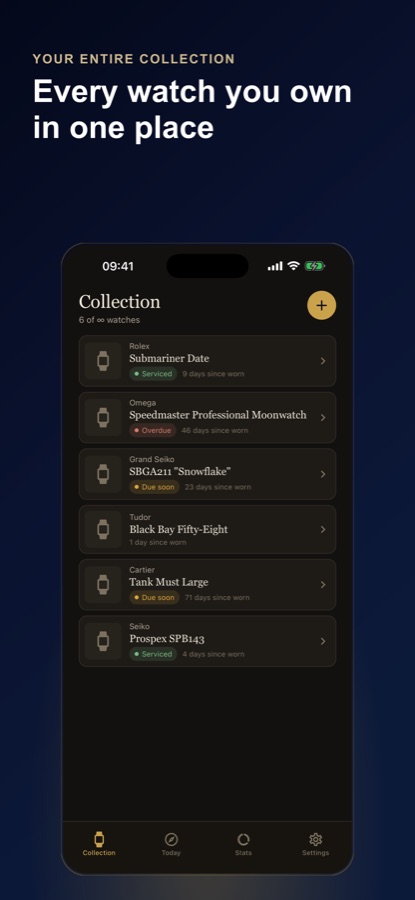
Watch Collection: Service Log is a free Android app that catalogues a watch collection and keeps a maintenance history for each piece. A built-in reference database of 65 models across 20 brands fills in details as you type, and a table of movement-based intervals sets the next due date after every service. It also logs wear, timing in seconds per day and straps, and it never appraises what a piece is worth.
Inside the app
What it looks like
Background
How often does a mechanical watch need servicing, and what is worth keeping a record of?
A mechanical watch is a small engine with oil in it, and the oil ages. Makers commonly recommend a service after several years, and the right interval depends on the movement, the maker and how often it is worn, so check your own maker's guidance. The practical problem for a collector is not the interval itself but remembering which of several pieces was last serviced when, which is a record-keeping problem.
Service intervaldepends on the movement
A hand-wound chronograph and a modern automatic do not share a schedule. Tying the interval to the movement type gives each watch its own next-due date rather than one generic number for the whole box.
Service historywhat to write down
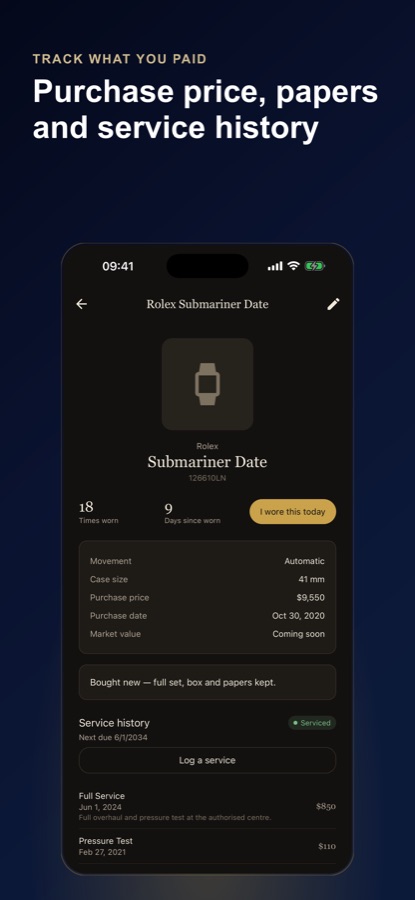
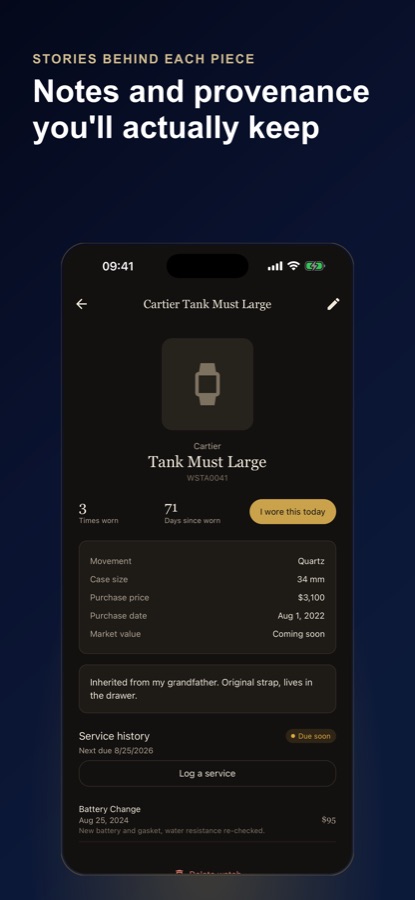
Date, type of service, who did it, cost and any notes such as a pressure test or a new gasket. A complete history makes the next service easier to judge and is useful if it is ever passed on.
Rateseconds per day
A mechanical watch gains or loses a little each day. Recording how far ahead or behind it runs on several days gives its rate in seconds per day, and a rate that drifts over time is one sign it may be due for attention.
Cost per weara collector's ratio
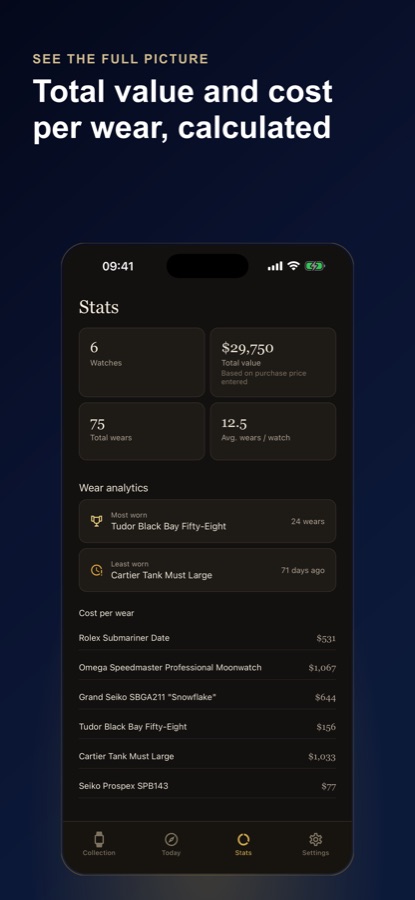
Dividing what a piece cost by how many times you have worn it shows which pieces earn their place in the rotation. It depends entirely on logging wears honestly, which is why a one-tap wear log matters.
How it works
How the app is used
Most of the work happens once, when a piece is added. After that, the app asks for one tap on the days you wear one and a record when you have one serviced.
Add a watch with search-to-fill
Start typing a model name and the reference database fills in brand, reference number and movement type. Then add serial, case size, purchase price and date, a photo and notes.
Log each service
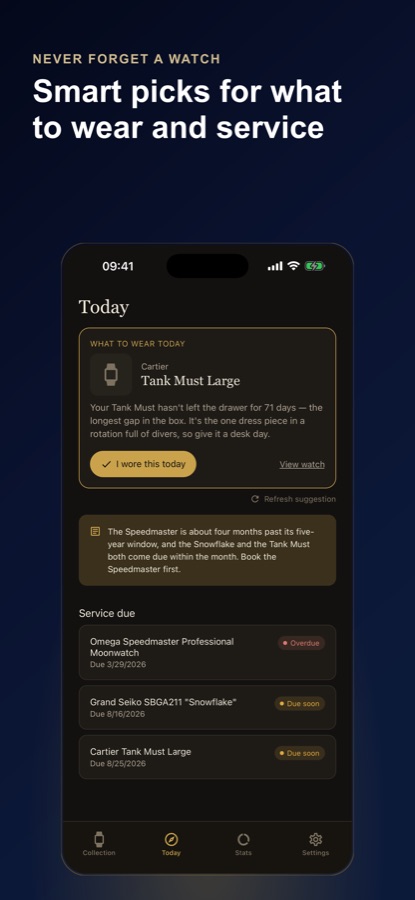
Record the type, date, cost and notes. Every entry recalculates the next due date, and the collection shows each watch as OK, due soon or overdue, sorted by urgency.
Tap when you wear one
The Today tab suggests what to wear from your own wear history, with a one-tap I wore this today, and wear analytics build up from there.
What's inside
What comes with the app
65
Models in the reference database
Across 20 brands, with reference numbers, case sizes and movement types, so a model name fills in the details for you.
Due
Servicing status at a glance
Every piece is shown as OK, due soon or overdue, sorted by urgency, with intervals based on the movement.
Timing
Seconds per day
Record how far ahead or behind a piece runs and see its rate in seconds per day.
Today
What to wear
A pick drawn from your own wear history, with a one-tap wear log.
Straps
Strap and bracelet list
Keep a list of straps and bracelets and see which of your pieces each one fits by lug width.
CSV
Export
A CSV of every watch, maintenance record, wear log and strap, so the record is yours to keep elsewhere.
Fit
Who it's for — and who it isn't
A good fit if you
- Own several timepieces and cannot remember which was serviced when
- Wear mechanical watches that need servicing on a schedule
- Like a record of purchase details, notes and provenance for each piece
- Want to know which pieces you actually wear, and what each costs per wear
- Prefer a private logbook to a marketplace or a price guide
Not the right tool if you
- Want an estimate of what your collection is worth — the app never appraises or guesses a value
- Want to buy or sell timepieces — it is not a marketplace
- Need servicing booked with a watchmaker — it records services, it does not arrange them
- Use an iPhone — this page covers the Android app
Privacy
A guest mode with no account
The app works in guest mode with no account, and service reminders are local notifications that do not need one. The optional AI notes in Pro are built only from your own logged data.
Full details are in the CoddyKit privacy policy.
Questions
Frequently asked questions
What is the best way to track a watch collection?
Keep one record per watch with its model, reference, movement, purchase details and service history, and log each wear. Watch Collection: Service Log does that on Android, fills in model details from a database of 65 models across 20 brands, and shows each piece as OK, due soon or overdue.
How does the app know when a watch is due for servicing?
Each piece is matched to a table of movement-based intervals, so a hand-wound chronograph and a modern automatic get different schedules. Every service you log recalculates the next due date. The intervals are a guide, and the manufacturer's own guidance should take priority.
Does Watch Collection: Service Log tell me what my watches are worth?
No. The app does not estimate, appraise or guess the value of any watch. The purchase price is only the number you entered, so totals and cost-per-wear figures show what you paid and nothing more.
Can it remind me when a service is coming up?
Yes. Reminders are local notifications sent before a service comes due, and no account is required. Pro adds reminders for every upcoming one.
What is cost per wear?
Cost per wear is the purchase price divided by the number of times you have worn a piece. The app calculates it in its wear analytics from the price you entered and the wears you log, and shows your most and least worn pieces beside it.
Can I track how accurately a watch runs?
Yes. You can record how far ahead or behind a watch runs, and the app shows its rate in seconds per day. Logging it over several days makes any drift visible.
Is Watch Collection: Service Log free?
It is free to download. Free covers up to 10 watches with photos and history, the reference database, the interval table, unlimited maintenance entries, wear logging and the Today pick. Pro, monthly or annual, removes the 10-watch limit and adds full wear analytics, AI-written notes built only from your own data, reminders for every upcoming service and no ads.
What does the AI do in Pro?
It writes rotation and service notes built only from your own logged data. It does not look up or estimate market prices.
Can I export my collection?
Yes. A CSV export covers every watch, maintenance record, wear log and strap, so the record is not locked inside the app.
What platforms and languages does it support?
Watch Collection: Service Log is available on Android through Google Play, in 10 languages with light and dark themes. This page does not cover an iPhone release.
Get started
Log your first piece today
Free to start on Android, in 10 languages.
More from CoddyKit
Available on Android.