

Surf Log & Session Tracker
Surf Log & Session Tracker — A surf log that shows which waves, boards and spots work for you
Surf Log & Session Tracker is a free, private surf log and surf journal. After each session you note the spot, the board and the conditions you actually found, and the app turns that history into your own sweet-spot analysis: the wave height, board and spot you personally rate highest. It is a logbook, not a forecast.

- Price
- Free, Pro upgrade
- Platforms
- Android
- Languages
- 10
- Account
- Not needed, works offline
A forecast is the same for everyone on the beach.
Your log is not. A forecast tells you what the ocean is doing; only your own sessions can tell you which of those days you actually surf well on, and on which board. The log is what turns a feeling of having had a good session into something you can compare.
What it is
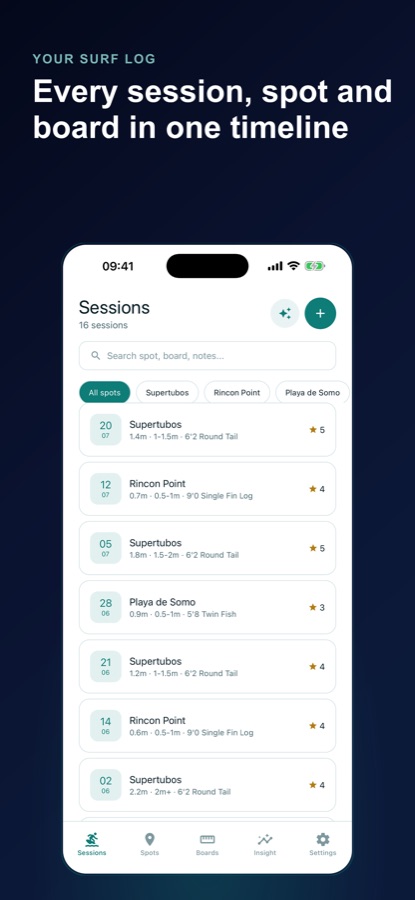
Surf Log & Session Tracker is a free Android surf tracker and surf journal. You log each session in under a minute with the spot, board, wave height, period, wind, tide, duration, a 1 to 5 rating and a note, then the app analyses your own history to show your best wave-height range, top spot and top board. It does not fetch swell charts or tide tables, you type in the conditions yourself, and everything stays on your device with no account required.
Surf Log records what you found; it does not tell you whether it is safe to go out. Check local conditions and lifeguard advice before you paddle out. See Safety and limits.
Inside the app
What it looks like
Background
What is worth writing down after a surf?
The most useful surf notes are the few conditions that change how a wave feels, plus your own verdict. Wave height, swell period, wind direction, tide level and tide movement explain most of the difference between a session you remember and one you forget, and a rating written straight after the surf is more honest than one remembered a month later. A log with those fields filled in for dozens of sessions starts to show patterns that no single forecast can.
Wave height and periodsize and power
Height is how big the waves are; period is the time between swells in seconds. A longer period usually means more power and cleaner lines, while a short period with the same height tends to feel weaker and choppier. Logging both lets you tell two 1 metre days apart.
Windoffshore, onshore, cross-shore
Offshore wind blows from the land toward the sea and tends to hold wave faces up and tidy. Onshore wind blows from the sea toward the land and tends to roughen the surface, and cross-shore blows along the beach. A glassy surface means almost no wind at all, and light or strong describes how much.
Tidelevel and movement
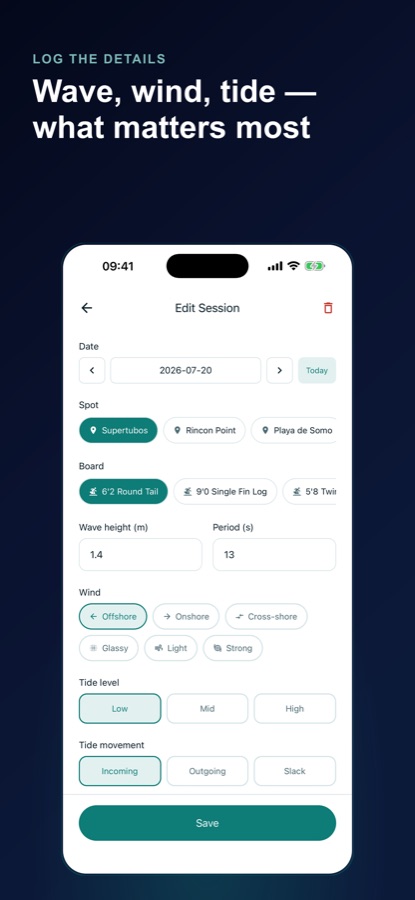
Many breaks work best at a particular tide: some only at low, some only when the tide is filling. Writing down whether the tide was low, mid or high, and whether it was incoming, outgoing or slack, is how you find out which tide a spot suits you.
Board volume and lengththe quiver question
A board's length and volume change how it paddles and turns. A longboard, a fish, a funboard, a gun, a foamie and a shortboard each handle a different range of waves, so noting which board you rode is what lets the log compare them fairly.
Your ratingthe number only you can give
A 1 to 5 score is simple, but a score for each session lets you ask better questions later: which board did I rate highest in offshore wind, and at which spot do I usually have my best day?
How it works
How a session gets logged
Logging takes about a minute at the car or the beach. The analysis only becomes useful as sessions pile up, so the habit matters more than the detail.
Add the spot and board once
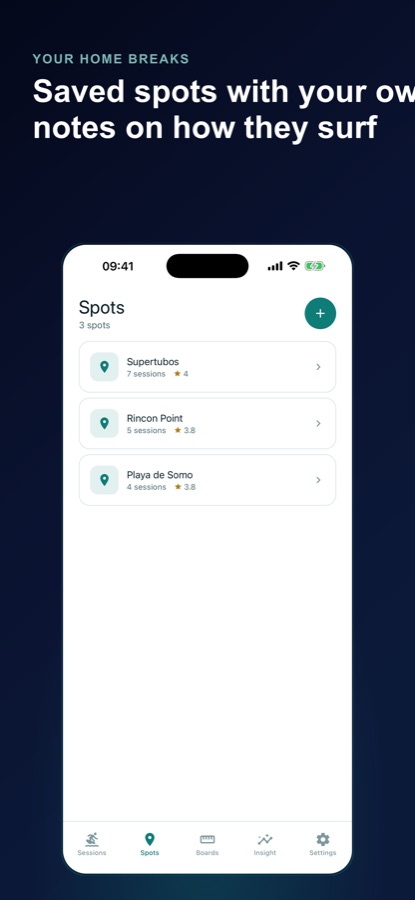
Save the breaks you surf with your own notes on what makes each one work, and the boards in your quiver with length and volume. After that, a session is a pick from your own lists rather than typing names again.
Log the session
Choose the date, spot and board, then enter wave height, period, wind, tide level and movement, how long you were in the water, a 1 to 5 rating and a note. Add a photo if you want one.
Read what your log says
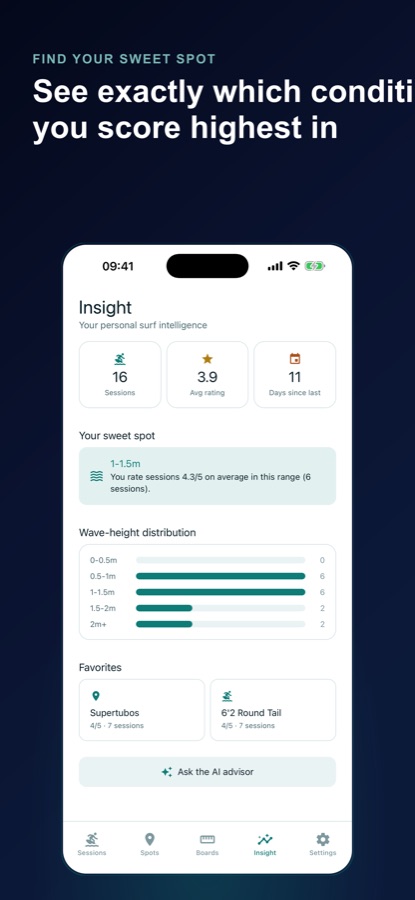
The Insight tab shows total sessions, average rating and days since your last surf. With Pro it adds your sweet-spot wave-height range, top spot, top board and a distribution chart, all worked out from your own ratings with a minimum-sample rule so one lucky day does not set the result.
What's inside
What the app keeps track of
5
Conditions per session
Wave height, period, wind (offshore, onshore, cross-shore, glassy, light or strong), tide level and tide movement, typed in by you from what you saw.
7
Quiver of board types
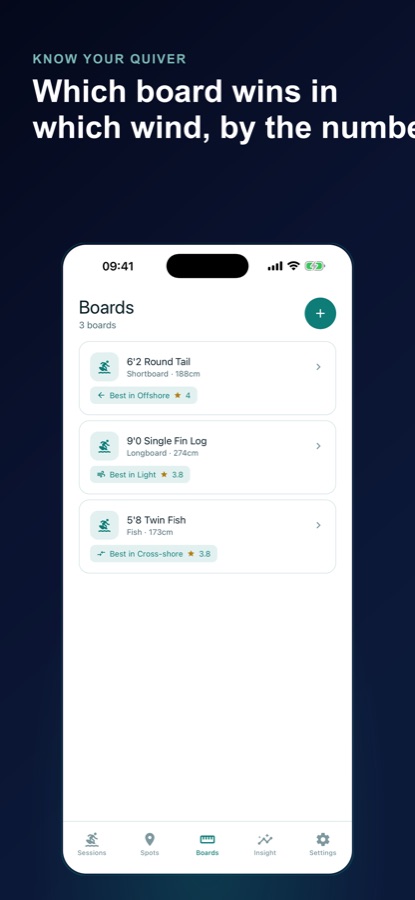
Shortboard, longboard, fish, funboard, gun, foamie or SUP, each saved with length and volume, and each showing its session count and average rating.
Spots
Home breaks with your notes
Save each spot with your own notes on how it surfs. Search and filter the session list by spot to see one break's history on its own.
Sweet
Sweet-spot analysis
Your best wave-height range, top spot, top board and a wave-height distribution chart, plus which wind scores highest on each board. This is plain arithmetic over your sessions, not AI, and it is part of Pro.
AI
AI Surf Advisor and note summaries
Paste a forecast from wherever you check and the Advisor matches it to your history, suggesting which saved spot and board fit and why. Three recommendations are free; Pro removes the limit. AI note summaries turn a long note into a short tagged one at no cost.
Local
Private, with optional reminders
Everything you log stays on your device and the app works offline. Optional weekly session reminders are local to your phone and off unless you turn them on.
Fit
Who it's for — and who it isn't
A good fit if you
- Surf often enough to want to know which waves you actually enjoy
- Own more than one board and want to compare them by your own ratings
- Check forecasts elsewhere and want your own history alongside them
- Surf where there is no signal and want a log that works offline
- Like keeping a journal with photos and notes for each session
Not the right tool if you
- Want swell charts, tide tables or live surf reports; Surf Log does not fetch any
- Want the app to say whether it is safe to surf today; it cannot
- Surf rarely and do not want to type conditions in by hand
- Expect everything free: the sweet-spot analysis, the board condition-fit view, an unlimited AI Advisor, CSV export and an ad-free app are Pro
Safety and limits
Safety and limits
Surf Log & Session Tracker is a logbook. It records what you tell it and does not read the sea, so it is not a forecast, a warning service or advice about whether conditions are safe. The Advisor only compares a forecast you paste in with your own past sessions.
Surfing carries real risks, including rip currents, strong shore break, hidden rocks, cold water and crowded line-ups. Check local conditions and follow lifeguard advice before you paddle out, and read the flags and signs at the beach. A good rating in your log for a certain wave height does not mean the same size is safe for you on a different day or at a different spot.
If a spot is unfamiliar, ask a local or a lifeguard about currents and hazards. Know your own limits and avoid surfing alone in conditions you are unsure about, and treat the log as a way to learn from past sessions, not a reason to go out.
Privacy
What stays on your phone
Everything you log stays on your device, the app works fully offline, and it never requires an account; you can continue as a guest in seconds. The AI Advisor and note summaries are optional features that you choose to use.
Full details are in the CoddyKit privacy policy.
Questions
Frequently asked questions
What is a good app for logging surf sessions?
A good surf tracker records the spot, board and conditions for each session and gives you something back from the history. Surf Log & Session Tracker saves wave height, period, wind and tide with a 1 to 5 rating and a note, and shows which wave heights, boards and spots you rate highest. It is free on Android, offline and private.
Is Surf Log a surf forecast app?
No. Surf Log & Session Tracker does not fetch swell charts, tide tables or reports, and it cannot tell you whether conditions are safe. You type in the conditions you saw, and the app learns from your own history. If you already use a forecast, you can paste it into the Advisor to compare it with sessions you have logged.
How can I find out which wave height suits me best?
Log the wave height and a rating for every session, then compare the averages. After enough sessions Surf Log & Session Tracker shows your sweet-spot range, such as the height band where you rate sessions highest, with a minimum-sample rule so a single great day is not treated as a pattern. The sweet-spot analysis is part of Pro.
What should I record in a surf journal?
The spot, board, date, wave height, swell period, wind, tide level and movement, how long you surfed, a rating and a short note cover most of what changes a session. Surf Log & Session Tracker has a field for each, plus an optional photo, and fills spot and board from your own lists.
Does the surf log work without internet or an account?
Yes. Surf Log & Session Tracker works fully offline, keeps everything on your device, and never requires an account, so you can log from a beach with no signal. Only the optional AI Advisor needs a connection.
How does the AI Surf Advisor work?
You paste in the wave height, period, wind and tide from whichever forecast you use, and the Advisor matches that against your own logged sessions. It suggests which saved spot and board fit, and explains why based on what worked for you before. Three recommendations are free and Pro removes the limit.
Can I track more than one board?
Yes. Surf Log & Session Tracker keeps a quiver of shortboards, longboards, fish, funboards, guns, foamies and SUPs, each with length and volume, and shows the session count and average rating for every board. With Pro you also see the wind condition each board scores best in.
Is Surf Log & Session Tracker free?
Yes to start. Unlimited session, spot and board logging, search, the headline stats, unlimited AI note summaries, three AI Advisor recommendations and local reminders are free. Pro is an optional subscription that adds the sweet-spot analysis, the board condition-fit view, an unlimited Advisor, CSV export and no ads.
Can I export my surf log?
Yes, with Pro: a full CSV export of your log. Because everything is stored on your device, a CSV file is the way to keep a copy or open the log in a spreadsheet.
Is it available on iPhone?
Not at the moment. Surf Log & Session Tracker is available on Android through Google Play, in 10 languages. The page will be updated if that changes.
Get started
Learn from every session
Free on Android, in 10 languages, private and offline.
More from CoddyKit
Available on Android.