

Disc Golf Scorecard & Stats
Disc Golf Scorecard & Stats — A disc golf scorecard, bag and putting log that never loses a round
Disc Golf Scorecard & Stats is a free Android frisbee golf score keeper. Tap through a round hole by hole against par, save every stroke as you go, keep every disc in your bag with its flight numbers, and log putting practice. Stats show the hole that costs you the most strokes, and an optional AI Shot Coach suggests what to work on.

- Price
- Free, Pro upgrade
- Platforms
- Android, on Google Play
- Languages
- 10
- Account
- Not needed to start scoring
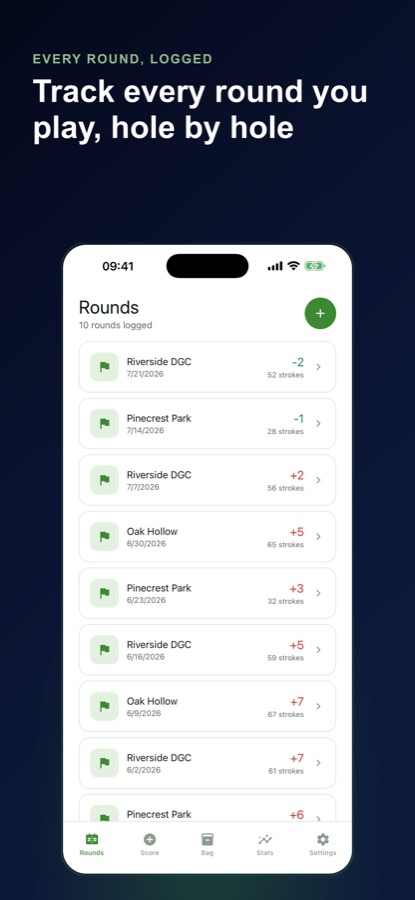
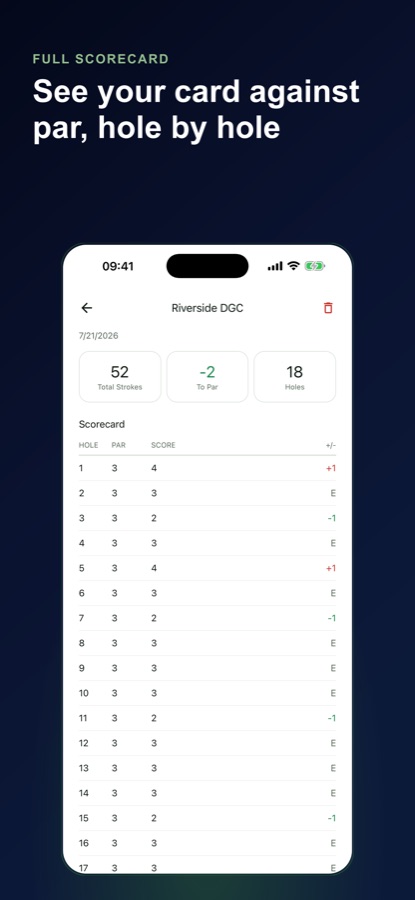
The card survives the phone.
Every stroke is saved the moment you tap it, so a phone call, a closed app or a restart in the middle of hole twelve never costs you the round. Open the app again and a reminder takes you back to the hole where you stopped.
What it is
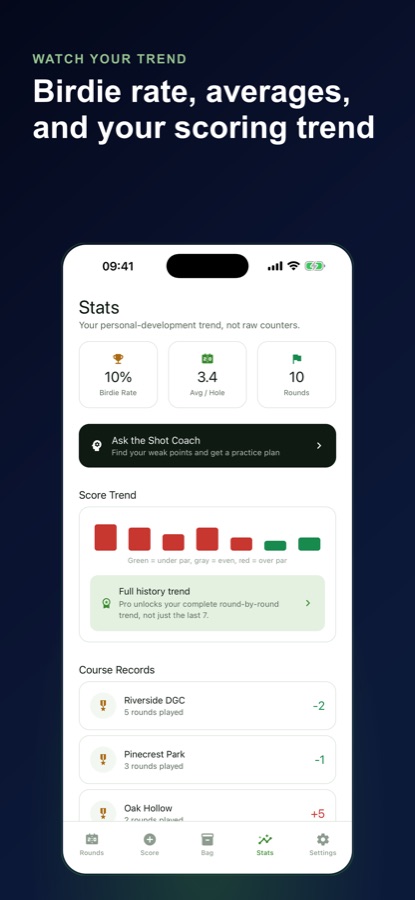
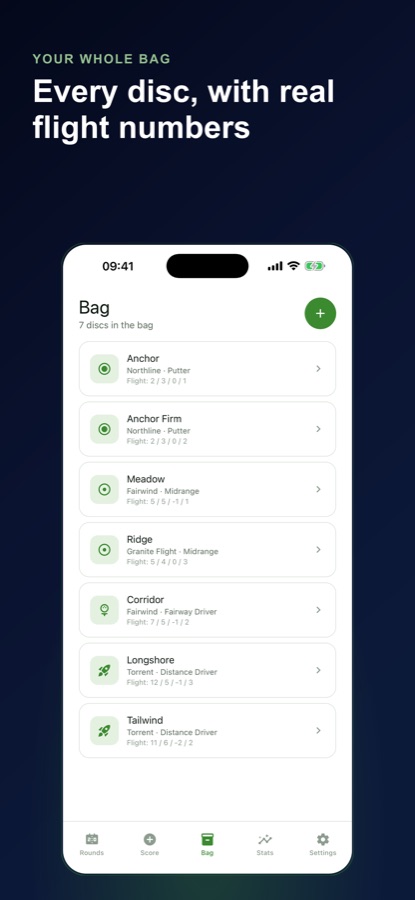
Disc Golf Scorecard & Stats is a free Android disc golf scorecard and frisbee golf score keeper. You can score a round hole by hole against par, start a Quick Round of 18 par-3 holes with no setup, build your own courses and layouts, log every disc in your bag with speed, glide, turn and fade, and record putting practice in C1 and C2. Stats such as course records, a score trend, a Hole Leak Map and shot quality percentages show where strokes go, and an optional AI Shot Coach suggests what to practise.
Inside the app
What it looks like
Background
What should a disc golf scorecard track besides your strokes?
A scorecard that only totals strokes tells you that you shot plus four, not why. Disc golf has a few events that explain a round: whether the drive found the fairway, whether you reached the circle around the basket, out-of-bounds throws and penalty strokes, and how many putts you made from each distance. Tracking those, along with wind and ground conditions, is what lets you see that one hole on one layout keeps costing you the same stroke every time.
C1 and C2the two putting circles
C1 is the inner circle close to the basket and C2 is the ring beyond it. Putting percentage from C1 is the number most players want to push up first, and keeping makes and attempts for each circle separately shows which one is the problem.
Flight numbersspeed, glide, turn and fade
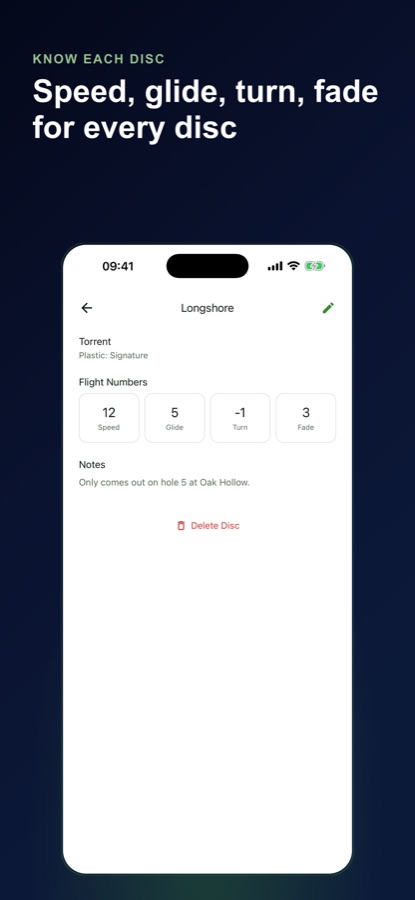
Most discs list four numbers: how fast it must be thrown, how long it holds the air, how much it turns over at first and how hard it fades at the end. Written down for each disc, they show whether your bag has two discs doing the same job.
Stability and bag gapsunderstable to overstable
A negative turn and a low fade make a disc understable, and the opposite makes it overstable. Plotting speed against stability across your bag shows empty spaces, such as nothing understable enough for a hyzer flip.
OB and penalty strokesthe quiet score killers
A throw that lands out of bounds adds a penalty stroke under the usual PDGA rules. Counting them per round, not only in the total, shows whether a course's water or road is what actually costs you.
Layoutsone course, several ways to play it
Many courses offer more than one set of tees or baskets. Comparing scores only across the same layout keeps a short-tee round from being measured against a long-tee one.
How it works
How a round works
Start scoring in seconds, then add detail only when you want it.
Start a round
Begin a Quick Round of 18 holes at par 3 with no course setup, or pick a course and layout you built yourself with par, distance and notes for every basket.
Tap through the holes
Tap strokes hole by hole and watch the running total against par. Optional tags record fairway hit or miss, circle reached, OB and penalty strokes, and wind and ground conditions.
Review and share
Finish the round to see your card against par, course records and best and worst hole. Share the scorecard with your group as a colour-coded grid, then check the stats to see what to practise.
What's inside
What is in the app
18
Quick Round
Start instantly with 18 holes at par 3, no course setup and no typing, with every stroke saved as you tap.
Bag
Disc bag with flight numbers
Log each disc with type, plastic and speed, glide, turn and fade, mark it in the bag, backup, retired or lost, and see Bag Gap Analysis for your own flight numbers.
Leak
Hole Leak Map
Shows the hole on each layout that costs you the most strokes, alongside course records, a score trend and your birdie rate.
C1
Putting practice log
Log C1 and C2 putting, approach work and field work with makes and attempts for each session.
AI
Shot Coach
Reads your recent rounds, finds where you lose the most strokes and suggests what to work on and which disc in your bag might fit the throw. It asks before sending anything.
Backup
Export and restore
Export your round book as a backup file and restore it on a new phone, with no account needed to start.
Fit
Who it's for — and who it isn't
A good fit if you
- Play regularly and want a card that is safe if the phone dies or the app closes
- Want to know which hole on which layout keeps costing you strokes
- Carry a full bag and want flight numbers and gaps written down in one place
- Practise putting and want makes and attempts logged for C1 and C2
- Like building the courses you actually play instead of searching a database
Not the right tool if you
- Use an iPhone, because the app is on Android for now
- Want a shared course database, since you enter your own courses
- Want multi-week practice plans, the full leak map and unlimited courses without Pro
Privacy
Where your rounds are stored
Your courses, rounds, bag and practice log are stored on your phone, and you can start scoring without an account. The Shot Coach asks first, then sends a summary of your rounds and discs (scores, par, course and disc names, flight numbers) to an AI service. Location and photos are never sent, and you can turn it off in Settings. The app uses Firebase analytics and crash reports, and the free version shows ads.
Full details are in the CoddyKit privacy policy.
Questions
Frequently asked questions
What is a good disc golf scorecard app?
A good one saves every stroke as you tap, scores against par without course setup, and shows where strokes go afterwards. Disc Golf Scorecard & Stats is a free Android frisbee golf score keeper with a Quick Round, your own courses and layouts, a disc bag with flight numbers, a putting log and a Hole Leak Map.
What happens if my phone dies in the middle of a round?
Your card is kept. Disc Golf Scorecard & Stats saves every stroke as you go, so a call, a closed app or a restart does not lose the round, and a reminder brings you back to an open round where you stopped.
How do I score a round without setting up a course?
Use Quick Round, which starts 18 holes at par 3 immediately with no setup and no typing. When you want more detail, build the course yourself with par, distance and notes for each basket, and add separate layouts such as long tees inside the same course.
What are C1 and C2 in disc golf?
They are the putting circles around the basket, with C1 the inner circle and C2 the ring beyond it. The app can tag whether you reached a circle on each hole, and its putting practice log records makes and attempts for C1 and C2 so you can see your percentage for each.
Can I keep my disc bag in the app?
Yes. Log each disc with its type, plastic and flight numbers (speed, glide, turn and fade) and mark it as in the bag, backup, retired or lost, with the course and fairway where one went missing. Bag Gap Analysis plots speed against stability from your own numbers and shows the gaps.
How does the AI Shot Coach work?
It reads your recent rounds, finds where you lose the most strokes, and suggests what to work on and which disc in your bag might fit the throw. It asks first and sends only a summary of rounds and discs, never your location or photos, and you can turn it off in Settings.
Is Disc Golf Scorecard & Stats free?
Yes, it is free to download. The free version includes unlimited rounds, an unlimited disc bag, up to three saved courses, course records, a seven-round score trend and three Shot Coach analyses a week, and it shows ads. Pro adds unlimited courses, full score history, unlimited Shot Coach, a multi-week practice plan and the full leak map, and removes ads.
Is the app available on iPhone?
Not yet. Disc Golf Scorecard & Stats is available on Android through Google Play. It is not on the App Store at the moment.
Get started
Score your next round hole by hole
Free on Android, with no account needed to start scoring.
More from CoddyKit
Available on Android.