
StoryMate - AI Story Generator
StoryMate - AI Story Generator — Turn a one-line idea into a finished story
StoryMate - AI Story Generator is a free iOS and Android AI story generator that writes a story from a few words. Pick a category such as fantasy, mystery or bedtime, add a line about what you would like to happen, set the length, creativity level and tone, and tap create. Finished stories are kept in your history so you can read them again, copy them or download them.


- Price
- Free, with optional in-app purchases
- Platforms
- iOS and Android
- Age rating
- 4+
- Requires
- iOS 15.1 or later
A story starts with a sentence you would like to read.
The app asks for very little: a category and a line about the plot or the character. The more specific that line is, the less generic the story that comes back, and you can always run it again with a different tone or length.
What it is
StoryMate - AI Story Generator is an iOS and Android app that writes original fiction from a short prompt. You choose a category such as adventure, bedtime, comedy, fantasy, mystery, romance or science fiction, describe what you want in a sentence, adjust length, creativity level and tone, and the AI writes the story. Finished stories are saved in a history list, and they can be copied or downloaded for personal use, classroom activities or sharing.
Inside the app
What it looks like
Background
How do you get a good story out of an AI story generator?
An AI story generator completes a pattern from the instructions it is given, so the quality of the story depends heavily on the quality of the prompt. A prompt that names a character, a place and a problem, such as an explorer searching for a lost city in a rainforest, gives the model something concrete to build on, while a bare genre name tends to return a familiar, generic plot. Treat the first result as a draft: change the tone or the length, add one new detail and generate again, then edit the parts you like into your own version.
Premisewho, where, what goes wrong
One sentence naming a character, a setting and a problem is enough to anchor a whole story. Adding an unusual constraint, such as a lighthouse keeper who is afraid of the dark, usually makes the result less predictable.
Tonethe same plot, a different voice
The same premise reads very differently as a comedy, a gentle bedtime tale or a mystery. Changing the tone setting is the quickest way to get a second version without rewriting the prompt.
Lengthshort sketch or full story
A short length suits a bedtime story or a classroom warm-up, while a longer one gives room for a beginning, a turning point and an ending. Choosing it up front avoids trimming later.
Creativity levelpredictable versus surprising
A lower setting keeps the story close to your instructions, and a higher one allows more unexpected turns. Raising it is worth trying when a draft feels flat, and lowering it helps when the plot keeps drifting away from what you asked.
How it works
How a story gets made
Making a story takes three short screens, and everything you generate is saved to read again.
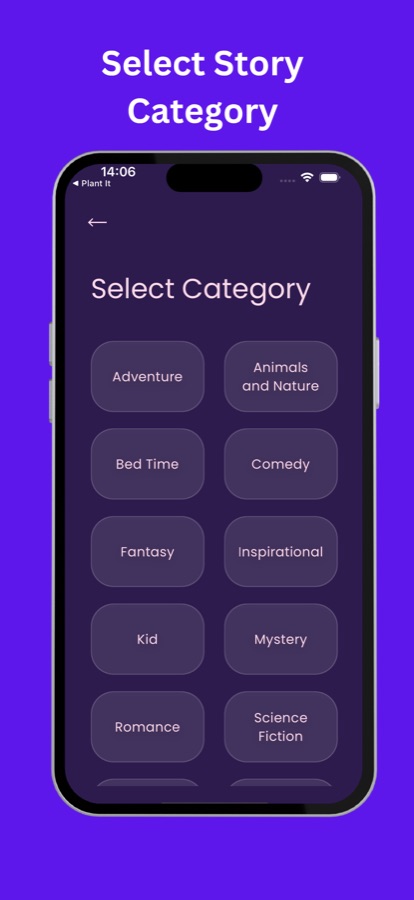
Choose a category
Pick the kind of story you want from the category list, which includes adventure, animals and nature, bedtime, comedy, fantasy, inspirational, kid, mystery, romance and science fiction.
Describe it and set the style
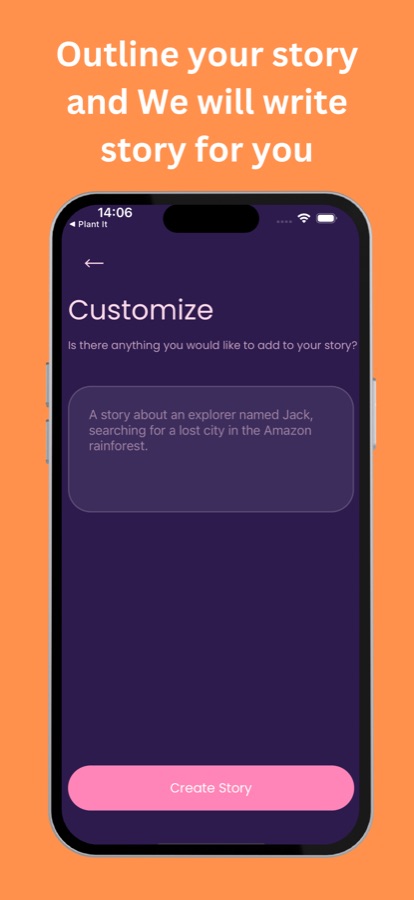
Type a line or two in the Customize box, such as an explorer searching for a lost city, then adjust length, creativity level, tone and genre to suit you.
Create, read and keep
Tap Create Story and read the result. It is saved under My History, and you can copy or download it for personal use, a classroom activity or sharing.
What's inside
What comes with the app
AI
Stories from a short prompt
Enter a topic or a sentence and the AI writes a full piece of fiction around it, rather than only suggesting ideas.
Genres
Many story categories
Adventure, animals and nature, bedtime, comedy, fantasy, inspirational, kid, mystery, romance and science fiction are on the category screen, and the store listing also mentions horror.
Control
Length, creativity and tone
Set how long the story should be, how adventurous the writing should get and what tone it should take, so the result sounds like what you had in mind.
History
Every story saved
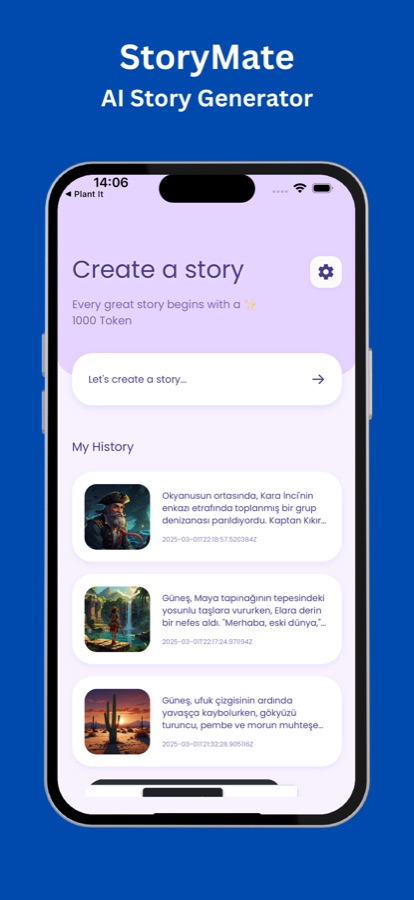
My History lists your earlier stories with a thumbnail and the opening lines, so you can return to one without generating it again.
Share
Copy or download
Take a story out of the app as text for personal use, a classroom activity or sharing with friends.
Fiction
Clearly fictional
StoryMate uses machine learning to generate fictional content. Characters, plots and events are created by the AI and do not reflect real people, beliefs or situations.
Fit
Who it's for — and who it isn't
A good fit if you
- Want a quick bedtime or short story to read aloud without starting from a blank page
- Are a teacher or tutor looking for a story as a classroom writing or reading prompt
- Write fiction and want a draft or a spark when an idea stalls
- Like to tweak the tone and length of a story until it suits the moment
- Want to keep the stories you generated in one place
Not the right tool if you
- Need a story that is guaranteed to be age-appropriate for a young child without any reading beforehand, since AI output should be read by an adult first
- Want a ready-to-publish novel, because generated text still benefits from editing
- Want real facts, biographies or news, as the app produces fiction only
- Need an interface in a language other than English, as the app lists no translated interface
Questions
Frequently asked questions
How does an AI story generator work?
An AI story generator uses a language model that has learned patterns of storytelling from large amounts of text and writes new text that fits your instructions. In StoryMate - AI Story Generator you supply a category and a short description, set the length, creativity level and tone, and the AI writes a story that follows them.
What should I write in the prompt to get a better story?
Name a character, a place and a problem in one or two sentences. An explorer called Jack searching for a lost city in the Amazon rainforest gives StoryMate - AI Story Generator more to work with than the word adventure alone. If the first draft feels generic, add one unusual detail and generate again.
Can StoryMate write a bedtime story?
Yes. Bedtime and kid are among the categories on the selection screen, and a short length with a gentle tone suits a story to read aloud. Because the text is written by AI, read it through yourself before reading it to a child so you can change anything that does not fit.
Can teachers use it in the classroom?
The store listing describes classroom activities as one use. A teacher can generate a short story on a theme as a reading passage, a writing prompt or an example to rewrite, and then copy or download it. As with any AI text, review it first and treat it as a starting point for discussion.
Which kinds of stories can it write?
The category screen in StoryMate - AI Story Generator lists adventure, animals and nature, bedtime, comedy, fantasy, inspirational, kid, mystery, romance and science fiction, and the store listing also mentions horror. Whatever the category, the prompt you type decides who the story is about and what happens.
Are the characters and events in the stories real?
No. StoryMate uses machine learning to generate fictional content, and the characters, plots and events are created by the AI. They do not reflect real people, beliefs or situations, so the app is not a source of facts.
Are my past stories saved?
Yes. Generated stories appear under My History on the home screen with a thumbnail and the opening lines, so you can open one again later. You can also copy a story or download it to keep it outside the app.
Does it write stories in other languages?
The App Store listing says stories can be created in more than ten languages, and the history screenshot shows a story written in Turkish. The app's own interface is shown in English, so the buttons and settings are in English even when a story is not.
Is StoryMate - AI Story Generator free?
It is free to download on the App Store and Google Play and offers optional in-app purchases. The home screen shows a token balance, and what is included for free and what is paid is shown in the app.
Which platforms does it run on?
StoryMate - AI Story Generator runs on iOS through the App Store and on Android through Google Play. It carries a 4+ age rating on the App Store and needs iOS 15.1 or later.
Get started
Write your first story in a minute
Free to start on iOS and Android.
More from CoddyKit
Available on iOS and Android.