

Speed Reading - Trainer
Speed Reading - Trainer — Read faster and prove you still understood it
Speed Reading - Trainer is a free Android app for speed reading that checks itself, built for students working through a reading list, professionals clearing a backlog and anyone who stopped trusting a speed reading number. Each timed run is followed by a comprehension quiz, the words per minute shown are measured from your actual reading time, and your next target pace goes up or down with how much you understood. You train with RSVP or grouped words, on built-in passages, AI-written ones or your own text.

- Price
- Free, Pro upgrade
- Platforms
- Android (Google Play)
- Languages
- 10
- Training modes
- RSVP and grouped words
Your speed comes from a stopwatch, not a slider.
Many speed reading apps flash text at whatever pace you dial in and report that number back. This one records the words actually shown against the time you spent reading, then quizzes you against the passage's own answer key, so both figures on the results screen are measured rather than chosen.
What it is
Speed Reading - Trainer is a free Android app for speed reading that trains you to read faster and checks that you still understand what you read. You read a passage in RSVP mode, which shows one word at a time, or in grouped mode, which shows several words at a glance, and the app measures your real words per minute. A comprehension quiz then scores your understanding, and the score sets your next target pace: below 70% eases it back, 90% or higher raises it, and anything in between holds steady. Core training is free, with a built-in passage library and AI-generated passages.
Inside the app
What it looks like
Background
Can you really learn to read faster, and what does it cost you in comprehension?
Most readers can speed up with practice, mainly by reducing habits that slow them down, such as sounding out every word or re-reading a line they just finished. The honest limit is that pushing pace much past your comfort zone starts to cost understanding, so speed only counts if comprehension holds. That is why a useful trainer measures both and treats the combination, not the raw words-per-minute figure, as the thing to improve.
RSVPrapid serial visual presentation
RSVP shows one word at a time in the same spot on the screen, so your eyes do not have to move across a line. It forces a steady pace and removes the habit of looking back, which makes it a useful drill even if you do not read this way every day.
Chunkingtaking in more per glance
Chunking groups several words so you take in a phrase at once rather than one word at a time. Practising it trains the skill that most real speed gains depend on: recognising familiar word groups without reading each letter.
Words per minuteonly meaningful when measured
A words-per-minute figure means little if it is just the setting you chose. A measured figure divides the words you actually read by the time you spent reading, which is why the app only records a run when you finish most of the passage.
Comprehension as the checkthe number that keeps you honest
A short quiz after each passage shows whether the extra speed cost you anything. When understanding drops as pace rises, you have found your current limit and know where to train.
How it works
How a training run works
Each session is a loop of read, get quizzed, and get a pace that reflects what you understood.
Choose a text and a mode
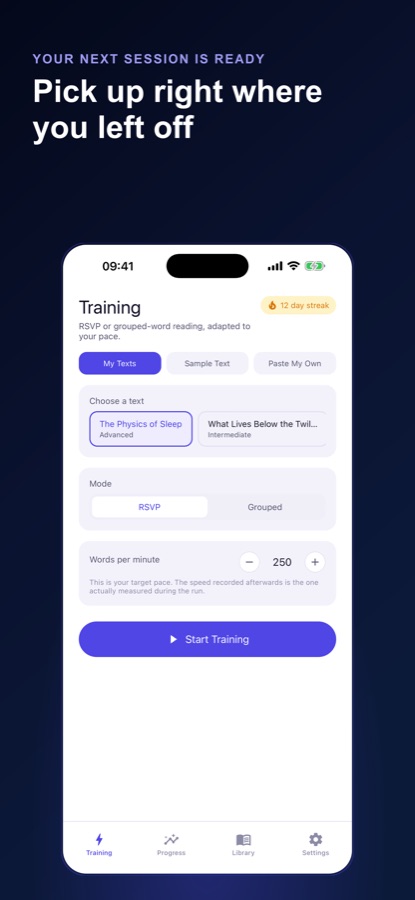
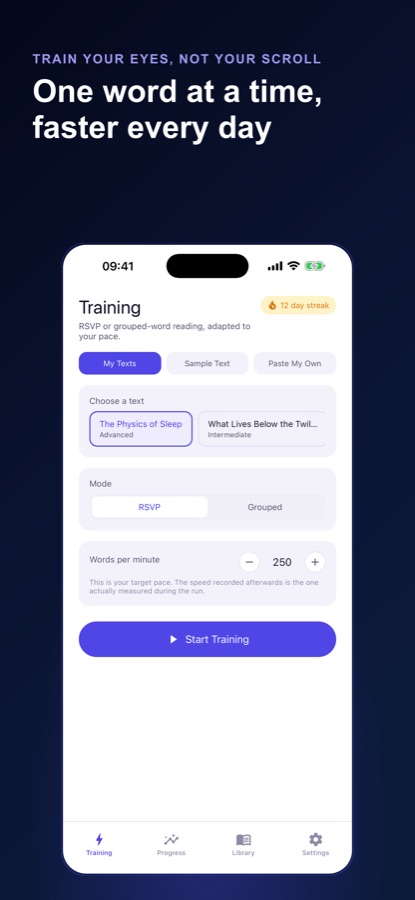
Pick one of your saved passages, a built-in sample text or your own pasted text, then choose RSVP or grouped reading and set a target words-per-minute and chunk size.
Read the passage
The app tracks the words shown against the time you spend reading. If you finish less than 80% of a passage, nothing is recorded.
Answer the quiz
A short quiz checks your understanding against the passage's own answer key, so the score reflects what you took in rather than a guess.
Take the next pace
Below 70% eases your target pace back, 90% or higher nudges it up, and anything between holds steady. Your recommended pace carries over to the next session.
What's inside
What is inside
2
RSVP and grouped modes
RSVP flashes one word at a time. Grouped mode shows chunks of words so you practise taking in more per glance. Pace and chunk size can be changed mid-run or before you start.
Quiz
Comprehension quiz on every run
Each passage comes with its own quiz scored against an answer key, and the result adjusts your target pace.
6
Built-in passages in three levels
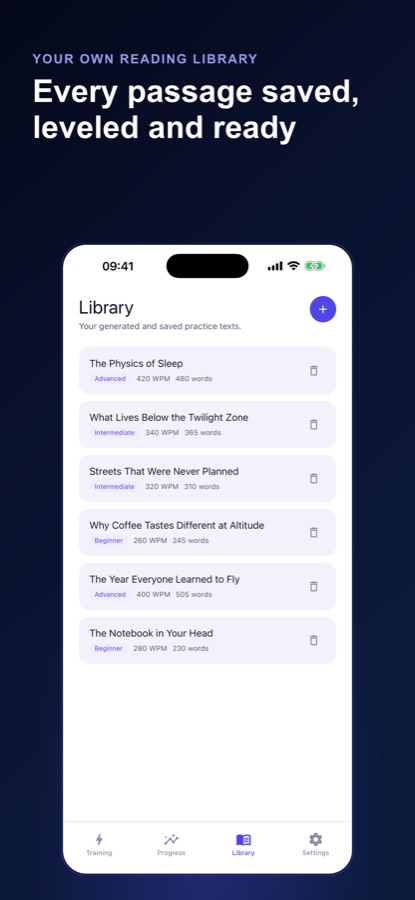
Six bundled passages across beginner, intermediate and advanced levels rotate in as you finish them, each with its own quiz.
AI
AI-written passages
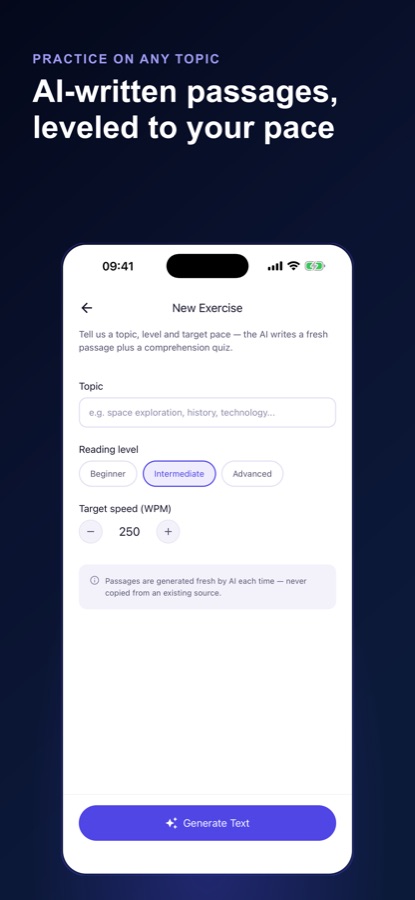
Give a topic, a reading level and a target pace and the AI writes an original passage with a quiz. Free use includes two a day, and Pro removes the limit.
Paste
Your own text
Paste an article, an email or study material and train on it. Nothing you read needs to leave your device unless you choose to save it.
Stats
Progress that is measured
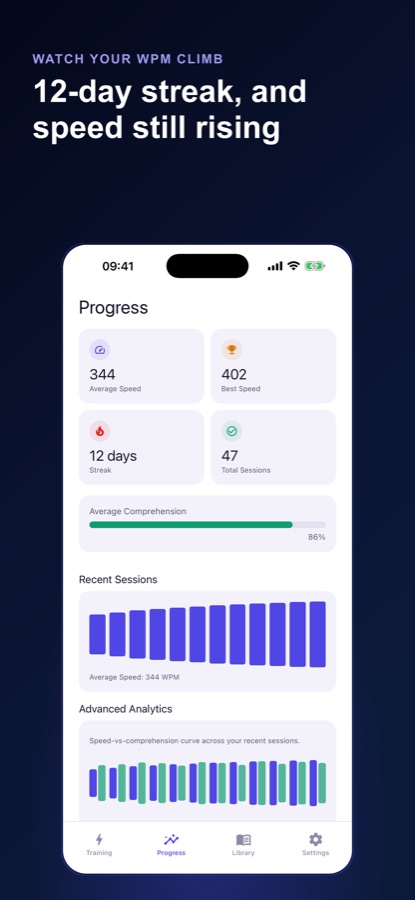
Average and best measured speed, a daily training streak, total sessions, a chart of recent runs and your comprehension average, plus an optional daily reminder.
Fit
Who it's for — and who it isn't
A good fit if you
- Have a reading list, a backlog of articles or study material to get through
- Tried a speed reading app before and stopped trusting the number it gave you
- Want a quiz to show whether faster reading cost you understanding
- Want to train on your own text, not only on samples
- Like a short daily practice with a streak
Not the right tool if you
- Expect to double your pace overnight, because gains come with regular practice and the app holds your pace back when comprehension drops
- Want unlimited AI-written passages for free, since free use includes two a day
- Want an e-reader or a library of books, because this is a trainer
- Use an iPhone, because the app is on Google Play for Android
Privacy
What stays on your phone
No account or sign-up is needed to start, and nothing you read needs to leave your device unless you choose to save it. Passages written by AI are generated from the topic, level and pace you enter.
Full details are in the CoddyKit privacy policy.
Questions
Frequently asked questions
Is Speed Reading - Trainer free?
Yes, to start. Speed Reading - Trainer includes unlimited RSVP and grouped-word training, six built-in passages with quizzes, your own pasted text, two AI-written passages a day, your full stats and the adaptive pace recommendation at no cost. Pro is a monthly or annual subscription that adds unlimited AI passages, the speed-versus-comprehension curve and no ads.
What is the best way to practise speed reading on a phone?
Practise with a method that measures both speed and understanding. Speed Reading - Trainer pairs every timed run with a comprehension quiz, records the words per minute you actually read, and moves your target pace up or down based on your quiz score. It is free to start on Android.
Does speed reading hurt comprehension?
It can, if you push the pace too far, which is why the two should be measured together. In Speed Reading - Trainer a quiz score below 70% eases your target pace back, 90% or higher raises it, and anything in between holds it, so you only speed up while you still understand.
What is RSVP reading?
RSVP shows a text one word at a time in a fixed spot, so your eyes do not move across the line. Speed Reading - Trainer offers it alongside a grouped mode that shows several words at once, and you can change the pace and chunk size before or during a run.
How does the app measure my reading speed?
It tracks the words actually shown against the time you spend actively reading, so the figure on the results screen is a real speed rather than the number you set. If you finish less than 80% of a passage, the run is not recorded.
Can I practise with my own articles or study material?
Yes. You can paste your own article, email or study text into Speed Reading - Trainer and train on it. You can also use the six built-in passages, each with its own quiz, or have the AI write a passage on a topic, level and pace you choose.
How many AI passages do I get?
Free use includes two AI-generated passages a day, each with its own comprehension quiz. Pro removes that limit, so your practice material never runs out and your score is not just memory of a text you have seen before.
What does Pro add?
Pro adds unlimited AI-generated passages, a speed-versus-comprehension curve on the Progress tab that shows where your understanding starts to fall behind your pace, and no ads. The core training loop, the sample library, your own text and your stats stay free.
Is there an iPhone version?
No. Speed Reading - Trainer is available on Google Play for Android only. It supports 10 languages and has light, dark and system themes.
Who is Speed Reading - Trainer for?
Speed Reading - Trainer is for students working through a reading list, professionals clearing a backlog of articles and reports, and anyone who tried a speed reading app before and stopped trusting the number it gave them. It is a trainer, not an e-reader, so it suits short daily practice on passages or your own text.
Get started
Read faster, and check you kept up
Free to start on Android, in 10 languages.
More from CoddyKit
Available on Android.