

Sneaker Collection & Wear Log
Sneaker Collection & Wear Log — See what each pair really costs you to wear
Sneaker Collection & Wear Log is a free-to-start Android app and private sneaker tracker. Add every pair you own, tap once each time you wear one, and the app works out your real cost per wear from what you paid and how often you laced up, flags pairs that are gathering dust and suggests what to wear today.

- Price
- Free, Pro upgrade
- Platforms
- Android
- Languages
- 10
- Account
- Not needed, data stays on your device
It tracks what you paid, not what a pair could sell for.
Resale prices move every week and say nothing about whether a pair earns its place on your shelf. Your own numbers do: the price you paid and the number of times you wore it. That is the only measure here, and there is no estimate of what the collection is worth.
What it is
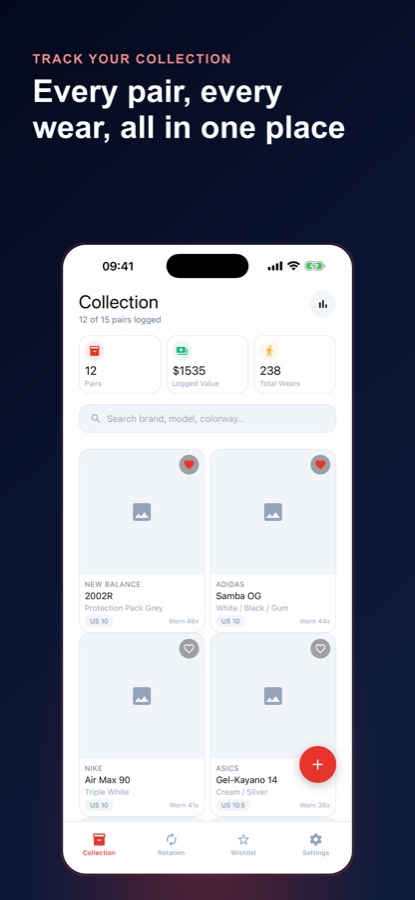
Sneaker Collection & Wear Log is an Android sneaker collection tracker. You add each pair with brand, model, colorway, size, condition, purchase price and a photo, then log each outing with one tap. From that ledger the app computes cost per wear for every pair, shows collection stats such as total pairs, total logged spend, total wears and a count of pairs never worn, picks a pair for today, and keeps a wishlist with target prices and release dates. It does not price or value your collection.
Inside the app
What it looks like
Background
How do you track a sneaker collection and work out cost per wear?
Track a sneaker collection by recording two facts for every pair: what you paid and how many times you have worn it. Divide the first by the second and you have cost per wear, which falls every time you put the pair on. A pair worn fifty times costs far less per wear than a pair worn twice, whatever the sticker price.
Cost per wearprice divided by wears
A $150 pair worn 50 times costs about $3 a wear, and the same pair worn five times costs $30. The figure rewards the pairs you actually reach for and exposes the ones you bought and never rotated in.
Rotationwhy not lace up one pair daily
Alternating pairs gives cushioning foam time to recover and spreads the load across your collection. A simple rotation also stops a few favourites taking all the use while the rest age untouched.
Never-worn and stale pairsthe quiet closet problem
Pairs bought for a drop and left in the box are common in a growing collection. Counting how many have never been worn, and listing pairs idle for a long time, shows where money is sitting unused.
Wishlist disciplinedecide before the release
Setting a target price and release date for each pair you want makes the purchase a plan rather than an impulse. Moving a pair from the wishlist into the collection when you buy it keeps the record of what you paid accurate.
How it works
How the loop works
The app is built around one small action: tap when you wear a pair. Everything else is calculated from that.
Add a pair
Enter brand, model, colorway, size in US, UK or EU, condition, purchase price, retail price, purchase date, notes and a photo.
Log each wear in one tap
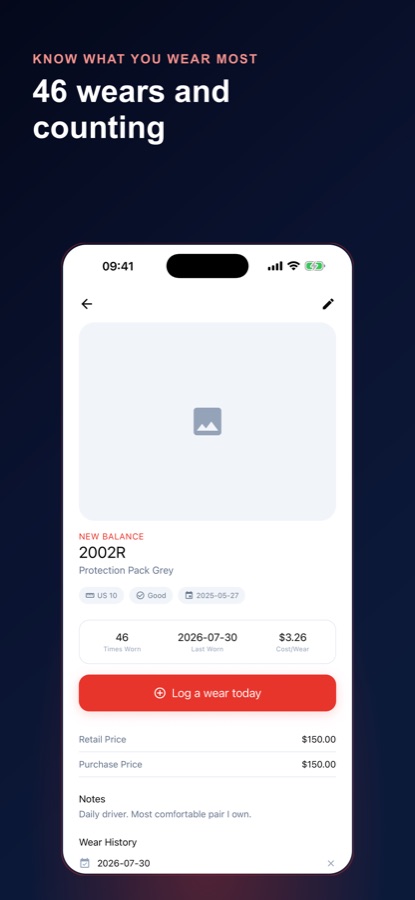
Open the pair and tap Log a wear today, or use I wore this on the Rotation tab. A ledger keeps the history, and you can remove an entry you logged by mistake.
Read the numbers
Cost per wear updates on each pair, the stats page totals your pairs, spend and wears, and the Rotation tab suggests what to put on next with a shuffle button if it does not appeal.
What's inside
What comes with the app
1 tap
Permanent wear ledger
Log a wear in a tap, see the full history for each pair and a running feed of your most recent wears across the whole collection.
$/wear
Real cost per wear
Calculated from what you actually paid and how many times you have worn the pair, shown on each pair and as an average across the collection.
Today
Today's pick
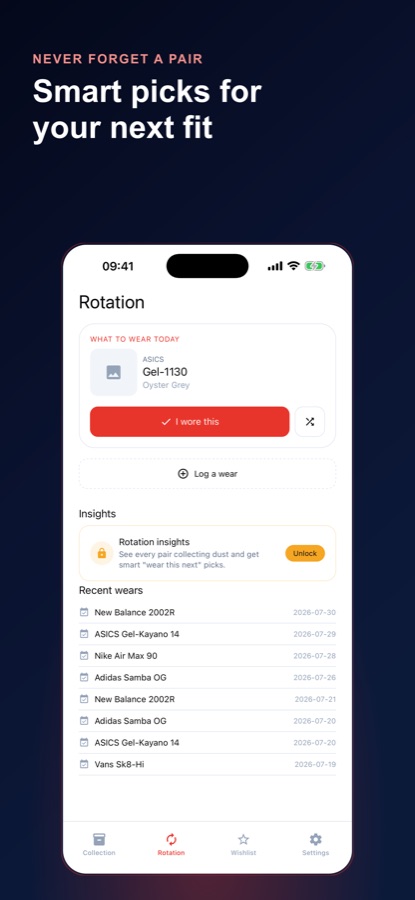
A suggested pair on the Rotation tab, with a shuffle if it is not calling to you, so the whole collection gets used.
Stats
Collection stats
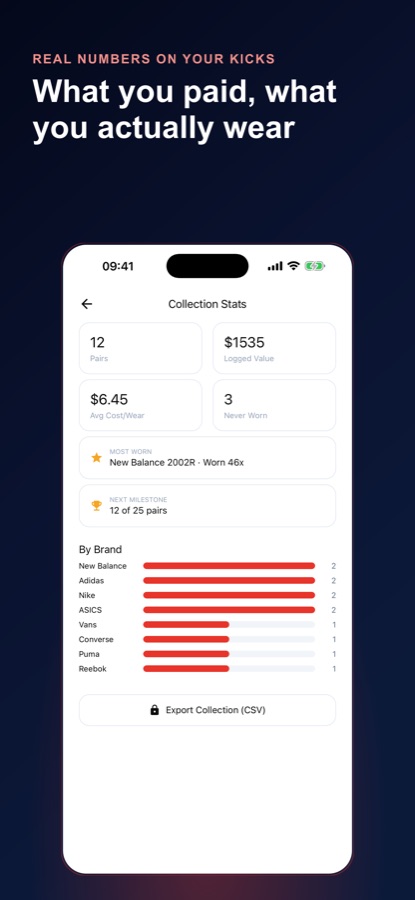
Total pairs, total logged spend, total wears, average cost per wear, a never-worn count, your most-worn pair and a brand-by-brand breakdown.
Wish
Wishlist
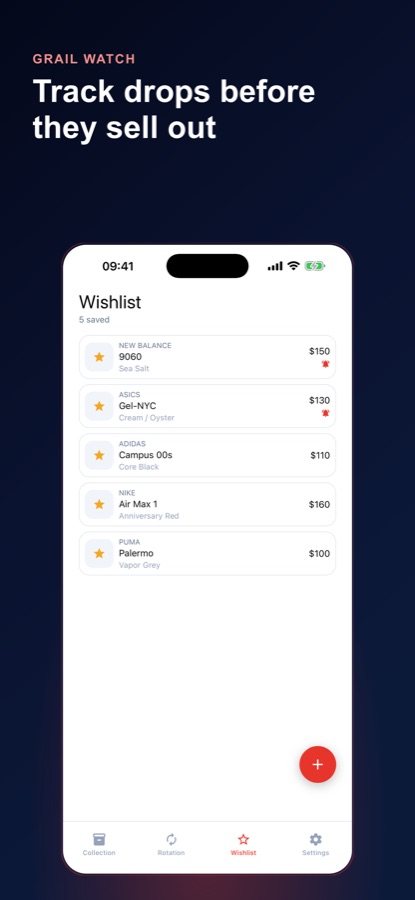
Pairs you are chasing, with a target price, release date and notes, and one tap to move a wishlist item into your collection once you have bought it.
25
Milestones
Milestone tracking at 10, 25, 50 and 100 pairs, with a shareable card when you reach one.
Fit
Who it's for — and who it isn't
A good fit if you
- Own more pairs than you actually wear and want to see which ones earn their place
- Like the idea of cost per wear as a way to judge a purchase
- Want a private record that stays on your device and needs no account
- Keep a wishlist of drops and want to decide on price before release day
- Enjoy stats about your rotation and your most-worn pair
Not the right tool if you
- Want resale prices or a market value for your pairs, because the app does not price your collection
- Need more than 15 pairs without upgrading, since unlimited pairs come with Pro
- Want to buy or sell inside the app, as it only tracks
- Use an iPhone, because the app is available for Android
Privacy
Where your data lives
Your collection and logs stay on your device, and you do not need an account to use the app. Nothing is shared or sold.
Full details are in the CoddyKit privacy policy.
Questions
Frequently asked questions
What is the best app to track a sneaker collection?
The best one measures use, not just ownership. Sneaker Collection & Wear Log lets you add every pair and log each outing in one tap, then calculates cost per wear, flags pairs collecting dust and suggests what to put on today. It is private, needs no account and is free to start on Android.
How do I calculate cost per wear for sneakers?
Divide what you paid for the pair by the number of times you have worn it. Sneaker Collection & Wear Log does this automatically from the purchase price you enter and the outings you log, shows the figure on each pair and averages it across your collection.
Does the app tell me what my sneakers are worth?
No. The app deliberately does not price your collection or attach a resale estimate. It tracks what you paid and how often you put on each pair, so the numbers are your own rather than a market guess.
How many pairs can I add for free?
The free version lets you log up to 15 pairs, with unlimited wears, the headline stats, rotation suggestions and a wishlist. Pro lifts the 15-pair cap and adds rotation insights, a weekly reminder about unworn pairs, release-date reminders, CSV export and no ads.
What is the Rotation tab?
It suggests what to put on today and shows a feed of your recent wears. You can shuffle the pick, log it straight from there, and with Pro see rotation insights, a list of every pair you have not worn in 60 days or more.
Do I need an account?
No. You open the app and start logging pairs straight away, and your data stays on your device. There is no login wall.
Can I keep a wishlist of sneakers I want?
Yes. Add a pair with a target price, a release date and notes. With Pro you get a reminder the day before a pair you are watching drops, and one tap moves a wishlist item into your collection once you have bought it.
Can I export my collection?
Yes, with Pro you can export the whole collection to a CSV file, handy for a spreadsheet or a backup. The export button appears on the collection stats page.
Does it support different sizing and any brand?
Yes. You can log pairs from any brand and record the size as US, UK or EU, along with condition, colorway and a photo. The brand breakdown on the stats page counts how many pairs you own from each.
What platforms does it support?
Sneaker Collection & Wear Log is available on Android through Google Play, in 10 languages, with light and dark themes.
Get started
Log your next lace-up
Free to start on Android, with a Pro upgrade.
More from CoddyKit
Available on Android.