
Lifestyle · Free · iOS & Android
By CoddyKit
CoParenting Planner: a shared custody schedule for separated parents
CoParenting Planner is a calm, neutral place for separated and divorced parents to coordinate the everyday logistics of raising a child. It keeps the custody schedule, handoffs, shared expenses, and documents in one shared space. It is a coordination and record-keeping tool — not legal advice, and not a way to keep score.
- Price
- Free, with optional Pro
- Platforms
- iOS and Android
- Languages
- 10
- Age rating
- 4+
Built for cooperation, not conflict.
The app records the parenting plan you already agreed on. It does not decide custody, judge either parent, or try to optimise a split — it just makes the plan the same for everyone.
What it is
CoParenting Planner is a free iOS and Android app for separated, divorced, or never-together parents who share custody. It holds the custody schedule — week-on/week-off, 2-2-3, every-other-weekend, or a custom rotation — plus handoff times and named exchange places, a shared child-expense ledger with a running who-owes-whom balance, a neutral timestamped message log, and a child profile. Both parents can join one household with an invite code.
It is an organising and record-keeping tool. It is not legal advice and not a substitute for a lawyer, mediator, or family professional — see Limits and safety.
Background
What is a custody schedule, and how do the common patterns work?
A custody schedule is the part of a parenting plan that says which parent the child is with on any given day, and when and where the changeovers happen. Most families use one of a few well-known repeating patterns, sometimes with a separate arrangement for holidays. The right pattern depends on distance, school, work shifts, and the child's age — and, where a court order or agreement exists, on what it says.
Week-on/week-offalternating weeks
The child spends a full week with one parent, then a full week with the other. It means the fewest changeovers of any common pattern, which suits older children and parents who live far apart.
2-2-3rotating five-day cycle
Two days with one parent, two with the other, then three, and the pattern flips the following week. Neither parent goes more than three days without the child, and weekends alternate automatically.
Every-other-weekendone primary home
The child lives mainly with one parent and spends alternate weekends with the other, sometimes with a midweek evening added. It is common when one parent lives further away or works fixed weekday hours.
Handoffthe changeover
The moment custody passes from one parent to the other. Plans usually fix a time and a named place — a school entrance, a car park, a relative's home — so nobody has to negotiate it each week.
How it works
Three steps to get the plan out of your heads
Most co-parenting friction is not disagreement, it is two people working from two slightly different versions of the same plan. The app exists to collapse those into one.
Set the schedule
Add the child profile, then pick the pattern you already agreed on — week-on/week-off, 2-2-3, every-other-weekend — or build a fully custom rotation. Add each handoff with its date, time, and named exchange location, such as the school front entrance.
Invite the other parent
Share a simple invite code and you both see the same schedule, the same expense ledger, and the same message log, so there is no separate version to reconcile. If the other parent would rather not join, the app still works for you alone.
Use it on ordinary days
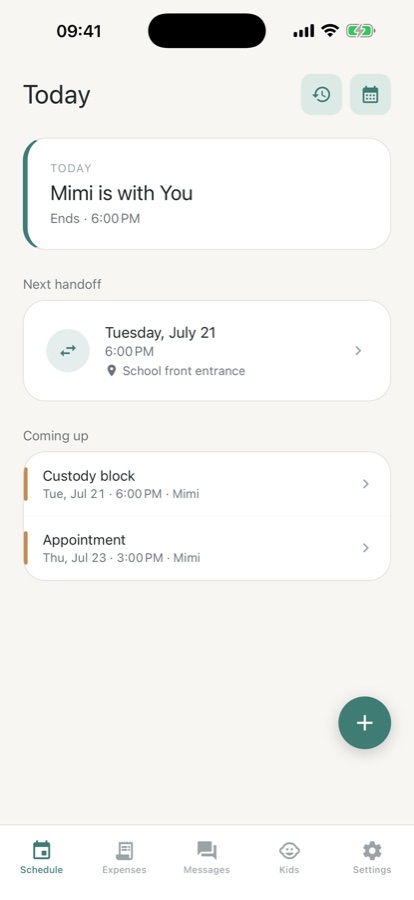
Open the app and Today and Up-next tell you who the child is with now, when the next handoff is, and where. Log a child expense as it happens, leave a factual note, and let reminders warn you before a handoff or event.
What’s inside
What it keeps in one place
2-2-3
Custody schedule
Recurring patterns like week-on/week-off, 2-2-3, and every-other-weekend, or a fully custom rotation. See at a glance who has the child on any given day.
Now
Today and Up-next
Open the app and immediately see who the child is with, when the next handoff falls, and the named place it happens — no scrolling through a calendar.
Split
Shared expenses
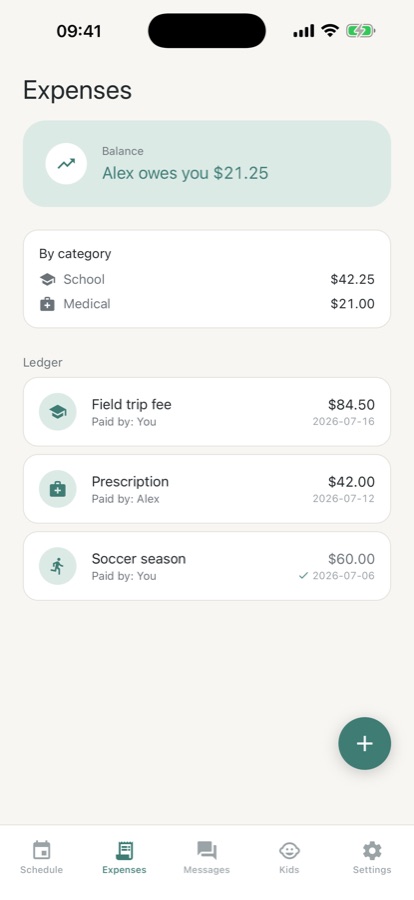
Log a child expense, mark your share, and watch a running who-owes-whom balance build. Keeps money factual and easy to settle instead of a recurring argument.
Log
Neutral message log
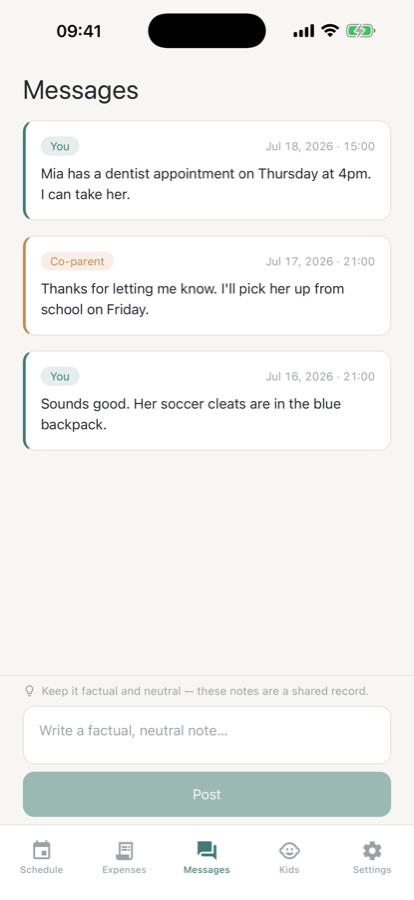
Calm, timestamped notes for the other parent. The tone is deliberately factual and non-accusatory, because a co-parenting log is only useful when it reads as neutral.
Code
Shared household
Invite the other parent with a simple code so you both see the same schedule, expenses, and log. The app stays genuinely useful if only one of you uses it.
Pro
Vault, export, more children
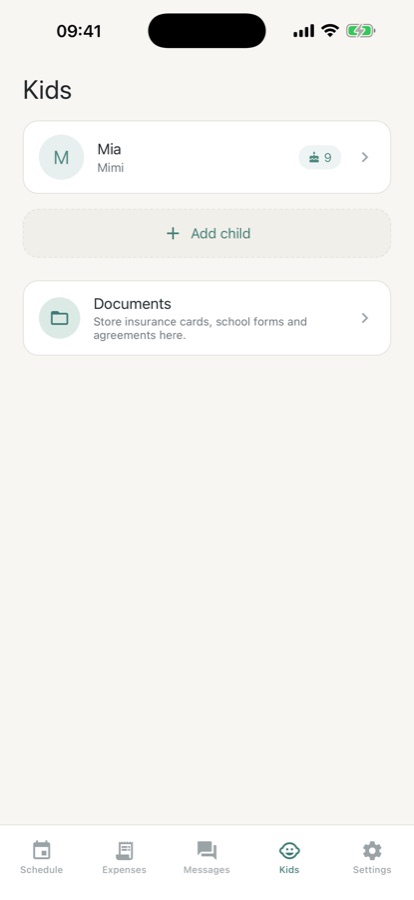
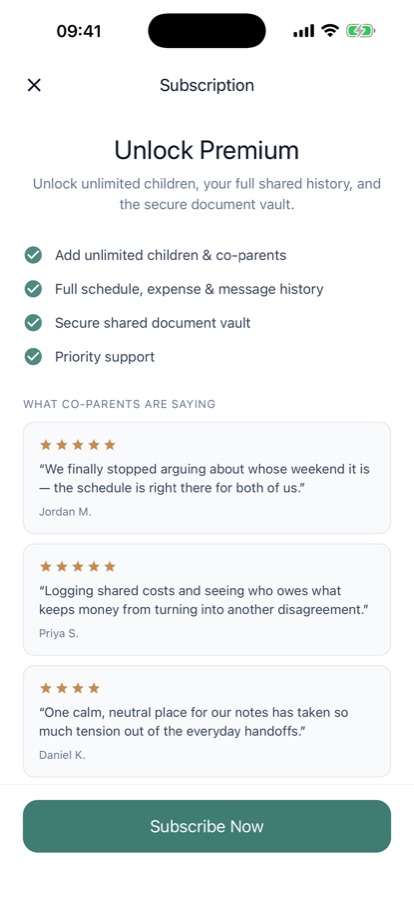
Pro adds a document vault, unlimited history, multiple children with per-child schedules, PDF or CSV export for any date range, full settle-up, and no ads.
Inside the app
What it looks like
Fit
Who it’s for — and who it isn’t
A good fit if you
- Share custody and want one schedule both households actually work from
- Keep losing track of who paid for what and want a plain running balance
- Want handoff times and exchange places written down instead of renegotiated weekly
- Would rather send a short factual note than have another long back-and-forth
- Are a grandparent, nanny, or partner who helps with pickups and needs the same view
Not the right tool if you
- Want an app that decides or optimises a custody split — it records the plan you already agreed on
- Need legal advice or a document prepared for a custody dispute; that is a lawyer's or mediator's job
- Want to see where your child physically is — there is no live location tracking of a child
- Are dealing with an unsafe situation rather than a logistics problem; that needs professional help, not an organiser
Safety and limits
Limits: this is an organiser, not legal advice
CoParenting Planner is a coordination and record-keeping tool. It is not legal advice, not a custody evaluator, and not a substitute for a lawyer, mediator, or family professional. Custody law differs from country to country and, in places like the United States, from state to state — nothing on this page or in the app should be read as guidance about your own case.
The app records the parenting plan you already agreed on; it does not decide custody or judge either parent. Pro can export a neutral PDF or CSV of your schedule, expense ledger, or message log for your own records or to share with a mediator or lawyer, but we make no claim that any export is admissible or will be accepted by a court. Whether a record helps in a legal process, and how it should be kept, is a question for a qualified lawyer in your jurisdiction.
The app stores no live GPS location of a child. A "handoff location" is only a named place for a scheduled exchange, such as a school front entrance.
If you or your child are not safe, an organising app is the wrong tool. Contact your local emergency number. In the US, the National Domestic Violence Hotline is 1-800-799-7233, or text START to 88788. Elsewhere, the global directory at HotPeachPages lists domestic-violence services by country. Speak to a lawyer or a family professional about your options.
Privacy
What the app does and does not store
Your family's data stays private and is never sold. The app holds no live GPS location of a child — a handoff location is only a named place for a scheduled exchange, like a school entrance or a car park. If you invite the other parent to your household, you share the schedule, expenses, and message log with them by design.
Full details are in the CoddyKit privacy policy.
Questions
Frequently asked questions
What is the best app for sharing a custody schedule with the other parent?
The one that both parents will actually open. That usually means it shows the plan you already agreed on rather than trying to reinvent it, it keeps the tone neutral so it does not turn into another argument, and it is useful even if only one parent signs up. CoParenting Planner is built on those three ideas: recurring or custom custody patterns, a shared view via an invite code, and a deliberately factual message log. It is free on iOS and Android.
What is a 2-2-3 custody schedule?
In a 2-2-3 rotation, the child spends two days with one parent, two with the other, then three with the first — and the pattern flips the following week, so it evens out over a fortnight. Its appeal is that neither parent goes more than three days without the child and weekends alternate on their own. The trade-off is frequent handoffs, which suits younger children and parents who live close to each other far better than a long commute would.
Which custody schedule is best for a child?
There is no single right answer, and it is not a question an app can settle. In practice families weigh how far apart the two homes are, the child's age and school routine, both parents' work patterns, and how many changeovers a child can handle without feeling unsettled. Younger children often do better with shorter gaps between parents; older children often prefer fewer disruptions. Where a court order or written agreement exists, that document governs — a lawyer or mediator is the right person to ask.
What should a parenting plan cover?
Most parenting plans set out the regular custody rotation, how holidays and birthdays are handled, the time and place of handoffs, how child expenses are shared, and how the two parents communicate about school, health, and travel. Writing the small details down is what prevents the weekly renegotiation. The legal weight of a plan, and what has to be in it, varies by country and state, so a lawyer or mediator should review anything you intend to rely on.
How should I word messages to my co-parent?
Short, factual, and about logistics. Stick to what is happening, when, and where — "Pickup Friday at 5 from the school front entrance" — and leave out interpretation of the other parent's motives. Keeping a written log neutral matters for two reasons: it lowers the temperature of the exchange itself, and it stays readable later without embarrassing anyone. CoParenting Planner's message log is designed around that: calm, timestamped notes rather than an open chat thread.
Is CoParenting Planner free?
Yes. The free version includes one child profile, the custody schedule with recurring and custom patterns, the Today and Up-next view with handoff details, the shared expense log and message log with the last 30 days of history, handoff and event reminders, 10 languages, and light and dark mode. It is supported by ads. Pro is $4.99 a month or $29.99 a year with a 3-day free trial, and removes the ads.
Does the other parent have to use the app too?
No. You can invite the other parent to a shared household with a simple code, and then you both see the same schedule, expenses, and log — that is the app at its most useful. But it is built to be genuinely worth having even if only one parent uses it, as a personal record of the rotation, the handoffs, and what you have spent on the child.
Can I export the schedule or expense log?
Yes, with Pro. You can export a clean, neutral PDF or CSV of the schedule, the expense ledger, or the message log for any date range, either for your own records or to share with a mediator or lawyer. To be clear about the limit: this is a personal record, and no claim is made that an export is admissible or will be accepted by any court. Ask a qualified lawyer in your jurisdiction what actually helps.
Does the app track my child's location?
No. CoParenting Planner stores no live GPS location of a child. When the app asks for a "handoff location" it means a named place for a scheduled exchange — "school front entrance", or an address — recorded alongside the date and time so both parents know where to be. It is a line in the plan, not a tracker.
Is this app legal advice, and can it decide custody for us?
No to both. It is a coordination and record-keeping tool, not legal advice, not a custody evaluator, and not a substitute for a lawyer, mediator, or family professional. It records the plan you already agreed on rather than deciding or optimising a custody split, and it does not judge either parent. Custody law varies by country and by state, so anything you plan to rely on should be checked with a qualified professional where you live.
Start logging
One plan, the same for everyone
Free on iOS and Android. Useful even if only one parent uses it.
More from CoddyKit
Not a medical device. Does not diagnose or treat any condition.