

Scale Model Kit & Paint Log
Scale Model Kit & Paint Log — A build tracker and paint shelf for more than one kit on the bench
Scale Model Kit & Paint Log is a free hobby log and build journal for scale model builders with more than one plastic kit going at once. Track every kit on a shelf from wishlist to built, move each project through ten build stages, and check what's actually left in a bottle before you start a coat of paint.


- Price
- Free, Pro upgrade
- Platforms
- Android now, coming to iPhone
- Languages
- 10
- Account
- Not needed, no cloud backup
The bottleneck is never the next kit. It's the paint you forgot you used up.
A builder running three projects stalls less often on skill than on standing in front of a shelf of paint bottles with no idea which ones are actually empty. Build Flow tracks the project; the paint inventory tracks the thing that quietly stops it.
What it is
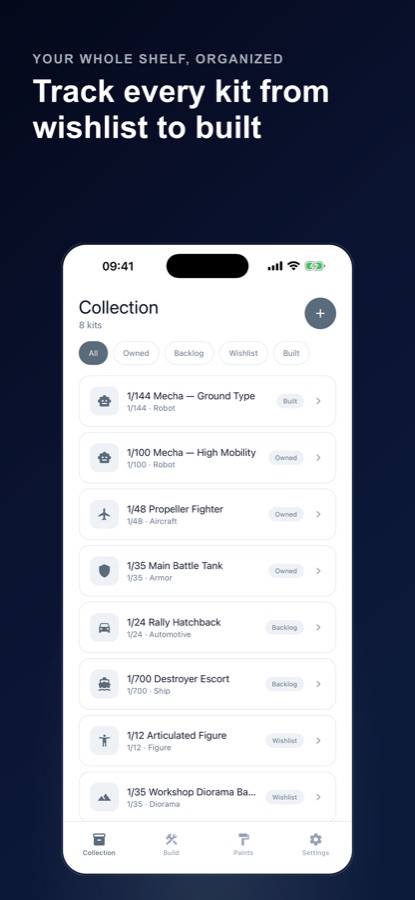
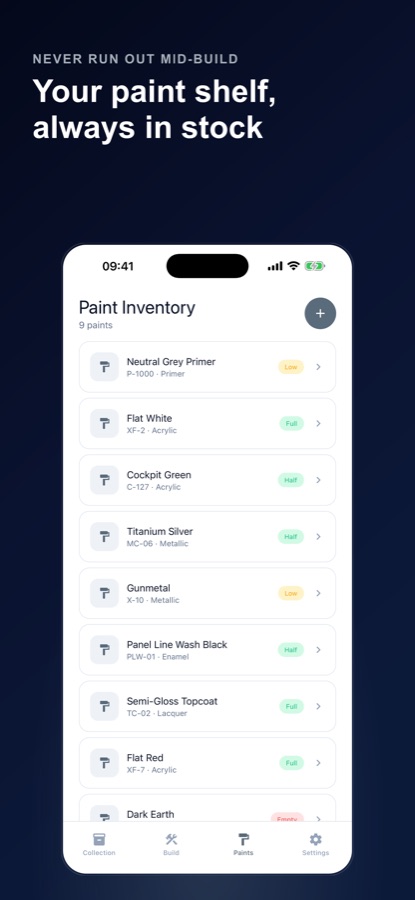
Scale Model Kit & Paint Log is a free Android app, coming to iOS, for scale model builders tracking aircraft, armor, cars, ships, robots, figures and dioramas from 1/144 to 1/24 and beyond. A kit shelf holds the whole stash by status — owned, backlog, wishlist or built — a build tracker moves each project through ten stages from planning to finished, and a paint inventory logs each bottle's brand, color code, type and remaining level so a project never stalls on a color nobody checked.
Inside the app
What it looks like
Background
What does building a scale model kit actually involve, stage by stage?
A plastic scale kit moves through a fairly consistent sequence regardless of subject — aircraft, armor or ship — even though the details differ: parts come off a sprue, get cleaned up, go together, get primed, painted and finished with effects like weathering or panel lining. Most builds that stall do so not from a skill gap but from losing track of where a given sub-assembly is, or running out of a paint color mid-coat with no backup plan.
Sub-assembly buildingparallel, not strictly linear
Experienced builders rarely finish one part of a kit before starting the next. A cockpit interior can be painted and detailed while the fuselage halves are still being cleaned up and glued, and the two come together only once both are ready — which is why a tracker needs to follow pieces of a build, not just one overall status.
Seam cleanup before primingthe step that gets skipped
Glued joints leave a visible seam line, and sanding or filling it before primer is what separates a clean finish from one with a visible ridge once paint goes on. Skipping straight from assembly to painting is the most common shortcut that shows up later.
Priming and panel liningtwo different jobs
Primer gives paint something consistent to grip and reveals sanding marks you missed before they're sealed under color. Panel lining — a dark wash worked into recessed detail lines and wiped back — is a separate, later step that adds depth to a finish rather than fixing surface prep.
Cure and dry time between stagesthe stage that stalls a shelf
Primer, paint and topcoat each need real drying or curing time before the next step, and that waiting window is exactly where a kit gets set aside and half-forgotten. A build log that tracks whose wait is up is the difference between a stalled project and a two-minute check-in.
How it works
How the app is used
The shelf and the stash get set up as kits and paints are acquired. After that, the habit is moving a build forward a stage at a time and logging what paint went into it.
Put the stash on one shelf
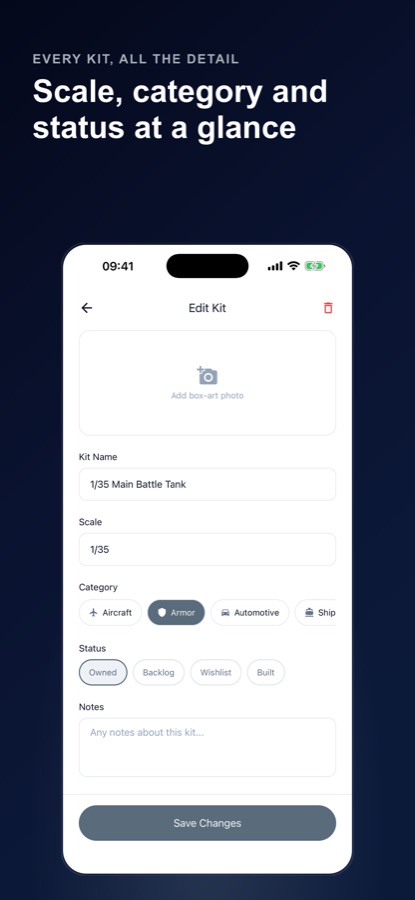
Add each kit across eight categories — aircraft, armor, automotive, ship, robot, figure, diorama and other — with its scale, a box-art photo and notes, marked owned, backlog, wishlist or built. There's no cap on how many kits are tracked.
Move a build through its stages
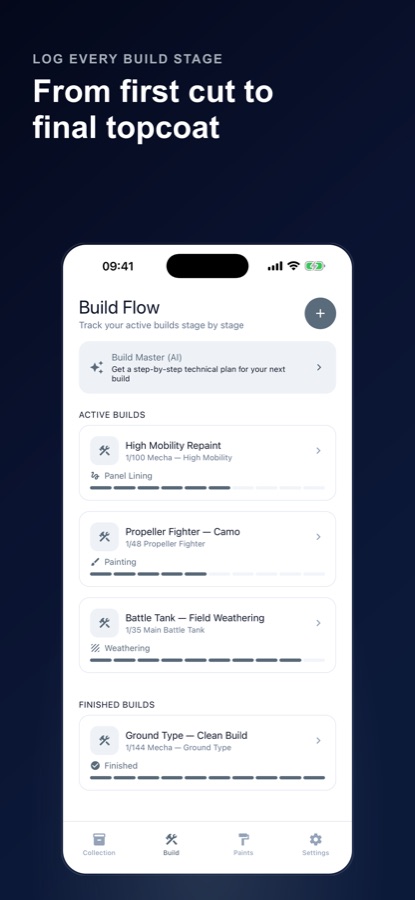
Ten stages run from planning and assembly through seam cleanup, priming, painting, panel lining, decals, topcoat, weathering and finished, with a finish style — clean, battle damage or camouflage — set per project. Sub-assemblies let a cockpit move on while a fuselage cures, and progress photos file under the stage they were taken.
Check the paint shelf before every coat
Assign paints to a project and Bench Check looks at those bottles before a stage starts, whether the plan is brushing or airbrushing. After a stage, tap the bottles that were drawn down and share a restock list before the next hobby shop run.
What's inside
What the app tracks
8
Eight kit categories
Aircraft, armor, automotive, ship, robot, figure, diorama and other, each kit marked owned, backlog, wishlist or built with its own scale and box-art photo.
10
Ten build stages
Planning, assembly, seam cleanup, priming, painting, panel lining, decals, topcoat, weathering and finished, with sub-assemblies so a cockpit can move on while a fuselage cures.
AI
Build Master plan
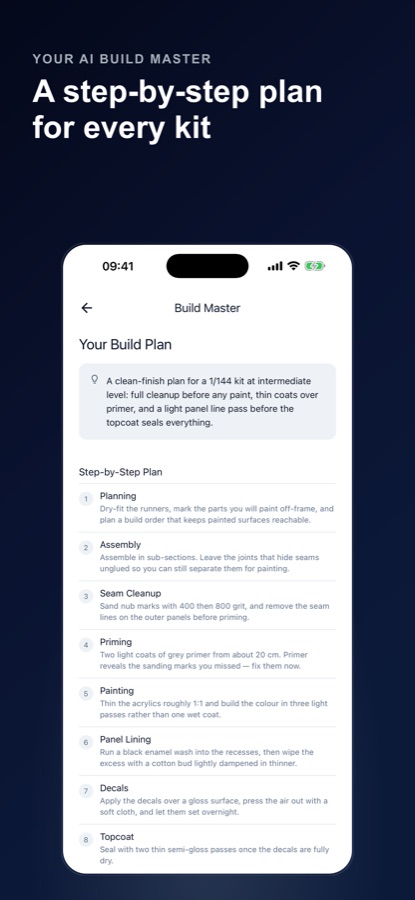
Describe the kit, pick a finish and skill level, and get a step-by-step build plan with a materials list drawn from the paints already in your inventory.
Bottle
Paint inventory with levels
Log brand, color code and type — acrylic, enamel, lacquer, primer, metallic or other — and track each bottle as full, half, low or empty, so a project never starts a coat on an empty bottle nobody noticed.
Doom
Shelf of Doom
Pick a stalled project from the shelf and get one small bench task for tonight, aimed at the kind of build that's been sitting untouched rather than the newest one.
Vision
Vision Feedback (Pro)
Add a progress photo for cleanup notes on seam lines, nub marks and finishing at the stage you pick. The photo goes to an AI only if you allow it; otherwise feedback comes from the stage alone.
Fit
Who it's for — and who it isn't
A good fit if you
- Have more than one kit going at once and lose track of which stage each one is at
- Want to know what's actually left in a paint bottle before starting a coat
- Build across categories — aircraft, armor, cars, ships, figures or dioramas — and want one shelf for all of it
- Want a small task to restart a project that's been sitting on the shelf
- Want a step-by-step build plan drawn from the paints you actually own
Not the right tool if you
- Are on iPhone today — the app is on Android now, with iOS coming
- Want the AI build plan to replace your kit's own instructions; it's general hobby guidance
- Want cloud backup across devices — your shelf, builds and paints live on the phone, with no account required
- Want unlimited Build Master plans and bench tasks for free; the monthly allowance is free, more is Pro
Questions
Frequently asked questions
What's a good app for tracking scale model kits and builds?
A model-building tracker earns its keep when more than one kit is in progress: it needs to hold the whole stash, follow each build through real stages, and know what paint is actually left before a coat starts. Scale Model Kit & Paint Log covers all three — a kit shelf across eight categories, a ten-stage build tracker with sub-assemblies, and a paint inventory with stock levels. It's free on Android, with iOS coming.
How do you organize a scale model kit stash?
Most builders end up with kits at very different points: some still in shrink wrap, some mid-build, some just bought on impulse. Sorting the stash by status — owned, backlog, wishlist or built — rather than only by subject matter is what keeps a growing shelf from turning into a guess. Scale Model Kit & Paint Log's kit shelf uses exactly those four statuses, alongside category and scale.
What are the typical stages of building a plastic model?
A common sequence runs planning, assembly, seam cleanup, priming, painting, panel lining, decals, topcoat and weathering, finishing at a completed build — though not every kit uses every stage, and finish style (clean, battle damage, camouflage) shapes how much weathering happens. The app's Build Tracker follows exactly this ten-stage sequence, with sub-assemblies so a cockpit or turret can progress separately from the main hull or fuselage.
Why does seam cleanup matter before priming a model kit?
A glued joint between two plastic parts leaves a seam line, and sanding or filling it before primer goes on is what keeps that line from showing through the finished paint job. Skipping from assembly straight to painting is one of the most common shortcuts that shows up later as a visible ridge. The build tracker keeps seam cleanup as its own stage, separate from assembly and priming, so it doesn't get skipped.
How do I keep track of leftover model paint?
The honest answer is logging each bottle's level rather than trusting memory, because a half-used bottle of a specific color code looks identical to a nearly empty one from across a shelf. Scale Model Kit & Paint Log's paint inventory tracks brand, color code, type and a full, half, low or empty level per bottle, and Bench Check looks at the bottles assigned to a project before each build stage.
Is Scale Model Kit & Paint Log free?
Yes. Unlimited kits, builds and paints, every tracker and timer, 8 Build Master plans and 4 AI bench tasks a month, and one Vision Feedback preview are free, and the free version shows ads. Pro adds unlimited Build Master plans and AI bench tasks, up to 30 photo critiques a month, and no ads.
Is Scale Model Kit & Paint Log on iPhone?
Not yet. The app is live on Google Play; the App Store listing is set up but the iOS app hasn't launched there yet. The Android app already covers the full kit shelf, build tracker and paint inventory.
What does the Build Master AI plan actually generate?
Describe the kit, pick a finish and your skill level, and it returns a step-by-step build plan with a materials list, drawing on the paint names already logged in your inventory and flagging what's still missing. It's general hobby guidance built from common build practice, not a replacement for the specific kit's own instruction sheet, which the app explicitly says to keep checking.
What is the Shelf of Doom?
It's a feature aimed at the kit that's been sitting untouched rather than the one just started: pick a stalled project from the shelf, and the app suggests one small bench task to do tonight instead of asking for a full session. The idea is lowering the bar back into a project rather than demanding a long return to the bench.
Does the app work without an internet connection or an account?
The kit shelf, build tracker and paint inventory are stored on the phone with no account required — you start as a guest, and there's no cloud backup. A connection is only needed for the optional AI features: Build Master, AI bench tasks, and Vision Feedback, which send only what each one needs — kit details, finish, skill level, paint names, or a progress photo if you allow it — through the app's own server.
Get started
Put the whole shelf in one place
Free on Android now, with iOS coming — unlimited kits, builds and paints.
More from CoddyKit
Available on Android.