
Fishing Log: Catch Journal
Fishing Log: Catch Journal — A private logbook for every catch, spot and bite window
Fishing Log is a free catch journal and tackle log for anglers who want to remember what actually worked: species, size, bait, spot and conditions. The log stays on your phone, never on a public map or a social feed, so your best spots stay yours and your own record — not a stranger's — tells you when to go back.


- Price
- Free, Pro upgrade
- Platforms
- Android now, coming to iPhone
- Languages
- 10
A pattern only shows up once it's written down.
One good trip looks like luck. Fifteen trips logged with bait, tide and time start showing a pattern — which lure actually produces, which hours the fish come on, which spot is worth the drive. None of that is visible from memory alone; it only appears once catches are recorded the same way, trip after trip.
What it is
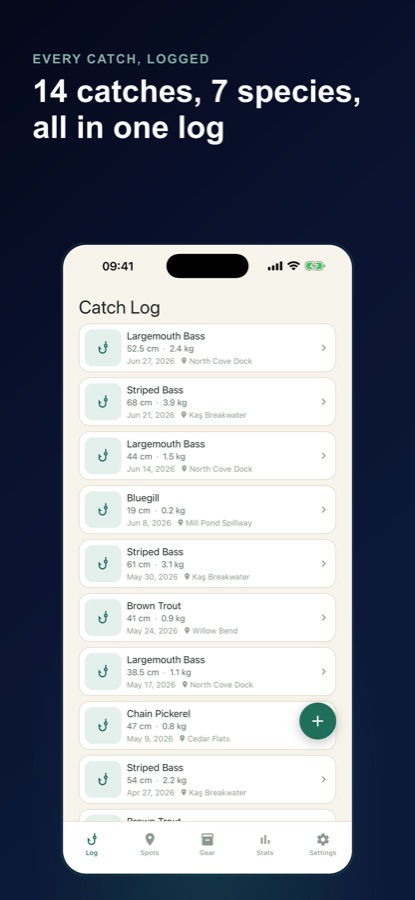
Fishing Log: Catch Journal is a free Android and iPhone app for recording catches, spots and gear. You pick a species from a searchable freshwater and saltwater list, enter length and weight, choose the lure from your own tackle box, and note the tide, water temperature and weather. Catches build toward personal bests per species, a 90-species life list, and Bite Windows — a 7-day bite-time ranking calculated on your phone from your own catch history once you have 15 or more logged.
Inside the app
What it looks like
Background
What actually predicts when fish bite?
Anglers commonly point to the solunar theory — that fish feed more around moonrise, moonset and the moon's transit of the sky — as a starting guide, alongside tide stage, water temperature and time of day. All of these are correlations seen across many anglers and waters in general; none of them substitute for what has actually worked in your own water, which is why a dated catch log tends to beat a generic calendar once there is enough of it to look back on.
Solunar theorya traditional starting pattern
A long-standing theory that fish activity rises around certain phases of the moon's daily cycle. It is a traditional, generalized pattern rather than a guaranteed forecast for any specific water, which is why it is commonly used as a starting point before a personal record exists, not a replacement for one.
Tide stagelow, rising, high, falling
In tidal water, many species feed more actively around moving water — rising or falling tide — than at dead low or high slack. The right stage varies by species, spot and season, so it is most useful recorded per catch rather than assumed from a tide table alone.
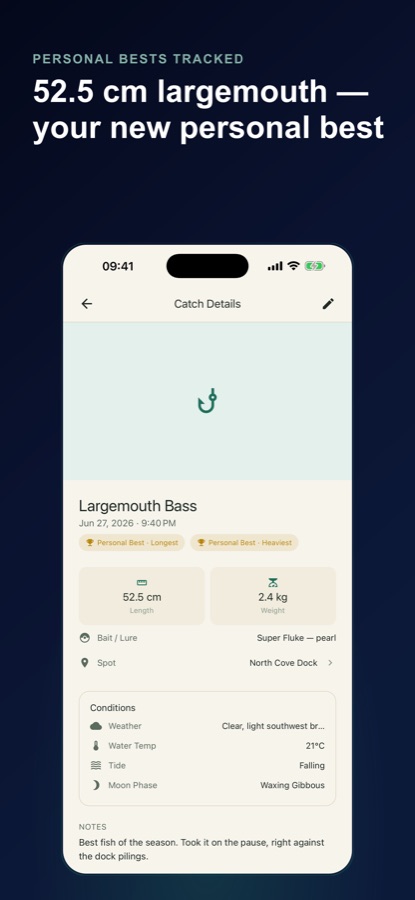
Personal bestby length and by weight, per species
The longest and heaviest catch logged for each species. Tracking both separately matters because the longest fish of a species is not always the heaviest one caught — a lean, long fish and a short, heavy one can both be personal records in their own category.
A life listborrowed from birding
A checklist of species a given angler has caught versus species still unticked, adapted from the birdwatching tradition of the same name. It reframes a season around breadth — new species tried — rather than only the single biggest fish of the year.
How it works
How the app is used
Logging a catch takes under a minute right after it comes aboard; everything else — trips, stats, bite windows — builds from that habit over a season.
Log the catch
Pick the species from a searchable freshwater and saltwater list, enter length and weight, choose the lure from your tackle box, pick the spot, and note tide, water temperature and weather. Quick Log saves just the species and one measurement when you're in a hurry, so the rest can be finished later.
Keep trips and spots separate
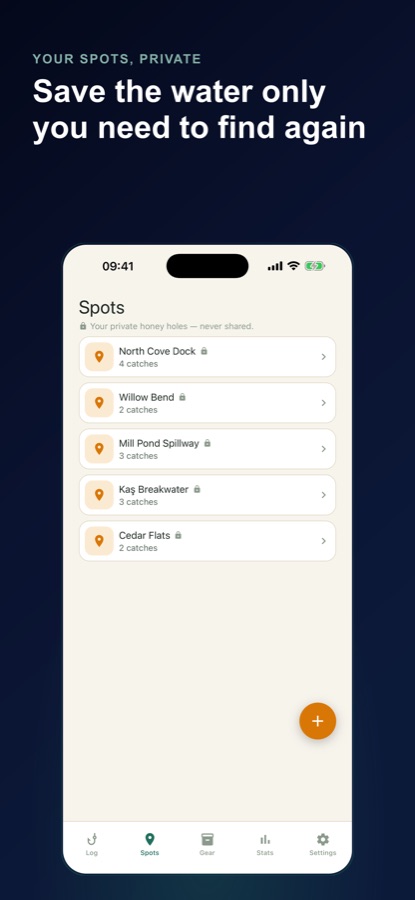
Start a trip and enter the water and conditions once; every fish added inherits them, and a trip recap shows fish, species, time on the water and the best catch. Spots get an optional private GPS pin and notes on access and timing — never shared, never on a public map.
Read the pattern back
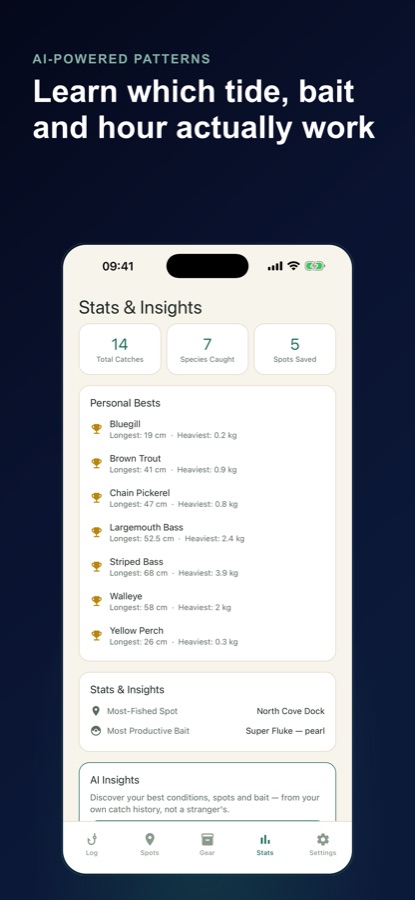
Stats surface total catches, species caught, most-fished spot and most productive bait. Once 15 catches are logged, Bite Windows ranks the next 7 days in 2-hour blocks from your own hours, months and moon phases, calculated on the phone with no connection required.
What's inside
What the app tracks
90
Species life list
A 90-species checklist marked caught or not, with field notes from FishBase, plus slams such as the Black Bass Slam and the Trout Slam to chase across a season.
15+
Bite Windows
Ranks the next 7 days in 2-hour blocks. Before 15 logged catches it shows the traditional solunar pattern and says so; after that it switches to the hours, months and moon phases your own fish actually came on.
Private
Spots stay yours
An optional GPS pin and notes on access and timing per spot, never shared and never shown on a public map — the opposite of a social fishing feed.
PB
Personal bests
Tracked per species, by length and by weight separately, flagged the moment a new one is set.
Tackle
Tackle box
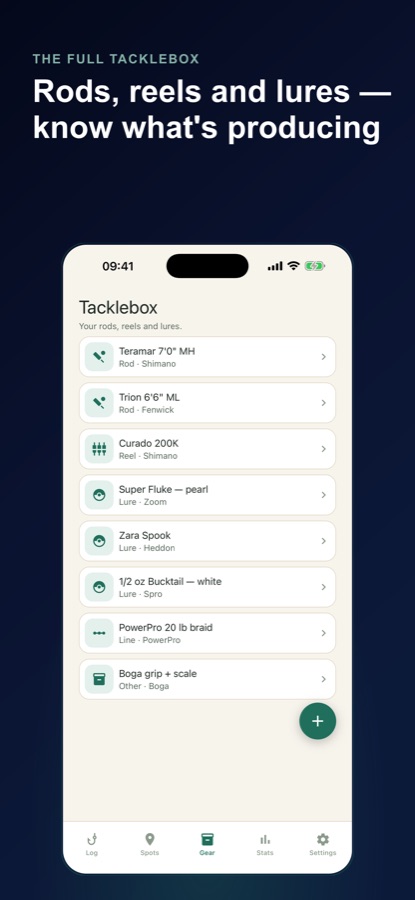
Rods, reels, lures and line logged once; pick a saved lure when adding a catch and stats show which one is really producing.
AI
AI Insights
From 5 or more catches, structured findings on your own best time of day, tide, moon phase, spot and bait — built only from your own records, never compared with anyone else's. Part of Pro.
Fit
Who it's for — and who it isn't
A good fit if you
- Want to remember which bait, spot and conditions actually produced instead of relying on memory
- Keep your best spots to yourself rather than posting them to a public map or feed
- Fish more than one species and want personal bests and a life list to chase
- Want a bite-time estimate built from your own catch history rather than a generic calendar
Not the right tool if you
- Want a social fishing app with a public feed, leaderboard or shared catch map
- Want tides and weather forecast for you — Fishing Log records what you enter and does not forecast conditions
- Log more than 25 catches and don't expect to need Pro's unlimited logbook
- Want the app to decide where to fish next without any catch history behind the suggestion
Questions
Frequently asked questions
What's the best app for logging fishing catches?
The useful test is whether it keeps spots and catch details private while still building real patterns from them — bait, tide, time, species. Fishing Log: Catch Journal does both: a searchable species picker, a tackle box tied to each catch, private GPS-pinned spots never shown on a public map, and Bite Windows that ranks future days from your own fishing history once you've logged enough catches. Free on Android, coming to iPhone.
What is solunar theory and does it actually predict fish activity?
Solunar theory holds that fish feed more actively around certain phases of the moon's daily cycle — moonrise, moonset and its transit overhead. It's a traditional, general pattern used across many anglers and waters, not a guaranteed forecast for any one spot. Fishing Log shows the traditional solunar pattern for Bite Windows until you've logged 15 catches, then switches to ranking days using the hours, months and moon phases your own fish actually came on.
How does Bite Windows work?
It ranks the next 7 days in 2-hour blocks, calculated entirely on your phone with no internet connection needed. Before you have 15 logged catches, it shows the traditional solunar pattern and says so plainly. After 15 catches, it switches to your own record — the hours, months and moon phases your fish actually came on — and shows the specific catches behind each score rather than a black-box number.
Does the app forecast tides and weather for me?
No. Tide stage, water temperature and the weather note are fields you fill in yourself at the time of the catch; Fishing Log does not fetch or forecast them. Moon phase is the one condition calculated for you, from the date and time you record. For a tide forecast ahead of a trip, check a local tide table.
Are my fishing spots kept private?
Yes. Spots can have an optional GPS pin and notes on access and timing, but they are never shared and never shown on a public map. Sharing a catch as an image is optional and the spot name in that image is also optional; coordinates are never included in a shared catch, which is a deliberate difference from apps built around a public catch feed.
What counts as a personal best?
Fishing Log tracks personal bests separately for length and for weight, per species, and flags the moment a new one is set. Tracking both matters because the longest fish of a species caught isn't always the heaviest — a lean, long fish and a short, heavy one can each hold a separate personal record for the same species.
Is Fishing Log free?
Yes. The free tier saves up to 25 catches (with a way to earn 5 more by watching a short ad, twice a week), unlimited spots and gear, all stats, Bite Windows, the Life List and personal bests, with occasional ads. Editing a saved catch is never limited. Pro adds unlimited catches, AI Insights from your own catch history, logbook backup and restore, CSV export and an ad-free app.
What is the Life List and what are slams?
The Life List is a 90-species checklist, marked caught or not, with field notes drawn from FishBase for each species — an idea borrowed from the birdwatching tradition of the same name. Slams are themed groups of species, such as the Black Bass Slam or the Trout Slam, that give anglers a specific multi-species goal to chase across a season rather than chasing size alone.
What do AI Insights actually use?
Once you have 5 or more logged catches, AI Insights produces structured findings about your own best time of day, the tide and moon phase your fish favor, and your most productive spot and bait — each tied to the specific catches behind it. It is built only from your own records and is never compared against other anglers' catches. It is part of Pro and requires consent before your catch data (never GPS coordinates or photos) is sent for the report.
Get started
Build a logbook that actually tells you where to go back
Free on Android, coming to iPhone — private spots, a real tackle box, and bite times from your own record.
More from CoddyKit
Available on Android.