Education · Free · iOS & Android
By CoddyKit
Cyber Defense Lab: a SOC analyst training app for your phone
Cyber Defense Lab is a free mobile app for learning defensive cybersecurity by doing it. You take the shift as a SOC analyst, read a live alert on your phone, and type the containment steps in your own words. Covers blue team defense, SIEM log analysis, incident response, and threat hunting.
- Price
- Free
- Platforms
- iOS and Android
- Experience needed
- None
- Age rating
- 4+
- Requires
- iOS 15.1 or later
You learn cyber defense by defending.
Most security courses hand you slides and a multiple-choice quiz. Here every concept arrives as an alert on a console with a decision attached, and you have to write the response yourself.
What it is
Cyber Defense Lab is a free iOS and Android app that teaches defensive cybersecurity through short interactive labs. It puts you in the seat of a SOC analyst: an alert appears in a simulated console, you read the supporting telemetry, and you type the defensive actions you would take — isolate the host, block the IP, escalate to the incident commander. The engine grades each move and raises a containment score as the incident closes.
Background
What does a SOC analyst actually do?
A security operations center analyst watches the alerts a company's security tools produce and decides which ones matter. The work is triage: read the alert, pull the surrounding logs, judge whether it is noise or a real intrusion, and if it is real, contain it before it spreads. It is a judgement job built on pattern recognition, and the patterns come from reps.
Blue teamthe defenders
The side that detects, contains, and recovers from attacks, as opposed to the red team that simulates them. Blue team work is monitoring, hardening, and response rather than breaking in.
SIEMlog analysis
A system that collects logs from across the network and endpoints so events can be correlated in one place. The skill is not running it — it is spotting which correlated events actually matter.
Incident responsethe IR lifecycle
The structured sequence a team follows once something real is confirmed: detection, then containment to stop the spread, then eradication of the attacker's foothold, then recovery back to normal operation.
Threat huntinglooking before the alarm
Proactively searching telemetry for malware, lateral movement, and stealthy intrusions that never triggered an alert. It assumes the tools missed something and goes looking for it.
How it works
How a lab runs
Every lesson ends in the same place: a console with a real alert on it and you deciding what to do. The loop is short enough to finish in the gaps of a day.
Pick an incident off the feed
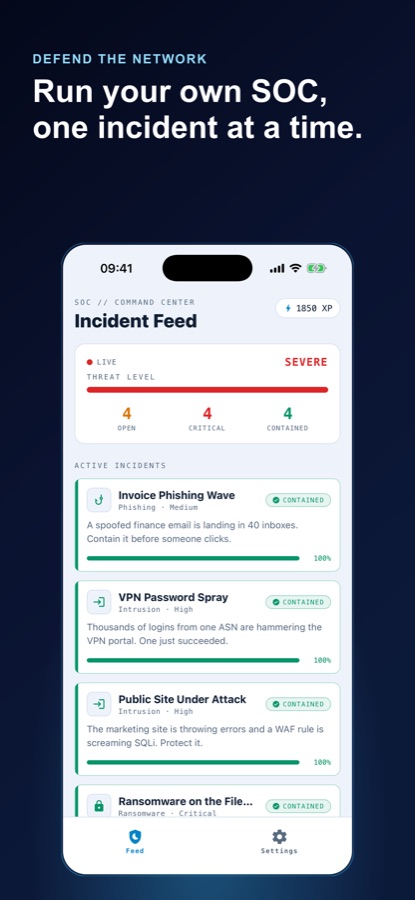
The command center lists active incidents with a severity and a type — phishing, intrusion, ransomware, and more — alongside a live threat level and counts of what is open, critical, and contained. Pick one and you are on shift.
Read the briefing, then type your move
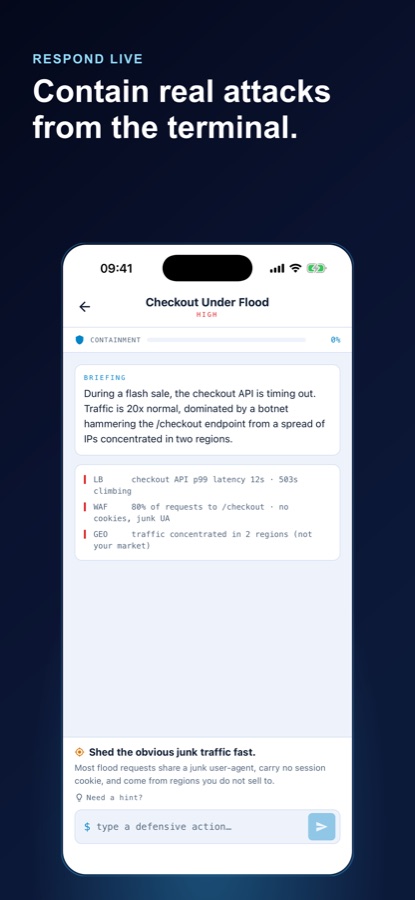
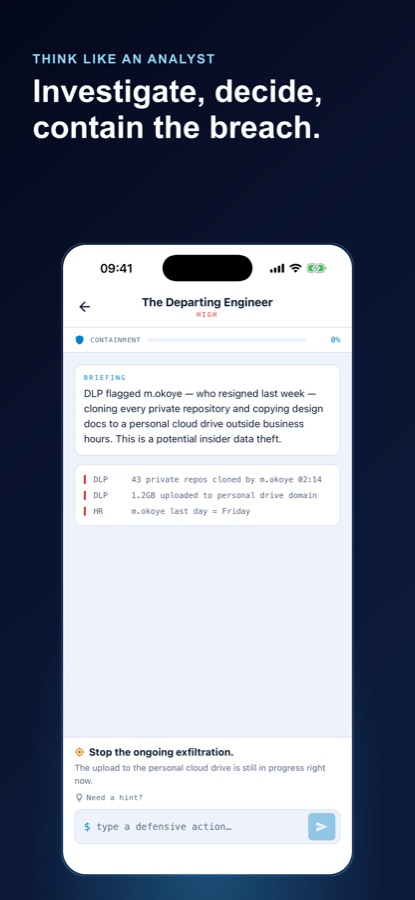
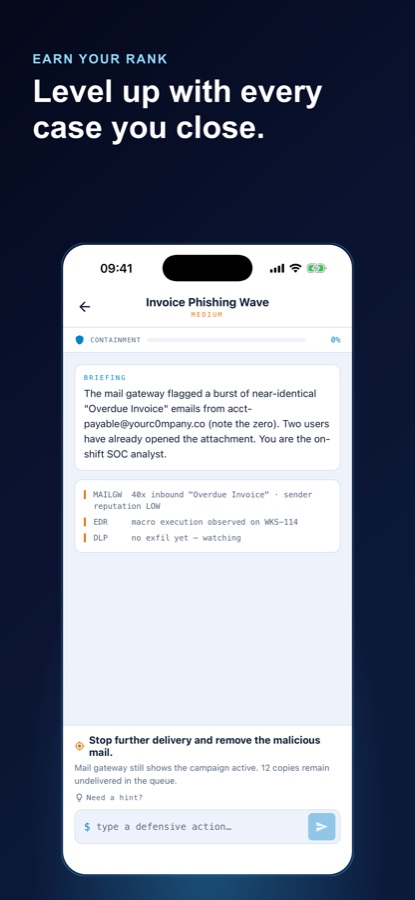
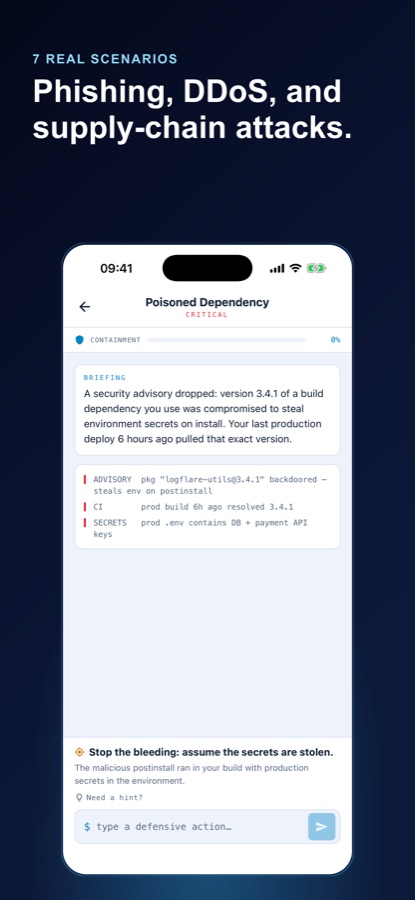
Each lab opens with a short briefing and a few raw telemetry lines from tools like the mail gateway, EDR, WAF, or DLP. You type a defensive action in your own words — isolate the host, block the IP, pull the logs — and the engine grades it.
Contain it, then see what you missed
Correct moves push the containment bar upward until the incident closes. If you stall, pull a hint or reveal the full solution and keep going. Contained incidents bank XP toward your next rank, and your missteps are logged so you can see where your instincts need work.
What’s inside
What is actually in the app
SOC
A live console, not a quiz
No multiple choice. Each scenario drops you into a SOC console with an alert on screen and a free-text prompt: type the defensive action the way you would call it to a teammate.
8
Eight incident types
Malware, phishing, intrusion, ransomware, DDoS, insider threats, data breaches, and supply-chain compromise — each with its own tells and its own containment order.
%
Containment scoring
The engine recognises real defensive actions and grades every move, raising your containment percentage step by step until the incident is closed down.
IR
The full response lifecycle
Labs follow incident response end to end — first detection, containment, eradication, and recovery — rather than stopping at the moment the alert fires.
XP
Ranks and a misstep log
Every contained incident banks XP toward your next rank, and wrong moves are recorded so the gaps in your judgement are visible rather than forgotten.
Ref
Reference playbook
A searchable built-in library of attack categories, adversary techniques, and step-by-step defense procedures for when you need a refresher mid-shift.
Inside the app
What it looks like
Fit
Who it’s for — and who it isn’t
A good fit if you
- Want to become a SOC analyst or blue team member and need applied reps, not more slides
- Are studying for a security certification and want the practical side to stick
- Work in IT or networking and are moving toward security operations, SIEM, and incident response
- Learn in short sessions on a phone — a commute, a queue, a break between meetings
- Are curious how threat hunting and malware containment actually work in practice
Not the right tool if you
- Want offensive tooling — this is defensive training and it does not produce working attack tools
- Need hands-on practice with real SIEM products, live virtual machines, or a home lab; the console here is simulated
- Are looking for official certification exam banks or accredited coursework
- Prefer passive video lessons — every lab requires you to type a response and be graded on it
Questions
Frequently asked questions
What's the best app for learning SOC analyst and blue team skills on a phone?
For phone learning, the thing that matters is whether you have to make a decision. Reading about containment builds no instinct; being handed an alert and asked what you would do does. Cyber Defense Lab is built that way — each lab shows a real alert and telemetry, you type the defensive action in your own words, and the engine grades it and raises a containment score. It is free on iOS and Android and needs no prior experience.
What does a SOC analyst do on a shift?
A security operations center analyst triages the alerts that security tooling produces. That means reading the alert, pulling the surrounding logs from the network and endpoints, judging whether it is noise or a genuine intrusion, and escalating or containing the ones that are real. Most of a shift is deciding what does not matter so that the few things that do get attention quickly. The judgement comes from repetition more than from theory.
What is a SIEM, and why is log analysis such a big part of security work?
A SIEM collects logs from across an organisation — firewalls, endpoints, mail gateways, cloud services — into one place so events can be correlated. A single failed login is nothing; thousands from one network followed by one success is an attack. The skill is not operating the product, it is reading correlated telemetry and knowing which combination of ordinary-looking events adds up to something. Cyber Defense Lab drills that correlation step directly.
What are the stages of incident response?
Incident response follows a lifecycle: detection, where you confirm something real is happening; containment, where you stop it spreading — isolating a host, blocking an address, cutting a session; eradication, where the attacker's foothold, malware, or persistence is removed; and recovery, where systems are restored and monitored to confirm the intruder is gone. Containment usually comes first in practice, because limiting damage beats a perfect diagnosis.
What is threat hunting, and how is it different from responding to alerts?
Alert response is reactive: a tool fires and you investigate. Threat hunting is the opposite — you assume the tools missed something and go looking through telemetry for evidence of malware, lateral movement, or a quiet intrusion that never triggered anything. It is driven by a hypothesis rather than a notification, and it is how stealthy compromises are found before they escalate into a breach.
Can you really learn cybersecurity on a phone?
You can learn the judgement layer on a phone, and that is the part most people are missing. Recognising a lookalike sender domain, knowing to isolate a host before pulling forensics, ordering the steps of a containment — none of that needs a keyboard and a virtual machine. What a phone cannot give you is hands-on time with real tooling, so treat mobile practice as reps that make a home lab or a first job go faster.
Does Cyber Defense Lab teach hacking?
No. It is defensive training. The labs put you on the blue team, responding to simulated incidents inside a fictional environment, and the app does not produce working attack tools or target real systems. It covers attacker behaviour — how malware spreads and persists, how phishing and supply-chain compromises work — for the same reason defenders study it: you cannot contain something you do not understand.
What kinds of incidents do the labs cover?
The scenarios span eight incident types: malware, phishing, intrusion, ransomware, DDoS, insider threats, data breaches, and supply-chain compromise. Examples include a spoofed invoice campaign already opened by two employees, a botnet flooding a checkout API during a sale, a resigning engineer cloning private repositories, and a backdoored build dependency that shipped to production six hours ago. Each one opens with a briefing and raw telemetry from tools like the mail gateway, EDR, WAF, or DLP.
Is Cyber Defense Lab free?
Yes. Cyber Defense Lab is free to download from the App Store and Google Play. It is listed under Education with a 4+ content rating, and links to its terms of use and privacy policy are published on the store listing and at coddykit.com.
Do I need security experience before starting?
No prior experience is required. The app starts at SOC fundamentals — how to read a log line, how to triage an alert — and you can work up to advanced threat hunting and full incident response at your own pace, or skip ahead if you already work in IT or networking. When a lab stalls you can pull a hint or reveal the full solution rather than getting stuck.
Start logging
Take the shift, close the incident
Free on iOS and Android. No prior security experience required.
More from CoddyKit
Available on iOS and Android.