

Keep in Touch - Friends
Keep in Touch - Friends — A personal CRM that shows who to call today
Keep in Touch is a free Android app (an iPhone version is on the way) that turns "we should catch up soon" into a routine. It is a personal CRM for friends, family, partners and colleagues: you choose how often you want to be in contact with each person, and a Today list shows who is overdue, whose birthday is close and which follow-ups you promised.


- Price
- Free, Pro upgrade
- Platforms
- Android now, coming to iPhone
- Languages
- 10
- Account
- Start as a guest, no sign-up needed
Friendships rarely end. They go quiet.
Most people lose touch not because they stopped caring, but because nothing nudged them at the right moment. Keep in Touch is built around that gap: one rhythm per person, one short list each day, and a place to remember what you said last time.
What it is
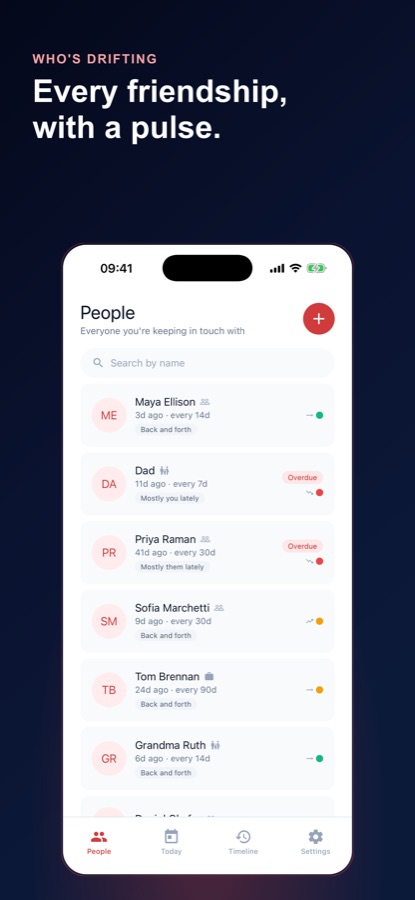
Keep in Touch - Friends is a free Android app that works as a personal relationship manager for the people in your life, not a sales pipeline. You add friends, family, partners and colleagues, set a check-in cadence for each, and a Today screen shows who to call, text or visit next. It also logs every conversation in a timeline, scores how each relationship is going, tracks birthdays and other dates, and sends a Sunday Digest. An iPhone version is planned.
Inside the app
What it looks like
Background
How do you keep in touch with people when life gets busy?
The workable answer is to stop relying on memory and goodwill and give each relationship a rhythm that matches how close you actually are. A sibling you speak to weekly, a college friend you see twice a year and a former colleague you greet at New Year are on different clocks, and a single "call everyone more" resolution fits none of them. What helps is a short list of who is due, a note of what was said last time, and permission to make the contact small.
Match the rhythm to the relationshipone size fits nobody
A close friend might be due every two weeks, a wider circle monthly, and a distant acquaintance once a quarter. Deciding this once, per person, replaces the vague guilt of an unwritten to-do list with a concrete date you can act on or consciously change.
Small contact still countsa line is not a failure
A one-line message, a shared photo or a reply to something they posted keeps a thread alive. Waiting for the time to hold a long catch-up call is the most common reason a message never gets sent at all.
Remember the details that mattercontext is what makes it personal
Their new job, a child's name, the trip they were planning, a food they cannot eat. People notice when you recall these, and almost nobody can hold them in their head for dozens of relationships at once.
Notice who reaches outreciprocity, without scorekeeping
Friendships go through stretches where one person carries most of the effort. Seeing the pattern as information, rather than as a grievance, helps you decide whether to keep initiating, ease off, or simply say so.
Dates you would otherwise missbirthdays, anniversaries, the day you met
Date reminders are the easiest contact to make because the occasion supplies the reason. A birthday known only by month is still worth recording, since the reminder can surface it long before the day.
How it works
How a week with Keep in Touch works
The first session is a few minutes of naming people. After that the app asks for very little: look at Today, reach out, and log what happened.
Sort your people into circles
A short setup asks who you meant to call back last month, whose birthday you always miss and who you only hear from at New Year. Each answer lands in a circle — inner, close or wider orbit — and each circle starts with its own rhythm, which you can change for any individual later.
Open Today and pick someone
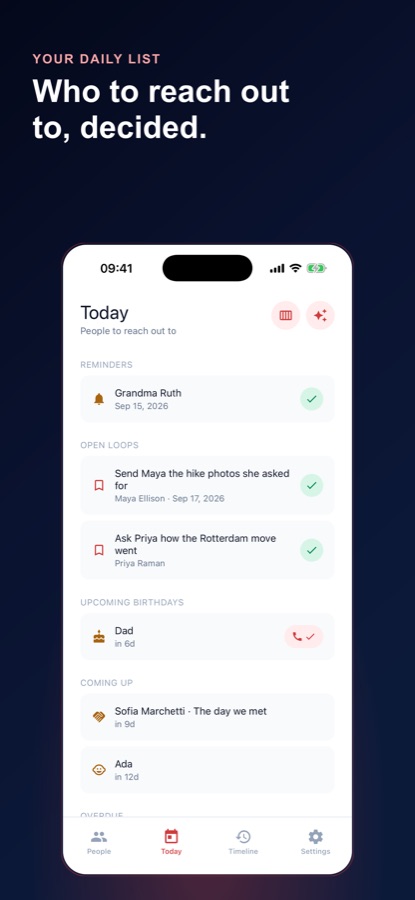
The Today screen gathers reminders, open loops such as "send her the hike photos", upcoming birthdays, dates coming up and anyone overdue. You tick items off as you handle them and call, text or visit whoever is next.
Log it in a few taps
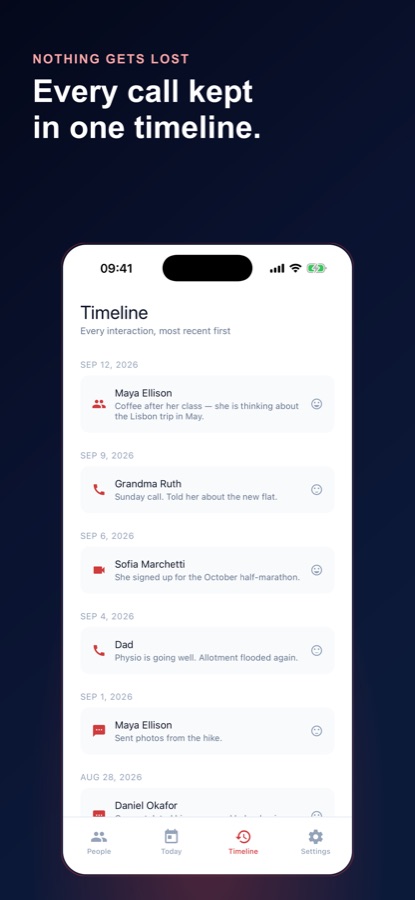
Record the channel — call, video chat, text, visit, email or social message — who reached out, how it went and a note. Every entry joins a timeline of all your interactions, most recent first, so the next conversation starts from what you actually said.
Read the Sunday Digest
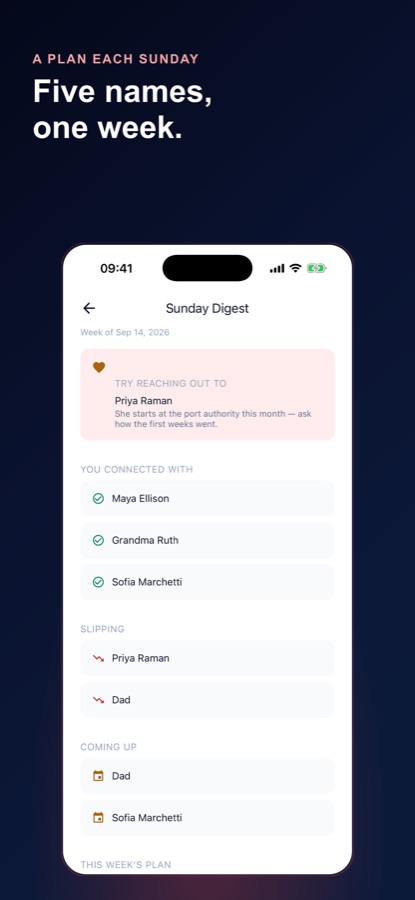
Once a week the digest lists who you connected with, who is slipping and what is coming up, and suggests someone to reach out to. Pro adds the full week's plan and a reciprocity breakdown.
What's inside
What the app keeps track of
Today
A daily list of who is next
Overdue people, due reminders, open loops, upcoming birthdays and extra dates in one place, with a clear all-caught-up state when there is nothing to do.
3
Circles with their own rhythm
Inner, close and wider orbit circles seed a check-in cadence for each person, so someone you miss is nudged every couple of weeks and someone in your orbit about every three months. A custom cadence per person replaces one reminder for everybody.
Log
Interaction timeline
Calls, video chats, texts, visits, emails and social messages, each with who reached out and how it went. The timeline shows every interaction across all your people, newest first.
Score
Relationship health score
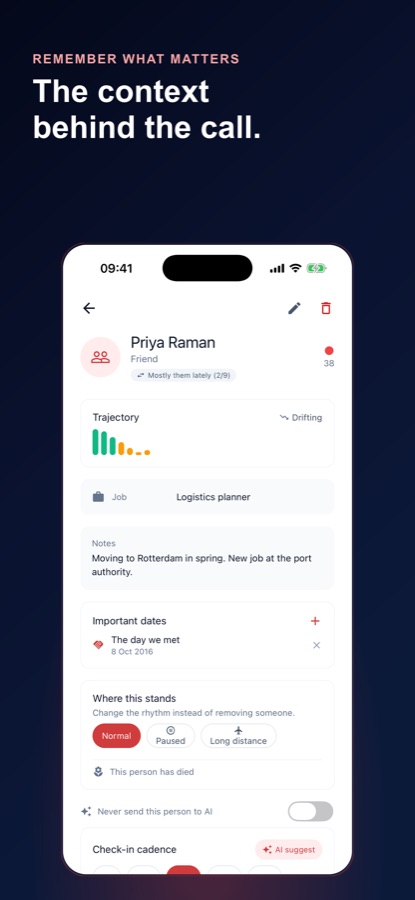
Each person gets a score with a plain explanation, a trajectory of recovering, steady or drifting, and a reciprocity label such as mostly you lately or back and forth. It is meant to be observational rather than accusatory.
Dates
Birthdays and extra dates
Birthdays show on Today even when you only know the month. Add anniversaries, a child's birthday or the day you met, and keep jobs, children's names, allergies and notes on each person's card.
AI
AI suggestions, only if you allow them
Conversation openers for "what should I say?", cadence suggestions and follow-up ideas drawn from your notes. AI stays off until you agree on a consent screen that lists what is sent, and any person can be marked never to send.
Fit
Who it's for — and who it isn't
A good fit if you
- Want to call parents or grandparents more often and need a prompt that arrives on time
- Have friends who moved away and tend to let months slide by
- Forget birthdays unless something reminds you, even when you know the month
- Like to remember the small details — a new job, a child's age, an allergy — before you reach out
- Want a simple log of who you spoke to and how it went, without a sales-style pipeline
Not the right tool if you
- Want an app that imports your phone's address book automatically — Keep in Touch adds people one at a time
- Need your notes to stay only on your phone — people, notes and reminders are stored on the app's server, linked to your guest or signed-in account
- Expect to message people from inside the app — it reminds and records, and you reach out with your own calling and messaging apps
- Dislike ads in a free app — the free version shows banners and an occasional full-screen ad, and Pro removes them
Privacy
What stays on your phone and what does not
Keep in Touch does not read or import your phone's address book. The people, interactions, notes and reminders you add are stored on the app's server, linked to your guest or signed-in account, while contact photos stay on your device and are never uploaded. AI requests go through the server to OpenRouter only after you allow AI, and everything can be exported as CSV or JSON or deleted from inside the app.
Full details are in the CoddyKit privacy policy.
Questions
Frequently asked questions
What is a personal CRM, and how is it different from a sales CRM?
A personal CRM is a contact manager for relationships rather than customers: it records who you want to stay close to, how often, and what you last talked about. Keep in Touch is built that way, with friends, family, partners and colleagues in place of leads, and reminders to call instead of a sales pipeline. Nothing in it tracks deals or revenue.
How can I keep in touch with friends when I am busy?
Give each friend a rhythm that matches how close you are, then act on a short daily list instead of trying to remember everyone. Keep in Touch does this with a check-in cadence per person and a Today screen showing who is overdue, and it counts a text or a quick call just as much as a long visit. The point is to make contact small enough that it actually happens.
How often should I contact friends and family?
There is no correct number, because it depends on the relationship. Keep in Touch starts people in circles with different defaults — about every two weeks for your inner circle, monthly for close friends and roughly every three months for your wider orbit — and you can set any custom cadence for one person. If a rhythm feels wrong, you change it rather than ignore the reminders.
Is Keep in Touch free?
Yes, it starts free. Free includes unlimited people, cadences, the Today list, the interaction log and timeline, dates, the health score, data export and five AI suggestions a week, with ads shown in the free version. Pro is an auto-renewing monthly or yearly subscription that adds the Relationship Assistant, the full Sunday Digest plan, unlimited AI suggestions and removes ads; you cancel in Google Play.
Does Keep in Touch read my phone contacts?
No. The app does not read or import your phone's address book, so only the people you choose to add appear in it. You add each person yourself with their relationship type, birthday, job, children's names, allergies and notes, and any contact photo you choose stays on your device.
Where is my data stored, and can I get it out?
The people, interactions, notes and reminders you enter are stored on the app's server, linked to your guest or signed-in account, not only on your phone. Contact photos stay on the device and are not uploaded. You can export everything as CSV or JSON, and delete your account and its data from inside the app.
What does the AI in Keep in Touch do, and what does it send?
The AI suggests what to say when you reach out, how often to check in, and follow-up ideas from your notes. It is off until you allow it. The consent screen lists what is sent: first name, relationship type, check-in rhythm and the notes you wrote, with allergy notes excluded by default and a never-send-to-AI switch for any person. You can turn it off in Settings at any time.
What is the relationship health score?
It is a score for each person with a short explanation of why, shown alongside a trajectory of recovering, steady or drifting. It is based on how long it has been since you last connected compared with the rhythm you set, and it reads as strong, steady-but-slipping or needs attention. It is a prompt to act, not a verdict on the friendship.
Can I pause someone, or keep a person who has died in the app?
Yes to both. You can pause a person, mark a long-distance friendship, or set someone as in memoriam so that nothing is counted, reminded or suggested about them, and everything you wrote stays readable. It is a separate, confirmed action rather than a button you could tap by accident.
Is Keep in Touch available on iPhone?
Keep in Touch is on Google Play now. An iPhone version is on the way, and the App Store page is reserved, but it is not downloadable yet. The same interface languages — English, German, Spanish, French, Japanese, Korean, Portuguese, Russian, Turkish and Chinese — are planned to be available there.
Get started
Reach out to the next person on the list.
Free on Android, with an iPhone version coming. Start as a guest, no sign-up needed.
More from CoddyKit
Available on Android.