
Row Counter Crochet & Knitting
Row Counter Crochet & Knitting — A crochet counter and knitting row counter with your yarn stash in the same place
Row Counter Crochet & Knitting is a free Android crochet counter and knitting row counter for crocheters and knitters who want to keep their place in the project in their lap right now. Tap one big button per row, follow your pattern, and see your yarn stash, gauge and finish-by date in the same app instead of on a scrap of paper covered in tally marks.

- Price
- Free, Pro upgrade
- Platforms
- Android, on Google Play
- Languages
- 10
- Account
- Not needed to start counting
Frogging is part of the craft, so the counter counts it.
Every maker rips back rows sometimes. Row Counter logs the rows you frogged and why, next to the rows you worked, so your session history shows what actually happened at the end of a long evening and not only the tidy final number.
What it is
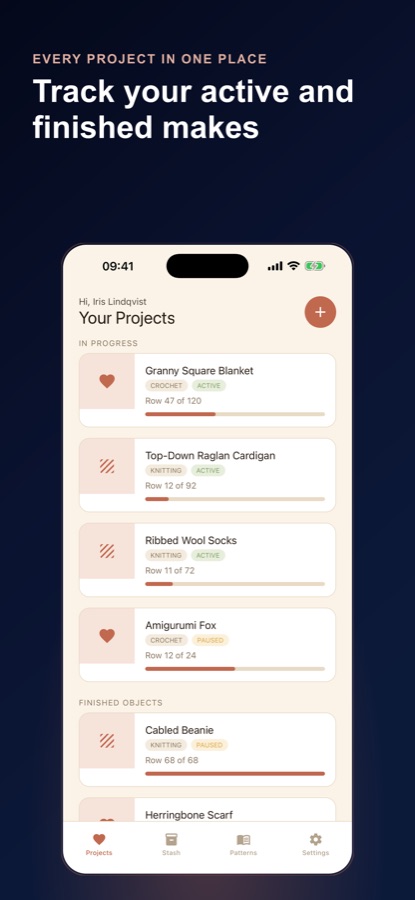
Row Counter Crochet & Knitting is a free Android crochet row counter, knitting counter and project tracker. A single large tap target counts each row with haptic feedback, undo and a reset that always asks first, and a pattern follower shows the current row, the repeat you are on and the stitches to expect. It adds a finish-by pace, a gauge checker, a yarn forecast, a yarn stash with ball band scanning, a pattern library with ten starter patterns, and a stitch glossary of more than 150 abbreviations, including US versus UK terms.
Inside the app
What it looks like
Background
How do you keep your place in crochet and knitting without losing a row?
Most lost places come from the same few moments: putting the work down mid-row, a double tap or a distracted count, and a pattern with repeats you are halfway through. A counter you can tap without looking helps, but so does knowing where you are in the pattern, not only the row number. The other half of staying on track is planning: whether your yarn reaches the last row and whether the finished piece will be the size the pattern intends.
Rows and roundswhat you are counting
Flat work is counted in rows and work in the round is counted in rounds, such as the amigurumi rounds in a pattern. A counter that follows a saved pattern tells you which repeat you are on and how many stitches to expect, which a bare number cannot.
Gaugestitches and rows per swatch
Gauge is how many stitches and rows fit in a measured square of your own work. If your swatch is off, the finished piece will not come out the intended size, and the fix is usually a different hook or needle size or a changed stitch count.
Yarn weight and dye lotwhy the stash needs details
Yarn weight, such as fingering, DK, worsted or aran, decides whether a skein suits a pattern. A dye lot is a batch dyed together, and skeins from different lots can differ slightly in colour, which is why it is worth writing down.
US and UK termsthe same name, a different stitch
In US terms a single crochet is the stitch that UK patterns call a double crochet. Knowing which system a pattern uses before you start avoids the most common misreading.
Froggingripping it back
Pulling out rows to fix a mistake is called frogging. It is a normal part of making, and counting it separately keeps your row total honest.
How it works
How a project runs in the app
Set a project up once, then the counter is the only thing you touch while you work.
Start a project and link a pattern
Choose crochet or knitting, set the target rows and link a saved pattern if you have one. Onboarding asks whether you read US or UK terms and which hook or needle you use, so new projects open with the right sizes.
Tap one button per row
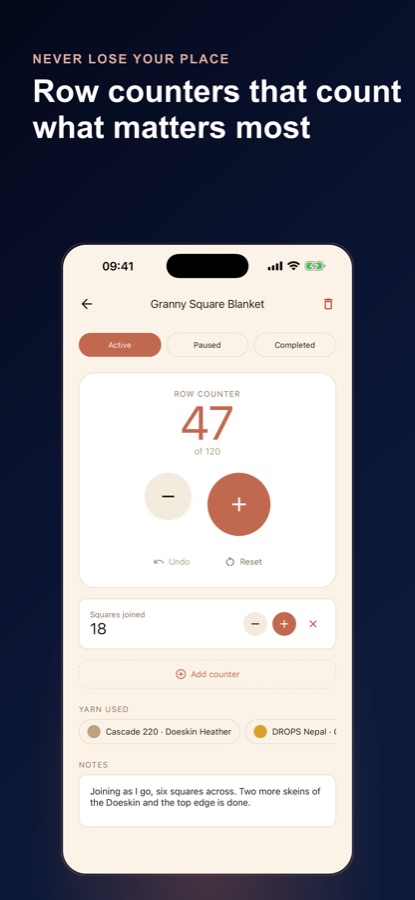
Use the big tap target with haptic feedback, undo a double tap, and add counters for repeats or colour changes with Pro. The session history records sittings, rows worked, rows frogged and your longest sitting.
Plan the finish
Set a finish-by date to see the daily pace it needs, check your gauge, and tap that you started a new skein so the yarn forecast can estimate whether your yarn reaches the last row.
What's inside
What the app does
1 tap
Row counter
One large tap target with haptic feedback on every tap, an undo for a double tap and a reset that always asks first. Extra counters for repeats and colour changes come with Pro.
Follow
Pattern follower
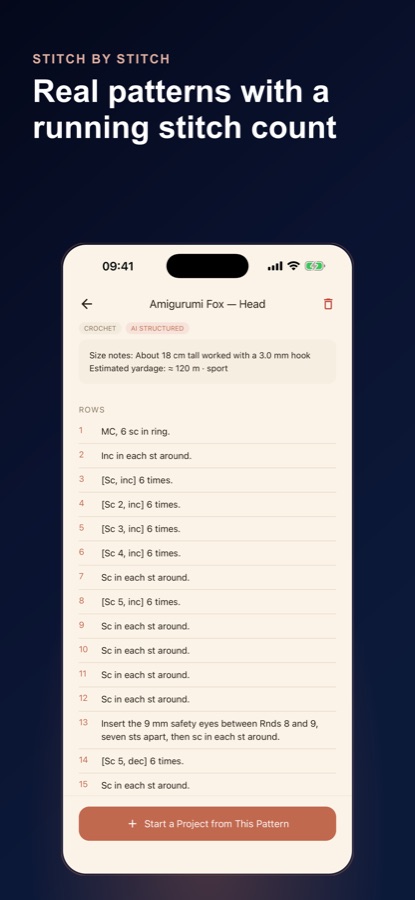
Link a saved pattern and the counter card shows the current row, the repeat you are on and how many stitches to expect.
Gauge
Gauge checker and yarn forecast
Enter your swatch to see whether the piece will come out the intended size, or which hook size or stitch count gets you there. The forecast estimates whether your yarn reaches the last row.
Stash
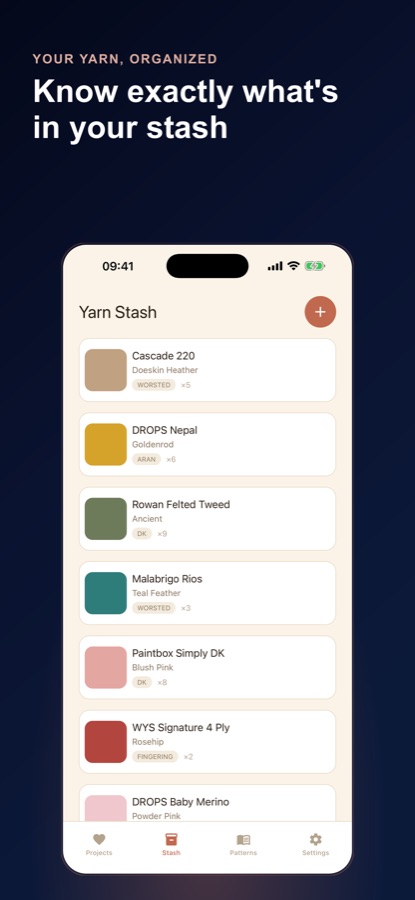
Yarn stash with ball band scanning
Log fibre, weight, colour, dye lot, grams and how much of each skein is left. AI reads a printed ball band and fills the fields for you to check, and stash match shows whether a colourway has enough yardage for a pattern.
10
Starter patterns and AI import
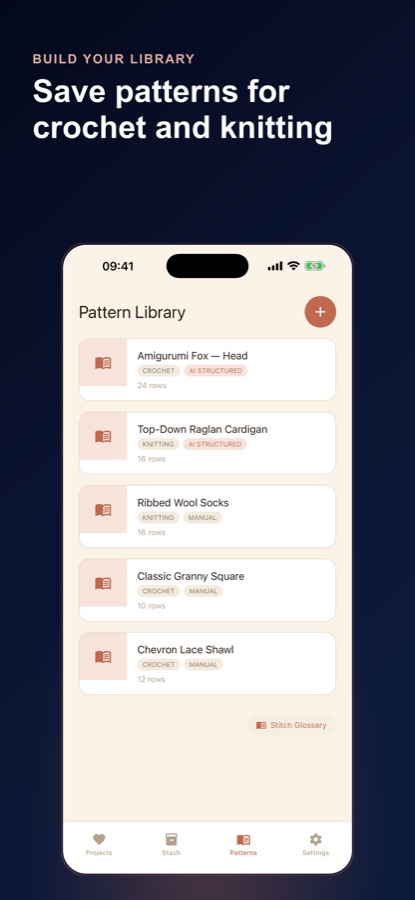
Ten free starter patterns from a dishcloth and a granny square to a beanie and a shawl, plus AI pattern import: photograph a page or paste the text and it becomes a step-by-step counter.
150+
Stitch glossary
More than 150 crochet and knitting abbreviations, including US versus UK terms, and a stitch count check that flags pattern lines whose numbers do not add up.
Fit
Who it's for — and who it isn't
A good fit if you
- Crochet or knit and lose your place when you put the work down
- Want the counter to follow a pattern and show which repeat you are on
- Keep a yarn stash and want to know if a colourway has enough yardage for a pattern
- Make gifts to a deadline and want to see the daily pace a project needs
- Read patterns in both US and UK terms and want a glossary at hand
Not the right tool if you
- Use an iPhone, because the app is on Android for now
- Want unlimited projects, stash entries and AI imports without Pro
- Expect the app to design patterns for you, since it counts and organises the ones you use
Privacy
Where your projects are kept
Your projects, stash, patterns and counts are stored on your device, and you can start counting without an account. The AI features ask first and send only the photo or text you choose to an AI service for processing. Cloud backup is a Pro feature for signed-in users and uploads your records only when you turn it on. The app uses Firebase analytics and crash reports, and the free version shows ads.
Full details are in the CoddyKit privacy policy.
Questions
Frequently asked questions
What is a good crochet counter app?
One where counting takes no thought and the app knows where you are in the pattern. Row Counter Crochet & Knitting has one large tap target with haptic feedback, an undo for double taps, a pattern follower that shows the current row and repeat, and a session history that includes rows you frogged. It is free on Android.
Is Row Counter Crochet & Knitting the same app as Row Counter: Crochet Tracker?
Yes. Row Counter Crochet & Knitting is the Google Play title, and the app's own screens call it Row Counter. It is one app for crochet and knitting, with the same pattern follower, gauge checker and yarn stash.
Can I use Row Counter as a knitting row counter?
Yes. Onboarding asks whether you crochet, knit or both, and a project can be either craft. The stitch glossary covers more than 150 crochet and knitting abbreviations, and the stash and pattern tools work the same way for knitting.
How does the pattern follower work?
Link a saved pattern to a project and the counter card shows the current row, which repeat you are on and how many stitches to expect. Patterns can be typed in, pasted line by line, or imported with AI from a photographed page or pasted text. A stitch count check flags lines whose numbers do not add up.
What is frogging and why does the app count it?
Frogging means ripping back rows to fix a mistake. Row Counter lets you log the rows you frogged and why, alongside rows worked, sittings and your longest sitting. That keeps your session history honest and means a ripped-back evening still shows what you did.
How does the gauge checker help?
Enter your swatch and Row Counter shows whether the finished piece will come out the intended size, or which hook size or stitch count would get you there. It is arithmetic based on your own numbers, so measure the swatch after washing if the pattern says so.
Can the app tell me if my yarn will be enough?
It can estimate it. Tap that you started a new skein as you join balls, and the yarn forecast estimates whether your yarn reaches the last row. In the stash, stash match also checks whether one colourway has enough yardage of the right weight for a pattern you open.
Is Row Counter Crochet & Knitting free?
Yes, it is free to download. The free version includes one active project with the full counter, up to 10 stash entries, all your saved and starter patterns, the stitch glossary, two AI pattern imports to try and five ball band scans each month, and it shows ads. Pro adds unlimited projects and stash, multiple counters per project, AI imports and scans without the free limits, AI row suggestions, cloud backup and no ads.
What is the difference between US and UK crochet terms?
The same stitch can have a different name. A US single crochet is a UK double crochet, for example. Row Counter asks which system you read during setup and includes US versus UK terms in its stitch glossary, so a pattern from either side is easier to follow.
Do I need an account or an internet connection?
You can start counting without an account, and your projects, stash and patterns are stored on your device. Signing in is optional. Features that use AI, and cloud backup for Pro users, need a connection.
Is Row Counter Crochet & Knitting available on iPhone?
Not at the moment. Row Counter Crochet & Knitting is available on Android through Google Play.
Get started
Count your next row without losing your place
Free on Android, with no account needed to start counting.
More from CoddyKit
Available on Android.