
Lifestyle · Free · iOS & Android
By CoddyKit
Skincare Routine: an AM/PM skincare routine tracker
Skincare Routine is a free AM and PM routine tracker, product shelf, and AI routine-builder for people who own the products but skip the steps. Lay out your morning and evening order, link each step to a product you own, and check it off daily. No face scan, ever.
- Price
- Free
- In-app purchase
- Pro, monthly or yearly
- Platforms
- iPhone and Android
- Age rating
- 4+
Your routine adherence — never your skin.
Most skincare apps ask for a photo and hand back a score. This one never points a camera at your face. The only number it keeps is how often you actually did the routine you built.
What it is
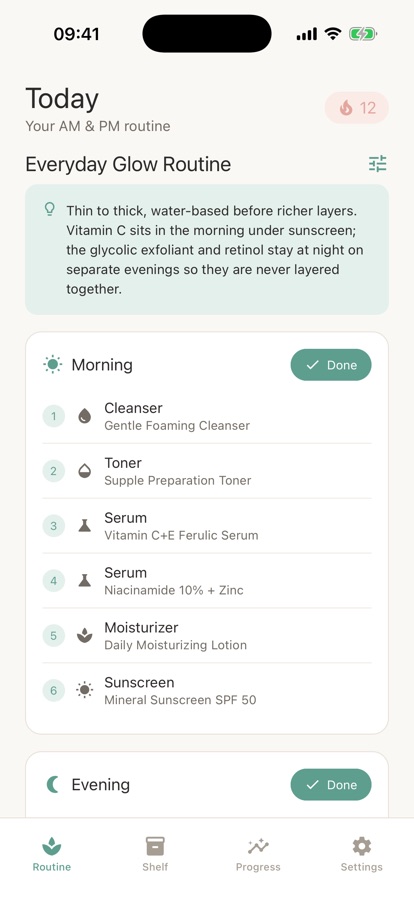
Skincare Routine is a free iPhone and Android app for building and keeping a daily skincare routine. You lay out your morning and evening steps in order — cleanser, toner, essence, serum, moisturizer, SPF — link each step to a product on your shelf, and check the routine off each day to build a streak. An optional AI builder sequences the steps for you from a short questionnaire. It never scans your face.
It organizes cosmetic products and habits. It does not diagnose or treat any skin condition — see Cosmetic, not medical.
Background
What order should skincare products go in?
The widely used rule is thin to thick: cleanse first, then apply water-based, lighter products before richer, oilier ones, so each layer can still reach the skin. In the morning, sunscreen goes on last. Beyond that the order is mostly about texture rather than brand, and a routine you repeat daily matters more than the number of steps in it.
AM routinemorning
The steps you do after waking, typically ending in sunscreen. Morning routines lean on protection — cleanse, treat lightly, moisturize, then SPF as the final layer before you leave the house.
PM routineevening
The steps you do before bed, when there is no sun exposure to plan around. Evening routines are where richer creams and stronger actives usually sit, since nothing has to go under sunscreen.
Layeringstacking steps
Applying several products in sequence rather than one at a time. The usual guideline is lightest texture first, so later, heavier layers do not block the earlier ones from absorbing.
Adherencethe part that slips
How consistently you actually complete the routine you set. It is the one thing a routine tracker can measure — as opposed to your skin, which it cannot and should not grade.
How it works
Three steps, repeated morning and night
The app follows the order the habit actually forms in: know what you own, decide the sequence once, then make the daily part small enough to keep doing.
Put your products on the shelf
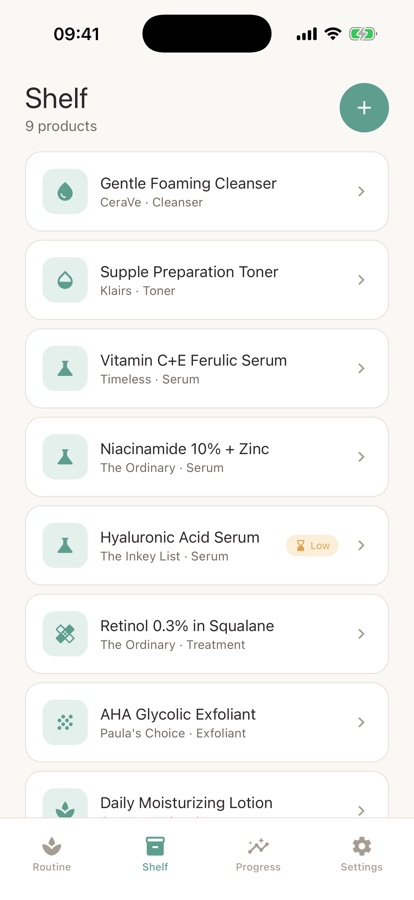
Add each one with brand, category, key ingredients, and any notes. The routine gets built around what is already in your bathroom rather than a shopping list, and anything you flag as running low is there when you restock.
Lay out AM and PM
Set the morning and evening order — cleanser, toner, essence, serum, moisturizer, SPF. Drag to reorder any step and link it to a product on your shelf, start from a template for your skin type, or answer a few questions and let the AI builder sequence it.
Check it off
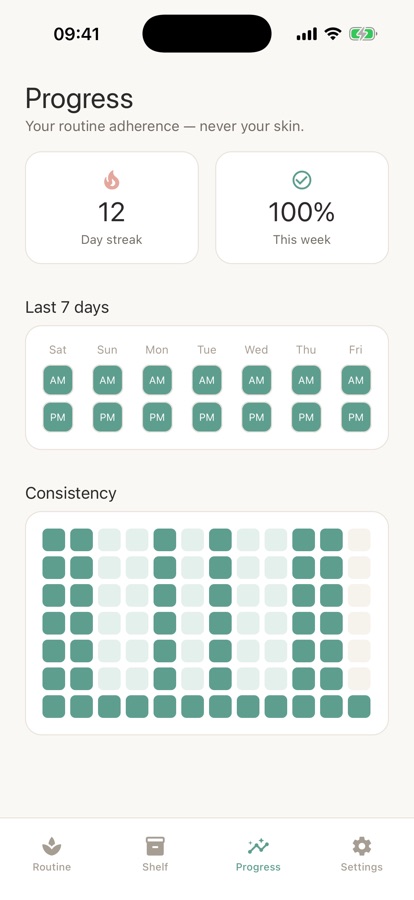
Tick AM and PM each day. The free version keeps a 7-day view and a streak; Pro adds full adherence history and a calendar heatmap. Optional local reminders nudge you at morning and evening so the SPF step does not get skipped.
What’s inside
Built for the shelf you already own
AM/PM
Morning and evening routines
Lay out the order that makes sense for you — cleanser, toner, essence, serum, moisturizer, SPF. Drag to reorder, link a step to a product, or start from a template.
AI
Routine builder, no face scan
Answer a short picklist — skin type, focus, budget, time per day, products you own — and get a full AM and PM order with a plain-language note on why it works.
0
Photos of your skin
No face scan, no skin score, no glow score. The camera is never pointed at your skin. Every answer you give is self-reported from a simple picklist.
Shelf
Your product shelf
Add each product with brand, category, key ingredients, and notes. Flag anything running low so you restock before it runs out, and build routines around what you actually have.
7d
Daily check-off and streak
Check off morning and evening each day and build a streak. The free version keeps a 7-day view; Pro adds full adherence history and a calendar heatmap.
Pro
Layering and conflict notes
Gentle heads-ups when two products are usually better kept apart, plus timing guidance for common ingredients. Informational ordering guidance for over-the-counter products — not medical advice.
Inside the app
What it looks like
Fit
Who it’s for — and who it isn’t
A good fit if you
- Already own the products and just want to use them in the right order, daily
- Want an AM and PM tracker that never asks for a photo of your face
- Lose track of which serum you own, or which bottle is nearly empty
- Would rather answer a few questions than sequence a routine from scratch
- Care more about doing the routine consistently than about a skin score
Not the right tool if you
- Want a diagnosis or a treatment plan — this app does neither; a dermatologist does
- Want your skin analyzed or graded from a photo; there is no face scan by design
- Need several routines, unlimited AI builds, or full history — those are Pro, not free
- Are looking for guidance on a condition such as acne, eczema, or rosacea
Safety and limits
Cosmetic organization, not medical advice
Skincare Routine helps you organize a cosmetic skincare routine. It does not diagnose or treat any skin condition, and nothing in it is medical or dermatological advice. It cannot tell you what is happening on your skin, and it does not promise that your skin will change.
Acne, eczema, rosacea, persistent irritation, or a mole that is changing in size, shape, or colour are matters for a doctor or dermatologist — not an app. Always patch-test a new product before putting it on your face, and stop using anything that causes a reaction.
The layering and conflict notes in the app are informational ordering guidance for over-the-counter products. They are not a substitute for advice from a pharmacist, doctor, or dermatologist who has actually seen your skin.
Privacy
What the app never collects
There is no face scanning, no skin grading, and no glow score — the app never takes a picture of your skin. What it knows about you, such as skin type, focus, budget, and time per day, is self-reported from a simple picklist. Your routine and your shelf are yours.
Full details are in the CoddyKit privacy policy.
Questions
Frequently asked questions
What is the best app for tracking a skincare routine?
The useful ones do three things: hold the actual order of your steps, know which products you own, and make checking off a routine take a second. Skincare Routine does those and adds a rule most skincare apps break — it never scans your face or grades your skin. It is free on iPhone and Android, with an AM routine, a PM routine, a product shelf, and daily check-off included at no cost.
What order should I apply skincare products in?
The general rule is thin to thick: cleanse first, then work from the lightest, most water-based products up to the richest creams, so nothing heavy blocks what comes after it. In the morning, sunscreen is the last step. A common sequence is cleanser, toner, essence, serum, moisturizer, then SPF, though not every routine needs every one of those. Consistency matters more than step count.
Do I need a ten-step routine?
No. A routine only has to include the steps you will repeat. For most people that means a cleanser, a moisturizer, and sunscreen in the morning, with a cleanser and moisturizer at night. Extra steps such as toner, essence, or a targeted serum are optional additions rather than requirements. A three-step routine you do every day beats a ten-step one you abandon after a fortnight.
Does tracking a skincare routine actually help?
It helps with the part that is usually the problem: doing it. Most people already own the products, and the gap is applying them in the same order, twice a day, for long enough to matter. Checking off a routine turns something vague into a visible record — a streak, a weekly percentage, a calendar of the days you did and did not. It does not change what the products themselves do.
Are apps that scan your face and give a skin score reliable?
Treat any photo-based score as a rough consumer metric rather than an assessment. Results shift with lighting, camera, angle, and time of day, and no phone photo diagnoses a skin condition — that is what a dermatologist is for. Skincare Routine takes the other approach entirely: no face scan, no skin score, no glow score. It measures how consistently you follow your own routine, which is something a phone can genuinely track.
Is Skincare Routine free?
Yes, it is free to download on iPhone and Android. The free version includes one AM routine and one PM routine you build yourself, a product shelf, daily AM and PM check-off with a 7-day view, AM/PM reminder notifications, and one AI routine build to try. Pro is an optional monthly or yearly subscription, and the core tracker and shelf stay free.
What does Pro add?
Pro adds unlimited AI routine builds and re-generation when your goals or products change, multiple routines for weekday versus weekend or summer versus winter or travel, the layering and conflict warnings engine, an unlimited shelf with an AI note on how to slot each product in, full adherence history with streaks and a calendar heatmap, a running-low tracker with restock reminders, routine export as a shareable card, and no ads.
Can it tell me if two products should not be used together?
It offers layering and conflict notes: gentle heads-ups when two products are usually better kept apart, plus timing guidance for common ingredients. That is informational ordering guidance for over-the-counter products, not medical advice, and the full warnings engine is part of Pro. For anything involving a prescription or a diagnosed skin condition, ask a pharmacist or dermatologist rather than an app.
Does it remind me to do my routine?
Yes. Optional local reminders nudge you when it is time for the morning or evening routine, so the last step — usually sunscreen — does not get skipped on a rushed day. Reminders are part of the free version, and you can leave them switched off if you would rather open the app on your own schedule.
Can this app help with acne or eczema?
No. Skincare Routine organizes a cosmetic routine, and it does not diagnose or treat any skin condition. Nothing in it is medical or dermatological advice. Acne, eczema, rosacea, persistent irritation, or a mole that is changing should be looked at by a doctor or dermatologist. You can still use the app to keep track of a routine you agreed with them, and to patch-test new products before adding them.
Start logging
Build the routine, then actually keep it
Free on iPhone and Android. No face scan, no skin score — just the routine you built.
More from CoddyKit
Not a medical device. Does not diagnose or treat any condition.