
LP & Vinyl Record Collection
LP & Vinyl Record Collection — A vinyl record collection catalog you build by photographing sleeves
LP & Vinyl Record Collection (shown as Vinyl Collection in the app) is a vinyl record collection tracker for people who own physical records. Photograph a sleeve and the AI suggests the artist, album, label and pressing year; you check each field in an ordinary form before it is saved. It works as a record catalog of your whole shelf, with a wishlist, condition grades and genre and decade insights.

- Price
- Free, Pro upgrade
- Platforms
- Android (Google Play)
- Languages
- 10
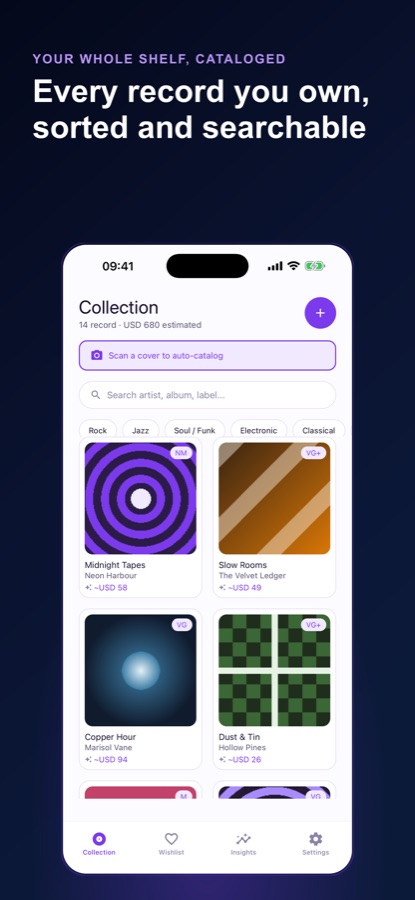
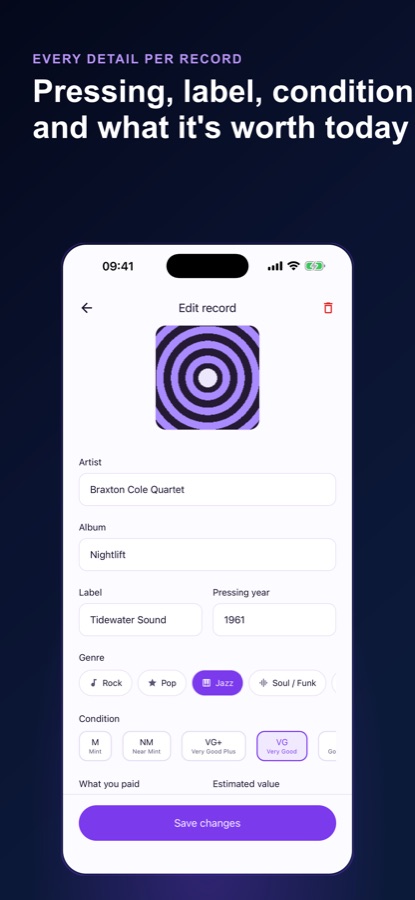
The AI fills in the form; you stay in charge of what is saved.
A scan never writes straight into your shelf. It hands its guess to the normal entry form, with a note on how sure the read is, so a wrong pressing year or a mistaken label gets corrected before it becomes part of your record catalog.
What it is
LP & Vinyl Record Collection is a free-to-start Android app for cataloguing physical vinyl. You add each record by photographing its cover, which suggests artist, album, label and pressing year, or by typing it in with full control over genre and condition. The app grades condition on the standard collector scale, keeps a wishlist that warns you if you already own an artist and album, and shows your shelf by genre and decade. Everything is stored on the device first.
Inside the app
What it looks like
Background
What should a vinyl record collection catalog record, and why does condition matter?
A useful catalog records enough to tell two copies of an album apart: the artist, the album, the label, the year of the pressing and the condition of the copy you own. The pressing matters because the same album can exist in several versions that differ in sound, packaging and collectability. Condition matters because it is the main reason two copies of the same pressing are not interchangeable. A catalog that holds these five details lets you search your shelf, spot gaps and avoid buying a record you already have.
Pressing and labelwhich version you own
An album is reissued repeatedly, and each pressing can have a different label, mastering or sleeve. Noting the label and the pressing year at the moment you add a record is far easier than working it out later from a shelf of covers.
Condition gradesMint down to Poor
Collectors describe a copy with a short scale: Mint, Near Mint, Very Good Plus, Very Good, Good Plus, Good, Fair and Poor. Many collectors grade the disc and the sleeve separately, and the scale gives buyers and sellers a shared vocabulary.
Wishlist and duplicatesthe cost of buying twice
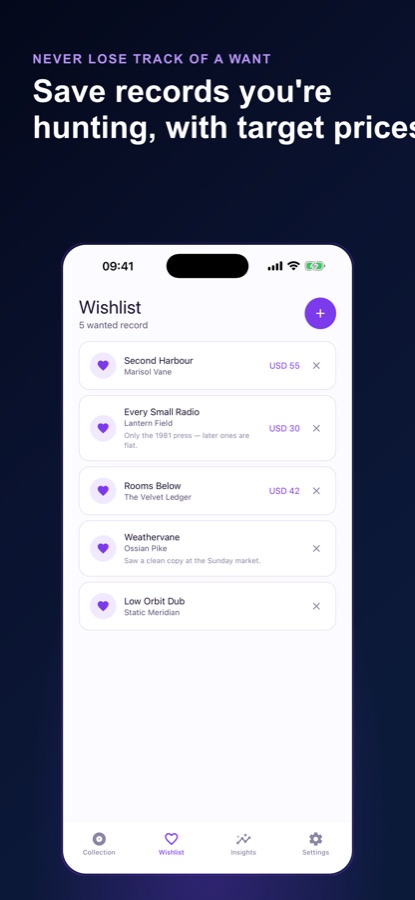
Record fairs and second-hand shops are the places people buy a duplicate by accident. The wishlist here checks the artist and album against your shelf, so a different pressing of an album you own is a deliberate choice rather than an oversight.
Shape of a collectiongenres and decades
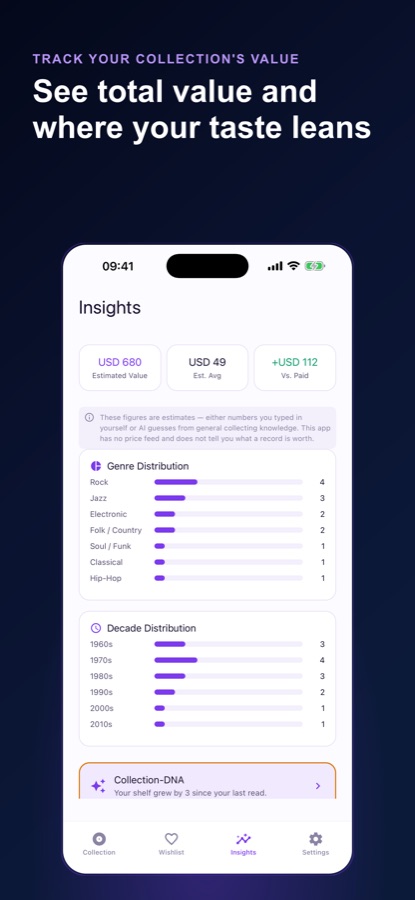
Counting records by genre and by decade shows what a collection leans on and where it is thin, which is a better guide to what to look for next than a flat alphabetical list.
How it works
From sleeve to shelf
Adding a record takes a photo and a quick check, and the collection fills in from there.
Photograph the cover
Tap the scan prompt on the Collection tab and take a picture of the sleeve. The app suggests artist, album, a likely label and pressing year, and says how sure it is.
Check the form and save
Review every field in the entry form, set the genre and condition, and save. You can also add a record by hand without scanning anything.
Read your shelf
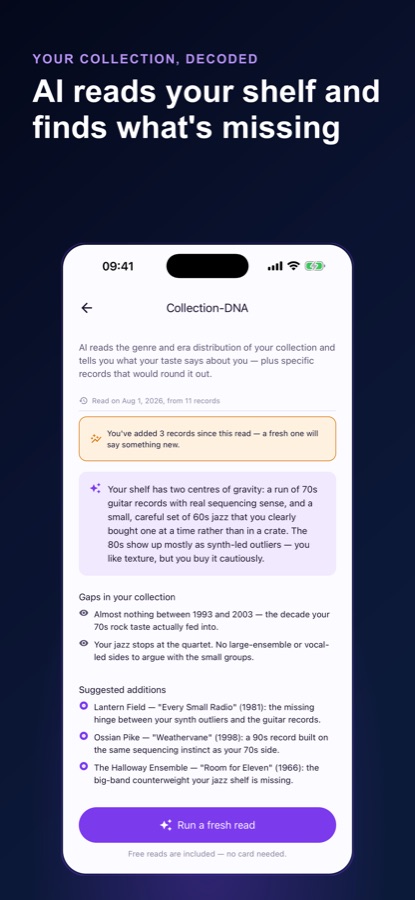
Search and filter by genre, add records you are hunting for to the wishlist, and open Insights for genre and decade breakdowns. Once you have three records, Collection-DNA writes a short read of your taste and gaps.
What's inside
What the app does
Scan
AI Cover-Scan
Photograph a sleeve for a suggested artist, album, label and pressing year, passed to a normal form for you to confirm.
DNA
Collection-DNA
A written read of your shelf, with the genres and decades you lean on, where the gaps sit and which titles could fill them, available once you have 3 or more records.
8
Collector condition grades
Mint, Near Mint, Very Good Plus, Very Good, Good Plus, Good, Fair and Poor on every record, with a condition badge on each tile.
Wish
Wishlist with ownership check
Save the records you are hunting with a note, and the app tells you if you already own that artist and album.
Insights
Genre and decade charts
Your shelf broken down by genre and by decade, with totals. Dollar figures are your own entries or AI estimates, and the app has no price feed.
Local
Local-first storage
Your shelf opens instantly and works with no signal. The network is used only for AI features, and reminders are optional and off by default.
Fit
Who it's for — and who it isn't
A good fit if you
- Own a shelf of LPs and cannot remember which pressings you have
- Have bought a duplicate at a record fair and want to stop doing that
- Would rather photograph a sleeve than type every detail
- Want to see which genres and decades your collection leans on
- Want your record catalog to work with no signal and stay on your phone
Not the right tool if you
- Need a market price guide or an appraisal; the app has no price feed and its figures are estimates
- Want a shared online database of releases with bundled cover art; no catalogue artwork is included
- Use an iPhone; the app is on Android for now
- Expect unlimited AI scans for free; the first 3 cover-scans are free, then Pro
Privacy
Where your collection is stored
Your vinyl record collection lives on your device, and the shelf opens with no signal. The network is used only for the AI features. The record photos are your own, nothing is shared, and no catalogue artwork is bundled with the app.
Full details are in the CoddyKit privacy policy.
Questions
Frequently asked questions
What is LP & Vinyl Record Collection?
LP & Vinyl Record Collection is an Android app, shown as Vinyl Collection inside, for cataloguing the physical records you own. You photograph sleeves or add records by hand, grade their condition, keep a wishlist and view genre and decade insights. It is free to start, with a Pro upgrade, and is available in 10 languages.
How do I catalog my vinyl records quickly?
Use the cover scan: photograph the sleeve and the app suggests the artist, album, label and pressing year, which you confirm in a form before saving. For records the scan cannot read, add them manually. Working through a shelf this way builds a searchable record catalog without typing every field.
Does the AI always get the record right?
No, and the app is designed around that. A scan returns a suggestion with a note about how sure the read is, and everything goes through an entry form for you to check. Pressing year and label are guesses from the cover, so confirm them against the record itself when it matters.
What is Collection-DNA?
It is a written read of your shelf that describes which genres and decades you lean on, where the gaps are and which specific titles could fill them. It becomes available once you have catalogued 3 or more records, and Pro keeps your history so you can see how the shelf changes.
How does the condition grading work?
Every record carries one of eight grades on the standard collector scale: Mint, Near Mint, Very Good Plus, Very Good, Good Plus, Good, Fair and Poor. A badge on each tile shows the grade, which is more useful to a collector than a generic star rating.
Does the app tell me what my records are worth?
Not as a market price. Figures in the app are either numbers you type in or AI estimates based on general collecting knowledge, and they are labelled as estimates. The app has no price feed, so it should not be used as an appraisal or to set a selling price.
Will it warn me about duplicates?
The wishlist checks whether you already own an artist and album before you buy. It matches on those two details, so a different pressing of an album you own will also count as owned. Treat the warning as a prompt to check your catalog rather than a ban.
What is free, and what does Pro add?
Free: unlimited manual records, unlimited wishlist entries, full genre and decade insights, your first 3 AI cover-scans and your first 2 Collection-DNA reads, with banner ads. Pro adds unlimited cover-scans, unlimited Collection-DNA reads with history, and no ads, as a monthly or annual subscription through Google Play.
Get started
Scan your first sleeve
Free to start on Android, in 10 languages.
More from CoddyKit
Available on Android.