

Photo Challenge: Composition
Photo Challenge: Composition — Daily photography tips and an AI critique of your real shot
Photo Challenge: Composition is a daily practice app for anyone with a camera, phone or otherwise. Each day you get one photo prompt with a photography tip and a composition goal. You shoot it, log it, and an AI photo coach reads the frame you took and ends with one suggestion for the next attempt. It is on Google Play for Android.

- Price
- Free with ads, Pro upgrade
- Platforms
- Android (Google Play)
- Languages
- 10
- Composition skills
- 8
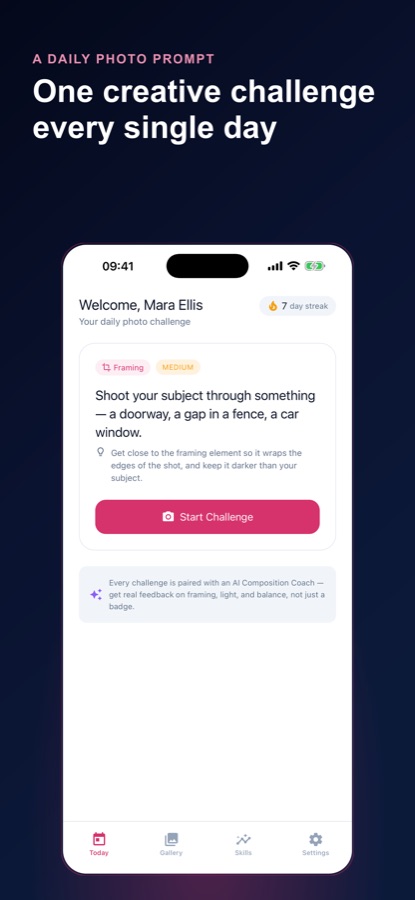
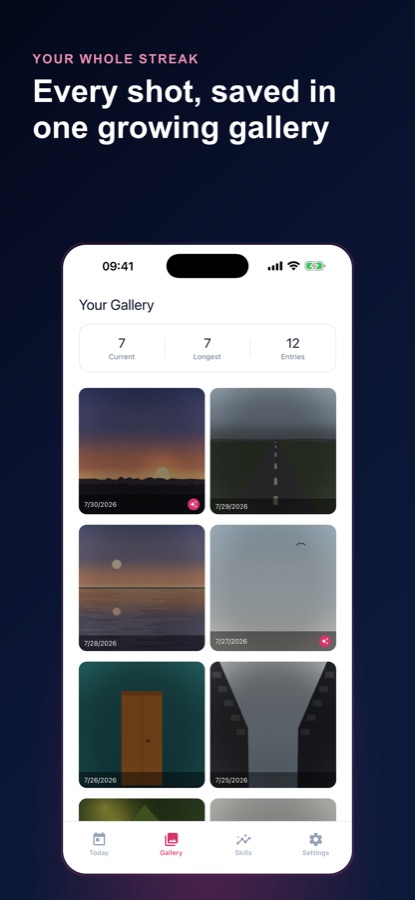
Not "nice shot" — one thing to change.
Photography tips are easy to find and hard to apply, because a tip about the rule of thirds says nothing about the frame you just took. A critique that names what worked and gives you a single specific change turns a general rule into practice.
What it is
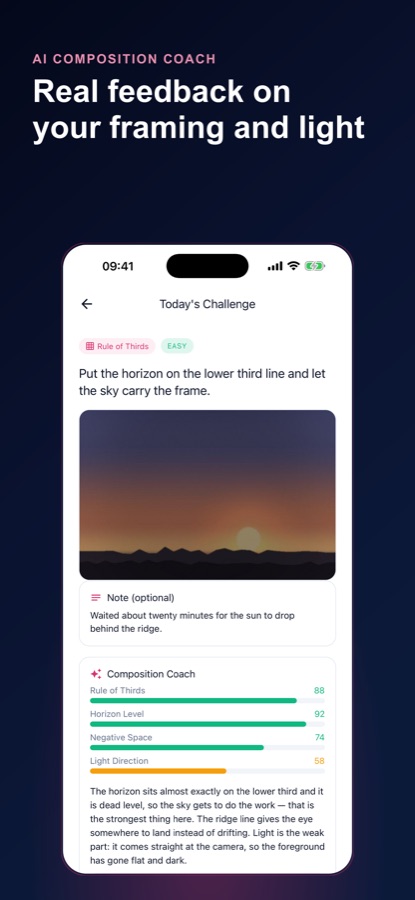
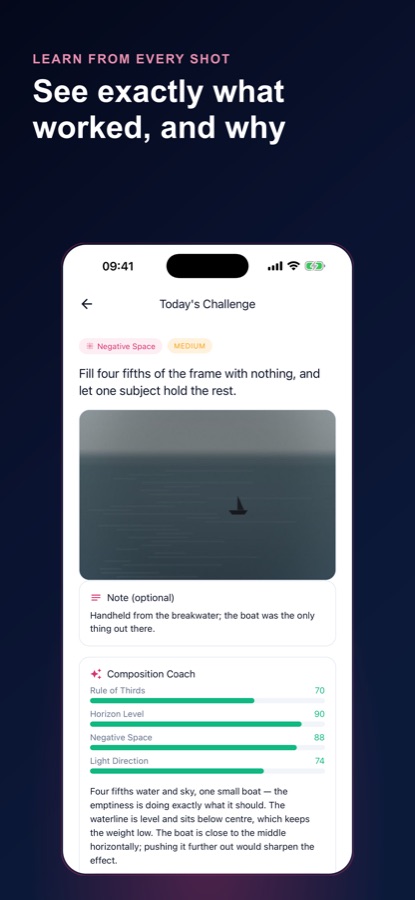
Photo Challenge: Composition is an Android app that teaches composition through a daily routine. Every day it gives you one prompt, a short photography tip and a composition goal, drawn from eight skills: rule of thirds, framing, light, perspective, color, negative space, reflection and leading lines. When you take the shot, an AI coach scores it on the skill of the day plus three supporting factors and ends with one concrete suggestion. A streak, a gallery and a skills screen keep a record of your progress. The coach looks at composition, not gear, so a phone camera works fine.
Inside the app
What it looks like
Background
How do you improve your photography without buying new gear?
Most of what separates an ordinary photo from a good one is composition, which costs nothing: where the subject sits in the frame, what you leave out, where the light comes from and where the horizon falls. Improvement comes from repetition with feedback, taking a specific kind of shot on purpose and then checking what the result actually shows. A phone camera is enough for that, because the choices that matter are made by you before you press the shutter.
Rule of thirdsthe first rule most people learn
Imagine the frame split into a three-by-three grid and place the subject or the horizon near one of the lines instead of dead centre. It is a starting point, not a law, and its value is that it makes you decide where things go.
Negative spacewhat you leave empty
Empty areas around a subject, such as sky, water or a plain wall, give it room and make it read as the point of the frame. Filling most of the picture with nothing and letting one subject carry it is a good exercise in restraint.
Light directionthe quiet variable
Light from the side adds shape and texture, while light straight from the camera tends to flatten a scene. Learning to notice where the light comes from is often the biggest step from snapshots to photographs.
Leading lines and framingguiding the eye
A road, a fence or a railing can lead the viewer's eye into the picture, and a doorway or a window can wrap a subject in a natural frame. Both are about directing attention, which is the real job of composition.
How it works
How the daily challenge works
The routine is small enough to fit into a day: a prompt in the morning, a frame whenever you pass something suitable, a critique when you want one.
Open today's prompt
The Today screen shows one prompt with its skill and its difficulty, easy, medium or hard, plus a short tip and a concrete shooting rule such as shooting through a doorway or a car window.
Shoot it and log it
Use your phone's own camera or pick a photo from your library, add an optional note and save it to your gallery. Your streak counts the days you complete a challenge.
Ask the coach to read the frame
After you agree in the app, your photo is sent for an AI critique. It scores the skill of the day and three supporting factors, then ends with one specific suggestion for your next attempt.
Reshoot and compare
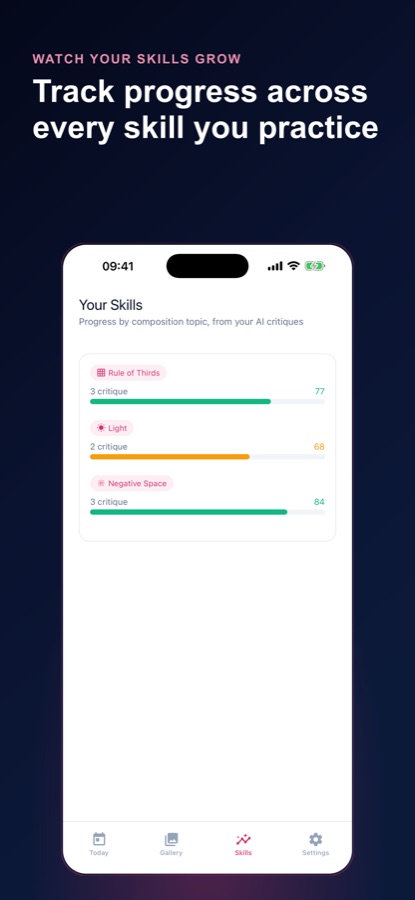
Try the same prompt again with the note and see whether the score moved. The Skills screen shows your scores for each composition skill and how they trend.
What's inside
What comes with the app
8
Composition skills in rotation
Rule of thirds, framing, light, perspective, color, negative space, reflection and leading lines, each practised through its own prompts at three difficulty levels.
AI
Critique that reads your shot
Scores for the skill of the day plus supporting factors such as balance, depth, edge control, horizon level or color contrast, and one concrete suggestion at the end.
Weak
A challenge aimed at your weak spot
After a few critiques the daily assignment leans toward your weakest skill, and you can always switch back to the shared prompt of the day.
90
Practice archive
Missed a day? Shoot a past prompt from the last 90 days. Catch-up frames count as practice but never backfill your streak.
Streak
Streak, repair and reminder
A current and a longest streak, a repair once a month that bridges a single missed day, and an optional daily reminder at a time you choose.
Skills
Coverage and weekly digest
A skills screen with scores per skill, a coverage view of which skills you have not tried, and a weekly digest of frames logged and the skill that moved the most.
Fit
Who it's for — and who it isn't
A good fit if you
- Want your photos to look less ordinary and are happy to practise a little each day
- Shoot with a phone and want feedback about composition rather than gear
- Learn better from a concrete suggestion than from a general rule
- Want a streak and a gallery as a record of progress
- Like the idea of practising one skill at a time
Not the right tool if you
- Want a photo editor, because the app has no filters or presets
- Do not want a photo sent off the device, although you can turn AI analysis off in Settings
- Expect unlimited AI critiques for free, since free use is limited to your first critique and then one a week
- Use an iPhone, because the app is on Google Play for Android
Privacy
When a photo leaves your phone
Your photos and notes stay on your phone. A photo is sent off the device only when you ask for a critique, and only after you agree in the app, and you can turn AI analysis off in Settings. Your streak, log dates and critique scores are saved on the app's server under an anonymous guest ID, and no account is needed.
Full details are in the CoddyKit privacy policy.
Questions
Frequently asked questions
What is a good app for daily photography practice?
A good one gives you a reason to take a photo today and tells you something useful about it. Photo Challenge: Composition gives one prompt a day with a photography tip, then an AI coach reads the frame you took and ends with one specific suggestion. It is free to start on Android.
How can I improve my phone photography?
Practise composition, because it is the part you control with any camera: where the subject sits, what you leave empty, how the light falls and where the horizon is. Photo Challenge: Composition builds a routine around eight composition skills, with a daily prompt and feedback on your own shot.
What are the eight composition skills?
They are rule of thirds, framing, light, perspective, color, negative space, reflection and leading lines. Photo Challenge: Composition rotates through them and, after a few critiques, aims the daily assignment at your weakest one. You can always switch back to the shared prompt of the day.
Does the AI critique judge my camera?
No. The coach looks at composition, not gear, so a phone camera works fine. It scores the skill of the day plus three supporting factors, such as balance, depth, edge control, horizon level or color contrast, and ends with one specific suggestion.
Does the app edit my photos?
No. Photo Challenge: Composition has no filters and no presets. You shoot with your phone's own camera or pick a photo from your library, and the app is the practice routine and the coach beside it.
What happens if I miss a day?
You can shoot a past prompt from the last 90 days in the practice archive. Those frames count as practice but never backfill your streak. Once a month you can also use streak repair to bridge a single missed day, which is free after a short ad or without an ad in Pro.
Is my photo stored on a server?
Photos and notes stay on your phone. A photo leaves the device only when you ask for a critique and agree in the app, and it is not stored on the app's servers. You can turn AI analysis off in Settings.
Is Photo Challenge: Composition free?
It is free to start with ads. The daily prompt, tip, skill and difficulty, the streak, gallery, Skills screen, weekly digest and practice archive are free, along with your first AI critique and then one a week. Pro adds unlimited AI critiques, a monthly skill report and no ads.
How is Pro billed?
Pro is a monthly or annual auto-renewing subscription through Google Play. The price is shown in the app before you buy, and you can cancel any time in your Google Play subscriptions.
Is there an iPhone version?
No. Photo Challenge: Composition is available on Google Play for Android only. It supports 10 languages and has light and dark themes.
Get started
Take today's photo
Free to start on Android, in 10 languages.
More from CoddyKit
Available on Android.