

Fasting Coach: Timer Tracker
Fasting Coach: a fasting timer that learns which eating window actually fits you
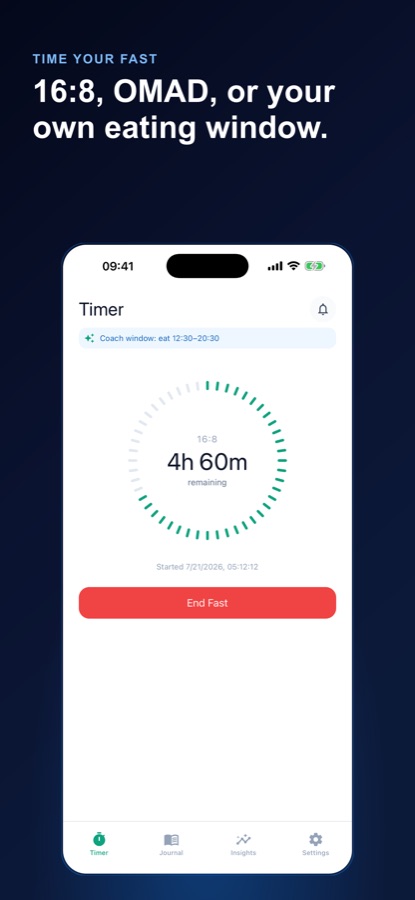
Fasting Coach is a free fasting timer and feel journal for 16:8, 18:6, 20:4, OMAD or a custom window. A live ring counts down your fast, and logging mood, energy and hunger after each one builds a private history that shows which schedule actually suits you — not a generic script.


- Price
- Free, Pro upgrade
- Platforms
- iOS and Android
- Languages
- 10
- Age rating
- 4+
- Version
- 1.1
- Requires
- iOS 15.1 or later
The timer tells you when. Only your own history tells you what fits.
A countdown ring is the easy part of fasting. The question people actually struggle with is which protocol — 16:8, 18:6, 20:4 or OMAD — leaves them with steady energy rather than a bad day, and that answer only comes from comparing how fasts actually felt, logged over weeks.
What it is
Fasting Coach: Timer Tracker is a free iOS and Android app for timing intermittent fasting windows — 16:8, 18:6, 20:4, OMAD or a custom schedule — with a live countdown ring that shows exactly when the eating window opens. After each fast you log mood, energy and hunger, and that history powers a streak, per-protocol energy comparison, and an AI coach that reasons over your own logged fasts rather than giving generic advice. It is an educational habit tracker, not medical advice, a diet program or a weight-loss treatment.
Inside the app
What it looks like
Background
What should you know before trying intermittent fasting?
Intermittent fasting covers a range of eating-window schedules, from a relatively mild 16:8 to a single daily meal under OMAD, and research on its effects is still evolving and mixed on many claimed benefits. What is consistent is that a given schedule does not suit everyone equally — some people feel fine extending a fasting window, others feel drained or irritable — which is why tracking how a specific fast actually felt matters more than copying someone else's protocol.
Common fasting schedules16:8, 18:6, 20:4, OMAD
These describe the fasting-to-eating hour split in a day: 16:8 fasts 16 hours and eats within an 8-hour window, 18:6 and 20:4 narrow that window further, and OMAD (one meal a day) compresses eating into roughly one sitting. None is inherently better; they differ in how demanding they are to sustain.
Starting point for beginnersusually the mildest schedule
People new to fasting are generally advised to start with a shorter fasting window, such as 16:8, and judge how it feels over at least a few attempts before considering something longer like 20:4 or OMAD. Jumping straight to the most restrictive schedule makes it harder to tell whether a bad day was the protocol or just an off day.
Who should check with a doctor firstfasting is not right for everyone
People who are pregnant or nursing, under 18, have diabetes, have a history of an eating disorder, are underweight, or take medication that needs to be taken with food are generally advised to talk to a doctor before fasting, since a fasting schedule can interact with all of these in ways that are not safe to self-manage.
Why logging how you feel mattersthe part a timer alone misses
A countdown ring tells you how much time is left in a fast; it says nothing about whether that fast actually worked for you. Logging mood, energy and hunger after each fast, over weeks, is what reveals a pattern specific to your own body rather than a generalized claim about fasting.
How it works
How the app is used
The habit is two parts: start and end the fast with the timer, then answer a short feel check after it ends.
Pick a schedule and start the timer
Choose 16:8, 18:6, 20:4, OMAD or a safe custom window, switch any time with a tap, and start the fast. A clean ring counts down and shows exactly when the eating window opens, including an overdue state if you go long.
Log the feel-loop after every fast
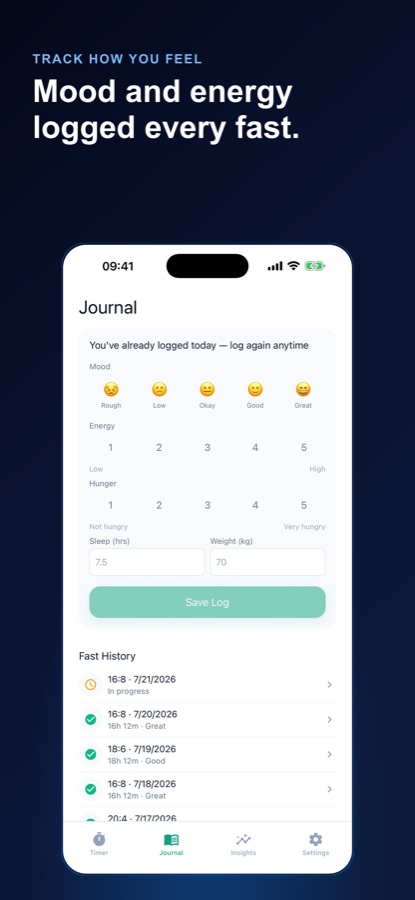
Log mood, energy and hunger with a note once a fast ends, plus an optional daily check-in. Over weeks, this builds a per-fast history: duration, whether you broke early, and how it actually felt.
Compare protocols and ask the coach
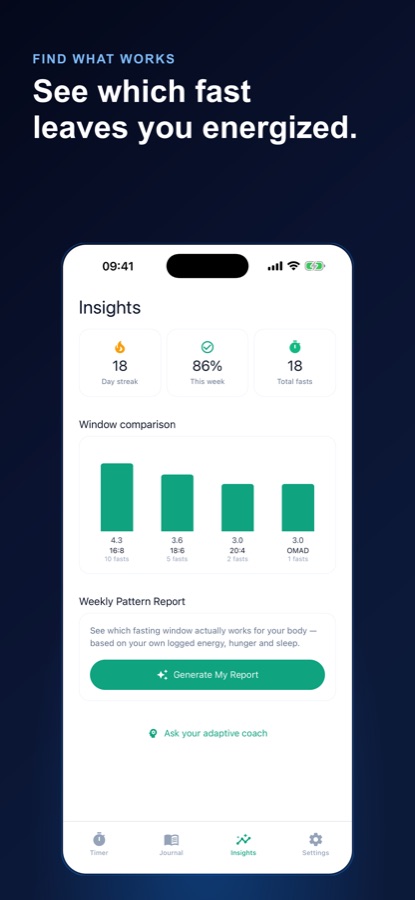
See which protocol tends to leave you with the most energy, drawn from your own logs, and read a plain-language pattern report of the schedule that fits you best. The AI coach answers questions about which window suits your routine, grounded in your real history rather than a generic script.
What's inside
What the app tracks
4
Every major protocol
16:8, 18:6, 20:4, OMAD, or a safe custom window, switched in a tap, with one-tap start and end so you pick up right where you left off.
3
Feel journal
Mood, energy and hunger logged with a note after each fast, plus an optional daily check-in, building the history the app's comparisons and coach are drawn from.
AI
AI Coach
Ask which fasting window suits your routine and get advice grounded in a summary of your own logged fasts, not a one-size-fits-all script. Limited free recommendations monthly; unlimited on Pro.
📈
Energy comparison
See which protocol tends to leave you with the most energy, calculated from your own logged fasts rather than a general claim about any one schedule.
🔥
Streak and stats
Current streak, weekly completion percentage and total fasts, with per-fast detail you can revisit: duration, whether you broke early, and how it felt.
🔔
Reminders
Optional local notifications that nudge you before your eating window opens or when a streak is at risk, so consistency does not depend on remembering unprompted.
Fit
Who it's for — and who it isn't
A good fit if you
- Are starting intermittent fasting and want a clear timer plus a simple way to stay on schedule
- Are torn between 16:8, 18:6, 20:4 and OMAD and want data instead of forum opinions
- Have felt great some fasting days and drained on others and want to know why
- Want a streak and a reason to come back tomorrow rather than relying on willpower alone
- Have spoken with a doctor and confirmed fasting is appropriate for your situation
Not the right tool if you
- Are pregnant or nursing, under 18, have diabetes or a history of an eating disorder, are underweight, or take medication — talk to a doctor before fasting
- Want a diet program or weight-loss treatment — this is a habit and feel tracker, not either of those
- Want the app to diagnose or treat any condition — it does not, and is not medical advice
- Want unlimited AI coach answers and the full pattern report for free — these are Pro
Safety and limits
Before you start fasting
Fasting Coach: Timer Tracker is an educational habit tracker. It is not medical advice, a diet program, or a weight-loss treatment, and it does not diagnose or treat any condition.
Intermittent fasting is not right for everyone. Talk to a doctor before you start if you are pregnant or breastfeeding, under 18, have diabetes, have a history of an eating disorder, are underweight, or take medication — especially medication that needs to be taken with food.
Never push a fast past what feels safe. Stop any fast that does not feel right, and treat persistent dizziness, weakness, confusion or illness during a fast as a reason to eat and seek medical advice, not a target to push through.
Privacy
What leaves your device
Your fasts and journal entries are saved on your phone and can be exported anytime. AI features work only after you agree on a consent screen: a summary of your protocol, streak and averages for energy, hunger and sleep goes through CoddyKit's server to a third-party AI service, and you can switch this off in Settings while the timer and journal keep working. Cloud backup, a Pro feature, uploads your fasts and journal only when you tap Back up.
Full details are in the CoddyKit privacy policy.
Questions
Frequently asked questions
What's a good app for intermittent fasting?
A fasting app should do more than count down a window — it should help you work out which schedule actually suits you, since 16:8, 18:6, 20:4 and OMAD do not all feel the same to every person. Fasting Coach: Timer Tracker pairs a live countdown timer for every major protocol with a mood, energy and hunger log after each fast, then compares protocols from your own history and offers an AI coach grounded in it. Free on iOS and Android; it is an educational tracker, not medical advice.
Which fasting protocol should I start with?
People new to fasting are generally advised to start with a shorter window like 16:8 and judge it over several attempts before trying something longer such as 20:4 or OMAD. Fasting Coach lets you switch protocols in a tap and its energy comparison shows, from your own logged fasts, which window tends to leave you with the most energy — useful once you have tried more than one.
Is intermittent fasting safe for everyone?
No. People who are pregnant or breastfeeding, under 18, have diabetes, have a history of an eating disorder, are underweight, or take medication should talk to a doctor before fasting, since a fasting schedule can interact with all of these in ways that need professional judgment. Fasting Coach is an educational habit tracker, not medical advice, and does not screen for these conditions itself.
What does the feel journal actually do?
After each fast, you log mood, energy and hunger with an optional note, plus an optional daily check-in. Over several weeks that history is what powers the app's per-protocol energy comparison and its pattern report, turning a vague impression of 'fasting makes me feel off' into a specific, dated record of which schedule and which days actually worked.
What does the AI coach do?
It answers questions about which fasting window suits your routine, drawing on a summary of your own logged fasts — protocol, streak, and averages for energy, hunger and sleep — rather than giving a generic script. A limited number of recommendations are included free each month; Pro removes that limit. You can turn AI features off entirely in Settings and keep using the timer and journal.
Is Fasting Coach free?
Yes. The timer with every protocol, the journal, streaks, insights, milestones, reminders and a limited number of AI coach recommendations are free, and the free version shows ads. Pro is a monthly or yearly subscription that adds unlimited AI coach answers, the full weekly pattern report, the complete protocol-vs-energy chart, cloud backup and no ads.
Does the app diagnose or treat anything?
No. Fasting Coach is explicitly an educational habit tracker. It does not diagnose, treat, or claim to cure any condition, and it is not a diet program or weight-loss treatment. It helps you stay consistent with a fasting schedule and understand your own logged patterns — nothing more.
Can I use a custom fasting schedule?
Yes. Alongside 16:8, 18:6, 20:4 and OMAD, you can set a safe custom fasting window and switch between any of these schedules whenever you like. The feel journal and protocol comparisons work the same way regardless of which schedule you choose.
What happens if I go over my fasting window?
The timer shows an overdue state once you pass your target window rather than stopping or hiding the fact, and you can log a fast as broken early with no judgment built into the flow. These entries still feed your history, which is useful for seeing honestly how often a given schedule actually holds for you.
Do I need an account to start fasting?
No. All of your fasting history lives on your device by default, and you can start your first fast today with no account and no login wall. An account becomes relevant only if you want cloud backup and restore, which is a Pro feature.
Get started
Let your own history show you what fits
Free on iOS and Android — an educational tracker, not medical advice.
More from CoddyKit
Not a medical device. Does not diagnose or treat any condition.