

London Guide & Maps - VoyageAI
London Guide & Maps - VoyageAI — An AI trip planner that turns a day in London into a route
London Guide & Maps - VoyageAI is a free AI trip planner and city guide for London on iPhone and Android. Share your interests and a budget style, and it answers with a day-by-day itinerary whose stops are put in an efficient order for sightseeing and shown on the map, next to a browsable guide to the city's places with opening hours, location and directions.


- Price
- Free, Pro upgrade
- Platforms
- iOS and Android
- Age rating
- 4+
- Version
- 11.8.3
- Requires
- iOS 15.1 or later
London is spread out, so the order of stops matters.
The famous sights sit in different districts along and across the Thames, and a list of names says nothing about how far apart they are. The planner arranges each day so neighbouring places are visited together before you start walking.
What it is
London Guide & Maps - VoyageAI is a free iOS and Android app for planning a visit to London. In a chat-style planner you describe your interests and choose Luxury, Economy or Family-friendly, and it returns a day-by-day itinerary with stops ordered for efficient sightseeing and plotted on a map. A guide to Popular, Trending and Top Rated places adds about text, opening hours, location, directions and reviews, and you can save favourites.
Inside the app
What it looks like
Ask it
What to ask the planner
Short requests with a budget style work best. These are the kinds of questions the planner is built to turn into a day-by-day London itinerary.
- Plan two days in London for a first visit, covering the big landmarks
- Build a Family-friendly London day with kid-friendly stops and short walks
- I have one rainy day in London, mix museums with indoor places
- Plan an Economy weekend in London that avoids expensive restaurants
- Give me a Luxury London itinerary with the best views of the Thames
- Group Big Ben, Westminster and Buckingham Palace into one efficient morning
- Plan a day that pairs the British Museum with quieter, less crowded spots
- Plan an evening route along the South Bank with food and a view
Background
How do you plan a first visit to London without wasting the day?
London is a large city with its landmarks scattered across several districts, so the biggest planning mistake is a list of famous names with no order. A workable day groups sights that sit close together, leaves room for the walk between them, and checks opening hours before you leave. The river Thames splits the centre into a north and a south bank, and most visitors find that one theme or one district per day beats trying to see everything.
Group by districtone area per half day
Big Ben and the Houses of Parliament, Westminster and Buckingham Palace sit within walking distance of each other, while the British Museum, Tower Bridge and the London Eye are in different parts of the centre. Grouping stops by area keeps a day from turning into a series of long journeys.
North bank and South bankthe river as a dividing line
The Thames separates much of the centre. The London Eye and a long riverside walk sit on the south bank, while Westminster and many museums are on the north. Crossing a bridge on foot is part of the sightseeing, and it also makes a good route between two stops.
Getting aroundUnderground, buses and walking
Visitors usually combine the Underground, buses and walking. Many travellers pay with a contactless card or an Oyster card rather than cash, but fares and rules change, so check the transport operator's current guidance before you travel.
Opening hours and closing dayscheck before you go
Museums and palaces keep their own hours, and some close on certain days or for special events. Many national museums have free general entry, while special exhibitions and some attractions charge. Looking at a place's hours first avoids arriving at a locked door.
Weather and indoor optionsplan a fallback
London weather can change within a day. Pairing outdoor stops such as parks and riverside views with indoor ones such as museums and galleries lets you swap the order when it rains.
How it works
How the planner is used
The planner is a conversation. You tell it what you like, pick how you want to spend, and it hands back a route instead of a list.
Pick a budget style and describe the trip
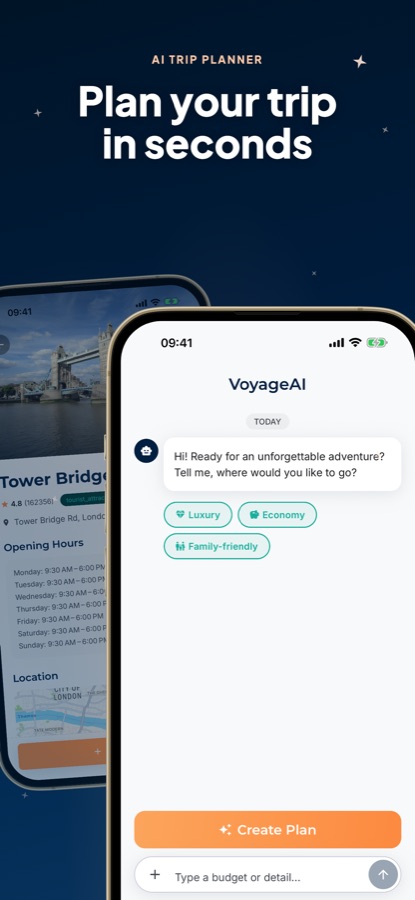
Open the planner, choose Luxury, Economy or Family-friendly, then type your interests and any detail such as how many days you have. A Create Plan button starts the itinerary.
Read the day-by-day route
The plan comes back split into days, with each day's stops ordered for efficient sightseeing and plotted on the map. Landmarks such as Tower Bridge, the British Museum or Buckingham Palace can be fitted into one day instead of three.
Check each place, then save it
Open any place to read its description, opening hours, location, directions and reviews, and bookmark it. Saved places stay available whether or not they ended up in a plan.
What's inside
What is in the app
AI
AI trip planner
Tell the planner your interests and budget style and it builds a personalised day-by-day London itinerary, rather than leaving you to piece one together from many pages.
Route
Optimised order
The app arranges your places in an efficient sightseeing order and maps them, so each day reads as a route.
3
Budget modes
Plan in Luxury, Economy or Family-friendly style before you ask for an itinerary.
Explore
Curated places
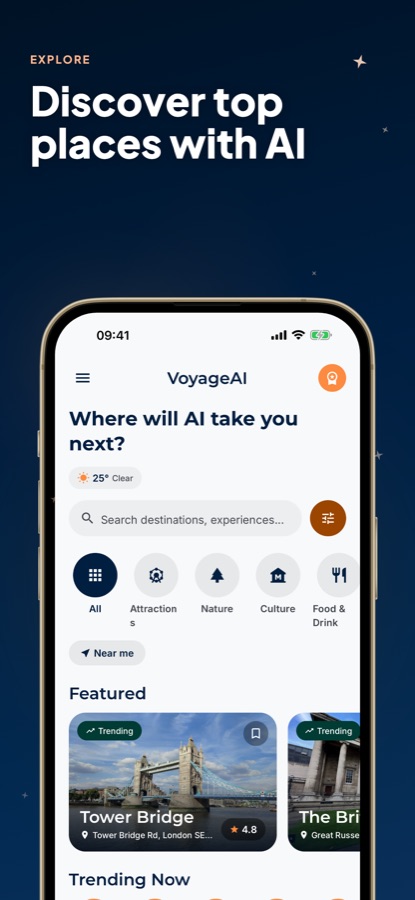
Browse Popular, Trending and Top Rated spots by category, including Attractions, Nature, Culture and Food & Drink, with a search box, a Near me filter and the current weather on the same screen.
Info
Place details
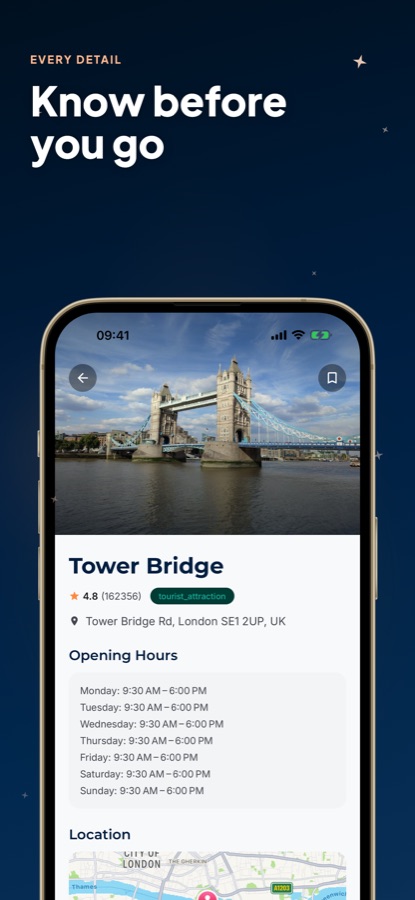
Each place carries an about section, opening hours, location, directions and reviews, so you can judge a stop before adding it.
Saved
Favourites
Bookmark places and build the trip you want, kept separately from any generated plan.
Fit
Who it's for — and who it isn't
A good fit if you
- Are visiting London and want a day-by-day route instead of a blank page
- Want the stops of each day ordered so you walk less and see more
- Like to check opening hours and directions for a place before adding it
- Travel with a budget style in mind, whether Luxury, Economy or Family-friendly
- Want to bookmark places on the way and decide later
Not the right tool if you
- Want unlimited AI itineraries for free, since the free version shows ads and Pro adds unlimited plans
- Need live transport times or real-time traffic; this is a place and trip planning guide
- Expect the app to buy or reserve anything for you; it plans and explains, nothing more
Privacy
What the planner sends
The interests, budget style and trip details you type into the planner are sent to an AI service so it can write your itinerary. The guide lists places for information only.
Full details are in the CoddyKit privacy policy.
Questions
Frequently asked questions
What is a good AI travel guide for London?
A useful one orders your stops, not just lists them. London Guide & Maps - VoyageAI asks for your interests and a budget style, then returns a day-by-day itinerary with stops arranged for efficient sightseeing and shown on a map. It also has a guide to places with opening hours and directions, and it is free to start on iOS and Android.
Is London Guide & Maps - VoyageAI the same app as London Guide - VoyageAI?
Yes. Google Play lists the app as London Guide & Maps - VoyageAI, while the App Store listing is titled London Guide - VoyageAI. It is one app with the same AI trip planner and place guide on both stores.
How many days should I plan for London?
A first visit to the main landmarks can fit in two or three days if you group stops by district, and more if you add museums and day-long activities. In London Guide & Maps - VoyageAI you tell the planner how many days you have, and it spreads the stops across them.
Which London sights can the planner fit into one day?
It can arrange landmarks such as Big Ben and the Houses of Parliament, Westminster, Buckingham Palace, the British Museum, Tower Bridge and the London Eye into a single sightseeing route. The app orders them by efficiency and shows them on the map, but the walking time between stops is still yours to judge.
How does the AI trip planner in VoyageAI work?
You open the planner, choose Luxury, Economy or Family-friendly, and write your interests and details in a short message. The AI then replies with a day-by-day itinerary. You can read each stop's details, save the places you like, and ask for a different plan if it does not fit.
Is London Guide & Maps - VoyageAI free?
Yes, it is free to use with ads. A Pro upgrade unlocks unlimited AI itineraries and planning, an ad-free experience and priority recommendations for the best places. The app is rated 4+ and the current version is 11.8.3.
Does the app tell me how to get around London?
It focuses on planning where to go and in what order, and each place has directions. It is not a live transport app, so check the transport operator for current times, fares and disruptions before you travel.
Get started
See London in a better order
Free on iOS and Android, with a Pro upgrade for unlimited AI itineraries.
More from CoddyKit
Available on iOS and Android.