

Paris Guide & Maps - VoyageAI
Paris Guide & Maps - VoyageAI — An AI trip planner that turns two days in Paris into a route
Paris Guide & Maps - VoyageAI is a free iOS and Android Paris travel guide with an AI trip planner. Made for travellers planning a visit, it takes what you like, how long you have and a budget style from a chat and answers with a day-by-day itinerary whose stops are ordered for sensible sightseeing and drawn on the map, next to a browsable guide with hours, addresses and reviews.


- Price
- Free, with ads
- Platforms
- iOS and Android
- Age rating
- 4+
- Version
- 11.8.3
- Requires
- iOS 15.1 or later


The best Paris plan is the one that does not backtrack.
A list of famous names tells you what to see, not in what order. Paris is spread along a river and up a hill, so the same five sights can fill one tidy day or one tiring one. The planner sorts each day's stops into a route first, so the time goes on seeing the city rather than crossing it twice.
What it is
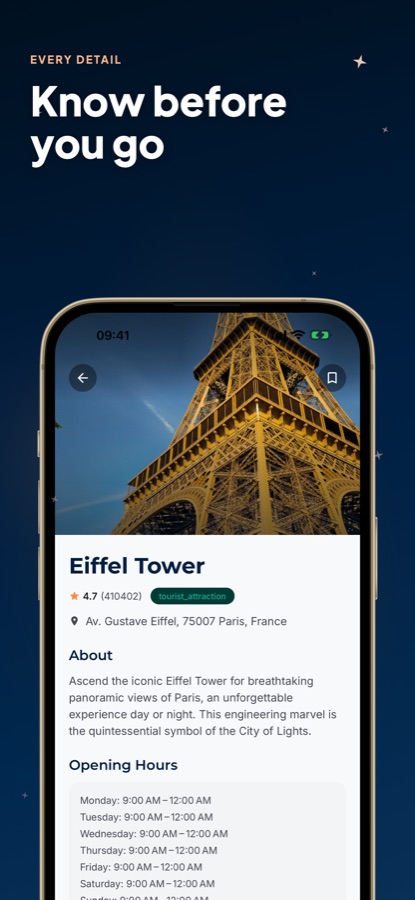
Paris Guide & Maps - VoyageAI, listed on the App Store as AI Travel Guide - Paris, is a free iOS and Android app for planning a visit to Paris. You describe your interests, your time and a Luxury, Economy or Family-friendly budget style in a chat, and it returns a day-by-day itinerary with stops placed in an efficient order on the map. A separate guide lists popular, trending and top-rated places with a description, opening hours, address, directions and reviews, and you can save favourites for later.
The app plans and explains. It is a guide, not a reservation service, so museum entry and restaurant tables are arranged with the places themselves..
Inside the app
What it looks like
Ask it
What to ask the planner
These are the kinds of requests the planner is built for, written the way you might type them.
- I have two days in Paris. Plan a route for the Louvre, Notre-Dame and the Seine
- Build a Family-friendly Paris itinerary with shorter walks and room for breaks
- Plan an Economy weekend in Paris that avoids expensive sit-down meals
- I want a Luxury evening in Paris with the best views of the Eiffel Tower
- Plan one day around Montmartre and the Sacré-Cœur with a quiet café stop
- Mix famous sights with quieter streets so the day feels less crowded
- Build a four-day Paris trip that groups sights by neighbourhood
- Plan a day on the Champs-Élysées and the Arc de Triomphe with a long lunch
Background
How do you plan two days in Paris without wasting them?
Paris rewards a plan built around geography rather than a checklist. The city is divided by the Seine into a Right Bank and a Left Bank and organised into twenty numbered districts called arrondissements, so most trips go best when each day stays in one or two neighbouring areas. Opening hours matter as much as distance, because many large museums close one day a week, and a famous viewpoint is a very different visit at sunset than at midday.
Arrondissementstwenty districts, spiralling out
Paris is numbered from the first arrondissement at the centre outward in a clockwise spiral. Knowing roughly which number a sight sits in tells you whether two stops are neighbours or a long metro ride apart, which is the quickest way to cluster a day.
Right Bank and Left Banknorth and south of the Seine
The Louvre, the Champs-Élysées and Montmartre sit on the Right Bank, while the Latin Quarter and the Eiffel Tower are on the Left Bank. Crossing the river is easy on foot, but planning a day on one side and a day on the other cuts down on zigzagging.
Getting aroundmetro, RER, and walking
Paris has a dense metro with frequent stops, regional RER trains for longer hops, buses and very walkable central streets. Fares and passes change, so check the current options on the official transport site before you arrive.
Closing days and quiet hourscheck before you go
Many national museums close for one day each week, often a Monday or a Tuesday, and popular sights get busy at midday. Looking at each place's opening hours while you plan avoids arriving at a closed door, and early or late visits are usually calmer.
How it works
How the planner is used
The planner is a conversation that ends in a route, not a form with a long list of fields.
Say what you want
Open the planner and tap a budget style, Luxury, Economy or Family-friendly, then type how many days you have and what you enjoy. A short message is enough to start.
Receive a day-by-day itinerary
The app builds a plan for each day and puts its stops in an order meant to cut backtracking. The route appears on the map so you can see how the day flows.
Check each place, then save it
Open any stop for a description, opening hours, address and rating. Bookmark the ones you like and they wait for you in your saved places.
What's inside
What is inside the app
AI
AI trip planner
A chat turns your interests, budget and time into a personalised itinerary for Paris in seconds.
3
Budget styles
Choose Luxury, Economy or Family-friendly before you ask, so the plan you get back matches the way you want to travel.
Map
Routes on the map
Stops come back in an efficient sightseeing order and are shown on the map, so the plan reads as a path to follow.
Explore
Popular, trending and top-rated places
Browse featured spots such as the Eiffel Tower and the Louvre, filter by category, search a destination or use Near me. Current weather appears at the top of the explore screen.
Info
Place details
Each place shows a short description, opening hours, address, directions and reviews with a star rating, so you can judge a stop before adding it to a day.
Saved
Favourites
Bookmark places while you browse and build the trip you want from your own shortlist.
Fit
Who it's for — and who it isn't
A good fit if you
- Are planning a Paris trip and want a route for each day instead of a loose list
- Want the day's stops put in a walkable order, not just saved as favourites
- Like to check opening hours and an address for each place before committing
- Travel with family or on a budget and want the plan to reflect that
- Want to browse Paris places by category and weather before you decide
Not the right tool if you
- Need live metro timetables or real-time traffic directions — this is a place and trip-planning guide
- Want to reserve tables or pay for entry inside the app, which it does not do
- Expect unlimited AI itineraries for free — Pro unlocks unlimited planning and removes ads
- Need a guidebook with in-depth history and language lessons rather than a planner
Privacy
What the planner processes
The interests, budget style and trip details you type into the planner are processed by an AI service so it can write your itinerary. The places in the guide are listed for information only.
Full details are in the CoddyKit privacy policy.
Questions
Frequently asked questions
What is a good AI travel guide for Paris?
A good one turns a loose request into a usable route and then gives you facts on each stop. Paris Guide & Maps - VoyageAI does both: you describe your interests, time and budget style in a chat and it returns a day-by-day itinerary on the map, while the place pages carry hours, address, directions and reviews. It is free on iOS and Android.
How does the Paris trip planner work?
You tap a budget style, Luxury, Economy or Family-friendly, then describe the trip in a short message. The planner returns an itinerary for each day, with stops sorted into an efficient sightseeing order and shown on the map. You can check any stop's details and save the ones you like.
How many days do I need in Paris?
Two or three days is enough to see the main landmarks at a relaxed pace, while four or five lets you add neighbourhoods such as Montmartre and the Latin Quarter. Tell the planner how many days you actually have and it fits the route to that time instead of cramming everything in.
How should I group sights in Paris to save time?
Group them by area. The Louvre and Notre-Dame sit near the river in the centre, Montmartre is a hilltop district to the north, and the Eiffel Tower is on the Left Bank. Putting neighbouring sights on the same day cuts down on metro rides, which is what the planner's route ordering aims to do.
Does the app show opening hours and directions?
Yes. Every place has a description, opening hours, address, directions and reviews, so you can see whether a stop is open on the day you plan to visit. Because hours can change, treat them as a planning guide and confirm with the place itself for a specific date.
What are the Luxury, Economy and Family-friendly modes?
They are budget styles you choose before you ask the planner for an itinerary. Luxury leans towards higher-end experiences, Economy towards lower-cost options and Family-friendly towards stops that suit travelling with children, and the plan you receive is shaped by the one you pick.
Can I save places without making a plan?
Yes. You can bookmark any place while browsing Popular, Trending or Top Rated and keep it in your saved places whether or not it ends up in a generated itinerary. That makes it easy to collect ideas first and decide the order later.
Is Paris Guide & Maps - VoyageAI free?
The app is free to use and is supported by ads. Pro upgrades the experience with unlimited AI itineraries and trip planning, an ad-free experience and priority recommendations. The explore guide and place details are part of the free app.
Which platforms does it run on?
Paris Guide & Maps - VoyageAI is available on the App Store, where it is called AI Travel Guide - Paris, and on Google Play. It is rated 4+ on the App Store and needs iOS 15.1 or later on iPhone.
Get started
Plan your Paris route today
Free on iOS and Android, with a Pro upgrade for unlimited AI itineraries.
More from CoddyKit
Available on iOS and Android.