

AI Travel Guide - Singapore
AI Travel Guide - Singapore — An AI trip planner for a compact island city
AI Travel Guide - Singapore is a free AI trip planner and city guide for Singapore. Say what you like and pick Luxury, Economy or Family-friendly, and it replies with a day-by-day Singapore itinerary whose stops are ordered for an efficient route on the map, next to a browsable guide to places with opening hours, directions and ratings.


- Price
- Free, with ads
- Platforms
- iOS and Android
- Languages
- 13
- Age rating
- 4+
- Version
- 11.8.3
- Requires
- iOS 15.1 or later
Everything is close, so the order is what matters.
Singapore is small enough that two famous sights can be fifteen minutes apart and still cost you an afternoon if you zigzag between them. A good day here is a sequence, with the indoor stops placed for the hours when the heat or a storm makes the street unpleasant. The planner puts each day's stops in an order that works on the map.
What it is
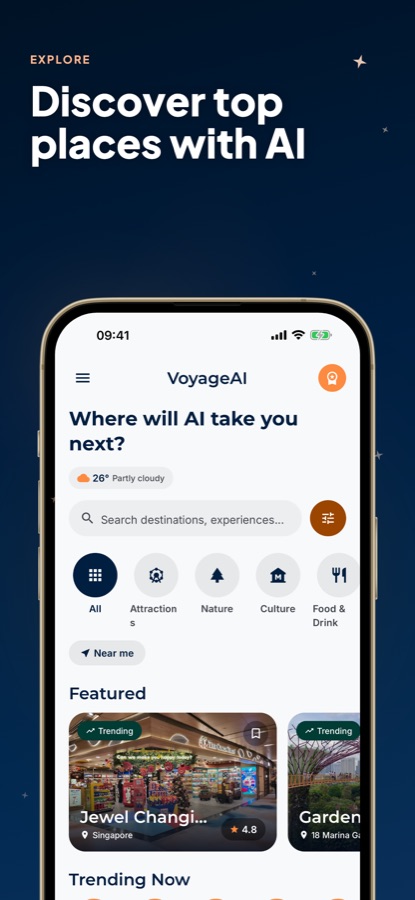
AI Travel Guide - Singapore, listed on Google Play as Singapore Guide - VoyageAI, is a free iOS and Android app for planning a visit to Singapore. You tell a chat-style planner your interests and choose a budget style, and it returns a day-by-day itinerary with stops ordered for an efficient route, shown on a map. A guide to places such as Gardens by the Bay, Sentosa and Jewel Changi Airport adds opening hours, directions and ratings, and you can save favourites.
Inside the app
What it looks like
Ask it
What to ask the planner
The planner takes a short description of what you want and a budget style. These are the kinds of requests it is built to turn into a day-by-day Singapore itinerary.
- Plan 3 days in Singapore with Gardens by the Bay, Sentosa and hawker food
- I have one day in Singapore after a long flight, so what is the best route near Marina Bay?
- Build a Family-friendly Singapore itinerary with short walks and indoor breaks
- Plan an Economy weekend in Singapore that avoids expensive restaurants
- I want a Luxury Singapore trip with skyline views and a relaxed pace
- Plan a rainy day in Singapore that stays mostly indoors
- Build a 4-day Singapore trip that covers Chinatown, Little India and Kampong Glam
- Plan an evening around Marina Bay for lights and a late dinner
Background
What should you know before planning a trip to Singapore?
Singapore is a city-state on a small island, so most sights are close together and a short stay can cover a lot, but the climate and the layout shape how a day should run. It is hot and humid all year with frequent afternoon rain, the public transport network reaches most visitor areas, and the food is as much a reason to visit as the landmarks. Check current entry requirements before you travel, as they change.
Heat and sudden rainplan the day around the weather
Temperatures stay warm all year and afternoon downpours are common. Putting outdoor walking in the morning and indoor stops such as malls, museums and covered gardens in the middle of the day is the habit that makes a long itinerary comfortable.
Hawker centreswhere locals eat
Hawker centres are open-air food halls with dozens of stalls, each cooking a few dishes well at modest prices. Eating at one is a standard part of a visit, and the best time is often just before or after the busiest lunch or dinner rush.
The main districtsMarina Bay, Orchard, Sentosa, the old quarters
Marina Bay holds Marina Bay Sands, Gardens by the Bay and the Merlion. Orchard Road is the shopping street, Sentosa is the island resort and Chinatown, Little India and Kampong Glam are the historic neighbourhoods. Grouping stops by district is what keeps travel time low.
Getting aroundtrains, buses, short taxi hops
The MRT train network and buses reach most places visitors want to go, and taxis fill the gaps. Most trips between central areas are short, so the real cost is the walk to and from a station in the heat. Fares and payment options change, so check the current ones.
How it works
How the planner is used
You start a chat, say what you want and choose a budget style, then read a route instead of a list.
Tell the planner what you like
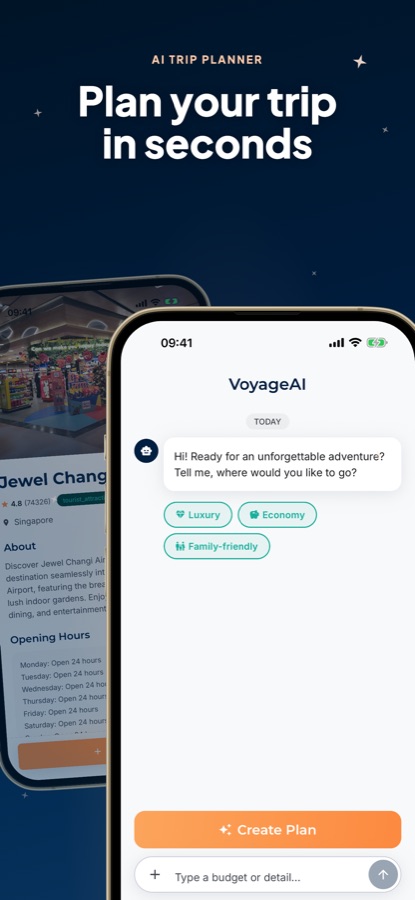
Open the Plan tab. The assistant asks where you would like to go and offers Luxury, Economy and Family-friendly chips. Type a budget or a detail, such as food, gardens or a day with children, and tap Create Plan.
Read the itinerary on the map
The reply is split by day, with each day's stops ordered for the most efficient sightseeing and plotted on the map, so you see the walk or ride before you take it.
Check each place, then save it
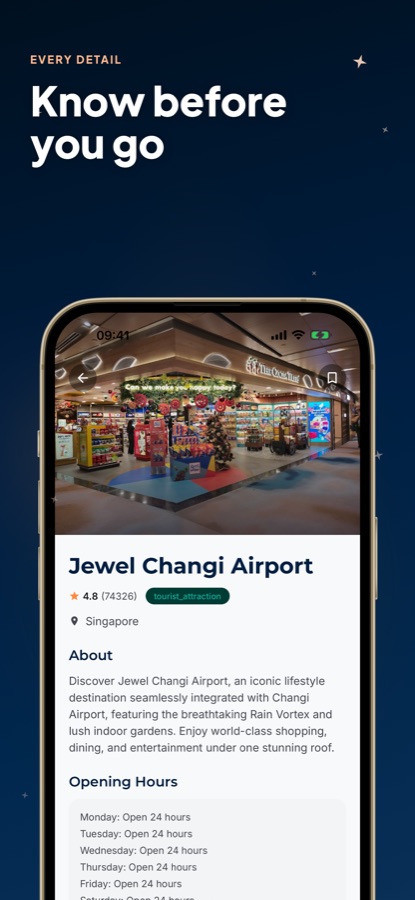
Open a stop to see its description, opening hours, address, directions and rating. Bookmark the places you want so they wait in your Saved tab.
What's inside
What's in the app
AI
AI trip planner
Share your interests and budget in a chat and get a full day-by-day Singapore itinerary in seconds, whether you have one day or a week.
Map
AI-optimized routes
Places are put in the order that suits the map, and the whole route is shown, so the plan is a path rather than a list to rearrange.
3
Budget modes
Plan in Luxury, Economy or Family-friendly style, chosen in the planner before you ask for a plan.
Explore
Curated places
Browse Popular, Trending and Top Rated places and categories such as Attractions, Nature, Culture and Food & Drink, or search directly, with the weather shown on the same screen.
Detail
Info before you go
Each place has an about section, opening hours, location, directions and reviews, so you can check a stop before it enters a plan.
Saved
Favourites
Bookmark places and build your own trip alongside any plan the AI creates.
Fit
Who it's for — and who it isn't
A good fit if you
- Are planning a Singapore stay of one day to a week and want a route rather than a blank page
- Want stops grouped so you waste little time getting between them
- Plan around the heat and rain and want indoor stops placed sensibly
- Want opening hours, addresses and directions without leaving the app
- Have a budget style in mind, from Economy to Luxury, or are travelling with children
Not the right tool if you
- Want unlimited AI itineraries for free, since Pro unlocks them and the free version shows ads
- Need live train times or real-time traffic routing, because this is a planning guide rather than a transit app
- Want to make reservations or payments in the app, as it only plans and informs
- Need an exhaustive directory of every shop and restaurant on the island
Privacy
What the planner sends
The interests, budget style and details you type into the planner are sent to an AI service so it can write your itinerary. That is the purpose they are used for. Place information in the guide is for reference only, and the app has no commercial relationship with the places it lists.
Full details are in the CoddyKit privacy policy.
Questions
Frequently asked questions
What is a good AI travel guide for Singapore?
A good one turns a loose wish into a real route and gives practical facts about each stop. AI Travel Guide - Singapore does both: a chat planner that returns an ordered day-by-day itinerary from your interests and budget style, and a guide to places with opening hours, directions and ratings. It is free to start on iOS and Android.
How many days do you need in Singapore?
Three to four days cover the main districts at an easy pace, since the island is compact and the transport network is dense. A single day can still work if you group stops by area, such as Marina Bay and Gardens by the Bay together. AI Travel Guide - Singapore plans for one day or a week and orders the stops to suit the time you have.
What is the best way to get around Singapore?
Most visitors use the MRT trains and buses, with taxis for short hops or late nights. Distances between central areas are small, so time goes on walking to stations in the heat rather than on the ride itself. Fares and payment methods change, so check the current options before you travel rather than relying on an older guide.
What should I do on a rainy day in Singapore?
Move the plan indoors: malls along Orchard Road, museums, covered gardens and food courts all work well while a storm passes. Showers are often short, so a flexible day with indoor stops in the middle helps. You can ask the planner for a mostly indoor day and it will build the route around that.
How does the AI trip planner work?
You open the Plan tab, say what you like, choose Luxury, Economy or Family-friendly, and tap Create Plan. AI Travel Guide - Singapore then returns a day-by-day itinerary with stops ordered for an efficient route and shown on the map. You can refine the request with extra details such as a budget.
What is included in the place guide?
Each place has an about section, opening hours, location, directions and reviews, and places are grouped as Popular, Trending and Top Rated and by category. Examples include Jewel Changi Airport, Gardens by the Bay, Marina Bay Sands and Sentosa. You can search, bookmark favourites and open them again from your Saved tab.
Is AI Travel Guide - Singapore free?
It is free to use with ads on iOS and Android. Pro is an optional upgrade that unlocks unlimited AI itineraries, an ad-free experience and priority recommendations. The free version lets you explore places and try the planner straight away, and prices are shown in the app.
Is it the same app as VoyageAI?
Yes. VoyageAI is the name shown inside the app and in the Google Play listing, Singapore Guide - VoyageAI. The App Store lists the same app as AI Travel Guide - Singapore. The city guide for each destination is a separate download.
Do I need an account?
No sign-in is needed to explore places or use the planner. You open the app, choose what you like and start. Favourites you save stay on your device.
Which phones does it run on?
AI Travel Guide - Singapore runs on iPhone and iPad with iOS 15.1 or later, and on Android through Google Play. It is rated 4+ on the App Store, and the app is available in 13 languages.
Get started
Plan your Singapore days in seconds
Free on iOS and Android, with a Pro upgrade for unlimited AI itineraries.
More from CoddyKit
Available on iOS and Android.