

Phishing Academy: Scam Safety
Phishing Academy: Scam Safety — Phishing awareness training that teaches you to spot a scam in seconds
Phishing Academy: Scam Safety is a free iOS and Android phishing awareness game for anyone who wants to spot scam texts, emails and DMs. A realistic text, email, WhatsApp chat or social media DM appears, you decide Safe or Scam? and a reveal panel shows the red flags that gave it away. Ten training packs and 185 authored practice messages turn spotting fraud, smishing and spam into a reflex.


- Price
- Free, Pro upgrade
- Platforms
- iOS and Android
- Languages
- 10
- Age rating
- 4+
- Requires
- iOS 15.1 or later
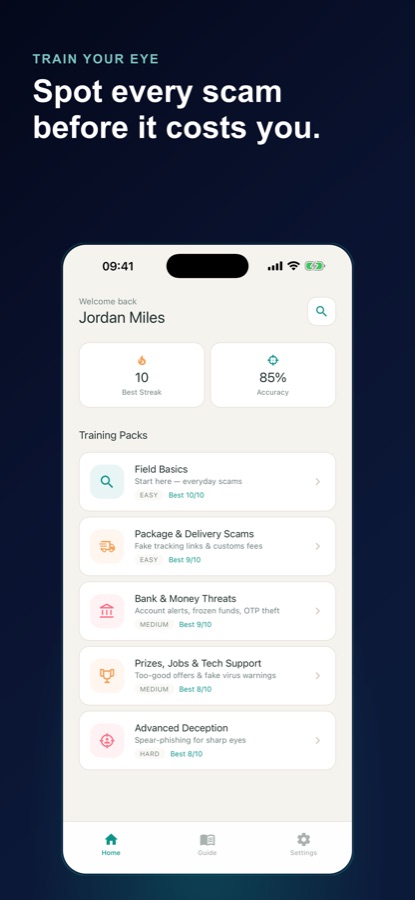
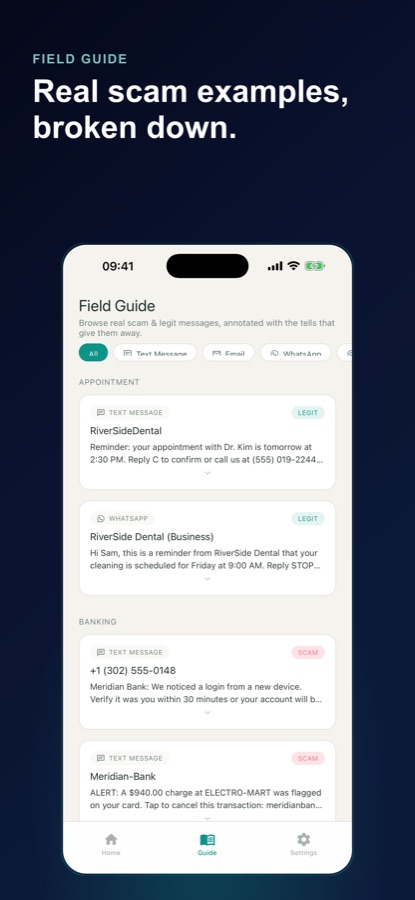
A list of tips fades; a trained eye does not.
Each round shows a message the way it really looks and asks for a verdict in seconds. The reveal that follows names the tell, whether that is a manufactured deadline, a link that does not match the sender or a domain that is almost right, so the next suspicious message is recognised rather than guessed at.
What it is
Phishing Academy: Scam Safety is a free iOS and Android security awareness training game that teaches you to recognise phishing, smishing and fraud messages. You judge realistic texts, emails, WhatsApp chats and social media DMs as Safe or Scam, then read a reveal of the exact red flags. It has ten training packs covering delivery, banking, prize, job, romance, crypto and account-takeover scams, a searchable Field Guide of annotated examples and a 45-second Rapid Fire mode. It is training, not a scanner: it never reads your real messages.
Inside the app
What it looks like
Background
What is phishing, and how do the common versions differ?
Phishing is a message designed to make you hand over something valuable, such as a password, a one-time code, payment details or simply a click, by pretending to be someone you trust. The channel changes the name but not the idea: phishing usually means email, smishing means text messages, and the same con also arrives through WhatsApp and social media direct messages. Spotting it is mostly a matter of noticing pressure and mismatch: urgency that leaves no time to think, a sender or link that does not quite match the organisation it claims to be, and a request that no genuine company makes by message.
Smishingphishing by text message
A fake delivery notice, a bank alert or a prize notification arrives as an SMS with a link or a number to reply to. Texts look short and official, which is why a mismatched link or an unexpected request for a code is the thing to look for.
Look-alike domainsalmost right is wrong
A sender address or link that swaps a letter, adds a word or ends in an unusual suffix can look correct at a glance. Reading the domain slowly, from the end of the name backwards, is the habit that catches most of them.
One-time code theftthe code is the key
A genuine service does not ask you to read a verification code back to a caller or reply with it in a message. A request to share one is the clearest sign that someone is trying to get into your account.
Spear-phishingwritten for you
Instead of a mass message, the attacker uses a real name, a real colleague or a plausible project to make the request feel routine. It is the hardest kind to spot, which is why it has its own advanced pack in the app.
How it works
How a round works
A round takes a few minutes and is built around one decision, so the skill is practised rather than described.
Read the message as it would really look
A text looks like a text and an email shows its sender and subject line, so you judge the same cues you would see in daily life.
Decide Safe or Scam
Commit to a verdict in seconds. Each pack mixes genuine scams with genuinely legitimate messages, so the aim is telling them apart rather than flagging everything.
Read the reveal, then go deeper
The reveal lists the red flags on a scam or the reasons a safe message is legitimate. Move on to the next pack, try the 45-second Rapid Fire round or revisit examples in the Field Guide.
What's inside
What comes with the app
10
Training packs
Field Basics, Package & Delivery Scams, Bank & Money Threats, Prizes, Jobs & Tech Support, Social Media Traps, Romance & Dating Scams, Crypto & Investment Cons, Brand & Celebrity Fakes, Account Takeover and Advanced Deception.
185
Authored practice messages
Example messages written for teaching and modelled on common scam patterns, each with concrete tells. The banks and brands in them are fictional stand-ins and the app is not affiliated with any of them.
4
Channels
Smishing texts, phishing emails, WhatsApp cons and social media DM fraud, each shown the way it appears in the real app.
Reveal
Red flags after every round
An instant panel shows the urgency hook, the mismatched link or the odd request on a scam, and what makes a safe message trustworthy.
Guide
Field Guide
A browsable library of annotated scam and legitimate messages you can filter by channel and return to whenever you want a refresher.
45 s
Rapid Fire
A timed round where you sort as many messages as you can into scam or legit, build a combo and beat your best score. A wrong answer costs three seconds.
Fit
Who it's for — and who it isn't
A good fit if you
- Want to know you would catch a fake delivery text or a bank alert before you tap
- Help parents, grandparents or teenagers stay safer online and want something to practise together
- Sit through workplace security awareness training and want it to stick
- Prefer learning by making quick judgement calls over reading long articles
- Want to practise telling scams from genuine messages instead of distrusting everything
Not the right tool if you
- Want an app that scans your inbox or texts and blocks scams, because this is training and does not read your messages
- Need to report or recover from a fraud that already happened, which is a job for your bank and local authorities
- Expect every pack free: Field Basics and Package & Delivery Scams are free, and Pro unlocks the rest
- Need practice messages in languages other than English, since the interface is translated but the examples are in English
Privacy
Training, not monitoring
Phishing Academy: Scam Safety practises on authored example messages only. It is not a spam filter, scam detector or antivirus, it does not scan your inbox or texts, and it never reads your real messages.
Full details are in the CoddyKit privacy policy.
Questions
Frequently asked questions
How can I learn to spot phishing messages?
Practise on realistic examples rather than memorising a checklist. Phishing Academy: Scam Safety shows a realistic text, email, WhatsApp chat or DM, asks you to call it Safe or Scam and then explains the exact red flags, so the cues become familiar through repetition. Short rounds make it easy to practise a little each day.
What is the difference between phishing and smishing?
Both are attempts to trick you into giving up information or money, and the difference is the channel. Phishing usually refers to email, while smishing is the same trick sent by SMS text message. Phishing Academy: Scam Safety trains on both, along with WhatsApp and social media DMs.
What are the common red flags in a scam message?
The usual signs are urgency that pressures you to act at once, a link or sender address that does not match the organisation it claims to be, a request for a password or one-time code, and an offer that is too good to be true. The reveal panel in Phishing Academy: Scam Safety points to the specific flag in every example, so you learn which one to look for.
Can an app protect me from scams?
An app can build your judgement but it cannot make every message safe. Phishing Academy: Scam Safety is awareness training: it does not filter messages, scan your inbox or act as an antivirus, and it never reads your real messages. Its job is to make you faster at recognising a suspicious one yourself.
Is this useful for security awareness training at work?
It can be a light, self-paced complement. Phishing Academy: Scam Safety covers bank alerts, account-takeover phishing, brand impersonation and advanced spear-phishing in short rounds, so people can practise the judgement call that awareness courses talk about. It is an individual app rather than an administrator dashboard, so it does not report results to an employer.
Can I use it to help an older relative or a teenager?
Yes. The rounds are short, the examples are everyday scams such as delivery texts and fake prize messages, and the Field Basics pack is free. Playing a few rounds together and talking through the reveal is an easy way to start the conversation. Phishing Academy: Scam Safety carries a 4+ age rating.
What does Rapid Fire mode do?
Rapid Fire is a 45-second round in Phishing Academy: Scam Safety where you sort as many messages as you can into scam or legit. Correct answers build a combo, a wrong answer costs three seconds, and the goal is to beat your best score. It tests how quickly your recognition works under time pressure.
Are the practice messages real scams?
They are authored examples modelled on common scam patterns, not copies of messages sent to real people. The banks, stores and services named in them are fictional stand-ins used to show how impersonation works. Phishing Academy: Scam Safety is not affiliated with any of them.
Is Phishing Academy: Scam Safety free?
It is free to download on the App Store and Google Play. Field Basics and Package & Delivery Scams are free to play in full, with ads. Pro unlocks all ten training packs and the full Field Guide and removes ads, and plans and prices are shown in the app before you buy.
Which languages and platforms does it support?
Phishing Academy: Scam Safety runs on iOS through the App Store and on Android through Google Play. The interface is available in 10 languages: English, German, Spanish, French, Japanese, Korean, Portuguese, Russian, Turkish and Chinese. The practice messages themselves are in English.
Is Phishing Academy: Scam Safety the same app as Phishing Academy: Scam Quiz?
Yes. The App Store currently lists the app as Phishing Academy: Scam Quiz and Google Play lists it as Phishing Academy: Scam Safety. It is one app with the same ten training packs, Field Guide and Rapid Fire mode on both stores.
Get started
Play your first round of Safe or Scam
Free to start on iOS and Android, in 10 languages.
More from CoddyKit
Available on iOS and Android.