
Learn Electronics & Arduino
Learn Electronics & Arduino — An electronics course with a circuit simulator in your pocket
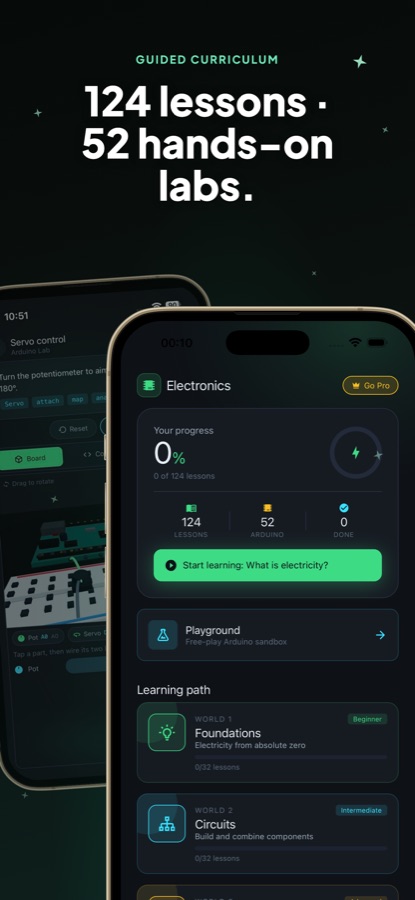
Learn Electronics & Arduino is an electronics course for beginners on iPhone and Android that needs no hardware. Read a short lesson, wire parts on a virtual breadboard in the circuit simulator, write a real Arduino sketch and watch it run on an interactive 3D board, then move on to ESP32 and Raspberry Pi projects. 124 lessons and 52 hands-on labs take you from what electricity is to a finished build.


- Price
- Free, Pro upgrade
- Platforms
- iOS and Android
- Languages
- 10
- Age rating
- 4+
- Version
- 3.25.0
- Requires
- iOS 15.1 or later
- App Store
- 4.2 ★ (5)
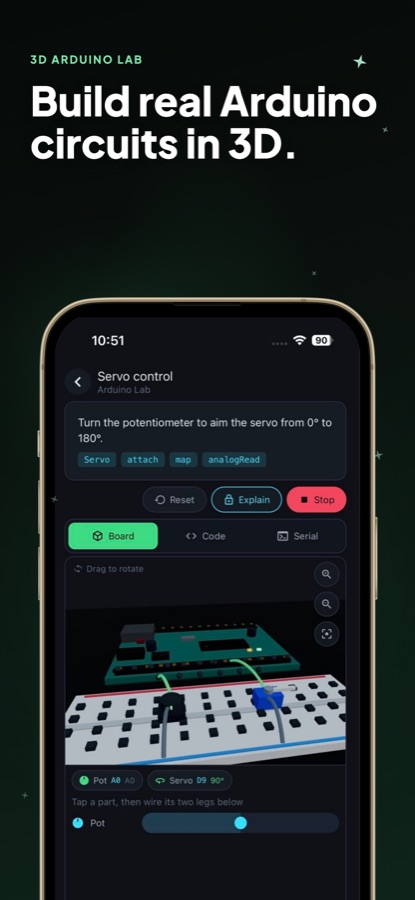
No compiler, no cables, no parts bin.
Your sketch runs in a simulator on the phone and drives a 3D board that reacts live, so a blinking LED, a turning servo or a tone from a buzzer is one tap away. A wiring check and a power budget flag mistakes while you build, which is exactly where a first real breadboard tends to go wrong.
What it is
Learn Electronics & Arduino is a free iOS and Android electronics course that teaches circuits, Arduino programming and ESP32 or Raspberry Pi projects entirely on a phone. It combines 124 lessons and 52 hands-on labs with a circuit simulator: you drag resistors, LEDs, buttons, sensors, servos and motors onto a virtual breadboard, write Arduino code in a built-in editor and watch it run on a rotatable 3D board, with no hardware required.
Inside the app
What it looks like
The course
What the worlds cover
The app's core path is four worlds, with further categories alongside. The coddykit.com site also carries a written Arduino and IoT course that goes on from the Arduino basics.
Foundations
Electricity from absolute zero: electrons, voltage, current, resistance and Ohm's law.
Circuits
Build and combine components: resistors, capacitors, diodes and LEDs, breadboards, and series and parallel circuits.
Arduino 101
Write code that controls hardware, starting with digitalWrite and analogRead on sketches that run on the on-device interpreter.
Arduino Projects
PWM, sensors, servos and more, put together into projects that mix several parts and several ideas.
Sensors, motion and displays
Temperature and humidity, a joystick and a rotary encoder, then servos, DC motors and steppers with their drivers, and screens over I²C.
Digital logic, IoT and soldering
Binary and logic gates, Wi-Fi and HTTP, and how to make a circuit permanent and fix it when it goes wrong.
Raspberry Pi and GPIO
A whole computer that can switch a wire, programmed in Python from the Pi Playground.
How it works
How a lesson and a lab fit together
Each topic pairs a short explanation with something you build, so the idea is tested in the same sitting.
Read a short lesson with diagrams
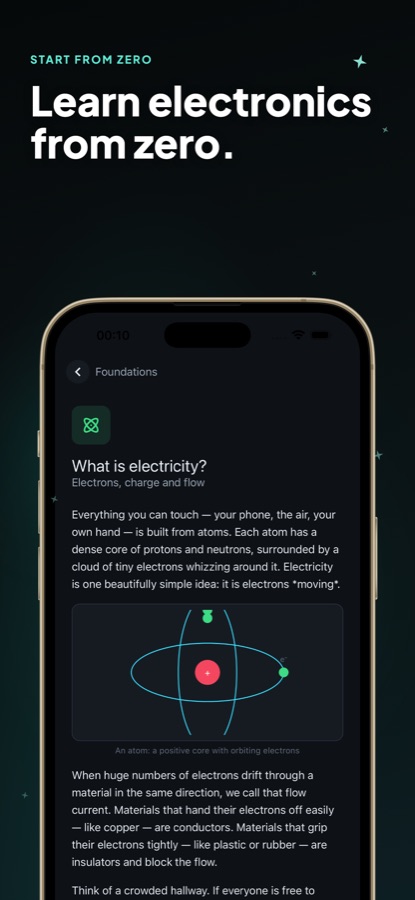
Lessons start with basic electronics and grow into complete Arduino projects. Clear diagrams, quizzes and tips explain the why behind a rule, not only the steps, for example what an atom's electrons have to do with current.
Wire it and run the sketch
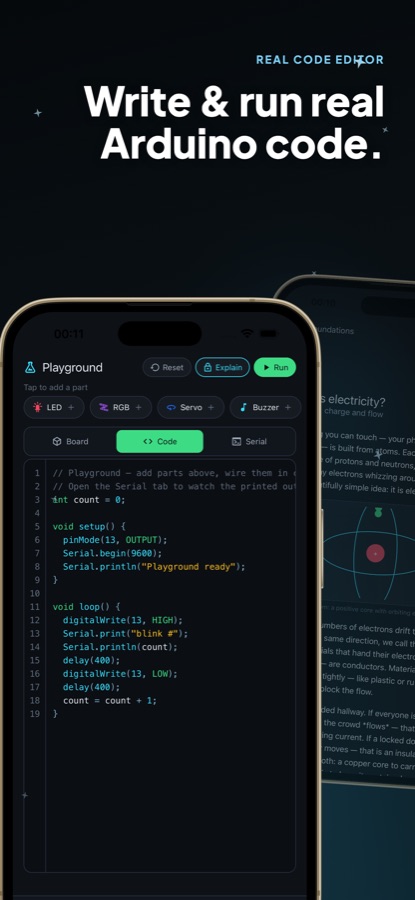
In a lab you get a guided task. Drag parts onto the virtual breadboard, connect their legs, write or edit the Arduino code and press Run. Switch between the Board, Code and Serial tabs to see the 3D board, your sketch and the Serial Monitor output.
Compare with the model solution, then debug
Each lab has a model solution to check against. When you want a harder test, the Fault Bench hands you a circuit that should work but does not, and you track down the fault, which is the quickest way to learn to debug. It opens once you finish your first lab.
What's inside
What comes with the app
124
Lessons
A guided path of lessons in four core worlds from electricity to Arduino projects, plus extra categories on power, sensors, displays, motion and more that you can take in any order.
52
Hands-on labs
Guided tasks with a model solution, each run in the built-in Arduino simulator with no compiler and no cables.
3D
Interactive board
An Arduino board and breadboard you can rotate and zoom, with LEDs, servos and motors that respond to your code as it runs.
Playground
Free-play circuit builder
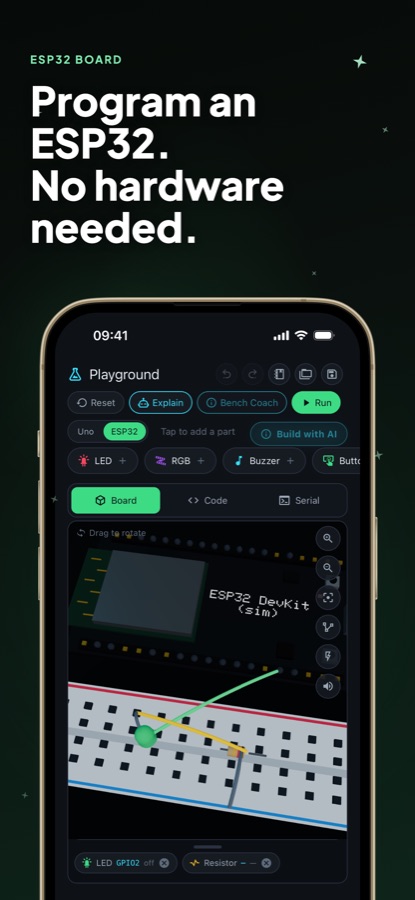
Add LEDs, RGB LEDs, servos and buzzers, wire them yourself and run a sketch. A wiring check and a power budget point out mistakes as you build.
ESP32 + Pi
ESP32 board and Raspberry Pi Playground
An ESP32 board shown in 3D with its own pins, PWM, analog inputs, touch and a simulated radio (Pro), and a Raspberry Pi Playground where you wire parts and write Python.
Share
Circuits from other makers
Share what you build, open circuits other makers made, press Run and make them yours. Passing the exam earns a certificate you can verify with a link (Pro).
Background
Can you learn electronics and Arduino without buying any parts?
You can learn the ideas and most of the habits without a single component: what current and voltage do, how a resistor protects an LED, how a sketch turns a pin on and off, and how a sensor reading becomes a decision. A simulator cannot give you the feel of a loose jumper wire or a hot component, which is why many learners practise in a simulator first and buy an Arduino starter kit afterwards, when a mistake costs nothing and the parts have a purpose.
Ohm's lawthe first rule of every circuit
Voltage equals current times resistance. It tells you why an LED needs a series resistor, how to size a voltage divider and why a thin wire can get warm. Almost every later topic, from sensors to motor drivers, leans on this one relationship.
Breadboardwhere a circuit becomes real
A solderless board whose holes are joined in rows, so parts connect by pushing their legs into the same row. Its power rails, strip layout and gaps in the middle are the usual sources of beginner wiring mistakes, which makes it worth practising on virtually first.
MicrocontrollerArduino and ESP32
A small chip that runs one program on its own pins, reading inputs such as buttons or sensors and switching outputs such as LEDs or motors. An Arduino Uno is the classic teaching board, and an ESP32 adds a faster processor and built-in radio for connected projects.
Raspberry Pia whole computer on a board
Unlike a microcontroller, a Raspberry Pi runs a full operating system and is usually programmed in Python. Its GPIO header can still switch a wire or read a button, so it bridges ordinary programming and physical electronics.
Fit
Who it's for — and who it isn't
A good fit if you
- Are a complete beginner who wants to understand circuits before spending money on parts
- Own or plan to buy an Arduino starter kit and want to try each idea first
- Study electrical engineering or physics and want a hands-on way to revise the fundamentals
- Teach and want a classroom tool where every student can wire a circuit on a phone
- Learn in short sittings and like a lab you can run straight after the theory
Not the right tool if you
- Need to design or lay out printed circuit boards, which the app does not do
- Want to flash real hardware from the phone, since sketches run in a simulator
- Expect every world free: the first lessons are free, Pro unlocks every world, lab and the ESP32 board
- Already build embedded products and want a reference manual, not a course
Questions
Frequently asked questions
What is the best app to learn electronics from scratch?
Look for one that explains the basics and lets you practise in the same place. Learn Electronics & Arduino starts with what electricity is, builds through Ohm's law, resistors and LEDs, and moves into Arduino programming, with 124 lessons and 52 labs you run in a circuit simulator. It needs no hardware and is free to start on iOS and Android.
Do I need an Arduino or any components to use Learn Electronics & Arduino?
No. The app simulates the board, breadboard, LEDs, buttons, sensors, servos and motors on the phone, so you can try every idea before you buy anything. If you already own a starter kit, the same circuits and sketches are a way to practise with it.
How does the Arduino simulator work?
You write a real Arduino sketch in the built-in editor and press Run. The app executes it on the phone with no compiler and no cables, and an interactive 3D board reacts live: LEDs blink, servos turn, motors spin and buzzers play tones. The Serial tab shows what the sketch prints.
Can I learn ESP32 and Raspberry Pi in the app?
Yes. The Playground can switch to a simulated ESP32 board, shown in 3D with its own pins, PWM, analog inputs, touch and a simulated radio, and this board is part of Pro. A separate Raspberry Pi Playground gives you an empty Pi to wire parts to and program in Python, and your build is saved for next time.
What topics does the electronics course cover?
Learn Electronics & Arduino covers voltage, current, resistance and Ohm's law, voltage dividers, series and parallel circuits, resistors, capacitors, diodes, LEDs, transistors, MOSFETs, relays and buzzers, and how to measure a circuit with a multimeter. It then moves into Arduino programming, sensors, motion, displays and I²C, logic gates and soldering basics.
What is the Fault Bench?
The Fault Bench is a set of circuits that should work but do not, and your job is to find the fault. Learn Electronics & Arduino unlocks it after your first hands-on lab, and it is built around the idea that debugging teaches faster than building from a perfect diagram.
Is Learn Electronics & Arduino free?
The app is free to download on the App Store and Google Play, and the first lessons are free. Pro unlocks every world, every lab and the ESP32 board, plus the certificate exam. Subscriptions renew automatically unless cancelled in your store account settings.
Is there a certificate?
Yes, with Pro. Pass the exam in Learn Electronics & Arduino and you earn a certificate that anyone can verify with a link, which you can add to a CV or profile. It records the work you did and is not an accredited qualification.
Is it safe to move from the simulator to real electronics?
A phone simulator carries no risk, but real parts can. Start with low-voltage battery or USB-powered circuits, never experiment with mains electricity, and check polarity and resistor values before powering a build. Learn Electronics & Arduino includes lessons on power and on soldering basics for the step from screen to bench.
Which languages and devices does it support?
Learn Electronics & Arduino is available in 10 languages, including English, German, Spanish, French, Japanese, Korean, Portuguese, Russian, Turkish and Chinese. It runs on iPhone with iOS 15.1 or later and on Android, and is rated 4+.
Get started
Wire your first circuit today
Free to start on iOS and Android, no hardware needed.
More from CoddyKit
Available on iOS and Android.