
AI Travel Guide - Istanbul
AI Travel Guide - Istanbul — An AI trip planner for a city on two continents
AI Travel Guide - Istanbul is a free AI trip planner and city guide for Istanbul. Describe your interests and a budget style in a chat, and it returns a day-by-day itinerary with stops ordered for efficient sightseeing on the map, plus a browsable guide to the city's places with opening hours, directions and reviews.


- Price
- Free, with ads
- Platforms
- iOS and Android
- Age rating
- 4+
- Version
- 11.8.2
- Requires
- iOS 15.1 or later

Two continents, one itinerary.
Istanbul punishes a plan made from a list of famous names: the sights sit on both sides of the Bosphorus and the Golden Horn, and the water decides how long a day really takes. The planner orders each day's stops so the route makes geographic sense before you start walking.
What it is
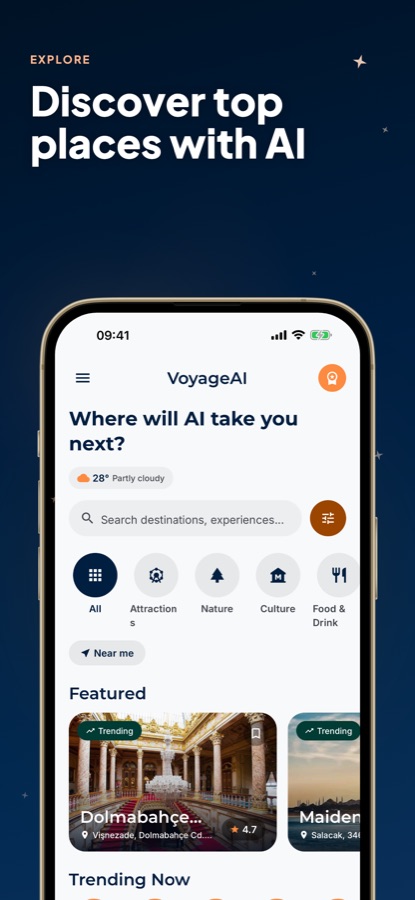
AI Travel Guide - Istanbul, listed as VoyageAI, is a free iOS and Android app for planning a visit to Istanbul. You describe your interests and pick a budget style — Luxury, Economy or Family-friendly — in a chat-style planner, and it returns a day-by-day itinerary with stops ordered for efficient sightseeing, shown on a map. Alongside the planner sits a browsable guide to the city's places, each with opening hours, address, directions and ratings, that you can save as favorites for later.
Inside the app
What it looks like
Ask it
What to ask the planner
The planner takes a short description of what you want plus a budget style — these are the kinds of requests it's built to turn into a day-by-day Istanbul itinerary.
- Plan 3 days in Istanbul focused on Ottoman history and local food
- I have one day in Istanbul — what's the most efficient route around Sultanahmet?
- Build a Family-friendly Istanbul itinerary with kid-friendly stops and shorter walks
- Plan an Economy weekend in Istanbul that skips the expensive sit-down restaurants
- I want a Luxury Istanbul itinerary with the Bosphorus and the best viewpoints
- Plan a day that mixes the Grand Bazaar with quieter, less crowded sights
- Build a 5-day Istanbul trip that covers both the European and Asian sides
- Plan an evening route around Beyoğlu and Galata for nightlife and views
Background
What's useful to know before planning a trip to Istanbul?
Istanbul is the only major city built across two continents, split by the Bosphorus strait into a European and an Asian side, with the Golden Horn cutting the European side again into an old and a newer quarter. That geography shapes almost every practical decision: which side to base yourself on, how you cross the water, and what a mosque visit actually involves once you're standing at the door.
Europe side vs Asia sidemost visitors stay on one
The historic peninsula (Sultanahmet) and the newer center around Beyoğlu and Taksim sit on the European side and hold most of the well-known sights. Kadıköy and Üsküdar, across the Bosphorus on the Asian side, are residential and local rather than built around tourism. A short ferry ride connects the two, and plenty of visitors cross just for the ride and the view.
Old City vs new centerSultanahmet vs Beyoğlu
Sultanahmet, on the historic peninsula, holds the Hagia Sophia, the Blue Mosque, Topkapı Palace and the Grand Bazaar within easy walking distance of each other. Beyoğlu and Taksim, across the Golden Horn, are the newer center for nightlife, restaurants and the Istiklal Avenue shopping street, with Galata Tower marking the edge between the two.
Getting aroundtrams, ferries, a transit card
Istanbul's public transport runs on trams, a metro, buses and commuter ferries, all generally paid for with a single rechargeable transit card rather than cash. A ferry across the Bosphorus is usually the fastest way between the two sides at rush hour, and doubles as a low-cost way to see the skyline. Fares and card details change, so check current ones before you travel.
Visiting a working mosqueetiquette, not formality
Istanbul's major mosques, including the Blue Mosque, are active places of worship as well as sights. Visitors are expected to dress modestly — shoulders and knees covered — women typically cover their hair, and shoes come off at the door. Visits pause around the five daily prayer times, so a mosque can be closed to sightseeing for a short window even during normal opening hours.
How it works
How the planner is used
The planner is a chat: you describe what you want, pick a budget style, and it hands back a route rather than a list.
Describe the trip
Tell the planner your interests, how long you have and what kind of trip it is, and choose a budget style — Luxury, Economy or Family-friendly. The chat interface takes a short message rather than a long form, and you can keep refining it with follow-up details.
Get a day-by-day itinerary
The planner replies with a full itinerary split by day, with each day's stops already ordered for efficient sightseeing and shown on the map. Replace what you'll skip, favorite what you'll keep, and the plan stays with the trip.
Open each place before you go
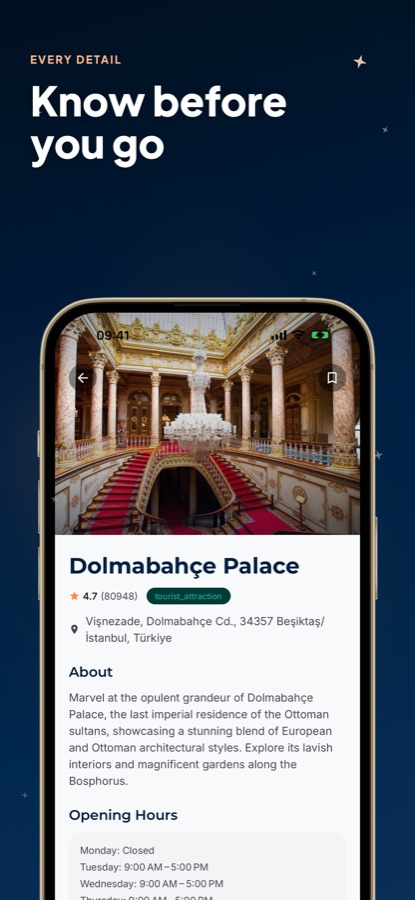
Tap into any stop for the fuller picture: a description, opening hours, address, directions and ratings pulled from its own listing. Bookmark places you want to keep regardless of whether they made it into a plan, and they're waiting in Saved later.
What's inside
What's in the app
AI
AI trip planner
A chat-style planner that turns your stated interests and budget into a day-by-day Istanbul itinerary in one reply, instead of cross-referencing a dozen browser tabs.
Map
AI-optimized routes
Each day's stops come back already ordered for efficient sightseeing and plotted on the map, so the plan is a route to walk rather than an unordered list to re-sort yourself.
3
Budget modes
Switch the planner between Luxury, Economy and Family-friendly before asking for a plan, so the itinerary it returns already fits how you want to spend.
Explore
Curated local places
Browse Popular, Trending and Top Rated places plus category rows — Attractions, Nature, Culture, Food & Drink and more — or search directly, with current weather shown on the same screen.
Info
Deep place details
Every place carries a description, opening hours, address, directions and ratings, so you can check a stop on its own before building it into a day.
Saved
Save favorites
Bookmark any place you like, independent of whether it's part of a generated plan, and come back to the full list from the Saved tab.
Fit
Who it's for — and who it isn't
A good fit if you
- Are planning an Istanbul trip and want a day-by-day route instead of a blank page
- Want each day's stops already ordered for walking, not just a saved list
- Are choosing between the European and Asian sides and want curated places on either
- Want a single place's opening hours, address and directions without leaving the app
- Have a budget style in mind — Luxury, Economy or Family-friendly — and want a plan built around it
Not the right tool if you
- Want unlimited AI itineraries for free — the free tier caps daily plans and shows ads
- Need live transit schedules or real-time traffic routing; this is a place and trip planning guide, not a transit app
- Want to make reservations or payments inside the app — it plans and explains, nothing more
Privacy
What the planner sends, and where
The interests, budget style and trip details you type into the planner are sent to an AI service so it can generate your itinerary. That's what they're used for. The places in the guide are listed for information only; the app has no commercial relationship with them.
Full details are in the CoddyKit privacy policy.
Questions
Frequently asked questions
What's a good AI travel guide for Istanbul?
A useful one has to do two things: turn a loose description of what you want into an actual day-by-day route, and give you real information — hours, address, directions — on each place in it without sending you elsewhere. AI Travel Guide - Istanbul does both: a chat-style planner that returns an ordered itinerary from your interests and a budget style, plus a browsable guide with deep detail on every place. Free on iOS and Android.
How do I get around Istanbul?
Istanbul's public transport runs on trams, a metro, buses and commuter ferries, usually paid for with a single rechargeable transit card rather than cash per ride. Crossing the Bosphorus by ferry is often the fastest option at rush hour and a scenic way to see the skyline at any time. Routes, fares and card details change, so check the current setup before you travel rather than relying on an old guide.
Should I stay on the European or the Asian side of Istanbul?
Most first-time visitors base themselves on the European side, where the historic peninsula (Sultanahmet) and the newer center around Beyoğlu and Taksim hold the bulk of the well-known sights and are a short walk or tram ride apart. The Asian side — Kadıköy and Üsküdar — is more residential and local, and makes a good half-day crossing rather than a first base. A short Bosphorus ferry connects the two whichever you choose.
What should I know before visiting a mosque in Istanbul?
Istanbul's major mosques, including the Blue Mosque, are working places of worship as well as sights. Dress modestly — shoulders and knees covered — women typically cover their hair at the entrance, and shoes come off before stepping onto the carpet. Visits pause for a short window around each of the five daily prayer times, so a mosque can be temporarily closed to sightseeing even during its normal opening hours.
How does the AI trip planner work?
You describe your interests and the kind of trip in a chat, choose a budget style — Luxury, Economy or Family-friendly — and the planner in AI Travel Guide - Istanbul returns a day-by-day itinerary. Each day's stops come back already ordered for efficient sightseeing and shown on the map, rather than as an unordered list you have to route yourself.
Is AI Travel Guide - Istanbul free?
Yes. It's free to download on the App Store and Google Play, and free use is supported by ads. Upgrading to Pro unlocks unlimited AI itineraries and trip planning, removes ads throughout the app, and gives priority recommendations. The core explore guide, place details and saved favorites are part of the free app.
Can I save places without putting them in a plan?
Yes. Any place in the guide can be bookmarked as a favorite independent of whether it ends up in a generated itinerary, and the full list is kept in the Saved tab. That's useful for places you've spotted while browsing Popular, Trending or a category row and want to decide on later.
What details does the app show for each place?
Each place has a description, opening hours, address, directions and ratings pulled from its own listing, plus whichever category it falls under — attraction, museum, restaurant, café and similar. That's enough to judge a single stop, such as Hagia Sophia or the Grand Bazaar, before deciding whether to build a day around it.
What are the Luxury, Economy and Family-friendly budget modes?
They're settings you pick before asking the AI trip planner for an itinerary, and they shape the kind of plan it returns — Luxury leans toward higher-end places and experiences, Economy toward lower-cost options, and Family-friendly toward stops and pacing that suit traveling with kids. Switching between them before a request changes the plan you get back, not just a label on top of the same one.
Get started
Let the plan come to you
Free on iOS and Android, with a Pro upgrade for unlimited AI itineraries.
More from CoddyKit
Available on iOS and Android.