

Homeschool Planner: Curriculum
Homeschool Planner: Curriculum — A homeschool lesson planner that drafts your school year
Homeschool Planner: Curriculum is a free iOS and Android homeschool lesson planner for parents who teach at home. Pick a grade, a subject, a number of weeks and a pace, and the AI curriculum generator drafts an editable week-by-week plan — then the same app keeps the school-day attendance, the gradebook and the progress for the whole year.


- Price
- Free, Pro upgrade
- Platforms
- iOS and Android
- Languages
- 10
- Age rating
- 4+
- Version
- 1.3.0
- Requires
- iOS 15.1 or later
A plan you use beats a perfect one you never open.
The hard part of a homeschool year is rarely the teaching; it is sitting down with a blank calendar and turning a whole subject into lessons. The planner starts from a draft you can reorder, rewrite and mix with your own lessons, so the plan on your phone is one you can teach from this week.
What it is
Homeschool Planner: Curriculum is a free iOS and Android app that works as a homeschool lesson planner, curriculum planner and year tracker in one. You choose a grade, a subject, how many weeks it should run and a Gentle, Standard or Rigorous pace, and an AI curriculum generator lays out an editable unit-by-unit, week-by-week plan; built-in sequences for grades K-2, 3-5, 6-8 and 9-12 can fill a subject offline instead. From there the app handles the school-year calendar, a homeschool scheduler that places lessons on real dates, attendance logging, a gradebook and per-subject progress for each child.
AI-generated plans and worksheets are editable starting points for a parent to review. They are not standards-certified curricula, and the app does not give legal or compliance advice..
Inside the app
What it looks like
Background
How do you plan a homeschool year from a blank page?
Most parents plan a homeschool year by deciding what each child should cover in each subject, spreading that across the weeks available, and then keeping simple records of what actually happened. The part that stalls people is the middle step, because a subject such as science or writing has no built-in order until someone chooses one. A workable plan is rarely perfect on day one; it is a draft that gets adjusted every few weeks as the child speeds up, slows down or gets sick.
Scope and sequencewhat, and in what order
The scope is everything a subject will cover during the year, and the sequence is the order it is taught in. Laying a subject out unit by unit and then week by week turns a vague goal such as finishing fractions into a short list of lessons that fit a school week.
Pacegentle, standard or rigorous
The same material can be stretched over a long term with room to breathe or compressed into a shorter, denser one. Choosing a pace up front decides how many lessons land in each week, which is why a plan built for a relaxed year looks nothing like one built to finish early.
School days and days offthe calendar behind the plan
A plan only works if it knows which weekdays you teach and which days are lost to holidays, co-op days, field trips or illness. Dated lessons that skip those days stay honest, and a missed day becomes a small catch-up job instead of a plan that silently falls a week behind.
Attendance and recordsrules differ by place
Some states and countries ask homeschooling families to keep attendance, hours or samples of work, and others ask for very little. Check what applies where you live; a running school-day count and a grade log make whichever record you need easy to produce.
How it works
How a school year runs in the app
The app is built around one loop: set the year up once, get a draft plan, then tick lessons off day by day.
Set up your students and your school year
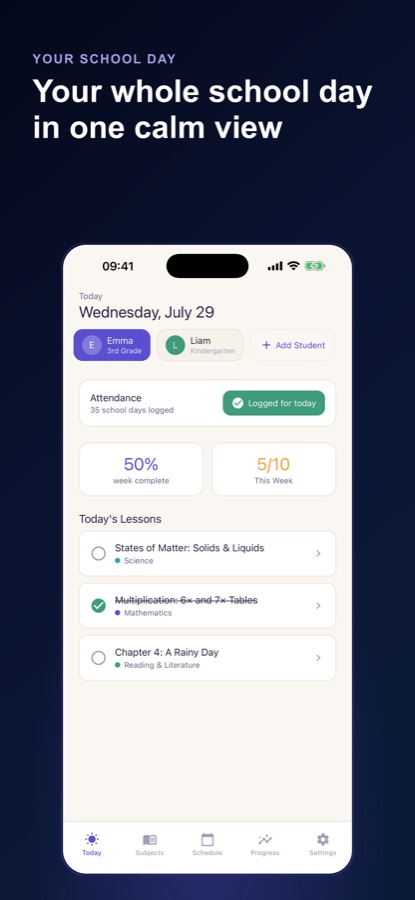
Add each child with a grade level and a colour, then enter the school year's start and end dates, your teaching weekdays, terms and planned days off. The free version includes one student profile.
Draft the plan, or build it by hand
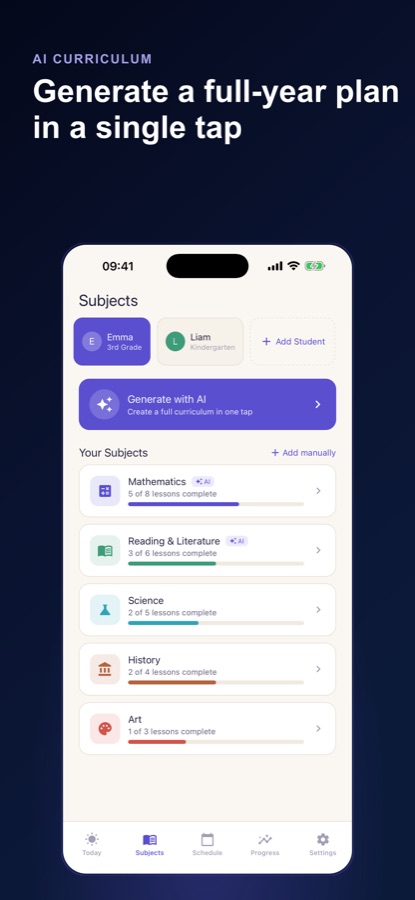
Ask the AI generator for a subject plan, use a ready-made sequence for the grade band, or add your own subjects and lessons with an objective, an activity and notes. Place the plan on the calendar and every lesson gets a real date that skips your days off.
Teach, log and catch up
The Today screen lists the day's lessons for the selected child. Tick them off, log the day as a school day, and when you fall behind let overdue lessons move to the next open day or ask the app to re-plan the rest of the term.
What's inside
What is in the app
AI
Curriculum generator
Grade, subject, number of weeks and a Gentle, Standard or Rigorous pace go in; an editable plan arranged by unit and by week comes out. You can reorder it, rewrite it or mix it with lessons of your own.
K-12
Ready-made sequences
Built-in sequences for grades K-2, 3-5, 6-8 and 9-12 fill a subject's weeks without any AI, so a plan is still available when you are offline.
Printable record pack
Pro produces a PDF with attendance, hours, courses and grades, handy for your own files, a co-op or an end-of-year review. It is a summary, not a certified transcript.
Dates
School-year calendar
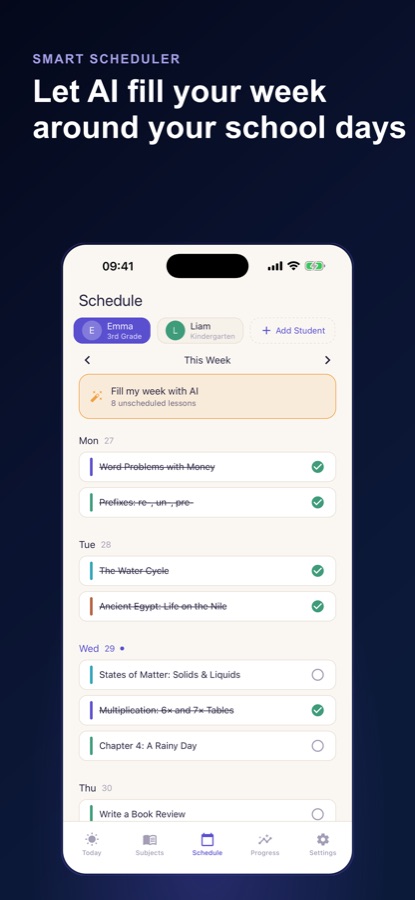
Set the year's start and end, your school weekdays, terms and planned days off, then place a plan on the calendar so lessons receive dates that avoid those days.
Days
Attendance tracker
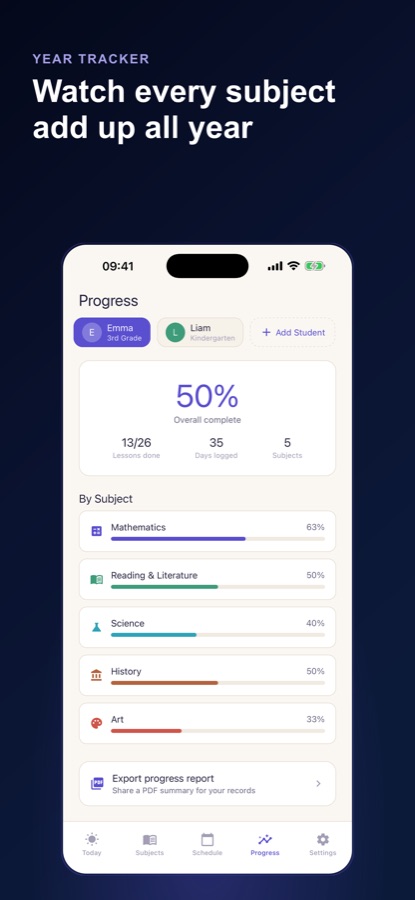
Log a school day with a tap, mark a day off, back-fill past days and watch a running count such as day 45 of 180 against your own target. School-day milestones appear at 30, 60, 100 and 180 days.
Grades
Gradebook and progress
Record a letter, a percentage or a simple pass on any lesson, along with minutes spent. Progress screens show completion, lessons done, days logged, hours by subject and units marked strong, mixed or needing review.
Fill
Fill my week with AI
Pro spreads unscheduled lessons across your school days, which rescues a week that got busy. AI review worksheets with a parent answer key and combined blocks for teaching two grade levels together are part of Pro too.
Fit
Who it's for — and who it isn't
A good fit if you
- Are a homeschooling parent who loses time every August turning subjects into week-by-week lessons
- Teach more than one child at different grade levels and want a separate plan and colour for each
- Want attendance, grades and hours kept in one place instead of scattered across paper notebooks
- Prefer to start from an editable draft and adjust it rather than design every lesson yourself
- Need a simple record to share with a co-op, an evaluator or your own files
Not the right tool if you
- Need a standards-certified curriculum or an accredited state transcript — the app produces neither
- Want legal or compliance advice for your state or country, which varies and is not covered here
- Expect unlimited AI plans on the free tier — one AI curriculum plan is free, and Pro unlocks the rest
- Want a classroom tool for grading a large group of students rather than a family planner
Privacy
What stays on your phone
Your students, subjects, lessons, attendance and grades are stored on your device, and you can use the app as a guest without signing in. AI features need a connection and ask your permission first; they send only the grade level, subject, topics or lesson titles and pace, never a child's name, age or attendance dates.
Full details are in the CoddyKit privacy policy.
Questions
Frequently asked questions
What is the best way to plan a homeschool year on a phone?
Start with a draft rather than a blank calendar. Homeschool Planner: Curriculum lets you choose a grade, a subject, a number of weeks and a pace, generates an editable week-by-week plan, and then places the lessons on your own school-year calendar. You change what does not fit and keep what does, which is faster than designing every week from nothing.
How does the AI curriculum generator work?
You give Homeschool Planner: Curriculum a grade, a subject, a length in weeks and a Gentle, Standard or Rigorous pace. It returns a unit-by-unit, week-by-week course that you can reorder, rewrite or combine with your own lessons. Before the first generation the app asks permission, and it sends only the grade level, subject, topics or lesson titles and pace to produce the plan.
Can I plan without using AI?
Yes. The planner works as a manual lesson planner where you add your own subjects and lessons with an objective, an activity and notes. There are also built-in sequences for grades K-2, 3-5, 6-8 and 9-12 that fill a subject's weeks offline, so AI is optional rather than required.
Can the app track attendance and grades for homeschooling?
It does both. You log a school day with a tap, mark days off and back-fill earlier days, and the app keeps a running count against your own target. Grades can be a letter, a percentage or a simple pass on any lesson, with minutes spent, and the progress screens roll those into completion and hours by subject.
Does Homeschool Planner support more than one child?
Yes. Each student gets a grade level and a colour, and you can run parallel plans for different grades. The free version includes one student profile, while Pro unlocks unlimited profiles and combined lesson blocks for teaching two grade levels together.
What happens when we fall behind?
Overdue lessons can move to the next open school day in one tap. If a whole subject is lagging, a card on the Today screen offers to re-plan the rest of the term around where you really are, and Pro's Fill my week scheduler spreads unscheduled lessons across your school days.
Is the plan accepted as an official curriculum or transcript?
No. The generated plans and worksheets are editable starting points for a parent to review, not accredited or standards-certified curricula. The PDF record pack summarises attendance, hours, courses and grades for your own records, but it is not a certified transcript, and homeschool rules differ by state and country.
Is Homeschool Planner free?
The app is free to download on iOS and Android and includes the manual planner, the ready-made sequences, the school-year calendar, attendance, grades, progress, one student profile and one AI curriculum plan. The free version shows ads. Homeschool Pro adds unlimited AI plans, the fill-my-week scheduler, review worksheets, unlimited students, the PDF record pack and no ads, as a monthly or yearly subscription.
Which platforms and languages does it support?
Homeschool Planner: Curriculum runs on iOS and Android and is available in 10 app languages, with a light, dark or system theme. It is rated 4+ on the App Store, and the planning and tracking screens work offline.
Get started
Turn the blank page into a plan
Free on iOS and Android, with a Pro upgrade for unlimited AI plans.
More from CoddyKit
Available on iOS and Android.