Education · Free · iOS & Android
By CoddyKit
3D Anatomy Learning: an interactive human anatomy app
AnatoMe is a 3D anatomy learning app that teaches the human body by having you build it. Place organs on the body, pick a system, and press Run to watch the pathway work — circulatory, respiratory, nervous, digestive, excretory. Free to start, with 78 guided lessons across 12 units. Educational content, not medical advice.
- Price
- Free, Pro optional
- Account
- Not required
- Platforms
- iOS and Android
- Age rating
- 4+
- Requires
- iOS 15.1 or later
A lab, not a lecture.
Most anatomy apps hand you a labeled diagram and a quiz. This one starts a step earlier — you place the organs yourself and press Run to find out whether the system you built actually flows.
What it is
AnatoMe is a free 3D anatomy learning app for iOS and Android that teaches human anatomy and physiology by having you build it. In the 3D Lab you place organs on the body, choose a system — circulatory, respiratory, nervous, digestive, or excretory — and press Run to watch the pathway work. It also includes 78 guided lessons across 12 units, an AI tutor, and 30 themed exams.
It teaches how the body is organised and how its systems function. It is not medical advice and not a substitute for a clinician — see Educational use and limits.
Background
What are the body's organ systems?
An organ system is a group of organs that work together on one job: the circulatory system moves blood, the respiratory system exchanges gases, the digestive system breaks down food, the urinary system filters waste, the nervous system carries signals. Most anatomy courses count eleven systems in the human body. They are studied separately, but they only make sense together — no system runs on its own.
Circulatory systemthe pump and the pipes
The heart, blood vessels, and blood. The heart pumps oxygenated blood out through arteries to every tissue, and veins return it, carrying carbon dioxide and waste, for another pass through the lungs.
Respiratory systemgas exchange
Airway, lungs, and diaphragm. Air travels down the trachea into progressively smaller branches, ending at alveoli where oxygen crosses into the blood and carbon dioxide crosses out to be exhaled.
Nervous systemthe signalling network
Brain, spinal cord, and nerves. Sensory neurons carry signals inward, the brain and cord interpret them, and motor neurons carry instructions back out to muscles and glands, usually in a fraction of a second.
Anatomy vs physiologystructure vs function
Anatomy describes structure — what a part is and where it sits. Physiology describes function — what it does and how. A labeled diagram teaches anatomy; watching a pathway run teaches physiology.
How it works
How you actually use it
The app runs the same loop for every system: read the short lessons, build the thing you just read about, then get tested on the system you built.
Work through a unit
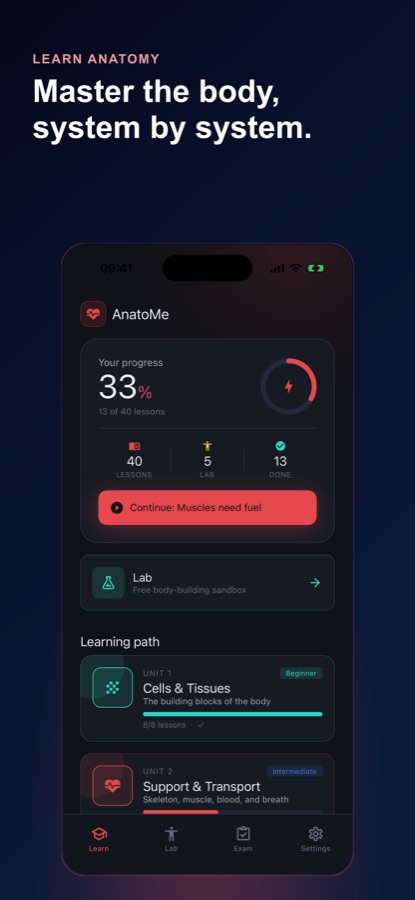
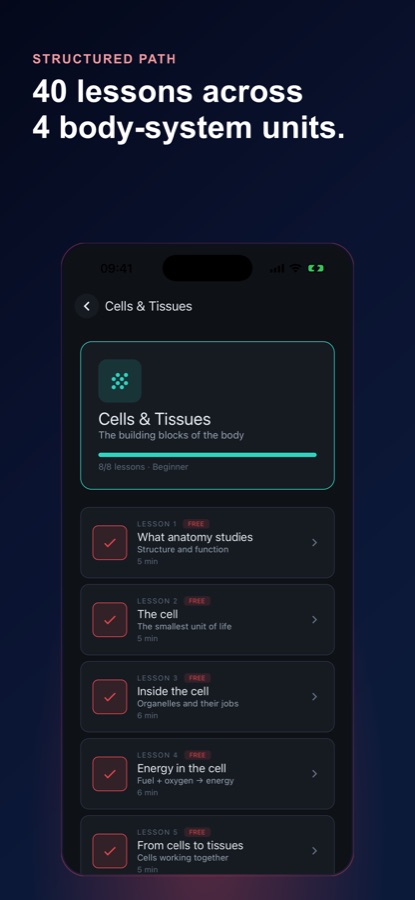
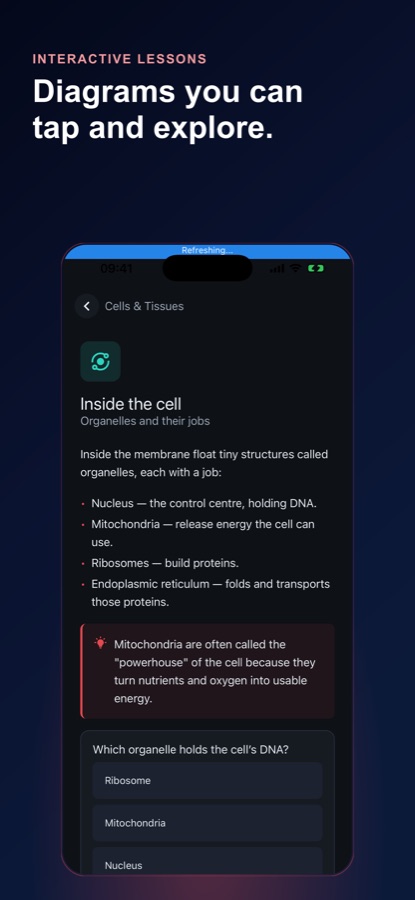
Open the Learn tab and start a unit, from Cells & Tissues through Skeletal, Cardiovascular, Respiratory and the rest. Lessons are short enough to read on a phone, with tappable diagrams and a question at the end to check you followed it.
Build it in the 3D Lab
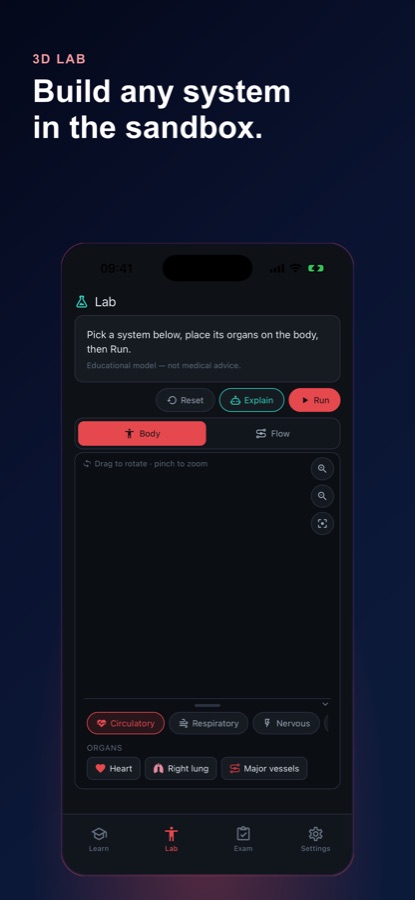
Open the Lab, pick a system, and drag its organs onto the body — heart, lungs, major vessels. Drag to rotate and pinch to zoom to see where each one sits, then press Run to watch the pathway move instead of reading about it.
Get it wrong, reset, run again
If the pathway does not run, tap Explain for a plain-language walkthrough of what you placed and what is missing, hit Reset, and rebuild it. When the system holds up, Exam mode tests the same one you just built.
What’s inside
What is in the app
3D
The 3D Lab
Place organs on a body you can rotate and zoom, switch between Body and Flow views, and press Run to watch the pathway move.
5
Five systems to build
Circulatory, respiratory, nervous, digestive, and excretory — each with its own organs and its own animated flow once the placement is right.
78
78 lessons, 12 units
Cells & Tissues, Skeletal, Muscular, Cardiovascular, Respiratory, Digestive, Urinary, Nervous, Endocrine, Immune & Lymphatic, Integumentary & Senses, and Reproductive, taken in order.
30
Exam mode
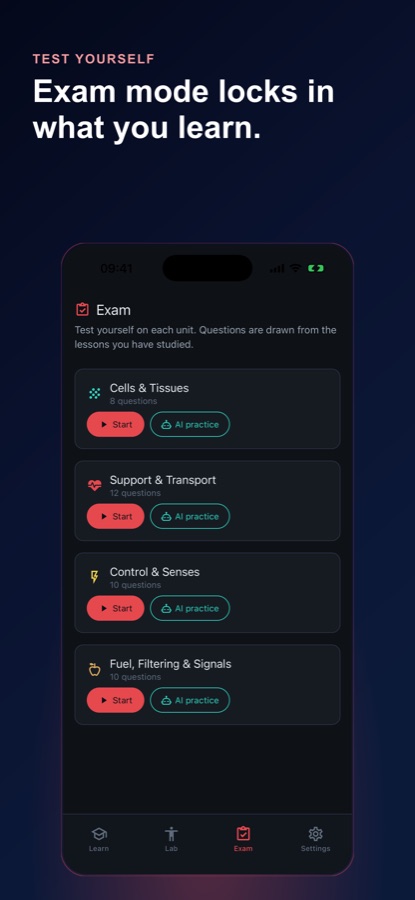
Thirty themed exams from beginner to expert, covering the systems you built. The first two are free, and each unit also offers AI practice.
AI
Explain, on demand
Tap Explain on any build and the tutor walks through what you placed, what is missing, and why the pathway runs the way it does.
Open
Sandbox playground
An open space to place organs and experiment beyond the guided units — no lesson, no score, just the body and whichever system you want to try.
Inside the app
What it looks like
Fit
Who it’s for — and who it isn’t
A good fit if you
- Are studying anatomy and physiology for a class or an exam
- Learn more from building something than from rereading a labeled diagram
- Want to see how organs work together, not just where they sit
- Want exams that test the same systems you actually built
- Are a teacher or parent looking for an interactive way to introduce body systems
Not the right tool if you
- Need clinical information or medical advice — this is educational content, and the Lab is an educational model
- Want a reference atlas to look up every bone, muscle, and nerve by name
- Want everything for free — the first unit, the circulatory Lab, and two exams are free; the rest needs Pro or the daily video unlock
- Prefer to read a textbook straight through; every unit here is something you interact with
Safety and limits
Educational anatomy — not medical advice
AnatoMe is educational anatomy and physiology content. It does not diagnose, treat, or advise on any health question, and it is not a substitute for a licensed clinician. The Lab carries the same note on screen: Educational model — not medical advice.
The 3D systems are simplified for teaching. They show how a pathway is organised and how it flows, not the exact anatomy of any particular body, and they are not diagnostic images. If you have a real health concern or a symptom you are trying to make sense of, talk to a doctor rather than an anatomy app.
Privacy
Accounts and progress
You can start building in guest mode with no account at all. Signing in later — with email, Google, Apple, or Facebook — is optional, and it exists so your completed systems, units, lessons, and exam results follow you rather than living on one device.
Full details are in the CoddyKit privacy policy.
Questions
Frequently asked questions
What is the best app for learning human anatomy on a phone?
The one that makes you do something. Anatomy sticks when you place a structure and see the consequence, not when you reread a labeled diagram on a small screen. AnatoMe is built that way: you drag organs onto a rotatable 3D body, choose a system, and press Run to find out whether the pathway actually flows. It also has 78 lessons across 12 units and 30 exams, and it is free to start on iOS and Android.
How many organ systems are in the human body?
Most anatomy courses count eleven: integumentary, skeletal, muscular, nervous, endocrine, cardiovascular, lymphatic or immune, respiratory, digestive, urinary, and reproductive. The exact number varies between textbooks, because some group the lymphatic and immune systems together and others split the senses out of the nervous system. The count matters less than the overlap: the respiratory and cardiovascular systems, for example, are really one gas-exchange loop working in two halves.
What is the difference between anatomy and physiology?
Anatomy is structure — what a part is, what it is made of, and where it sits relative to everything else. Physiology is function — what that part does and how it does it. They are taught together because structure explains function: the heart has four chambers and one-way valves precisely because blood has to move in one direction. A static diagram teaches you anatomy; watching a pathway run teaches you physiology.
What is the best way to learn the body systems?
Follow pathways instead of memorising lists. Trace a red blood cell from the left ventricle out to a toe and back through the lungs, or a mouthful of food from mouth to small intestine, and the order stops feeling arbitrary — each step exists because of the one before it. Then close the book and rebuild it from memory, fix what you missed, and repeat. Retrieval and rebuilding beat rereading.
Is AnatoMe free?
The app is free to download on iOS and Android, and a real slice of it costs nothing: the circulatory system in the 3D Lab, the first unit's lessons, and the first two exams. Pro unlocks the full 12-unit path, every system in the Lab, the unlimited AI tutor, and all 30 exams, with monthly and annual options and a free trial on annual. You can also watch a short video to open every Pro lesson for the rest of that day.
Do I need an account to use it?
No. Guest mode lets you open the Lab and start placing organs straight away, without signing up for anything. If you want your progress, completed units, and exam results to survive a reinstall or follow you to another device, you can sign in later with email, Google, Apple, or Facebook. That is the only thing an account is for here.
Can I use AnatoMe to answer a medical question?
No. AnatoMe is educational anatomy and physiology content, not medical advice, and it is not a substitute for a licensed clinician. The 3D systems are simplified teaching models rather than diagnostic images, and the Lab says so on screen. It is a good tool for understanding how a system is organised and how it works, and the wrong tool for interpreting a symptom. For that, see a doctor.
What does the AI tutor do?
You tap Explain on a build in the 3D Lab and it gives a plain-language walkthrough of that build: what you placed, what is missing, and why the pathway runs the way it does. It is aimed at the moment you are stuck — the system will not run and you cannot see why. Exam mode also offers AI practice per unit. Pro removes the limit on how much you can use it.
Is it suitable for students and younger learners?
It is rated 4+, and the lessons are short enough to fit the gaps in a day, which suits school and university students working through anatomy and physiology as well as teachers and parents introducing body systems for the first time. Nothing has to be signed up for before you start. It is a learning tool rather than a curriculum, so it sits alongside a class rather than replacing one.
How is this different from other 3D anatomy apps?
Most anatomy apps give you a labeled model to rotate and a quiz to take afterwards, so you are reading and then being tested on the reading. AnatoMe starts one step earlier by making you build the system yourself: place the organs, press Run, and find out whether the pathway works. Getting it wrong is part of it — you reset the organs and rebuild until the system runs correctly.
Start logging
Build the body, system by system
Free to start on iOS and Android, no account needed.
More from CoddyKit
Not a medical device. Does not diagnose or treat any condition.