
Cleaning Schedule - Chores
Cleaning Schedule - Chores — A house cleaning schedule built room by room
Cleaning Schedule - Chores is a free Android house cleaning schedule and chore chart that starts from your actual home. Tell it your rooms and what each surface is made of, and it assembles a room-by-room plan from a library of 240+ cleaning tasks, shows only what is due today, and lets roommates or family share the chores.

- Price
- Free, Pro upgrade
- Platforms
- Android, on Google Play
- Languages
- 10
- Account
- Starts as a guest
A cleaning plan should know what your floor is made of.
Sealed hardwood, a marble counter and a glass shower do not tolerate the same products, and a chore list that treats them alike eventually damages one of them. The plan here is built from your surfaces, so each task comes with the reason for its interval, the steps, the tools and what to avoid.
What it is
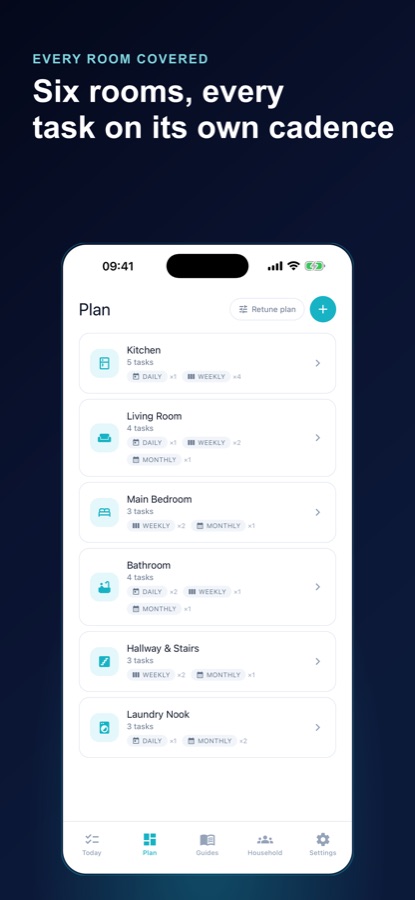
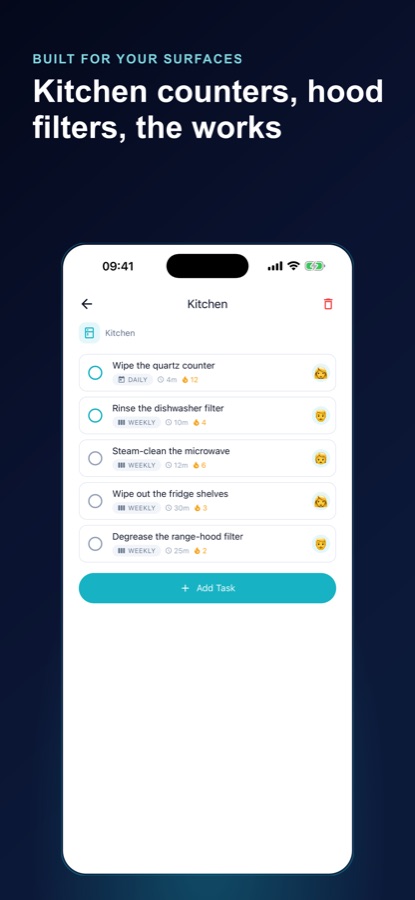
Cleaning Schedule - Chores is a free Android app on Google Play that builds a house cleaning schedule for your own home, room by room. You pick from 15 room types and tick the surfaces you really own, and the app assembles a plan on your phone from a library of 240+ cleaning tasks, each explaining why it comes around as often as it does. The Today screen lists only the chores that are due, a reset builder fits the highest-impact tasks into the minutes you have, 96 material care guides explain how to look after each surface, and a shared household chart splits the work between people.
Inside the app
What it looks like
Background
How often should each part of a home actually be cleaned?
There is no single correct schedule, because the right interval depends on how a space is used and what it is made of. A kitchen counter that meets food several times a day needs attention far more often than a guest bedroom, and a floor finish can be damaged by the wrong cleaner or by too much water. A sensible plan sorts tasks into daily, weekly, monthly and seasonal jobs and ties each one to a surface and a reason.
Daily, weekly, monthly and seasonal jobsthe cadence ladder
Daily jobs keep high-touch areas such as the kitchen counter and toilet from building up, weekly jobs cover floors, bedding and appliances, and monthly or seasonal jobs handle things such as range-hood filters and mattresses that are easy to forget for a year.
Surface and materialwhy the same cleaner is not for everything
A polyurethane-finished hardwood floor, a waxed one and a laminate need different handling, and natural stone dislikes acids. Knowing the material first is what separates routine upkeep from a repair bill.
The reseta short block with a clear end
When time is short, a timed block of the highest-impact tasks beats an all-or-nothing deep clean. Fifteen focused minutes that you actually finish do more for a home than a long session you postpone.
Fair division of choresvisible, not argued
Shared homes work better when the split is visible. Counting each person's weekly minutes shows whether the load is balanced, which turns a vague sense of unfairness into numbers people can adjust.
How it works
How the app plans your home
Setup takes a few minutes, and the plan appears before you are asked to create an account.
Describe your rooms and surfaces
Choose from 15 room types such as kitchen, bathroom, bedroom, laundry and outdoor, and tick the surfaces you really have, for instance a marble counter, stainless steel or a wool rug. You can add your own rooms, surfaces and one-off tasks too.
Work from Today
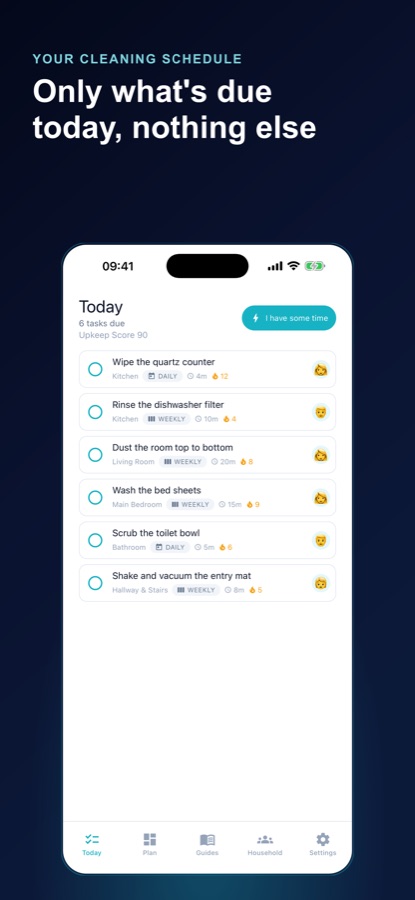
The Today screen shows the chores that are due and nothing else. Tell the reset builder you have 5, 10, 15, 30 or 45 minutes and it picks the highest-impact tasks that fit, and run mode takes you through them one at a time.
Share the household
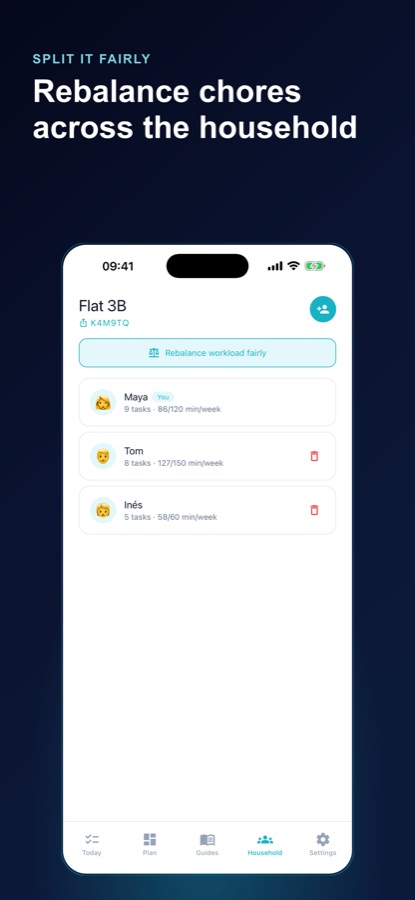
Create a household, share the invite code and everyone who joins sees the same chart with their own assigned tasks. Weekly minutes per person are tracked so the split is clear.
What's inside
What is in the app
240+
Cleaning tasks in the library
The plan is assembled on your phone from a built-in library of more than 240 tasks, so it appears within seconds of setup.
96
Material care guides
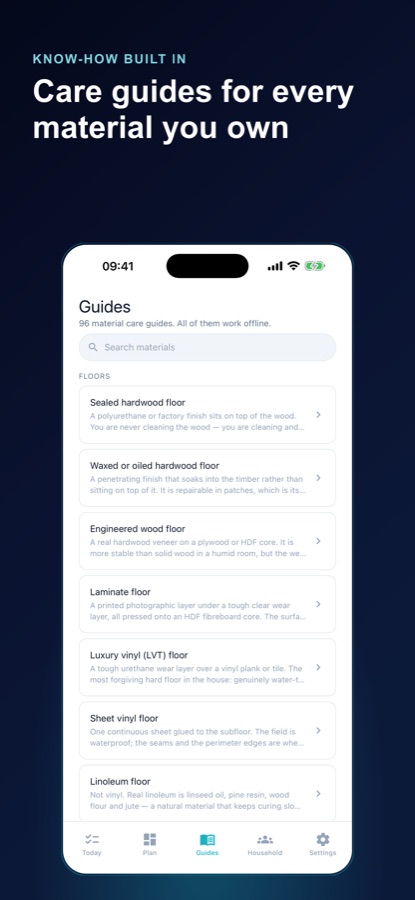
Guides for floors, counters, appliances, bathroom fixtures and textiles cover the everyday routine, what damages the material and when a deeper job is due. They work offline.
15
Room types
Kitchen, bathroom, bedroom, living room, laundry, outdoor and more, with unlimited rooms in the free version.
Why
A reason behind every interval
Each task explains why it recurs as often as it does, with steps, tools and what to avoid, so the schedule teaches rather than just nags.
Check
Will this ruin it?
Pick a surface, name a product and get a clear verdict. Do-not-mix warnings flag dangerous combinations, such as bleach with ammonia or acids.
Score
Streaks and an Upkeep Score
Per-task streaks and an Upkeep Score track your overall pace. You can pause the whole household schedule while you travel or renovate, and seasonal jobs follow your hemisphere.
Split
Fair-load rebalancing
Pro rebalances the week's work across the household in one tap, with unlimited members and seasonal or once-a-year jobs. Free households share with up to three people.
Fit
Who it's for — and who it isn't
A good fit if you
- Just took over a whole home, such as a first flat or a move-in with a partner, and do not know what needs cleaning how often
- Share a home with roommates or family and want the chores split visibly and fairly
- Own mixed surfaces and want to know which product is safe on each
- Prefer a short list of what is due today to a long chore list you never finish
- Have a few free minutes and want the best jobs that fit them
Not the right tool if you
- Use an iPhone — the app is only on Google Play
- Want a professional cleaning service; it plans and guides your own cleaning
- Expect every care guide free — 20 are free plus the ones for surfaces you said you own, and Pro opens the full library
- Want a paper-style list that never changes rather than a plan built from your rooms
Safety and limits
Read the label before you clean
Cleaning Schedule - Chores is a planning and care guide, not a safety authority. Always read the label on every cleaning product and follow its directions.
Never mix cleaning products unless the label says it is safe. Combining bleach with ammonia or with an acid can release harmful fumes, and the app's do-not-mix warnings are a reminder, not a complete list. Ventilate the room and keep products away from children and pets.
If you breathe in fumes and feel unwell, get fresh air and contact your local poison control centre or emergency services.
Privacy
What is saved and where
The app starts as a guest with no sign-in wall. Your rooms, tasks and household are saved to your account on the developer's servers so everyone in your home sees the same list, and you can delete your account in the app at any time.
Full details are in the CoddyKit privacy policy.
Questions
Frequently asked questions
How do I make a house cleaning schedule that fits my home?
Start from the rooms and surfaces you really have, then sort tasks by how often they recur. Cleaning Schedule - Chores does that setup for you: choose from 15 room types, tick your surfaces, and it builds a plan from 240+ tasks with a reason for each interval. You can edit it and add your own tasks.
How does the app decide what is due today?
Every task has an interval, and the Today screen shows only those that have come due, never the whole list. If you are short on time, you can tell the reset builder that you have 5, 10, 15, 30 or 45 minutes and it picks the highest-impact tasks that fit, in order.
What are the material care guides?
There are 96 guides for floors, counters, appliances, bathroom fixtures, textiles and more. Each is written for the material rather than the room and covers the everyday routine, what damages it and how to tell when a deeper job such as resealing or descaling is due. All of them work offline.
Can the app tell me whether a product will damage a surface?
Yes. The Will this ruin it? check lets you pick a surface and name a product to get a clear verdict. The app also shows do-not-mix warnings for dangerous combinations such as bleach with ammonia or acids, but always read the product label as well.
How do shared chores work for roommates or a family?
Create a household and share the invite code. Everyone who joins sees the same chore chart with their own assigned tasks, and each person's weekly minutes are tracked so the split is visible. Free households can have up to three people, and Pro adds unlimited members and a one-tap fair-load rebalance.
Do I need an account?
No. Cleaning Schedule - Chores starts as a guest, and you set up a first room and see your plan before being asked to create anything. Because your household is stored on the developer's servers so others can see it, you can delete your account from inside the app whenever you wish.
Is Cleaning Schedule - Chores free?
The core app is free: full home setup with all 15 room types and unlimited rooms, Today, the reset builder, run mode, streaks, the Upkeep Score, 20 care guides plus every guide for a surface you own, and household sharing for three people. The free version shows ads. Pro adds the full guide library, seasonal and yearly jobs, unlimited members, rebalancing and no ads.
Is there an iPhone version?
No. Cleaning Schedule - Chores is an Android app and is available through Google Play only.
What languages does the app support?
The interface is available in 10 languages and comes in a light or dark theme. Seasonal jobs follow whether you live in the northern or southern hemisphere.
Get started
Build a plan for the home you actually have
Free on Android, with a Pro upgrade for the full care library.
More from CoddyKit
Available on Android.